
Letar du efter ett sätt att förbättra din produktsökning i WooCommerce?
WooCommerce är ett fantastiskt sätt att bygga en skalbar onlinebutik. Men deras produktsökning är ärligt talat otillfredsställande. Du kan gå miste om ENORMT många försäljningar bara på grund av standardproduktsökningen i WooCommerce.
Så, vad kan du göra? I den här artikeln kommer vi att guida dig genom några mycket enkla, lätta sätt att förstärka WooCommerce produktsökning utan att använda en enda kodrad. Och vi kommer att göra det på 10 minuter eller mindre.
Låter bra? Låt oss dyka in.
PushEngage är det främsta push-notiser-pluginet i världen. Skaffa det gratis!
Varför förbättra din produktsökning i WooCommerce?
WooCommerce använder standard WordPress-sökning direkt ur lådan. Och även om WordPress kommer med många bra funktioner, är deras sökfunktion inte riktigt avsedd för e-handelsapplikationer.
Till exempel tar den inte hänsyn till produktattribut, ger dig inget sätt att styra dina sökresultat, samlar inte in någon sökdata och mycket mer. Vi rekommenderar att använda ett WooCommerce produktsökningsplugin för att förbättra användbarheten av din sökmotor.
Med rätt sökningsplugin kan du söka resultat från:
- Anpassade fält (postmetadata) inklusive ACF-fält
- E-handelsproduktdetaljer, varianter och attribut
- Kategorier, taggar, anpassade taxonomier
- Kortkodutdata
- Uppladdade dokument (PDF, .docx, .txt, etc.)
- Innehåll i anpassade databastabeller
Och naturligtvis kan du också söka i inläggstitlar och innehåll.
Ett alternativ skulle vara att använda ett AJAX-produktsökningsplugin på dina produktsidor. Ett AJAX-sökplugin fungerar som Amazons autokomplettering på din webbplats. Men varför nöja sig med det när du kan skapa en anpassad sökmotor på din webbplats?
När en webbesökare söker efter något på din webbplats, talar de bokstavligen om exakt vad de vill ha från dig. Men de flesta WordPress-sökfält kan helt enkelt inte köra djupa sökningar. Och de kan definitivt inte hjälpa dig att förstå vad dina besökare söker efter.
Du behöver börja använda ett sökningsplugin som kan hjälpa dig att bygga en anpassad sökmotor som ger dina webbplatsbesökare kontextuella sökresultat.
Vi rekommenderar att använda SearchWP.
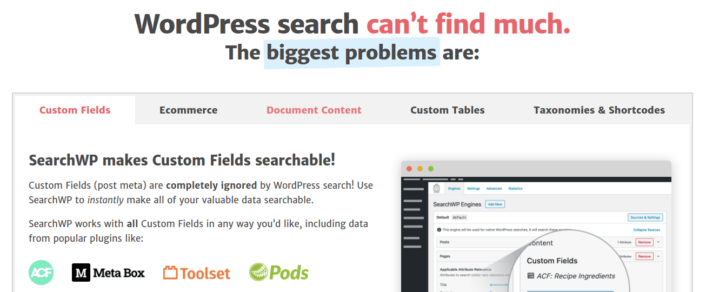
SearchWP är ett av de bästa WooCommerce sökningsplugins vi känner till.
Du får ett stort utbud av funktioner till ett överkomligt pris. Faktum är att SearchWP gör allt som alla andra plugins i listan kan göra förutom att skapa ett produktfilter.
Det coolaste är att SearchWP talar om exakt vad dina webbplatsbesökare letar efter genom att upprätthålla detaljerad analys. Så det hjälper dig också att skapa innehåll som din webbplats för närvarande saknar och att få mer trafik, engagemang och försäljning på din webbplats.
Läs vår fullständiga recension av SearchWP och när du är klar, fortsätt och installera pluginet.
Hur du ställer in SearchWP och uppgraderar din produktsökning i WooCommerce
SearchWP är överlägset ett av de enklaste sökpluginen att ställa in och använda. Efter att du har laddat ner och installerat pluginet får du en installationsbekräftelse:

Därefter kan du gå till Inställningar » SearchWP för att ställa in ditt plugin. Klicka sedan på menyn 'Licens':
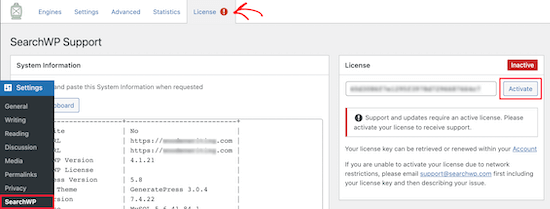
Ange din licensnyckel i rutan 'Licens' och klicka på knappen 'Aktivera':
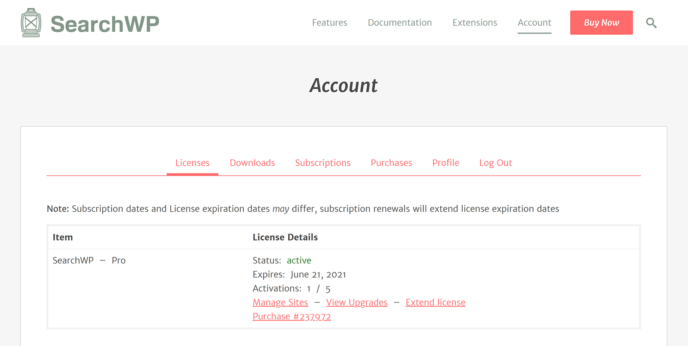
Vi kommer att prata mer om inställningarna snart. Men det är bokstavligen allt du behöver göra för att komma igång.
Med SearchWP måste du skapa en webbplatsomfattande sökmotor innan du kan anpassa din sökning ytterligare.
Gå till Inställningar » SearchWP » Motorerna:
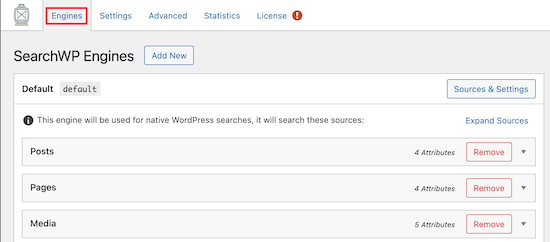
Du kan justera inställningarna för din sökmotor genom att inkludera olika innehållstyper genom att klicka på deras rullgardinsmenyer. Och du kan styra hur mycket relevans din sökmotor tilldelar varje innehållstyp med hjälp av reglage:
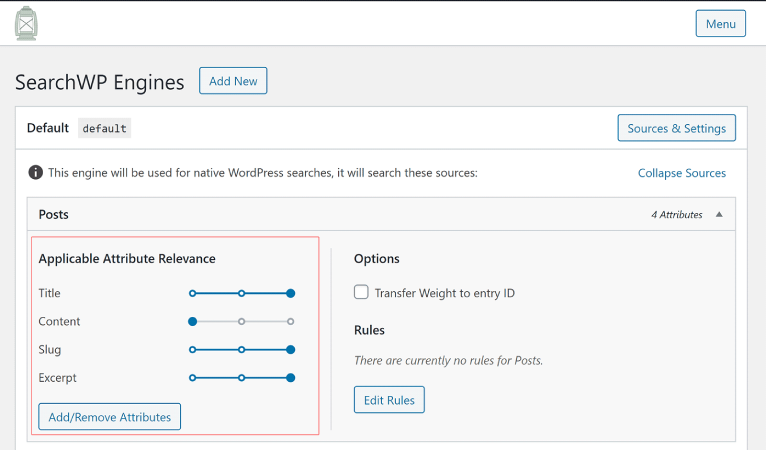
I vårt exempel värderar vi inläggstitel, slug och utdrag framför det faktiska innehållet när det gäller relevans för sökresultat.
När du är klar, klicka bara på 'Spara'.
En riktigt cool sak med sökmotorn du just skapade är det faktum att den använder nyckelordsstamning framför exakta sökmatchningar. Vad detta innebär är att dina användare kan söka efter ditt innehåll på vilket sätt de vill och de kommer att få kontextuellt relevanta resultat även om ditt innehåll inte innehåller den exakta sökfrasen!
Hur du förstärker produktsökningen i WooCommerce
Låt oss nu titta på vad vi kan göra för att förbättra produktsökningen i WooCommerce.
#1. Begränsa produktsökningen i WooCommerce till WooCommerce-produkter
När du har installerat och aktiverat SearchWP-pluginet är det första du vill göra att begränsa produktsökningsresultaten till att bara inkludera WooCommerce-produkter istället för att visa någon annan posttyp.
För att komma igång, klicka på knappen Källor & Inställningar under Motorer.
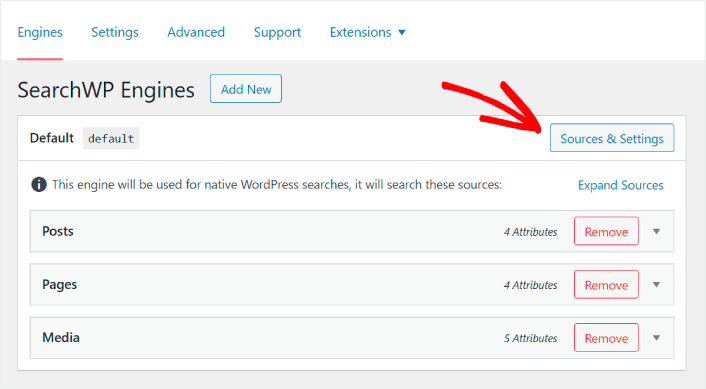
Här, avmarkera rutorna bredvid alla sökarkällor utom Produkter.
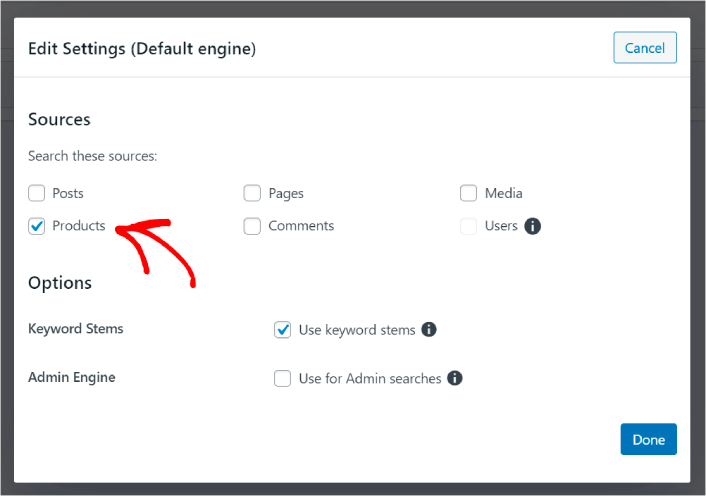
När du är klar, tryck på knappen Klar för att spara ändringarna. Och du är klar!
#2. Aktivera sökning efter produktattribut
Låt oss också göra produktattribut för alla WooCommerce-produkter sökbara. WooCommerce lagrar dessa attribut som anpassade fält ändå. Vi kommer bara att göra dem sökbara.
Du har redan ställt in en sökmotor för produkter. Så du kan helt enkelt fortsätta från föregående steg. Klicka på knappen Lägg till/ta bort attribut för att lägga till anpassade fält.
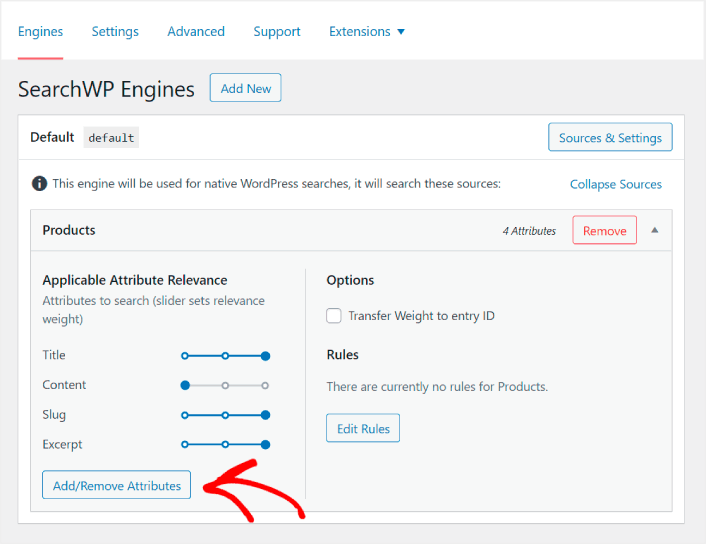
Välj sedan alternativet Alla metanycklar i listrutan Anpassade fält.
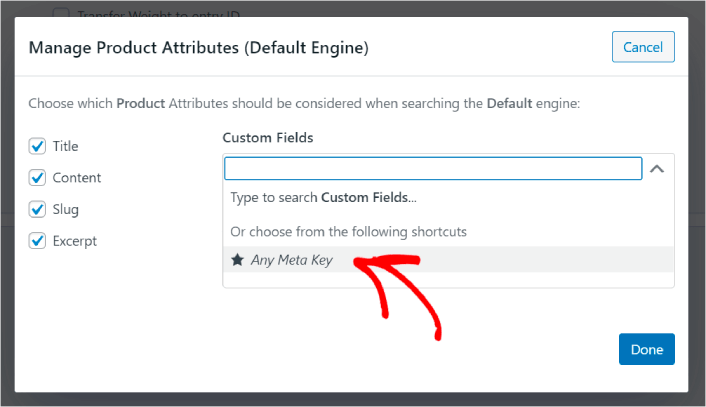
Detta gör att du automatiskt kan göra anpassade fält sökbara. Och nu kan din produktsökmotor söka efter anpassade fält som produktattribut.
#3. Aktivera sökning efter produktkategori
Du har redan sett hur du gör produktattribut sökbara. Men hur är det med kategorier? Tänk om dina kunder inte söker efter en produkt, utan letar efter något i en specifik kategori?
Det är enkelt. Fortsätt bara från föregående tips. På samma skärm under Hantera produktattribut ser du en annan listruta med etiketten Taxonomier. Välj bara Produktkategorier från listan.
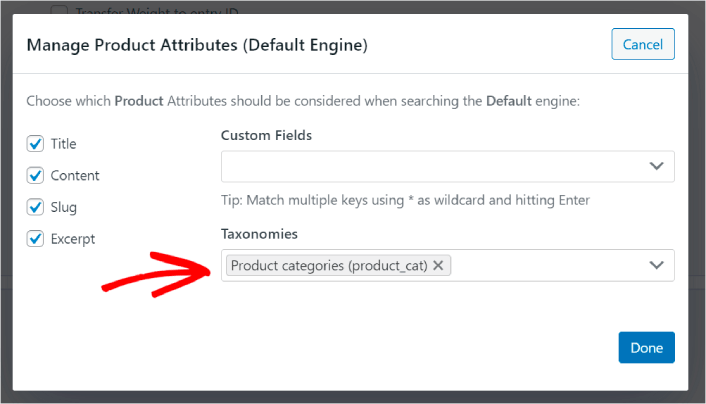
Och nu kommer din sökmotor att tillåta användare att söka efter kategori.
#4. Aktivera sökning efter produktetiketter
Du är inte klar än. På samma skärm kan du lägga till ännu fler taxonomier i listrutan Taxonomier. Tänk om dina kunder inte letar efter en produkt eller en övergripande kategori? Tänk om de inte vet att de vill ha blå och vita Air Jordans eller ens sneakers, utan istället letar efter blå och vita sneakers?
Det är då du behöver aktivera sökning efter produktetiketter.
Under Taxonomier, välj även Produktetiketter.
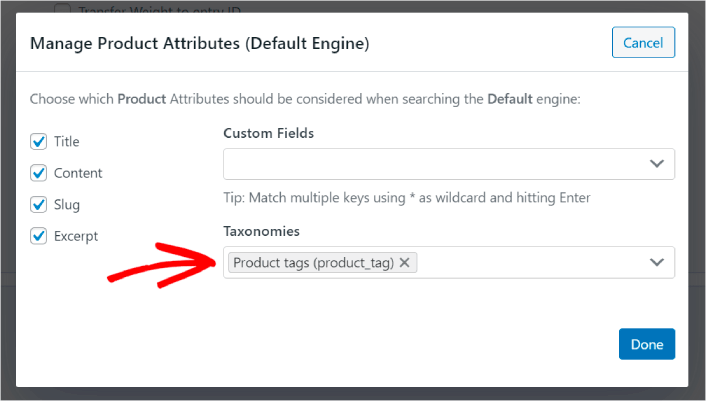
Att låta din produktsökning i WooCommerce även ta hänsyn till produktetiketter ger den ett helt nytt sätt att söka efter produkter. För att inte nämna, det hjälper också dina kunder att hitta det de letar efter mycket snabbare.
#5. Gör produkt-SKU:er sökbara
Slutligen kommer vi att lägga till ett sista anpassat fält till sökmotorn för att förstärka den. Vi kommer även att tillåta sökning efter produkt-SKU:er. Stock Keeping Units (SKU:er) är ett sätt för e-handelsföretag att snabbt identifiera olika produkter eller till och med liknande produkter.
I en butik är SKU:n vanligtvis en streckkod. På så sätt identifierar du snabbt produktvarianten, storleken, priset, färgen, typen och tillverkaren utan att ens titta på produkten.
Mestadels används SKU:er för lagerhantering i WooCommerce. Men det är också vanligt för dropshipping-, affiliate- och butikssajter att visa SKU:n för sina produkter i produktbeskrivningen.
Så, för att göra produkt-SKU:er sökbara, behöver du bara lägga till ytterligare ett Anpassat fält i dina inställningar för Produktattribut. Skriv bara in ' _sku' och SearchWP sköter resten automatiskt.
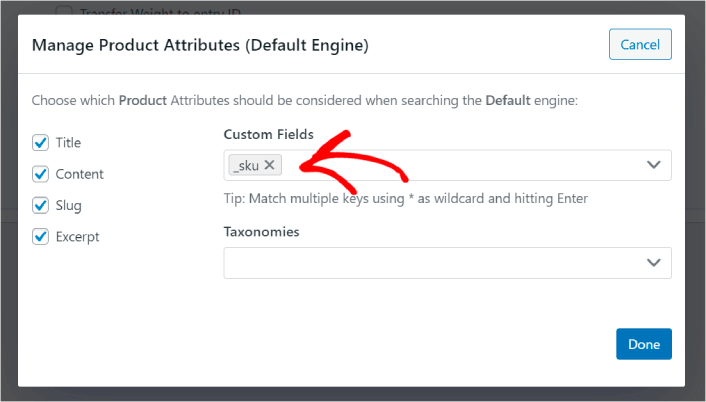
Och du är redo att köra!
Vad du ska göra efter att ha förbättrat produktsökningen i WooCommerce
Nu när du har förbättrat produktsökningen i WooCommerce är alla dina produkter redo att ge dig pengar. Det är dags att fokusera på att driva trafik, engagemang och försäljning från ditt innehåll härnäst.
Och om du letar efter nya sätt att få trafik, engagemang och försäljning, kan push-notiser vara super användbara för din webbplats.
Om du inte är 100% övertygad bör du kolla in dessa resurser om hur du effektivt använder push-meddelanden:
- 7 smarta strategier för att öka kundengagemanget
- Är push-notiser effektiva? 7 statistik + 3 experttips
- Hur du ställer in pushmeddelanden för övergivna kundvagnar (Enkel handledning)
- Hur man lägger till ett WordPress-plugin för webbnotiser på din webbplats
Vi rekommenderar att använda PushEngage för att skapa dina push-notiskampanjer. PushEngage är den främsta push-notisprogramvaran i världen. Så, om du inte redan har gjort det, kom igång med PushEngage idag!


