Кампания "Уведомление о снижении цены" отправляет автоматическое push-уведомление подписчикам, которые согласились получать уведомления о снижении цен на конкретный товар в вашем магазине Shopify. Когда вы снижаете цену товара в Shopify, PushEngage обнаруживает изменение и уведомляет всех, кто подписался на уведомления об этом товаре.
В этом руководстве объясняется, как работает виджет уведомлений, как его включить и настроить, а также как настроить кампанию уведомлений.
Прежде чем начать
- PushEngage установлен в вашем магазине Shopify.
- Для кампаний "Уведомление о снижении цены" требуется план PushEngage Growth Plan или Automation Plan.
- Кампания предварительно создана PushEngage во время онбординга. В этом руководстве описывается, как ее включить и настроить.
Как работают уведомления о снижении цены
Кампания "Уведомление о снижении цены" состоит из двух частей: виджет на страницах ваших товаров, который используют клиенты для подписки, и триггерная кампания, которая запускается при снижении цены.
- Посетитель заходит на страницу товара и видит виджет "Уведомление о снижении цены".
- Он нажимает "Уведомить меня о снижении цены" и подписывается.
- Когда вы снижаете цену этого товара в админке Shopify, PushEngage обнаруживает изменение.
- Каждый подписчик, который согласился на получение уведомлений для этого товара, получает push-уведомление с новой ценой.
Подписчики получают уведомления только о тех товарах, на которые они подписались. Они не будут получать уведомления о других товарах, если только не подпишутся на них отдельно.
Шаг 1: Включите виджет уведомлений
Виджет — это то, что клиенты видят на страницах ваших товаров для подписки. Он должен быть включен, прежде чем кампания сможет собирать подписчиков.
- Войдите в свою панель управления PushEngage.
- Перейдите в раздел «Дизайн» » «Виджеты».
- Прокрутите вниз до раздела «Виджет кампании уведомлений».
- Переключите переключатель в положение «Вкл.».
Настройка виджета
После включения вы можете настроить внешний вид виджета в соответствии с брендингом вашего магазина.
| Настройка | Описание |
|---|---|
| Сообщение виджета | Текст, отображаемый посетителям с предложением подписаться. Пример: "Получить уведомление о снижении цены" |
| Текст кнопки | Надпись на кнопке подписки. Пример: "Уведомить меня" |
| Цвета | Сопоставьте цвет фона виджета и кнопки с темой вашего магазина |
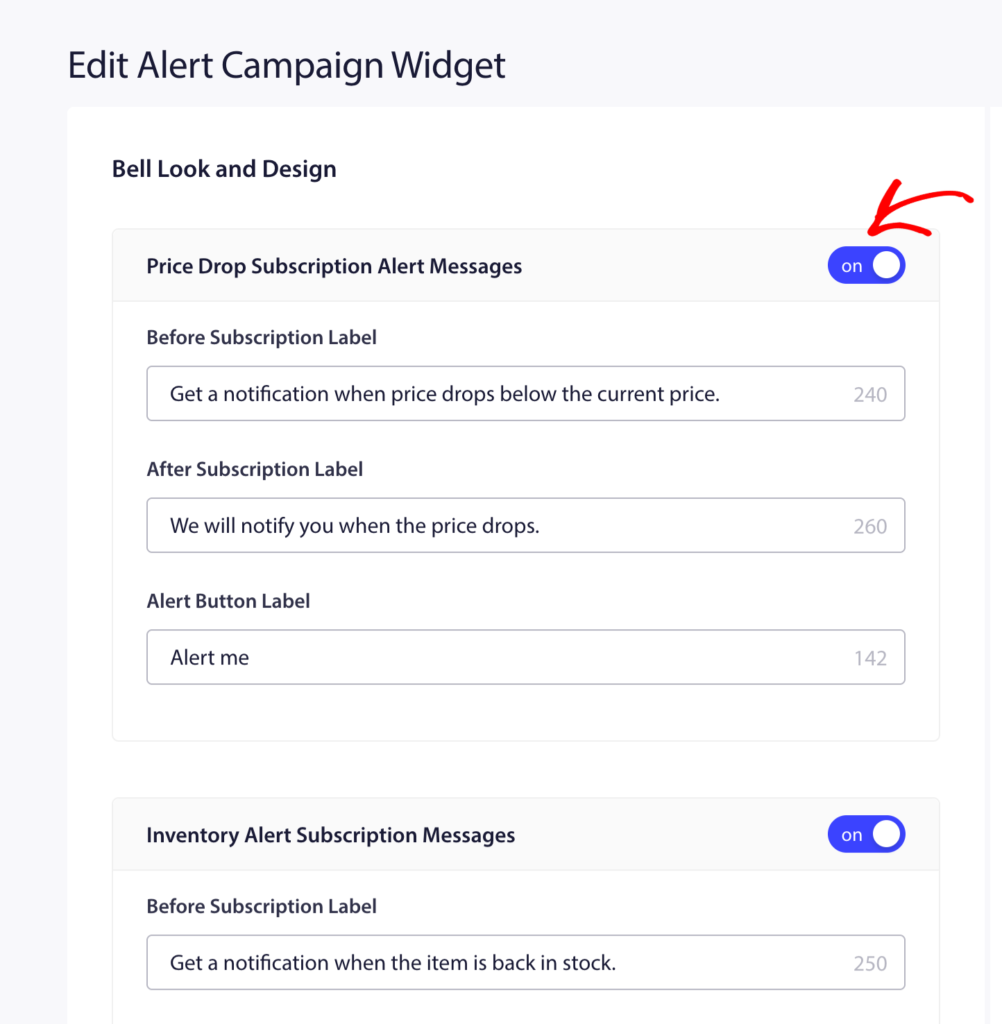
Нажмите «Сохранить» после внесения изменений.
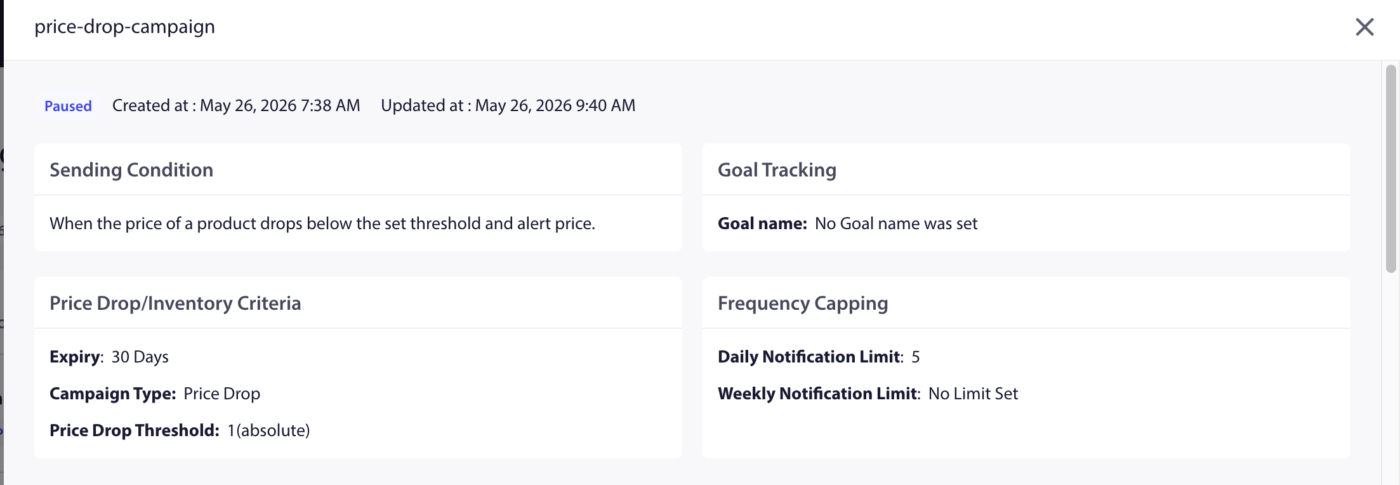
Шаг 2: Откройте кампанию "Уведомление о снижении цены"
- Перейдите в раздел Campaigns » Trigger Campaigns.
- Найдите "Уведомление о снижении цены" в списке и нажмите "Редактировать".
Шаг 3: Редактирование уведомления
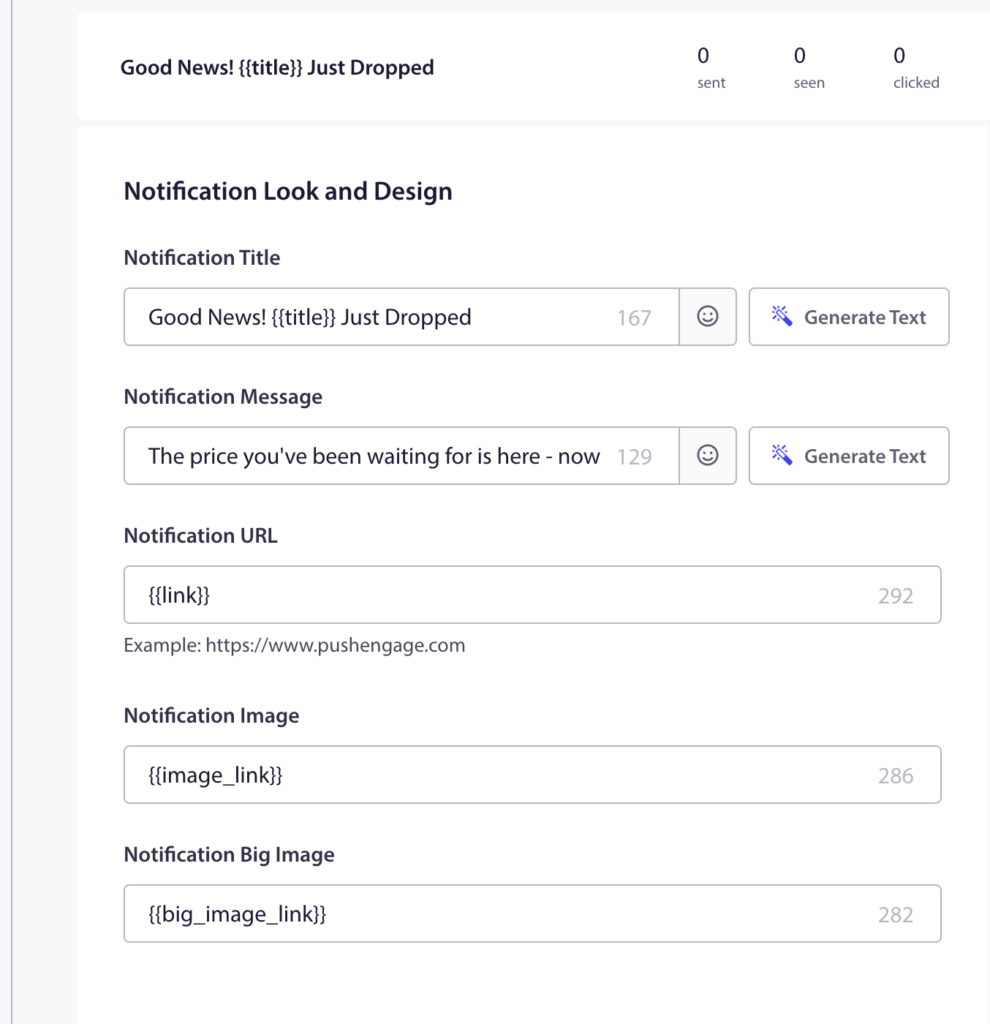
Предварительно созданная кампания содержит одно уведомление. Нажмите на него, чтобы отредактировать.
Доступные переменные
| Переменная | Что она вставляет |
|---|---|
{{productname}} | Название товара, цена которого снизилась |
{{price}} | Новая (сниженная) цена товара |
{{notificationurl}} | Прямая ссылка на страницу товара |
{{imageurl}} | Логотип вашего магазина |
{{bigimageurl}} | Изображение товара |
Примечание: Не удаляйте эти переменные. Они извлекают актуальные данные о товаре из вашего магазина Shopify в момент отправки уведомления.
Рекомендуемые настройки полей
| Поле | Рекомендация |
|---|---|
| URL | Используйте {{notificationurl}} для перехода непосредственно на страницу товара |
| Изображение | Используйте {{bigimageurl}} для отображения изображения товара |
Параметры копирования
| Опция | Заголовок | Сообщение |
|---|---|---|
| 1 | Снижение цены на {{productname}}! | Хорошие новости! {{productname}} теперь стоит всего {{price}}. Успейте купить, пока цена не вернулась. |
| 2 | Цена только что снизилась | {{productname}} теперь стоит {{price}}. Вы подписались на это уведомление. Сейчас самое время купить. |
| 3 | Ваше уведомление о цене здесь | {{productname}} упал до {{price}}. Нажмите, чтобы купить сейчас, пока товар есть в наличии. |
Шаг 4: Установите продолжительность уведомления
Установите срок действия, чтобы уведомление не оставалось в центре уведомлений подписчика слишком долго после того, как оно перестанет быть актуальным.
Рекомендуемая настройка: 48 часов
Включите "Держать уведомление открытым до взаимодействия с пользователем", чтобы push-уведомление оставалось видимым до тех пор, пока подписчик не нажмет на него или не отклонит.
Шаг 5: Активируйте кампанию
- Нажмите Save в редакторе кампании.
- Вернитесь в раздел Кампании » Триггерные кампании.
- Нажмите кнопку "Воспроизвести / Возобновить" рядом с "Уведомление о снижении цены".
Кампания теперь активна. В следующий раз, когда вы снизите цену на любой товар в админке Shopify, подписчики, согласившиеся на уведомление о снижении цены для этого товара, автоматически получат уведомление.
Отслеживание эффективности
Чтобы просмотреть эффективность кампании:
- Перейдите в раздел Campaigns » Trigger Campaigns.
- Нажмите на "Уведомление о снижении цены", чтобы развернуть представление аналитики.
- Просмотрите показатели отправленных, доставленных, кликнутых и конверсионных метрик.
Для атрибуции дохода включите отслеживание целей. Инструкции см. в разделе Как настроить отслеживание целей.
Часто задаваемые вопросы
Уведомление срабатывает при каждом снижении цены, даже незначительном? Да. Любое снижение цены продукта запускает уведомление для подписчиков этого продукта. Если вы хотите избежать уведомления подписчиков о незначительных корректировках, подумайте, как часто вы меняете цены.
Может ли подписчик получать уведомления о снижении цен на несколько товаров? Да. Подписчики могут выбрать получение уведомлений по неограниченному количеству отдельных товаров. У каждого товара свой список подписчиков.
Что произойдет, если цена товара снова вырастет после срабатывания уведомления? Уведомление срабатывает только при снижении цены. Повышение цен не запускает никаких уведомлений. Подписчики остаются подписанными на будущие уведомления о снижении цен на тот же товар.
Могу ли я настроить виджет отдельно для Снижения цены и Поступления в продажу? Переключатель виджета "Уведомления о кампаниях" включает оба типа. Настройки внешнего вида виджета применяются к обоим. Вы не можете стилизовать их по-разному из одной панели виджета.
Куда попадают подписчики, когда нажимают на уведомление? Они перенаправляются на страницу товара с помощью переменной {notificationurl}. Вы можете изменить это на страницу корзины или любой другой URL, отредактировав поле URL в редакторе кампаний.
Если у вас возникнут какие-либо проблемы, пожалуйста, свяжитесь с нами, нажав здесь. Наша служба поддержки сможет вам помочь.