В вашей учетной записи PushEngage вы можете в любое время обновить сведения о сайте, такие как название сайта, URL и логотип сайта.
Это руководство проведет вас через процесс обновления/изменения сведений о сайте непосредственно из вашей панели управления.
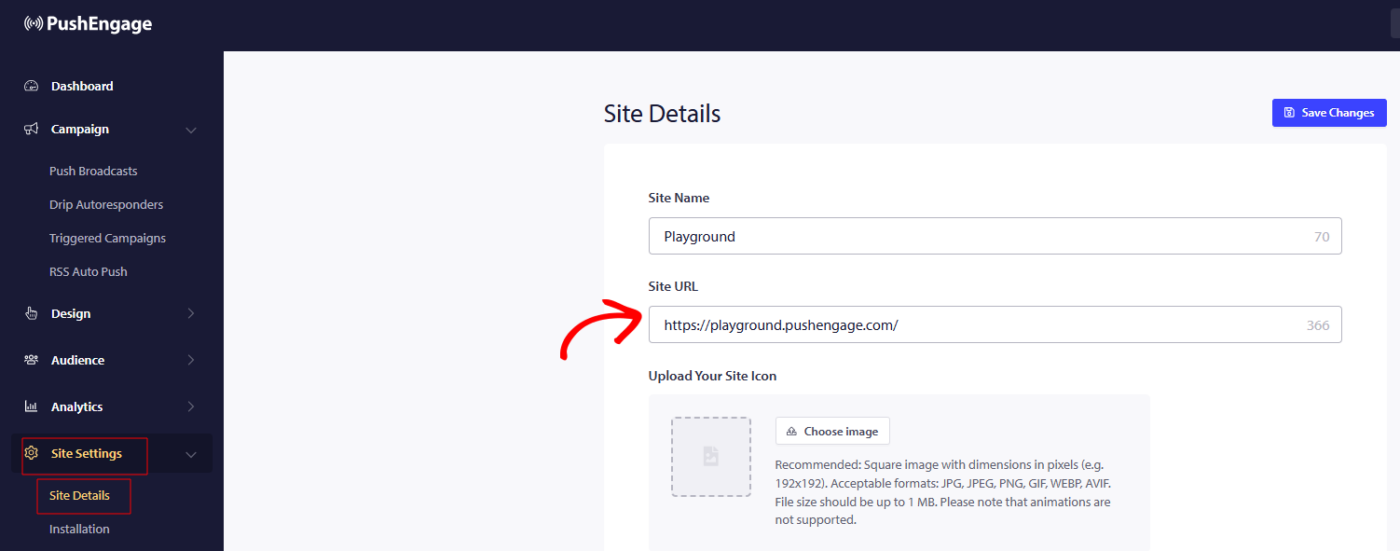
Вы можете перейти в раздел Настройки сайта » Сведения о сайте и обновить любые сведения, которые вы хотите обновить.
Указаны также размеры логотипа сайта, поэтому ожидается, что вы будете использовать то же соотношение сторон и размер, чтобы логотип не был обрезан на изображении подписки или уведомления.
T
G
После внесения изменений не забудьте нажать Сохранить изменения, чтобы применить обновления.
Если у вас возникнут какие-либо проблемы, пожалуйста, свяжитесь с нами, нажав здесь. Наша служба поддержки сможет вам помочь.