Vil du se, hvordan dine udsendelser klarer sig efter at have sendt dem & de når dine abonnenter? Har du abonnenter fra mere end én geolokation?
Hvis ja, vil denne guide vise dig, hvordan du kan bruge denne funktion til at udnytte den optimalt. Da dit websted betjener flere geografiske områder, og du har brugere over hele kloden, vil du gerne engagere dig med dem, når dine brugere er aktive. Du kan planlægge din udsendelse for en bestemt geolokation på det tidspunkt, hvor brugerne er aktive, men dette kræver planlægning af flere meddelelser for hver af tidszonerne.
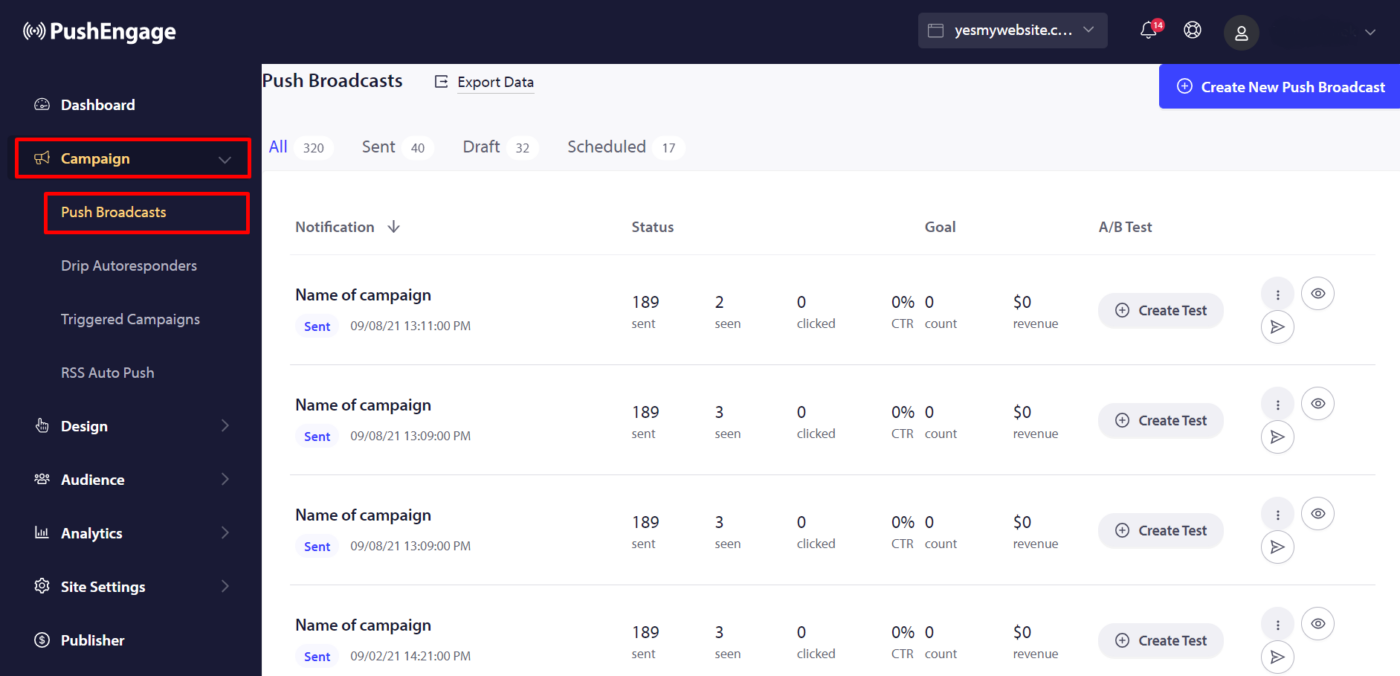
For at tjekke de udsendelser, der er sendt til abonnenterne & tidszonen, skal du logge ind på dit PushEngage-dashboard og navigere til Kampagner > Push-udsendelser og vælge fanen Tidszone-meddelelser.
Du kan se listen over meddelelser, der blev sendt i henhold til abonnentens tidszone. For at se flere detaljer kan du klikke på '+' ikonet og se dybdegående analyser.
Hvis du støder på problemer, er du velkommen til at kontakte os ved at klikke her. Vores supportteam vil kunne hjælpe dig.