A/B-testning er en kraftfuld metode til at bestemme, hvilket indhold der bedst resonerer med dit publikum. Det indebærer at eksperimentere med variationer af indhold, såsom forskellige tekster eller designs, og sammenligne deres ydeevne.
Dette kan gøres ved at teste variationer på et udsnit af publikum eller på tværs af alle publikummer, og derefter underrette det bredere publikum om den mest succesfulde version, en effektiv måde at optimere din indholdsstrategi og forbedre publikumsengagement.
Efter opsætning af intelligente A/B-notifikationer er det næste skridt at analysere deres ydeevne gennem analyser. Dette indebærer at undersøge, hvor godt disse notifikationer klarer sig, og forstå deres indvirkning på dit publikumsengagement og konverteringsrater.
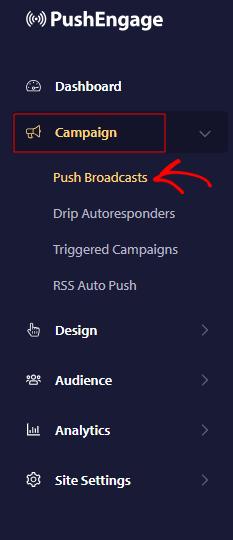
Vi kan se analyserne fra selve PushEngage-dashboardet ved at navigere til Kampagne » Push Broadcast
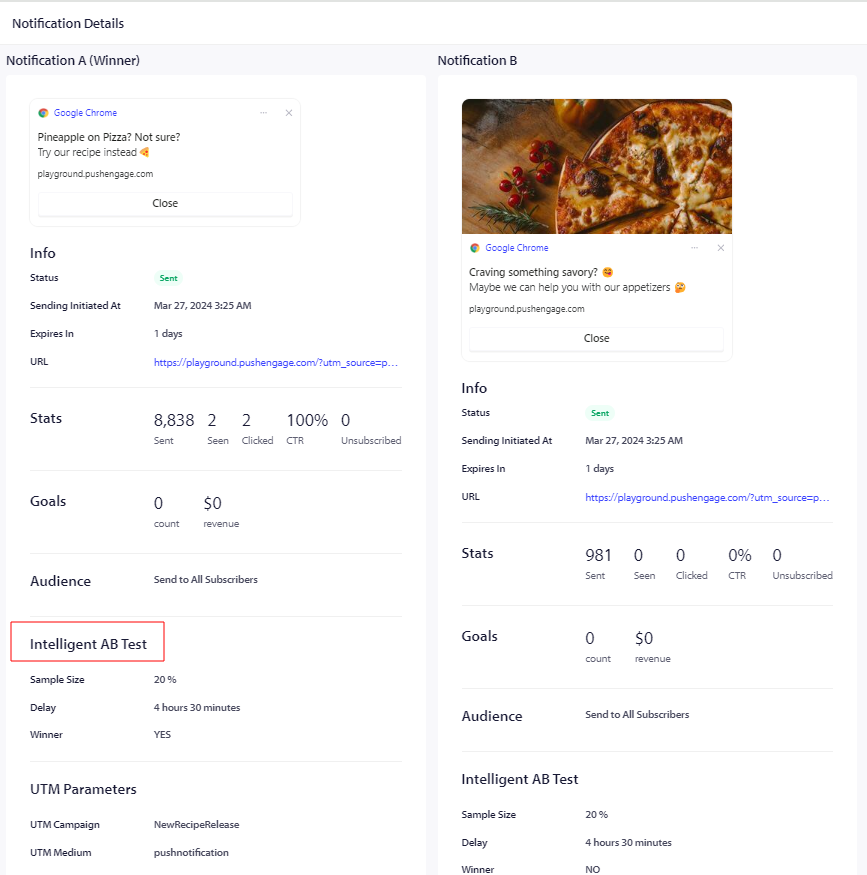
Vælg derefter den specifikke kampagne, der er oprettet ved hjælp af intelligent A/B-testning, og klik derefter på øjeikonet for at se analyserne

Når du klikker, kan du se de samlede analyser af kampagnen i detaljer
Hvis du støder på problemer, er du velkommen til at kontakte os ved at klikke her. Vores supportteam vil kunne hjælpe dig.