Du kan indsamle abonnenter, når siden indlæses, ved at vise tilmeldings-/tilladelses-Opt-in, men der er også en mulighed for at indsamle abonnenter ved et klik på et element. HTML-elementet kan også være en knap/et link eller et billede. Det gode er, at du kun behøver at kende elementets ID, men du behøver ikke tilføje nogen kode.
I denne guide kan du lære, hvordan du gør det fra selve dashboardet.
Tilføjelse af tilmeldings-Opt-in-trigger
Naviger til Design » Popup Modal, og klik på knappen Rediger Popup.
Du kan rulle ned til Aktivér tilmeldings-Opt-in-trigger og slå den til.
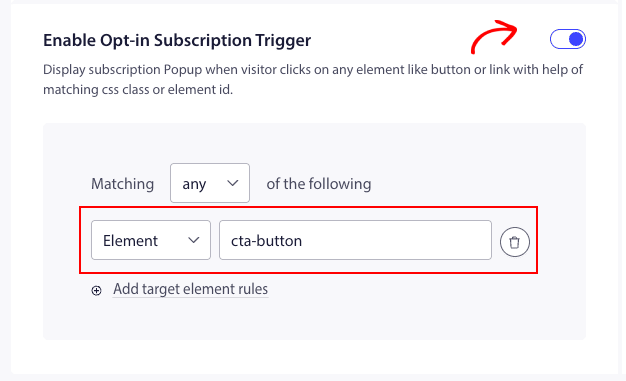
Nu skal du hente elementets ID og tilføje det til filteret for matchende kriterier.
Når det er tilføjet, kan du klikke på Gem og aktivér Popup.
Dette vil vise Optin ved klik på et element eller en knap efter sideindlæsning.
Det var det, du kan nu teste ved at klikke på det pågældende element på dit websted, hvis Popup vises.
Hvis du støder på problemer, bedes du kontakte os ved at klikke her. Vores supportteam vil kunne hjælpe dig.