Easy Digital Downloads er et alsidigt og brugervenligt e-handelsplugin designet specifikt til WordPress-websteder. Enhver e-handelsbutik står over for udfordringer som indkøbskurv & browsing-afgang. PushEngage tilbyder en innovativ løsning, der muliggør kampagner, som direkte engagerer sig med dit produktfeed og omdanner potentielle tab til konverteringer ved hjælp af WPCode.
Dine kunder kan modtage push-notifikationspåmindelser efter deres afgang, og det kan opfordre dem til at gennemføre betalingen.
Før du starter
Her er et par ting, du skal vide, før du går i gang:
- Vores WooCommerce-integration kræver et PushEngage Growth-abonnement for at oprette en kampagne for forladte indkøbskurve og browsing ved hjælp af vores funktion til udløserkampagner.
- Denne guide antager, at du allerede har WooCommerce og WPCode plugins installeret på dit WordPress-websted.
Oprettelse af udløserkampagne i PushEngage Dashboard
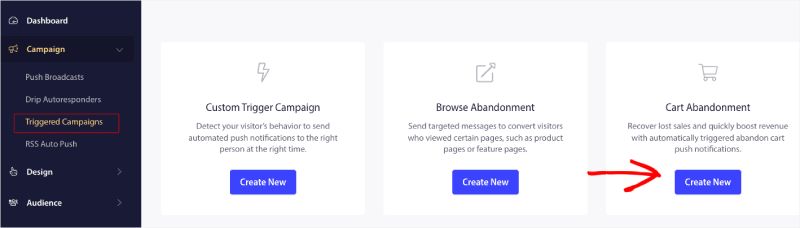
Du skal logge ind på dit dashboard og navigere til Kampagne » Udløste kampagner.
Vælg Indkøbskurv/Browsing-afgangskampagne, og klik på Opret ny.
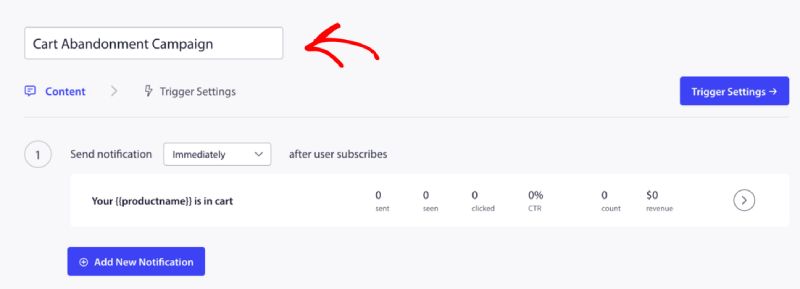
Du kan nu indtaste Kampagnenavn.
Tilføjelse af kampagneindhold
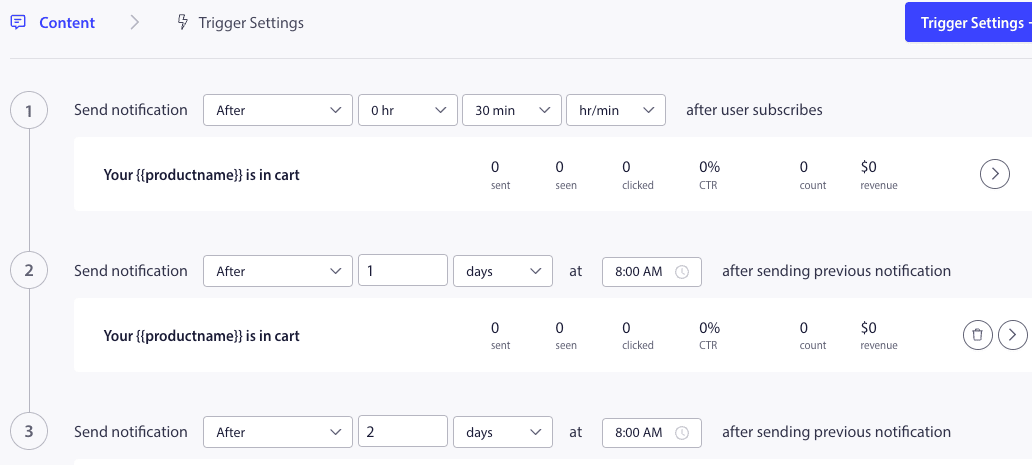
Det næste trin er at konfigurere rejseplanen – Du kan vælge en af mulighederne med det samme, efter n timer og minutter, eller efter en bestemt dag.
Normalt anbefaler vi ikke at have tidspunktet planlagt til med det samme. Du bør have mindst 15 eller 30 minutters mellemrum for den første kampagne i serien.
Når du opsætter en serie, kan du have mindst tre kampagner. Du kan tilpasse titlen og beskeden for hver kampagne i serien. Sørg for, at du ikke ændrer variabler, hvis du vil bruge disse variabler i kampagnen.
Standardvariablerne, der tilføjes i koden i henhold til kampagnen, er – {{productname}}, {{price}} og {{notificationurl}}
Håndtering af udløserindstillinger
Når du har tilføjet notifikationsindhold, kan du gå videre til Udløserindstillinger.
Her er udløserne foruddefinerede. Kampagnen starter, hvis en person tilføjer produktet til kurven og ikke gennemfører betalingen. Hvis han gennemfører betalingen, vil han ikke modtage meddelelsen om forladt indkøbskurv. Men dette er blot definerede hændelser; de kan ikke udføres, medmindre de er placeret på hjemmesiden.
Udløserne her er Start Kampagne Hvis – tilføj-til-kurv og Stop Kampagne Hvis – betaling.
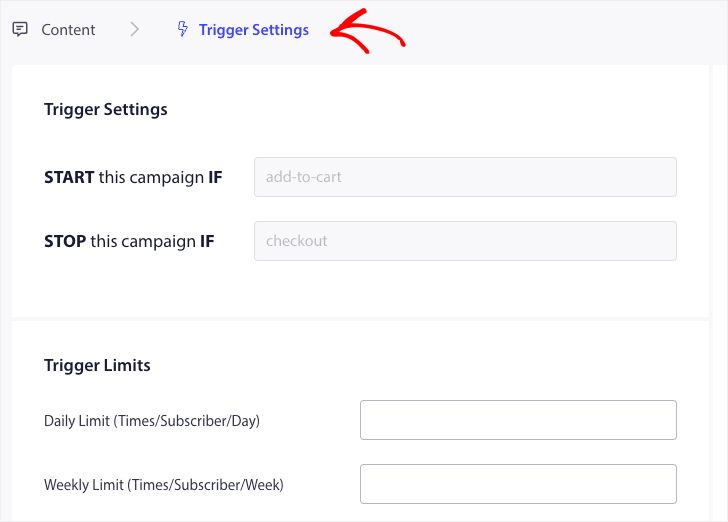
Det næste trin er at tilføje de daglige og ugentlige udløsergrænser. Dette vil definere det samlede antal notifikationer, en abonnent kan modtage dagligt og ugentligt. For eksempel – Hvis to notifikationer er daglige, så skal det være 14 ugentlige; på denne måde vil frekvensen blive begrænset, selvom mere end to produkter er forladt.
Redigering og aktivering af snippet i WPCode
For at komme i gang skal du besøge Code Snippets fanen i dit WordPress Dashboard.
Her skal du redigere to uddrag baseret på din kampagne.
- For indkøbskurv-afgangskampagne – Ved tilføjelse til indkøbskurv-hændelse i EDD og Efter checkout-hændelse i EDD.
- For browsing-afgangskampagne – Ved browsing af EDD-produkter og Ved tilføjelse til indkøbskurv-hændelse i EDD.
Vælg baseret på din kampagne, og klik på Brug uddrag, når du har uddraget åbent i redigeringsprogrammet.
Tilføjelse af kampagnenavn
Sørg for, at det korrekte kampagnenavn er tilføjet for begge hændelser. Du behøver ikke at ændre placeringen; lad uddraget blive tilføjet på hele webstedet.
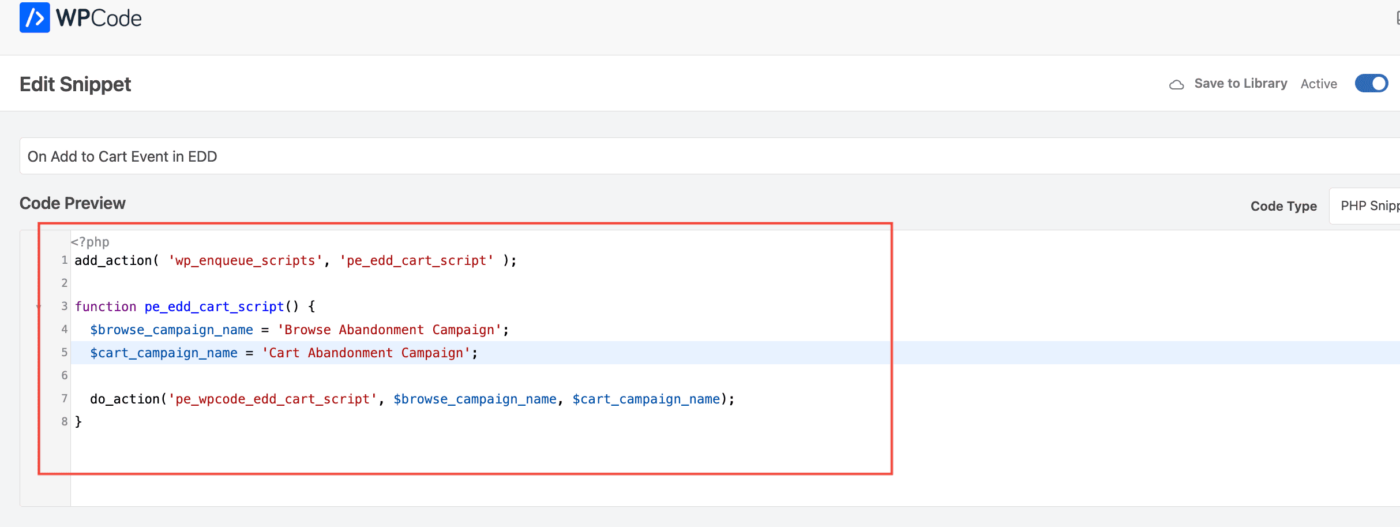
Når uddraget er færdiggjort, kan du aktivere det. Uden aktivering vil uddraget ikke være funktionelt.
Fejlfinding af udløserkampagner
- Kampagnenavnet skal være det samme i koden og på PushEngage-dashboardet.
- PushEngage installationskode skal være til stede, hvor indkøbskurv-afgangskampagnekoden er til stede, ellers. Kampagnerne vil ikke blive udløst uden den.
- Sørg for, at kampagnen er aktiv på dashboardet, efter du har placeret koden på din hjemmeside.
- Du skal være en web push-abonnent på din hjemmeside; ellers kan du ikke teste, om du modtager kampagner for forladt kurv på dit system.
Det var det! Du har nu aktiveret en indkøbskurv/browsing-afgangskampagne på din WooCommerce-butik ved hjælp af WPCode.
Hvis du støder på problemer, er du velkommen til at kontakte os ved at klikke her. Vores supportteam vil kunne hjælpe dig