
Looking for a quick guide to track SEO keyword rankings in WordPress?
Tracking your SEO rankings is one of the most important parts of any SEO campaign. If you can’t track your rankings, you can’t improve your traffic and conversions.
And WordPress has a ton of SEO plugins. But which one allows you to track SEO keywords? Do you need to buy a premium SEO tool like SEMrush or Ahrefs? Do you need a developer to integrate rank tracking into your WordPress site?
The short answer is: No!
You can simply install a WordPress plugin to track SEO keyword rankings. And in this article, we’re going to show you how.
لنبدأ.
Why Should You Track SEO Keyword Rankings?
Let’s talk about why it’s a good idea to keep track of your website’s keyword rankings for SEO.
Think of it like keeping an eye on your garden to see how well your plants are growing. Just like you want your plants to flourish, you want your website to show up well when people search for stuff on the internet.
PushEngage هو المكون الإضافي رقم 1 للإشعارات الفورية في العالم. احصل عليه مجانًا!
Here’s why tracking your SEO keyword rankings is like tending to your online garden:
- See What’s Blooming: By tracking your keyword rankings, you can see how your website is doing in search results. Are your keywords (the words people use to search) helping your site appear on the first page of results? It’s like checking to see if your flowers are blooming nicely.
- Measure Your Green Thumb: You can tell if your SEO efforts are working. If your keyword rankings are going up, it means you’re doing a good job. It’s like getting a thumbs-up for taking care of your garden well.
- Spot the Weeds: If your rankings drop, it’s a sign that something might be wrong. Maybe a new competitor popped up, or your content needs a little makeover. Just like spotting weeds early in your garden and getting rid of them.
- Stay Ahead of the Game: You can keep an eye on what your competitors are doing. If they’re using certain keywords that work well, you might want to consider using them too. It’s like learning from your gardening neighbors about which plants thrive best in your area.
- Tweak and Prune: When you see which keywords are doing great and which ones need a bit of help, you can make changes. It’s like adjusting how much water or sunlight your plants get to make them happier.
- Harvest the Fruits: High rankings mean more people see your site. When more folks visit, you might get more clicks and visitors. It’s like having a lot of people stop by to admire your garden.
- Plant New Seeds: If you notice some keywords are getting popular, you can create more content around them. It’s like planting new seeds in your garden to add more beauty.
- Celebrate Growth: Watching your rankings rise is exciting! It’s like watching your garden grow and flourish. You can pat yourself on the back for a job well done.
So, tracking SEO keyword rankings is like taking care of your website’s garden. You nurture it, watch it grow, and make sure it looks beautiful to everyone passing by (or searching online).
How to Track SEO Keyword Rankings
Now that we understand why we should track SEO keyword rankings, let’s check out how you can do it for your WordPress site.
Step #1: Install an SEO Rank Tracker WordPress Plugin
Before you can track SEO keyword rankings for your WordPress site, you need to pick the right WordPress SEO plugin. We recommend using All In One SEO.

All in One SEO (AIOSEO) هي واحدة من أكثر إضافات تحسين محركات البحث شهرة في مجتمع ووردبريس. تم تجديد الإصدار الأصلي بالكامل لإضافة طن من الميزات والإضافات الجديدة. لذلك، إذا كنت قد استخدمت AIOSEO في الماضي، فأنت بحاجة إلى التحقق من الإضافة مرة أخرى.
لا يمتلك AIOSEO ميزات تحسين محركات البحث القوية بما يكفي لتطبيق أحدث أفضل ممارسات تحسين محركات البحث فحسب، بل تحصل أيضًا على إعدادات تحسين محركات البحث المتقدمة لحل مشكلات تحسين محركات البحث المحددة فورًا. يشمل ذلك:
- وحدات تحسين محركات البحث المحلية للشركات الصغيرة ذات الجمهور المحلي
- تحسين محركات البحث لـ WooCommerce للمتاجر عبر الإنترنت
- محسن تحسين محركات البحث داخل محرر ووردبريس الخاص بك
- خرائط الموقع الذكية للفهرسة الفورية على محركات البحث
- إضافة Schema لجعل المحتوى الخاص بك يحتل مرتبة في المقتطفات الغنية
And of course, you also get a built-in SEO rank tracker to stay on top of your SEO rankings.
باختصار: يتيح لك All in One SEO إعداد تحسين محركات البحث في ووردبريس بشكل صحيح دون الحاجة إلى توظيف خبير. وإذا كان 3 ملايين عميل لـ All in One SEO يمكن تصديقهم (بما في ذلك نحن)، فإن AIOSEO هو برنامج رائع لتحسين محركات البحث لكل متطلبات تحسين محركات البحث.
إنه مثالي للمدونين وأصحاب الأعمال الصغيرة لأنه يساعدك على الاهتمام بتحسين محركات البحث دون الحاجة إلى توظيف محترف. يمكنك أن تأخذ كلمتنا في مراجعة All in One SEO الخاصة بنا، أو يمكنك قراءة عن التأثير الذي تحدثه AIOSEO في مساعدة الشركات على الظهور في نتائج البحث.
تذكر: يمكنك فقط دمج Google Search Console مع All in One SEO. إذا كنت بحاجة إلى تحليلات موقع ويب أكثر تفصيلاً، فيجب عليك التفكير في تثبيت إضافة MonsterInsights لتثبيت Google Analytics على موقع ووردبريس الخاص بك.
Step #2: Get an Overview of Keyword Rankings
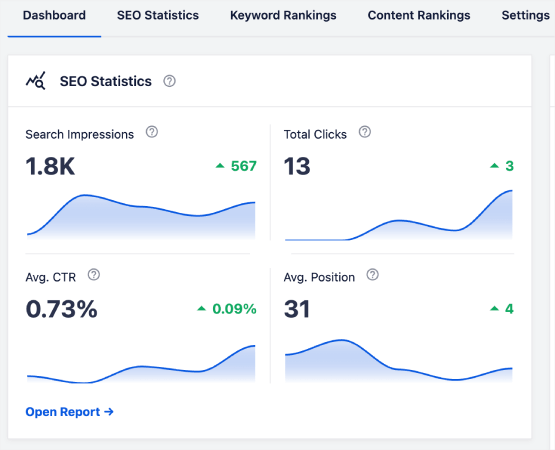
Head over to the Search Statistics section in the WordPress plugin to see an overview of your keyword rankings:
تحتوي لوحة التحكم الرئيسية أيضًا على قسم ترتيبات الكلمات المفتاحية (Keyword Rankings) يعرض نظرة عامة على أهم الكلمات المفتاحية (Top Keywords) وأهم الكلمات المفتاحية الرابحة/الخاسرة (Top Winning/Losing keywords).
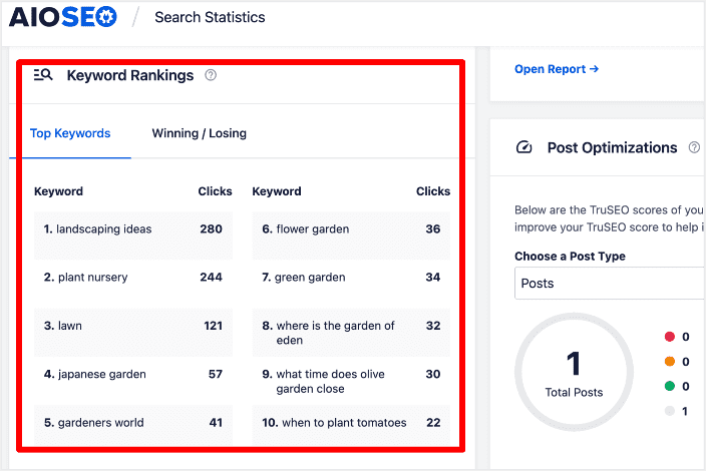
يعد اكتشاف الكلمات المفتاحية التي تتراجع في التصنيفات مثل اكتشاف مكان قطع أحجيتك المفقودة. يساعدك ذلك على فهم ما يحدث لتلك الصفحات والتخطيط لاستراتيجية لاستعادة تلك المواقع.
And guess what? When you do that, you’ll see more people visiting your site, which means more money in your pocket. It’s like solving a puzzle to make your website even better!
On the other hand, the Top Winning keywords can give you insight into the SEO tactics that are producing results so you can replicate them.
Step #3: Dive Deep into the Keyword Rankings Report
بمجرد حصولك على فكرة عامة عن أداء كلماتك المفتاحية، فإن الخطوة التالية هي فتح تقرير ترتيبات الكلمات المفتاحية (Keyword Rankings). يمكنك أيضًا رؤية إحصائيات مفصلة لترتيبات المحتوى الخاص بك هنا.
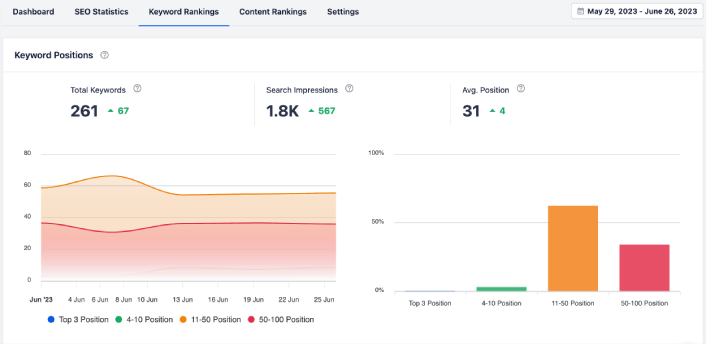
إذا قمت بالتمرير لأسفل أكثر، يمكنك حتى رؤية المنشورات الدقيقة التي تكتسب أو تفقد ترتيب البحث. علاوة على ذلك، يمكنك تصفية أفضل الكلمات الرئيسية الخاصة بك حسب النقرات والتحقق من ترتيبها على الفور.
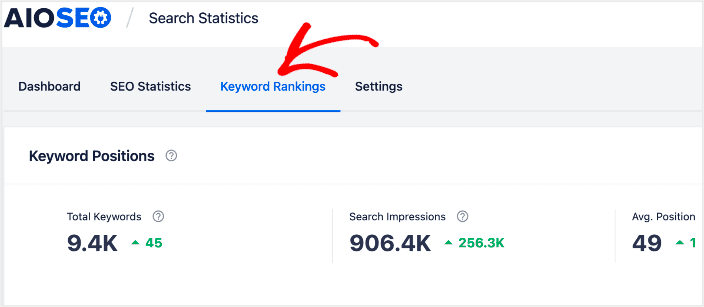
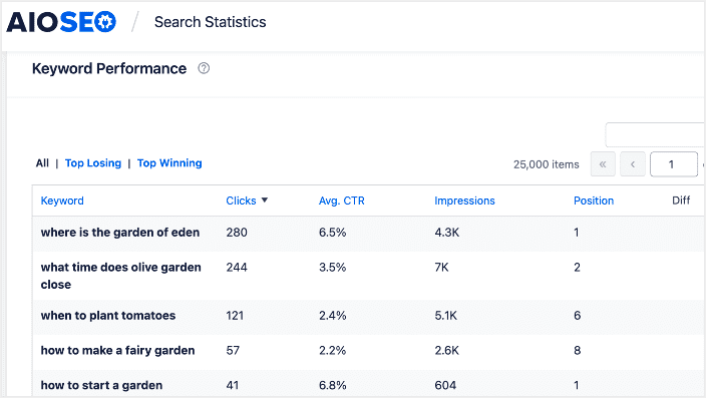
This is where you get a detailed report of all your keywords and their performance on SERPs. Scrolling down to the Keyword Performance section gives you a deeper look at how individual keywords are performing.
This is the spot where you get a full report about all the words you’re using and how well they’re doing in search results. When you scroll down to the Keyword Performance part, you dive deeper into how each word is doing all on its own.
If you click on the Top Winning tab, you see the keywords that are improving in rankings.
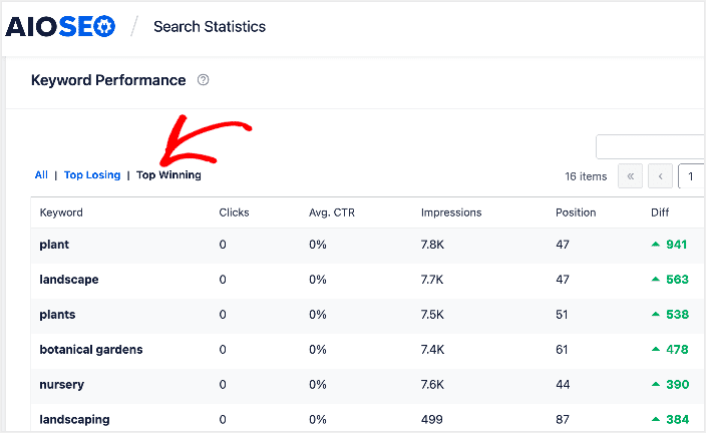
These show that you’ve optimized well for the target keywords and that your SEO strategy is working.
Step #4: Check Your Top Losing Keywords
Besides checking your Top Winning keywords, you can also track your Top Losing keywords. Click the Top Losing tab in the Keyword Performance report to do that.
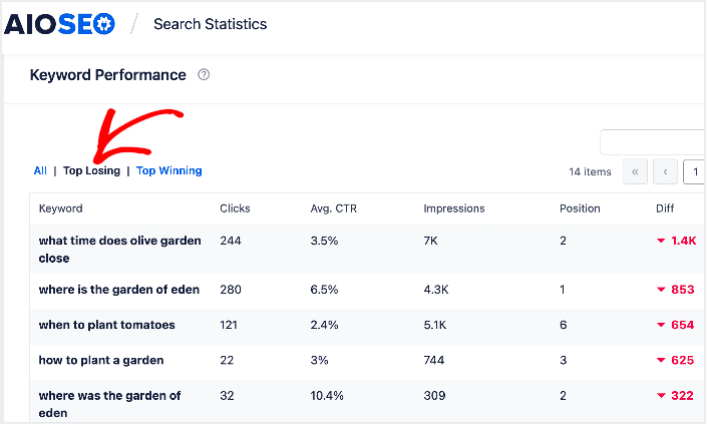
This section shows keywords that are dropping in rankings. This is vital information as it shows you the keywords and content to be optimized. If your keyword rankings are dropping, then you need to update your content right away.
What to do After You Track SEO Keyword Rankings
Tracking your SEO rankings is only one part of the puzzle. Our top recommendation is to use All in One SEO to optimize your website content. The right tools can help you with getting repeat traffic, engagement, and sales. For that, we recommend using push campaigns.
يمكن أن تكون إشعارات الدفع أداة تسويقية قوية للشركات النامية. غير مقتنع؟ تحقق من هذه الموارد الرائعة:
- 7 استراتيجيات ذكية لزيادة تفاعل العملاء
- هل إشعارات الدفع فعالة؟ 7 إحصائيات + 3 نصائح خبراء
- كيفية إضافة إضافة إشعارات الويب لـ WordPress إلى موقعك
- كيفية إعداد إشعارات الدفع للسلات المتروكة (دليل سهل)
نوصي باستخدام PushEngage لإنشاء حملات إشعارات الدفع الخاصة بك. PushEngage هو البرنامج رقم 1 لإشعارات الدفع في العالم. لذا، إذا لم تكن قد قمت بذلك بالفعل، ابدأ مع PushEngage اليوم!


