
Looking for a quick guide to add local business Schema in WordPress?
If you’re running a brick and mortar business and marketing on search engines to get more footfalls to your store, then local business Schema is going to be super helpful for you. But, how do you do it?
Isn’t Schema a lot of code snippets? Do you need to write code to add Schema to your site? Should you hire a developer?
The short answer is: No!
You can simply install a WordPress plugin to add local business Schema. And in this article, we’re going to show you how.
لنبدأ.
Step #1: Select a Local Business Schema WordPress Plugin
Before you can add local business Schema to your WordPress site, you need to pick a WordPress plugin. We recommend using All In One SEO.

All in One SEO (AIOSEO) هي واحدة من أكثر إضافات تحسين محركات البحث شهرة في مجتمع ووردبريس. تم تجديد الإصدار الأصلي بالكامل لإضافة طن من الميزات والإضافات الجديدة. لذلك، إذا كنت قد استخدمت AIOSEO في الماضي، فأنت بحاجة إلى التحقق من الإضافة مرة أخرى.
لا يمتلك AIOSEO ميزات تحسين محركات البحث القوية بما يكفي لتطبيق أحدث أفضل ممارسات تحسين محركات البحث فحسب، بل تحصل أيضًا على إعدادات تحسين محركات البحث المتقدمة لحل مشكلات تحسين محركات البحث المحددة فورًا. يشمل ذلك:
- وحدات تحسين محركات البحث المحلية للشركات الصغيرة ذات الجمهور المحلي
- تحسين محركات البحث لـ WooCommerce للمتاجر عبر الإنترنت
- محسن تحسين محركات البحث داخل محرر ووردبريس الخاص بك
- خرائط الموقع الذكية للفهرسة الفورية على محركات البحث
- إضافة Schema لجعل المحتوى الخاص بك يحتل مرتبة في المقتطفات الغنية
وأكثر من ذلك بكثير!
باختصار: يتيح لك All in One SEO إعداد تحسين محركات البحث في ووردبريس بشكل صحيح دون الحاجة إلى توظيف خبير. وإذا كان 3 ملايين عميل لـ All in One SEO يمكن تصديقهم (بما في ذلك نحن)، فإن AIOSEO هو برنامج رائع لتحسين محركات البحث لكل متطلبات تحسين محركات البحث.
It’s perfect for bloggers and small business owners because it helps you take care of SEO without having to hire a professional.
Remember: You can only integrate the Google Search Console with All in One SEO. If you need more detailed website analytics, you should consider installing the MonsterInsights plugin to install Google Analytics to your WordPress site.
Step #2: Add Location Schema (Single Location Business)
Once you’ve installed AIOSEO, go to the AIOSEO menu » Local SEO. This will open a page where you can input your location and business information.
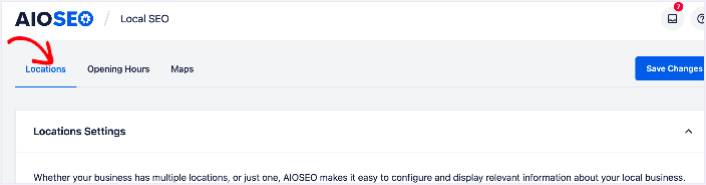
Next, you need to select whether your business is in one location or many.
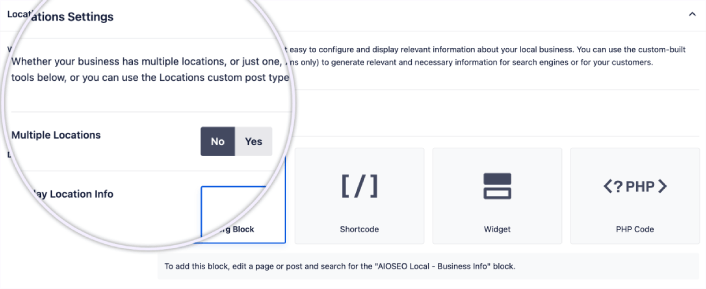
If yours is a single-location business, leave the Multiple Locations toggle set to No.
You can also choose whether you want your location information to be displayed as a:
- Gutenberg Block
- Shortcode
- عنصر واجهة المستخدم
- PHP code
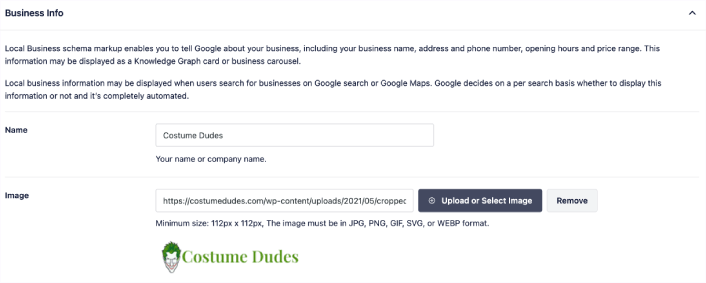
Then, add other business information like name, logo (image), business type, and address.
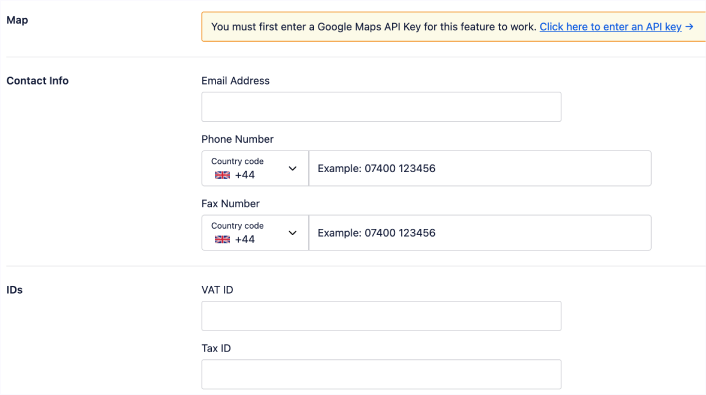
You can also add other information like a map of your location (more on this in a moment), contact information, VAT and Tax IDs, payment information, and the areas you serve.
You can also add your payment info under Payment Info and showcase your store locations under Areas Served.
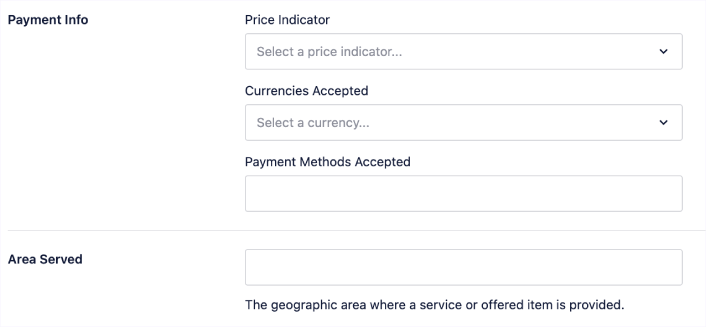
When you’re done, go ahead and hit the Save Changes button.
Step #3: Add Opening Hours
The next step to adding Local Business schema is to add your business hours. Go to the AIOSEO menu » Local SEO » Opening Hours. This will open a window where you can add your opening hours.
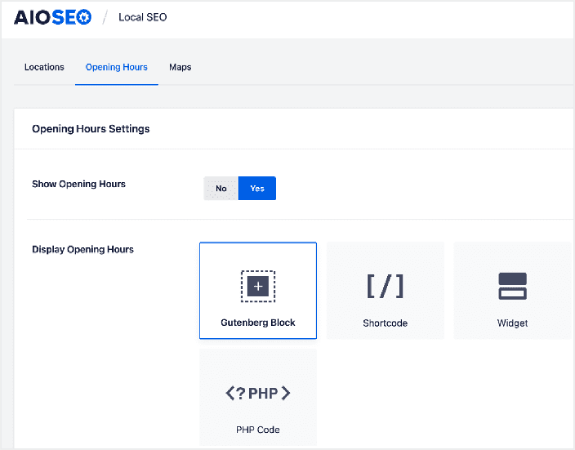
Set the Show Opening Hours toggle to Yes, and you can get options for displaying your opening hours.
If your business is open 24 hours, you can set the toggle to Open 24/7, and that’s it. You’ve added business hours to your Local Business schema.
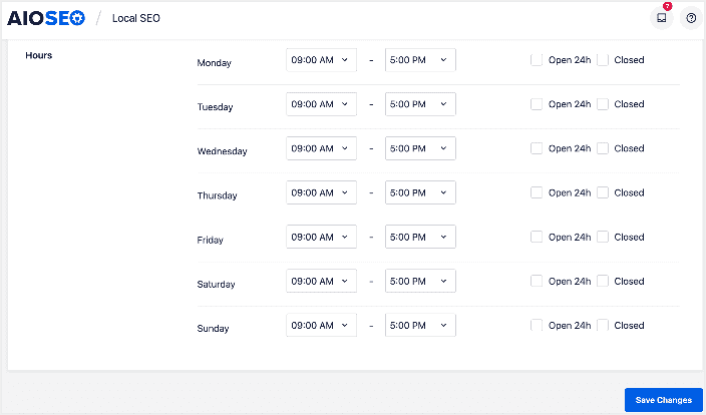
Once you’re done, click Save Changes, and your operating hours will be set.
Step #4: Add Google Maps
The final step to setting your Local Business schema is adding Google Maps, so you can visually display your location. To do that, go to the AIOSEO menu » Local SEO » Maps.
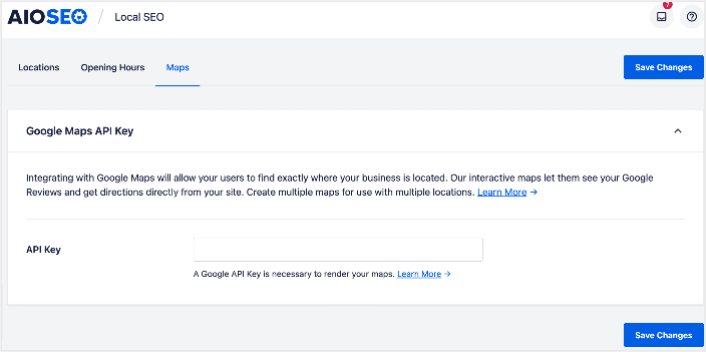
You’ll have to add a Google Maps API key in the API Key field for search engines to render your map.
Once done, click Save Changes.
And that’s it!
What to do After Adding Local Business Schema in WordPress
Adding local business schema is only one part of the puzzle. Our top recommendation is to use All in One SEO to optimize your website content. The right tools can help you with getting repeat traffic, engagement, and sales. For that, we recommend using push campaigns.
يمكن أن تكون إشعارات الدفع أداة تسويقية قوية للشركات النامية. غير مقتنع؟ تحقق من هذه الموارد الرائعة:
- 7 استراتيجيات ذكية لزيادة تفاعل العملاء
- هل إشعارات الدفع فعالة؟ 7 إحصائيات + 3 نصائح خبراء
- كيفية إعداد إشعارات الدفع للسلات المتروكة (دليل سهل)
نوصي باستخدام PushEngage لإنشاء حملات إشعارات الدفع الخاصة بك. PushEngage هو البرنامج رقم 1 لإشعارات الدفع في العالم. لذا، إذا لم تكن قد قمت بذلك بالفعل، ابدأ مع PushEngage اليوم!


