يساعد PushEngage في تجميع الشرائح المخصصة التي تم إنشاؤها بالفعل، والموقع الجغرافي، والأشخاص الذين يتفاعلون مع حملات الإشعارات الخاصة بك. مجموعة الجمهور تختلف عن الشرائح. الشرائح إما أن تحتوي على معايير افتراضية أو معايير مخصصة بناءً على الإجراءات. تجمع مجموعة الجمهور كل هذه المعايير الشرائحية في مجموعة وتسمح لك باستهدافها، مما يوفر الوقت في الإرسال إلى شرائح أو اختيارات متعددة. سيساعدك هذا على إرسال إشعارات أكثر استهدافًا مما يؤدي إلى تحسين نسبة النقر إلى الظهور.
يمكنك الرجوع إلى هذا الدليل لإنشاء مجموعة جمهور لموقع ووردبريس الخاص بك من خلال إضافة PushEngage، ولكن إذا لم يكن لديك موقع ووردبريس، فسيساعدك هذا الدليل في إنشاء وإرسال حملة باستخدام مجموعات الجمهور.
كيفية إنشاء مجموعة جمهور؟
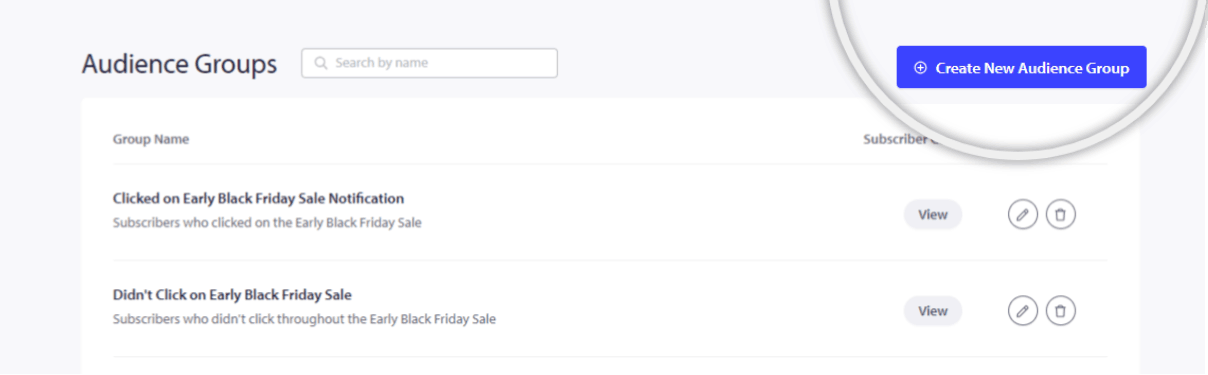
1. بمجرد تسجيل الدخول إلى حساب PushEngage الخاص بك، انتقل إلى الجمهور » مجموعة الجمهور.
2. حدد إنشاء مجموعة جمهور جديدة وأدخل اسم مجموعة الجمهور. إذا أردت، يمكنك أيضًا إضافة وصف للمجموعة. سيساعدك هذا لاحقًا أنت وفريقك على معرفة مجموعة الجمهور التي أنشأتها من خلال النظر إلى المعاينة دون الحاجة إلى تعديلها وعرضها. انقر فوق زر "عرض" لمعرفة عدد المشتركين في مجموعة الجمهور.
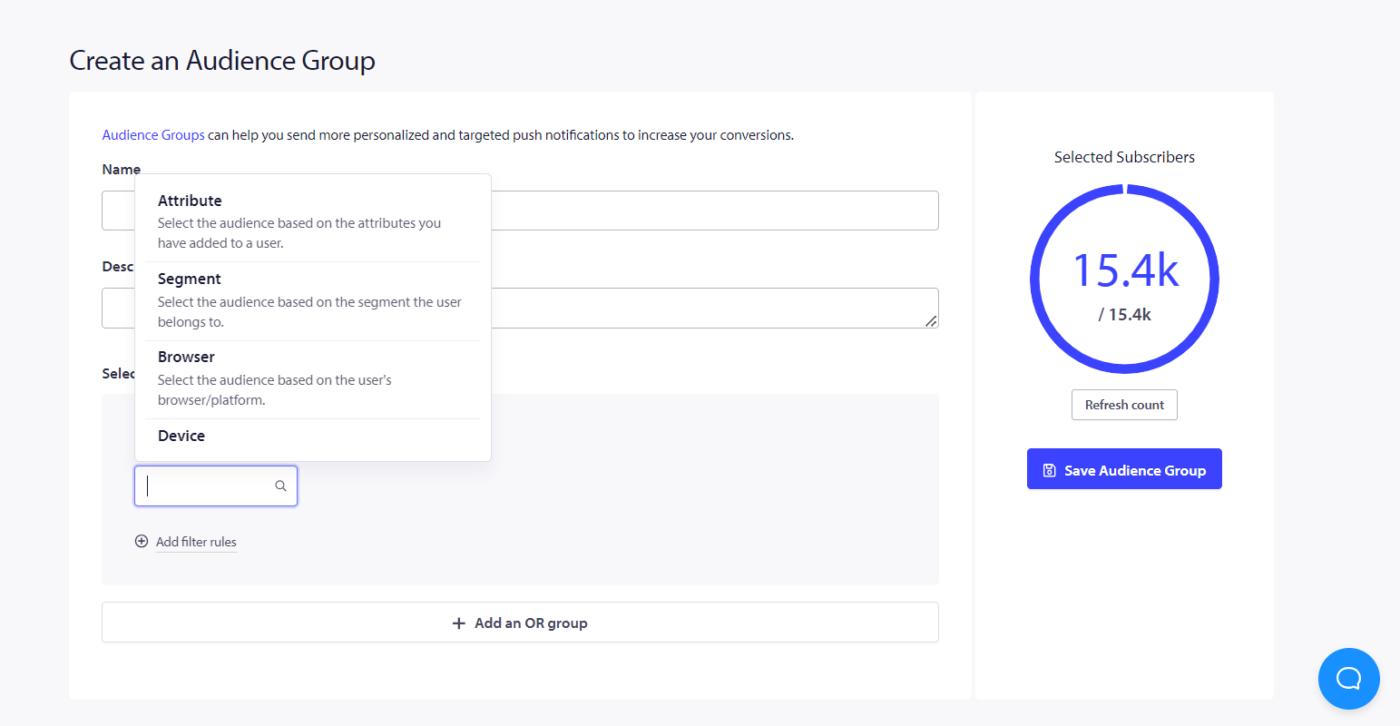
الآن، يمكنك تحديد المعايير كما فعلت لإزالة المشتركين غير النشطين. يمكنك تحديد السمات، والشرائح، والمتصفحات، والأجهزة، والبلدان، والولايات، والمدن، وتواريخ الاشتراك، وآخر نقرة، والإرسال، وتاريخ العرض، وإجمالي الإرسال، والعرض، وعدد النقرات، ومعرف الملف الشخصي، وتجزئة المشترك، وما إلى ذلك.
3. يمكنك إضافة أكبر عدد ممكن من المعايير التي تناسب حملتك التسويقية.
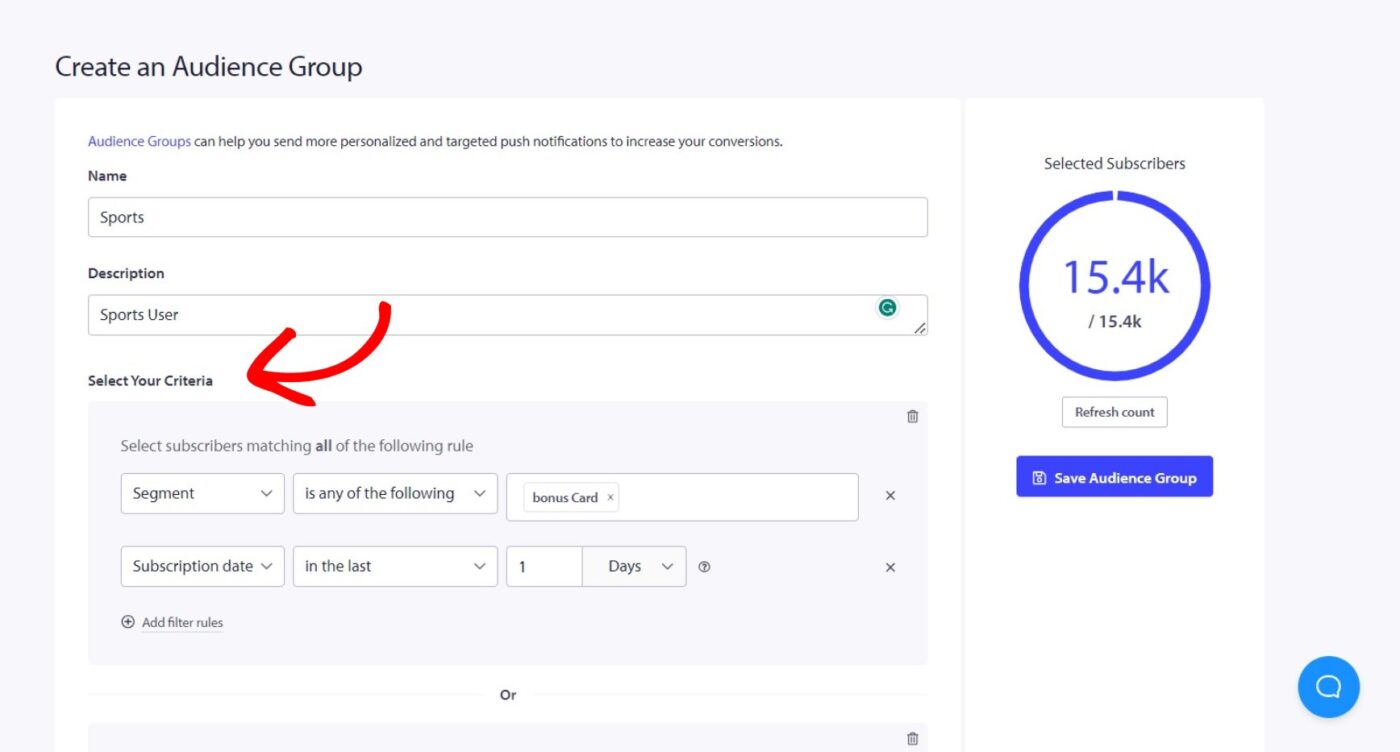
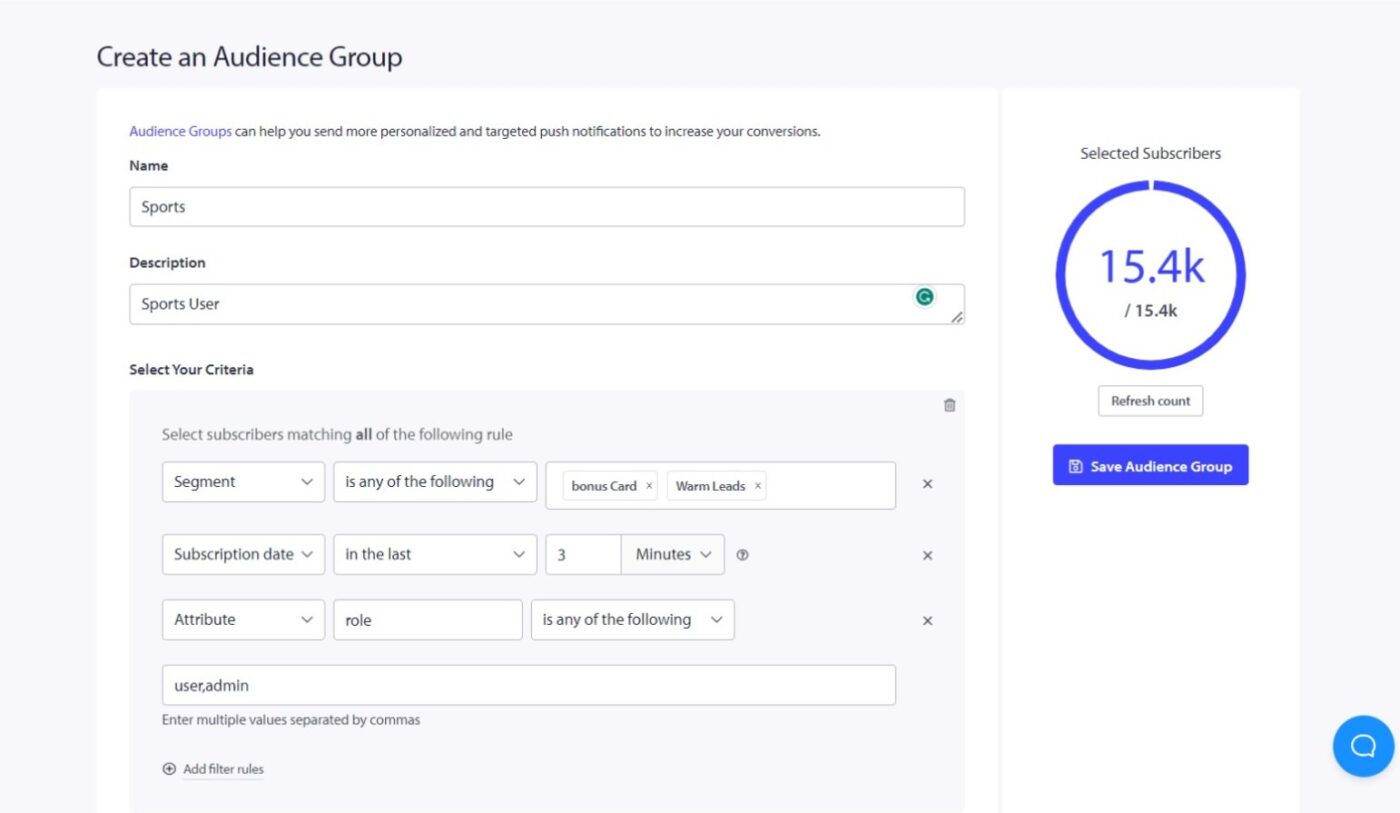
ملاحظة: لإضافة شرائح مخصصة، وسمات، ومعرفات ملفات شخصية، وتجزئة مشترك في مجموعة الجمهور، تأكد من أنك قمت بإنشائها مسبقًا أو قبل إنشاء مجموعة الجمهور.
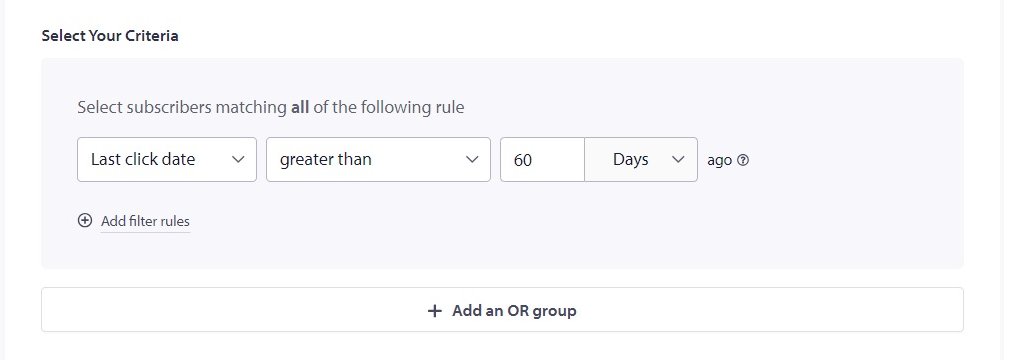
باستخدام هذه الميزة، يمكنك أيضًا إعادة استهداف المستخدمين الذين لم ينقروا على إشعاراتك في الأيام القليلة الماضية. يمكنك إنشاء مجموعة جمهور محددة لهم، وتعيين معايير مثل "تاريخ آخر نقرة أكبر من 60 يومًا"، ثم إعادة استهدافهم. بهذه الطريقة، يمكنك إرسال إشعارات أكثر استهدافًا لمشتركيك الأقل نشاطًا وإشراكهم بشكل أكبر. يسمح لك إضافة المزيد من المعايير ذات الصلة بتقسيم نفس مجموعة المشتركين في نفس مجموعة الجمهور.
هذا كل ما تحتاجه لبناء مجموعات جمهور باستخدام شرائح وسمات مختلفة.
حقائق رئيسية حول مجموعات الجمهور
- تسمح لك هذه الميزة أيضًا بإعادة استهداف المستخدمين الذين لم ينقروا على إشعاراتك في الأيام القليلة الماضية. يمكنك إنشاء مجموعة جمهور محددة وتعيين معايير، مثل تجاوز تاريخ آخر نقرة 60 يومًا.
- يمكنك زيادة التفاعل وتشجيعهم على التفاعل مع المحتوى الخاص بك. يمكنك القيام بذلك عن طريق إرسال إشعارات مستهدفة إلى المشتركين الأقل نشاطًا لديك بناءً على معايير نشاطهم في مجموعات الجمهور.
إرسال حملة إلى مجموعة جمهور
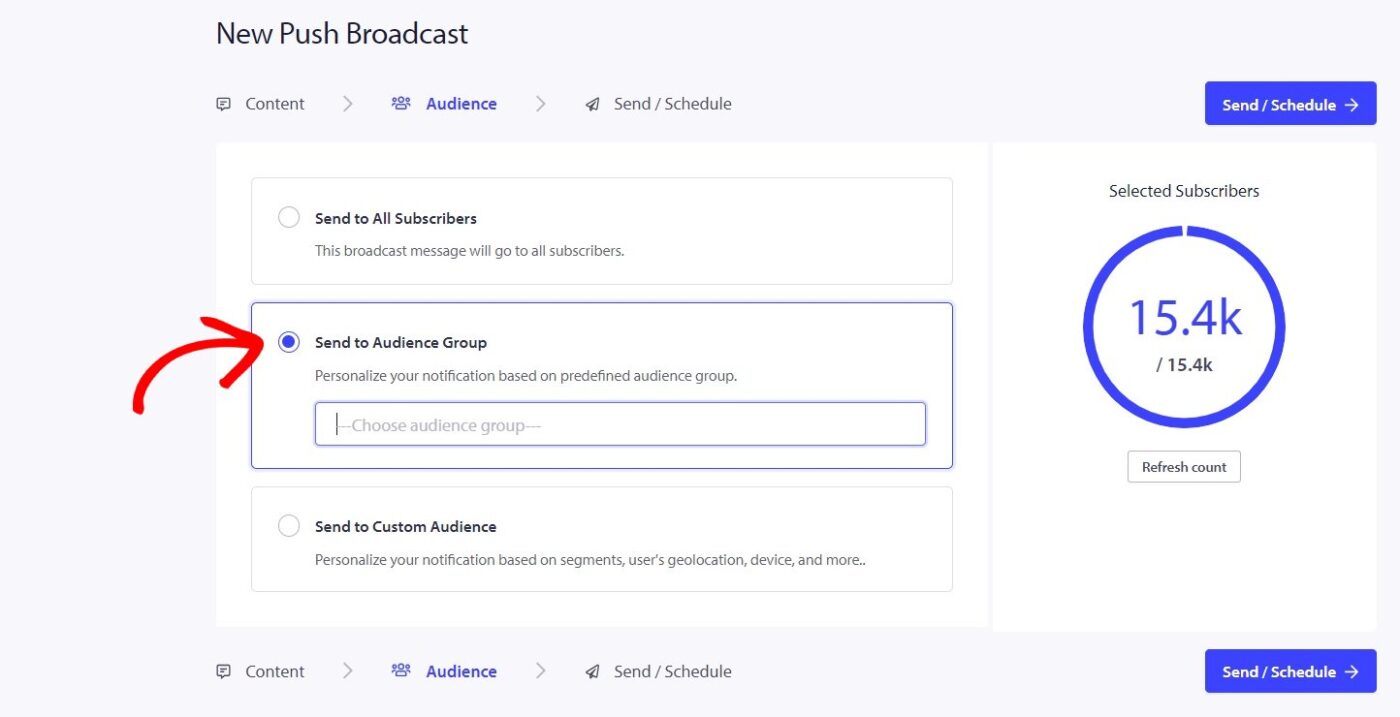
يمكنك تحديد مجموعة الجمهور من علامة التبويب "الجمهور" في "بث الإشعارات".
الآن بعد أن قمت بإنشاء مجموعة الجمهور، يمكنك إنشاء بث إشعارات. قبل إرساله إلى قاعدة المشتركين بأكملها، يمكنك تحديد مجموعة جمهور قمت بإنشائها مسبقًا، وبعد ذلك ستحصل مجموعة واحدة معينة فقط على الإشعار. يمكنك التحقق من أداء الحملة عن طريق الانتقال إلى الحملة » بث الإشعارات.
إذا واجهت أي مشاكل، فلا تتردد في الاتصال بنا بالنقر هنا. سيكون فريق الدعم لدينا قادرًا على مساعدتك.