يمكنك جمع المشتركين عند تحميل الصفحة عن طريق عرض خيار الاشتراك/الإذن، ولكن هناك أيضًا خيار متاح لجمع المشتركين عند النقر على عنصر. يمكن أن يكون العنصر HTML أيضًا زرًا/رابطًا أو صورة. الجزء الجيد هو أنك تحتاج فقط إلى معرفة معرف العنصر، ولكن ليس عليك إضافة أي رمز.
في هذا الدليل، يمكنك تعلم كيفية القيام بذلك من لوحة التحكم نفسها.
إضافة مشغل خيار الاشتراك
انتقل إلى التصميم » نافذة منبثقة، وانقر على زر تعديل النافذة المنبثقة.
يمكنك التمرير إلى تمكين مشغل خيار الاشتراك وتشغيله.
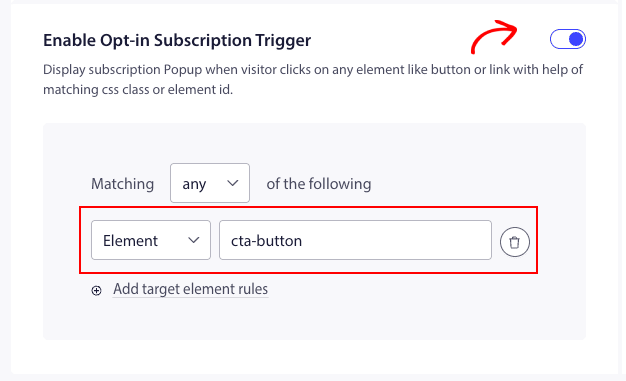
الآن تحتاج إلى جلب معرف العنصر وإضافته إلى عامل تصفية معايير المطابقة.
بمجرد إضافته، يمكنك النقر على حفظ وتمكين النافذة المنبثقة.
سيؤدي هذا إلى عرض خيار الاشتراك عند النقر على عنصر أو زر بعد تحميل الصفحة.
هذا كل شيء، يمكنك الآن الاختبار عن طريق النقر على هذا العنصر على موقعك الإلكتروني إذا ظهرت النافذة المنبثقة.
إذا واجهت أي مشاكل، يرجى الاتصال بنا بالنقر هنا. سيكون فريق الدعم لدينا قادرًا على مساعدتك.