Web Push Notification Campaigns

How to 3X CTR With a Web Push Notification Campaign

If email open rates are dropping and your social posts are getting buried, it might be time to try something different. A web push notification campaign could be exactly what you need.

Web push is fast, direct, and shows up right when your subscriber is online. No inbox. No algorithm. Just a quick message that brings people back to your site when it matters most.

In this guide, I’ll show you how to set up your first web push notification campaign using PushEngage. It’s easier than you might think, and you’ll see how even a simple campaign can drive real results.

Sounds good? Let’s just dive right in.

Send Web Push Notifications Today!

推送通知是一种超级有效、低成本的营销工具,可帮助您自动增加重复流量、互动和销售。

Why Web Push Works (Even When Other Channels Don’t)

Web push notifications cut through the noise in a way that email and social just can’t.

  • You don’t need a phone number or email address to grow your list
  • Messages show up while your subscriber is actively browsing
  • You can automate everything — from cart recovery to product drops
  • It works across devices and browsers (no app required)

It’s like having your own private traffic channel… one that actually gets noticed. Think about it… when was the last time you ignored a browser notification that popped up with your name, a juicy headline, and a call to action you cared about?

Instant Visibility: Unlike emails that sit unread for days, push notifications hit instantly. Right on the user’s screen. Desktop, mobile, doesn’t matter. You’re not waiting for them to open an inbox. You’re showing up exactly when it matters.

🧠 Zero Memory Required: Users don’t need to remember your website. Or your product. Or even their login.
Once they subscribe, you can re-engage them anytime — no forms, no friction, no fuss. It’s like having a fast lane straight into their attention span.

📈 Stupid-High Engagement: Web push CTRs often 2–3x email. Why? Because it’s short. Unexpected. And native to how people browse. Plus, no one’s inbox is drowning in push notifications (yet). So you stand out.

💸 You Own the Channel: No algorithms. No bidding. No social feed shenanigans. Push subscribers are yours. You decide what they see and when. It’s your audience, not rented from Meta or Google.

🧪 Perfect for Testing: Need to know if a headline works? If people care about a new feature? Push is the fastest A/B testing tool you didn’t know you had. Send a headline variation. See which one gets more clicks. Learn fast. Move faster.

Web push is the rare channel that’s cheap, high-converting, and brutally effective when used right.

And the best part… it takes under 10 minutes to launch your first campaign.

Let’s build one.

A Breakdown of Web Push Notification Campaign Types

In the broadest sense, there are 3 types of web push notification campaigns:

Broadcasts are push notifications that you send out as a single notification. You can schedule them, but they will only fire off once. Triggered campaigns involve setting up a push notification, defining a trigger to set it off, and a workflow to control its scheduling. Automated drip notifications are a series of notifications that set off automatically at specific times or when specific conditions are met.

For all intents and purposes, triggered campaigns and automated drip campaigns look the same from the outside. The critical difference is that trigger campaigns are way more flexible and customizable. If you consider that push notifications cost way less than most other channels, it makes perfect sense to use a combination of all three to grow your business.

If you’re new to push notifications, we strongly recommend starting your journey using proven templates.

The Best Service to Send a Web Push Notification Campaign

Let’s start things off by saying that most of the “free push notification services” out there are actually free trials. Some of the providers we’ve listed here are trial software, while others have a forever-free plan that you can opt for.

There are some other freemium options, such as Firebase Cloud Messaging (FCM), but that’s not really a good option at all. You can read more about why FCM can’t compete with a service provider like PushEngage. But for now, just take our word for it and jump into the better options.

我们推荐使用PushEngage

PushEngage automated notifications

PushEngage 是全球排名第一的推送通知插件。

推送通知可帮助您自动增加网站流量和参与度。如果您经营在线商店,PushEngage 还可以通过帮助您创建自动电子商务推送通知来帮助您增加销售额。

您可以免费开始使用,但如果您想认真发展业务,则应购买付费套餐。此外,在购买任何推送通知服务之前,您应该查看这篇关于 推送通知成本的指南。

PushEngage 提供以下功能,快速概览:

And this is barely scratching the surface. Check out PushEngage’s full list of features before you go any further.

但PushEngage最吸引人的地方在于,您可以从一个永久免费的计划开始。而且您可以使用它通过多种自定义选项来发展您的业务。

您会发现,如果您想为您的业务带来流量、参与度和销售额,PushEngage 绝对是最佳选择。而且,如果您预算有限,您总是可以 在推送通知方面发挥创意

The free version allows up to 200 subscribers and 30 lifetime notifications. That’s good enough to get your business to a point where you can easily afford the paid plans that start at $9/month for 100,000 subscribers.

PushEngage SaaS pricing 2026

And don’t worry if you know absolutely nothing about coding. You can install PushEngage using one of the many installation guides for any website and CMS.

Pushengage’s AI-powered optimization helps you craft better titles and messages, leading to increased engagement and campaign success. Ever wished that your push notifications would write themselves? Well, now they can!

In all likelihood, you can cut down campaign creation time for push broadcasts, drip campaigns, and automated trigger campaigns by as much as 50% while improving the quality of your copywriting.

The PushEngage AI uses high-performing campaigns as a reference point for all copywriting and will always stick to best practices by default.

And the best part is that it works for web push, Android native notifications, iOS native notifications, Flutter notifications, and React Native notifications from the same dashboard!

You can use AI text generation for any campaign type. For this example, I’m using a push broadcast to demonstrate the capabilities. But if you want to see its full potential in action, watch this video!

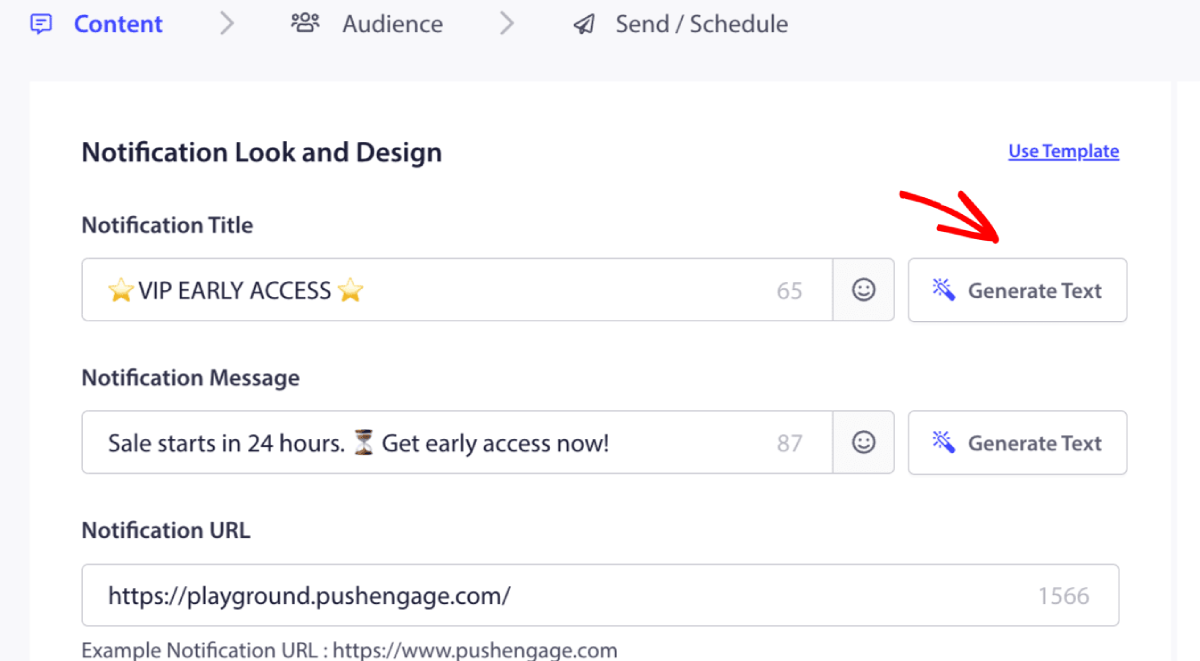
Create a new campaign or choose any from the Templates. You can then click on Generate Text Button.

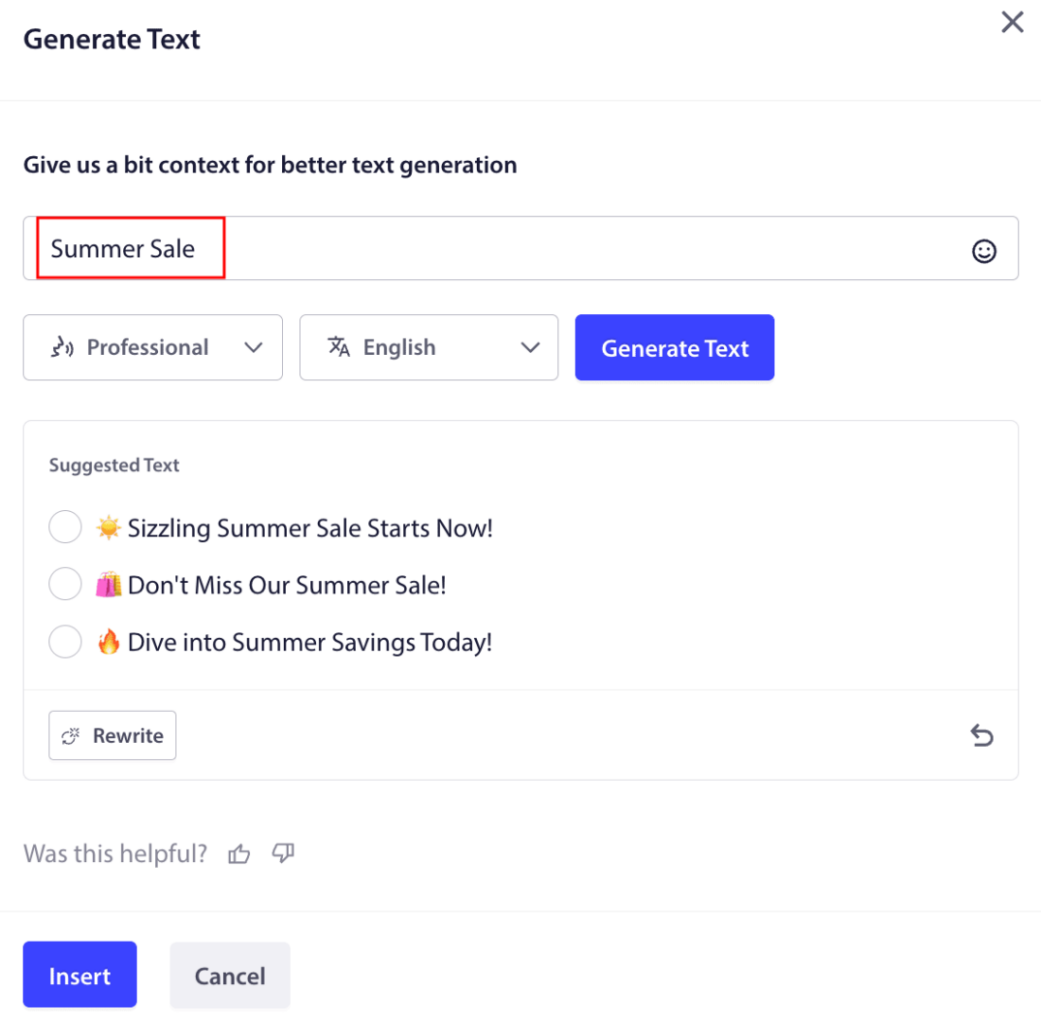
It will open up a small window for the web push notification campaign title & message. You can start by adding any keywords that will act as a prompt for the AI. The prompt can be as detailed as you like.

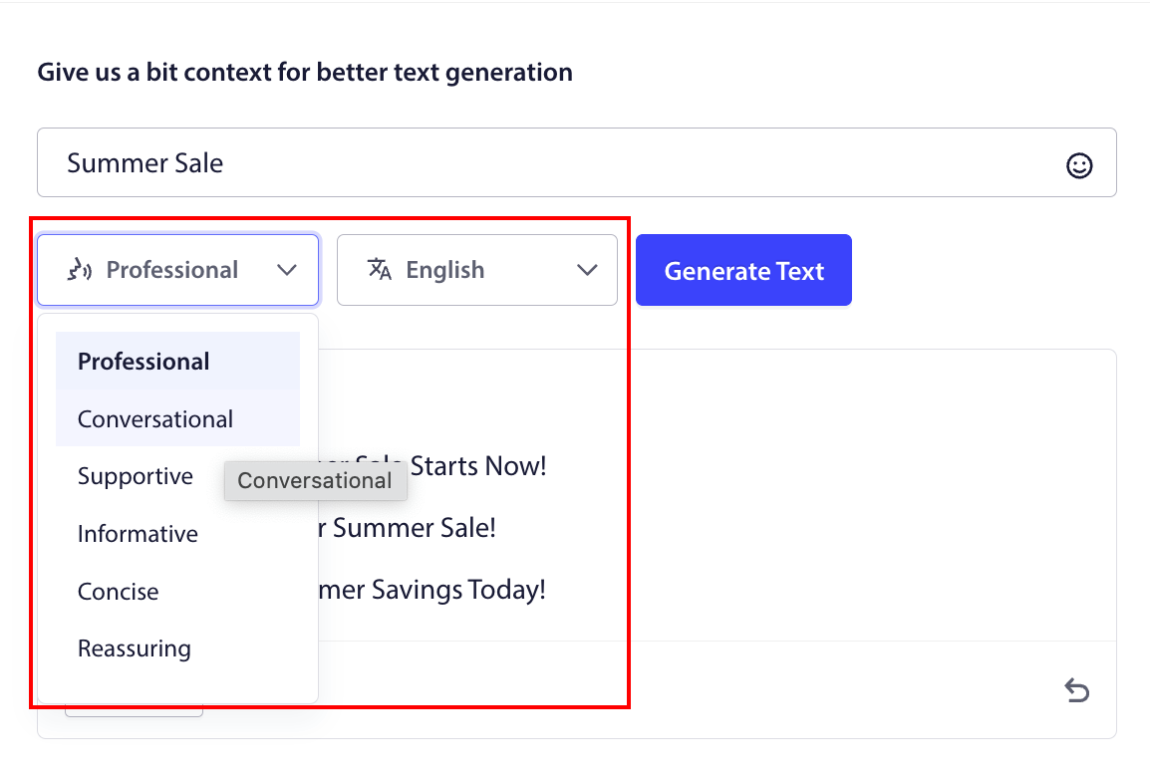
You can also set the tone for the web push notification campaign title or message. The tone of the conversation is very important in deciding the type of campaign that will be created. Make sure that it resonates with your brand style.

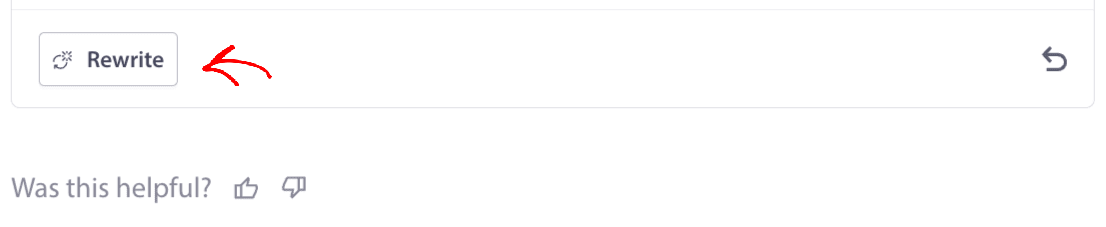
Once it’s set, you can click on the Generate Text button. Not happy with the generated text? Simply click the Rewrite button!

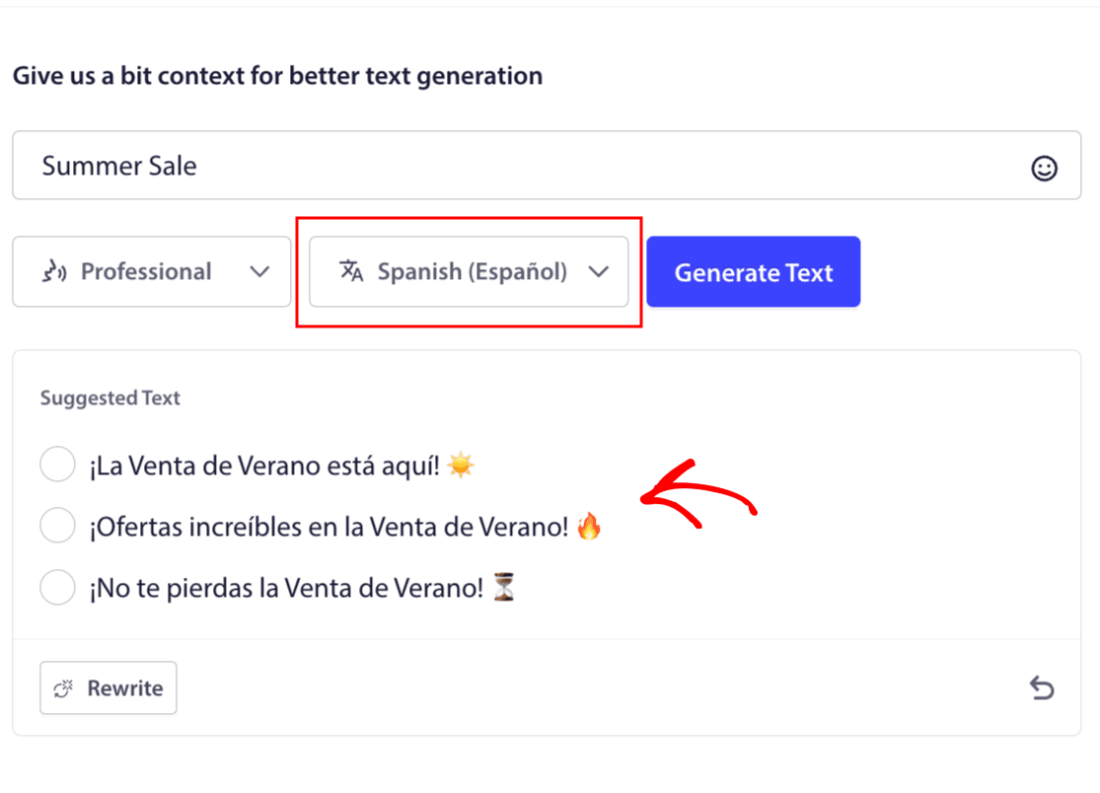
You can actually craft copy in ANY LANGUAGE!

This level of built-in multi-language support simply doesn’t exist in any other push notification software. And don’t worry, the translations are dead on! So, you can send geo-specific campaigns very easily now. Select the right Audience Group, select the language, and let our AI do its magic.

How to Send a Web Push Notification Campaign

Now that you know what a web push notification campaign is and what service you need to send them, it’s time to check out how to send different notifications.

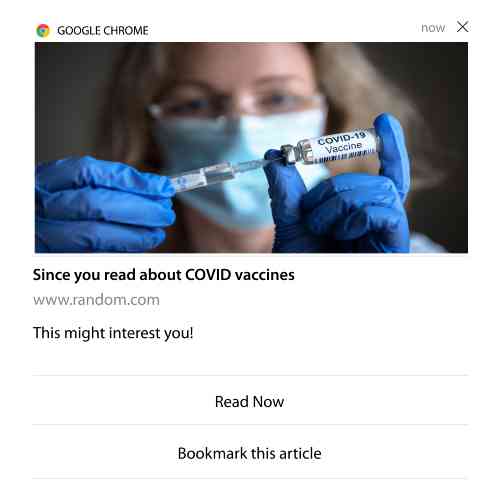
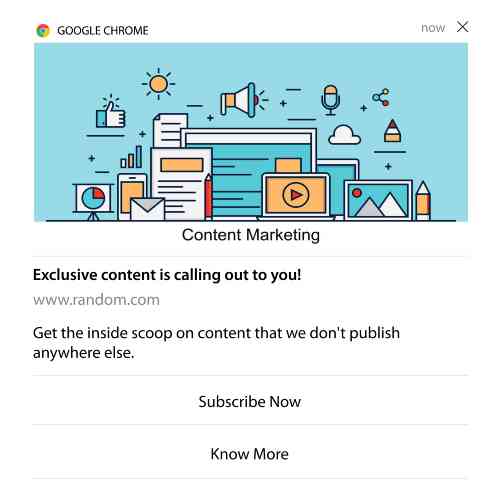
Here’s what web push campaigns look like in the wild:

🛒 E-commerce:

  • Welcome discount: “Thanks for subscribing! Here’s 10% off.”
  • Price drop alert: “The jacket you liked? It’s finally on sale.”
  • Product drops: “New arrivals just landed. Be the first to shop.”

📚 Publishers & Bloggers:

  • New post alert: “Don’t miss this week’s breakdown on [Topic].”
  • Weekly digest: “Your Friday readlist is here.”
  • Lead magnet delivery: “Here’s your free guide. Let us know what you think.”

💼 SaaS & Tools:

  • Feature updates: “We just launched something new. Try it free.”
  • Trial reminders: “Your free trial ends tomorrow.”
  • Abandoners: “Still thinking it over? Here’s 20% off to try us out.”

Start small. Steal these. Tweak them to match your tone. Done.

For practical purposes, we aren’t talking about custom triggered campaigns you can create using an API service here. If you’re more interested in custom notifications, you should check out our documentation.

#1. Welcome Web Push Notification Campaign

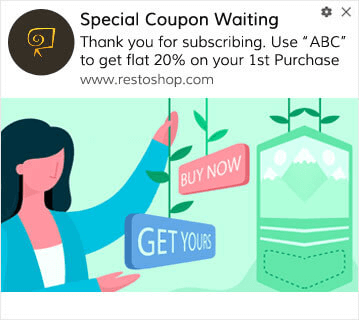
A welcome web push notification campaign is a simple push notification meant to welcome any new subscriber.

welcome web push notification campaign

You can also send an offer or a gift for subscribing to your push notifications. This is pretty common with a lot of our customers. You can use your welcome push notifications to:

  • 分享欢迎优惠券
  • 提供高级功能
  • 发送免费送货
  • 提供免费礼品
  • 通过演练引导您的订阅者

现在,让我们使用 PushEngage 设置您的第一个欢迎推送通知。

Here is how to Enable Welcome Notifications in PushEngage.  Go to the PushEngage dashboard and head over to Campaign » Drip Autoresponders and click on Create New Drip Autoresponder:

创建新的自动回复邮件

然后,为您的广告系列命名(我们建议使用类似“欢迎滴灌”的名称),然后在内容下,选择显示“用户订阅后立即发送通知”的选项):

创建欢迎邮件系列

此时,您可以单击通知旁边的箭头来编辑通知的内容。如果您拥有PushEngage的高级或企业版套餐,您将能够添加多个通知来创建一系列自动欢迎消息。只需点击Add New Notification并编辑内容。

完成后,点击邮件序列设置并选择将您的欢迎广告系列发送给所有订阅者的选项:

向所有订阅者发送推送通知

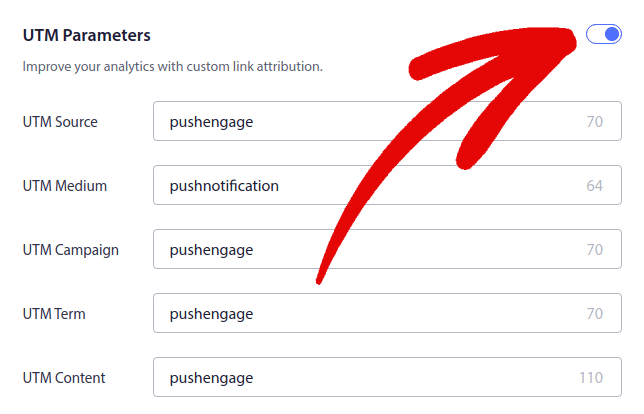
然后,向下滚动以设置您自己的 UTM 参数以跟踪推送通知

UTM 参数

完成后,滚动回顶部并点击激活自动回复器按钮:

激活自动回复器

Now you know why setting up a welcome push notification campaign is important. You also know how to set it up. Go ahead and activate welcome push notifications to re-engage new subscribers, or check out this article on website welcome messages for inspiration.

#2. Abandoned Cart Web Push Notification Campaign

购物车放弃是指潜在客户将产品添加到购物车但未完成结账过程。

您的工作是尽可能减少购物车放弃

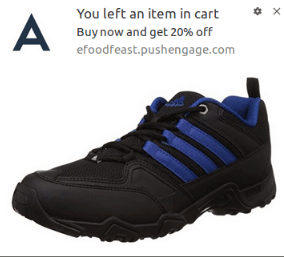
One way to recover your lost sales is to use a cart abandonment web push notification campaign. Cart abandonment recovery campaigns target subscribers with an abandoned cart and send them follow-ups, reminders, offers, coupons, and discounts.

废弃购物车自动推送通知

这是一个简单的想法:让尽可能多的人购买东西。

购物车放弃推送通知对您的最终利润有着非常实际的影响。例如,WickedWeasel 的购物车放弃推送活动每周可带来 2,000 至 4,000 美元的额外销售额

现在,让我们来设置您的第一个购物车放弃活动。

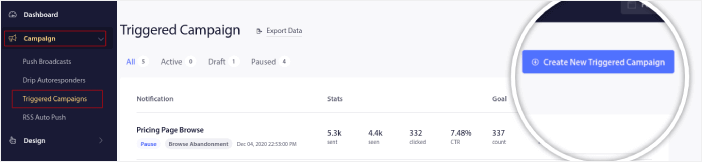
Go to the PushEngage dashboard and head over to Campaign » Triggered Campaigns, and click on Create New Triggered Campaign:

创建新的触发式广告系列

然后,选择 **Cart Abandonment** 模板,然后点击 **Create New**:
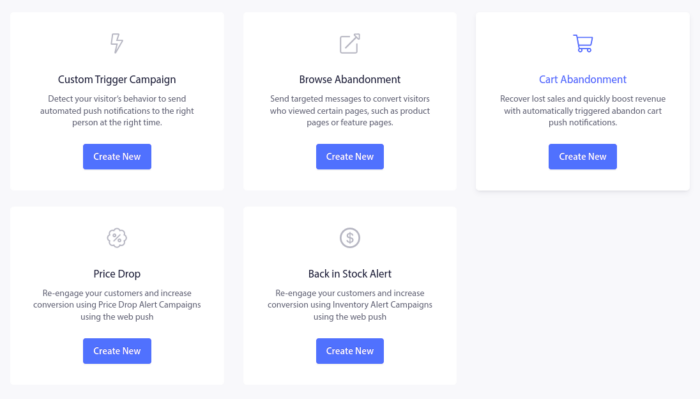
购物车放弃广告系列模板

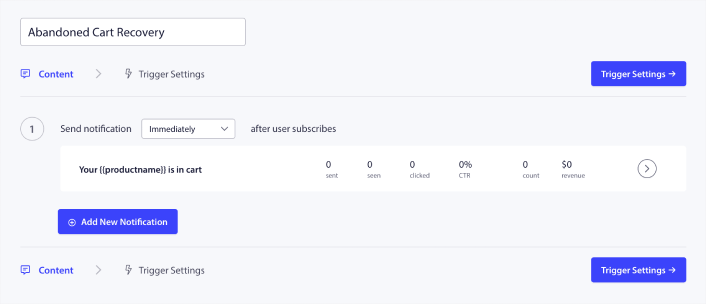
And you can start drafting an abandoned cart autoresponder. Under the Content tab, you can create a series of push notifications:

新的废弃购物车营销活动

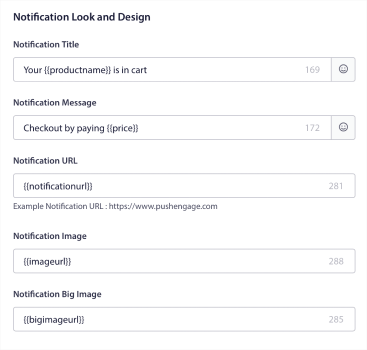
To edit a notification, simply click the arrowhead next to it, and you can customize the push notification:

废弃购物车通知设计

For a more tutorial, check out this article on how to set up abandoned cart push notifications.

#3. Browse Abandonment Web Push Notification Campaigns

浏览放弃顾名思义。当网站访问者浏览您的网站并突然离开时发生。其他供应商也将这些事件称为漏斗放弃。

浏览放弃几乎在所有行业中都非常普遍。

而且很难减少或控制,因为没有办法激励随机用户留在您的网站上。这就是浏览放弃活动如此强大的原因。

这是发布商的浏览放弃推送通知示例:
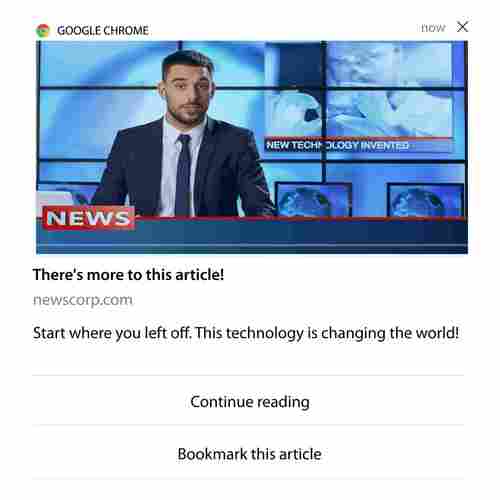
浏览放弃示例

PushEngage 的出色之处在于,您可以为几乎任何行业设置活动。因此,您也可以为 SaaS 和旅游网站发送浏览放弃推送通知。

那么,如何设置浏览放弃活动?

对于购物车放弃,有一个非常明确的参数来触发您的推送通知。对于浏览放弃,您可能需要考虑以下参数:

  • 将产品添加到心愿单
  • 查看同一产品的次数超过 X 次
  • 浏览同一类别中的产品超过 X 件
  • 搜索网站上的特定产品
  • 在跳出之前至少在网站上停留 X 分钟

对于电子商务网站,此活动背后的想法是让订阅者将产品添加到购物车。对于发布商来说,这可能是他们正在阅读的文章的点击或下载。

Head over to the PushEngage dashboard again and go to Campaign » Triggered Campaigns to create a new triggered campaign:

PushEngage 触发式广告系列

Then, create a new Browse Abandonment campaign by click on the Create New button:

触发式广告系列类型

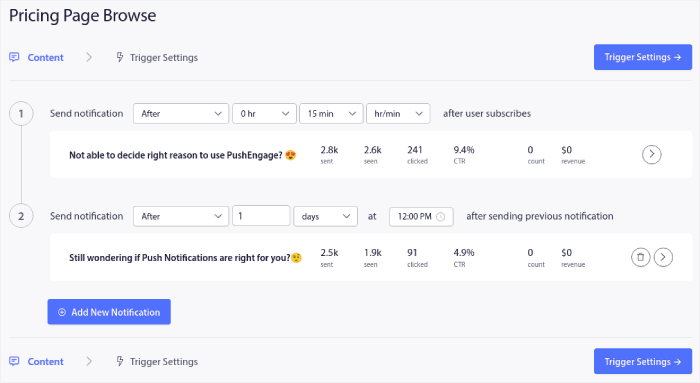
Next, you’ll be able to set up your entire sequence of push notifications along with a delay in between each notification:

浏览放弃广告系列

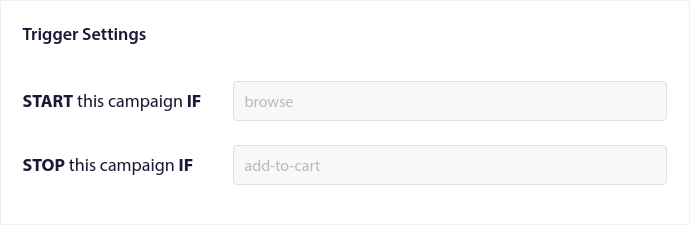
If you’re new to push notifications, you should check out our article on push notification best practices. When you’re happy with your push notification content, click on Trigger Settings. You’ll see that the conditions for a browse abandonment campaign have been pre-configured into the sequence.

浏览放弃触发器

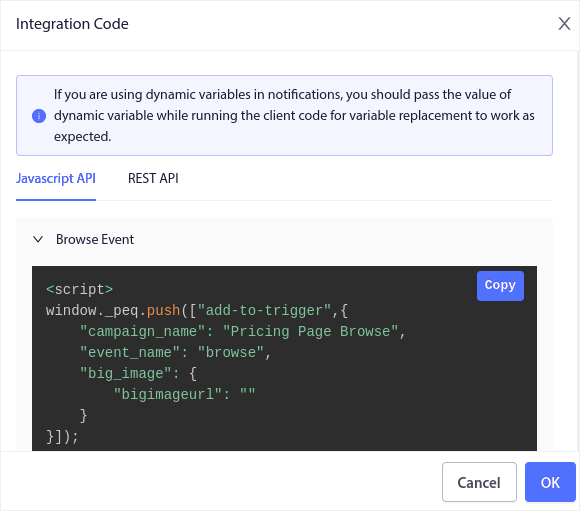
Click on the Integration Code button to get the code snippet you need to embed the browse abandonment campaign on your site.

Browse Abandonment Integration Code

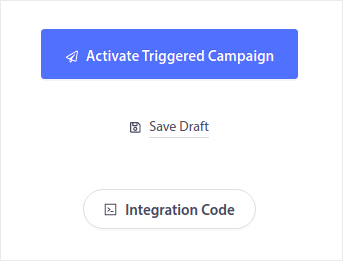
Then, copy the code and paste it into your site. You want to paste that code into the HTML <head> section of the page that you want to track. Finally, click on the Activate Triggered Campaign button:

激活触发式营销活动

您就完成了!

#4. RSS Feed Web Push Notification Campaign

RSS 自动推送允许您通过 RSS 自动发送通知。 

PushEngage 每 10 分钟检查一次 RSS Feed 中是否添加了新帖子。如果找到新帖子,PushEngage 会将其转换为推送通知并发送给所有订阅者。最棒的是,这一切都是完全自动完成的。

RSS Feed 活动非常适合发布商和新闻网站:
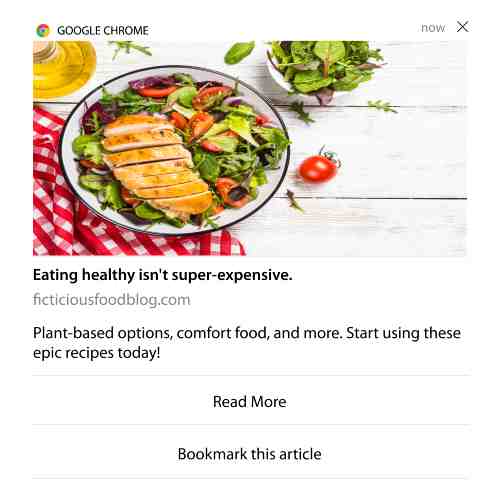
RSS Feed 广告系列示例

如果您是大型发布商,并且发布帖子的频率高于每 30 分钟 1 篇,PushEngage 会在 2 个帖子通知之间保持 5 分钟的延迟。

在我们继续之前,您应该阅读这篇关于如何使用 RSS Feed 的文章,以获取更多精彩的技巧和窍门。

Now, let’s go set up an RSS feed web push notification campaign on PushEngage.

Create a New RSS Web Push Notification Campaign

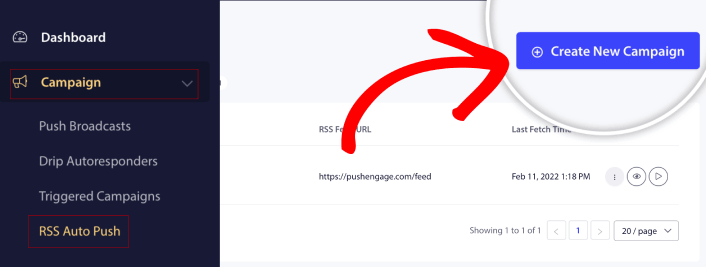
Once you’ve installed PushEngage on your site, head over to your PushEngage dashboard and go to Campaign » RSS Auto Push and click on Create New Campaign:

新的 RSS 自动推送活动

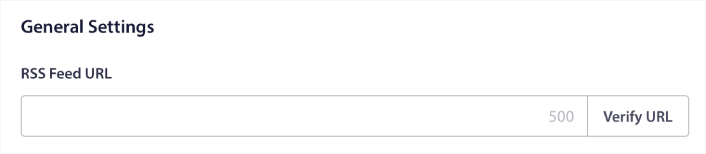
This will create a brand new RSS web push notification campaign. You can set up multiple RSS feed campaigns in PushEngage. Start by giving your campaign a descriptive name. Then, paste in the URL for your RSS feed:

RSS feed URL

Set Up RSS Notification Settings

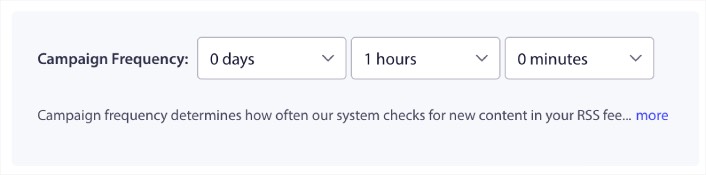
Next, you want to set the Campaign Frequency:

RSS feed 活动频率

The Campaign Frequency is how often the RSS feed web push notification campaign looks for new content in your blog to send an automated push notification. The minimum value is 15 minutes, and the maximum value is 7 days.

除非您是新闻机构,否则我们建议每 2 天查找一次要推广的内容。对于新闻机构,您应将其限制在 15 分钟。请记住,一旦您设置并发布了 RSS Feed 广告系列,PushEngage 才会查找新内容。

选择要推广的帖子

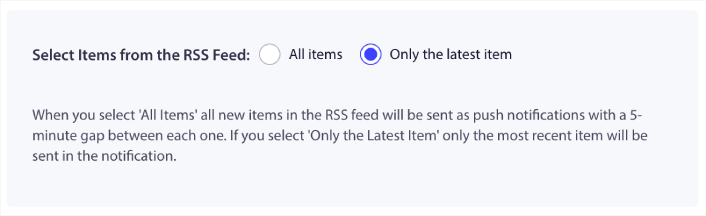
You can select what posts to promote. You can choose between Only the latest item or All items. If you set up the RSS push notifications to select only the latest item, PushEngage only sends the latest post:

选择要推广的帖子

Or, you can select the All items options. In this case, the campaign will select all the posts on your site and send out a web push notification campaign for each with a 5-minute gap between them.

Set an RSS Push Notifications Icon

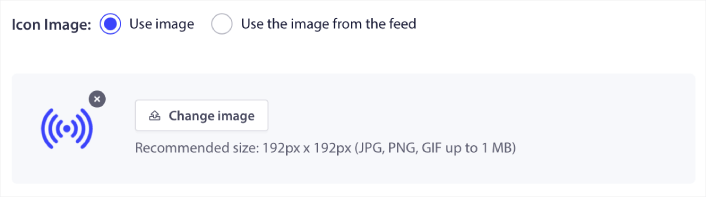
Your push notification icon establishes your brand identity in your RSS push notifications. We recommend using your brand mark so that your subscribers know instantly that the notification is from your brand.

现在,这里有两个选项。您可以手动上传通知图标:

将推送通知图标上传到 RSS 推送

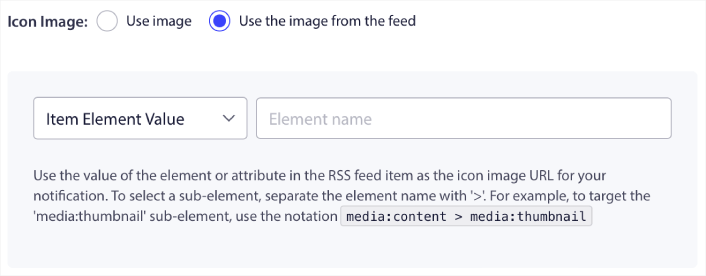
And that’s really simple to do. Just click on Change image and upload your notification icon. Or, you can fetch it from your RSS feed:

从 RSS feed 中选择图标图像

You can either select the item element or the attribute inside an element to dynamically select your notification icon from the feed. Typically, most RSS feeds will hold the site icon inside the media:content item element. Even more specifically, it’s usually inside the media:thumbnail attribute of the media:content element.

To target the element, you can select the Item Element Value option and set it to media:content. Or, you can select the Element Attribute Value option and set it to media:content > media:thumbnail.

Select Large Image for RSS Feed Notifications

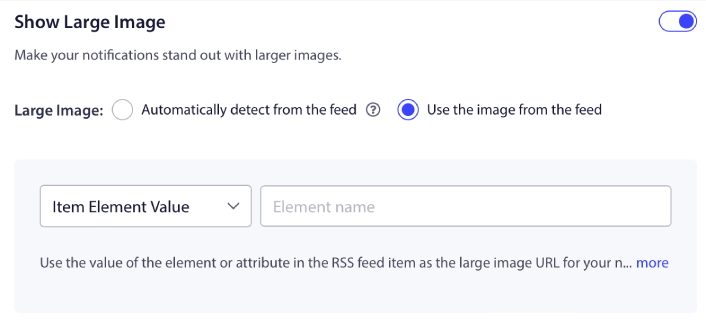
Now, we’re going to select the large image for your RSS feed web push notifications. Again, there are two ways to do this. You can let PushEngage automatically find the image from the RSS feed:

为 RSS 推送通知选择大图像

或者,您可以手动选择 Feed 中的图片:

从 RSS feed 中查找大图像

这与从 RSS Feed 中选择通知图标完全相同。您可以再次选择包含图片的 XML 元素,或者选择包含您首选图片的特定属性。

Set Web Push Notification Campaign Duration

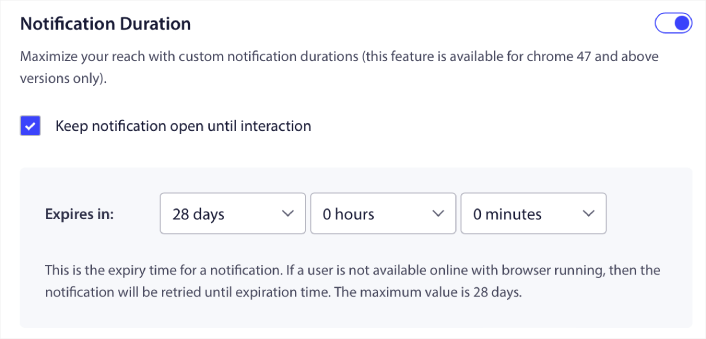
The web push notification campaign duration is how long the notification stays in your subscriber’s notification tray before it gets automatically deleted.

通知持续时间

如果您不想让订阅者被大量未读通知淹没,最好让推送通知在几天后过期。

Unlike broadcast notifications or even other automated web push notifications, you can’t really schedule RSS push notifications. So, you always have the option to keep the notification open until your subscriber interacts with it, even within the expiry limit.

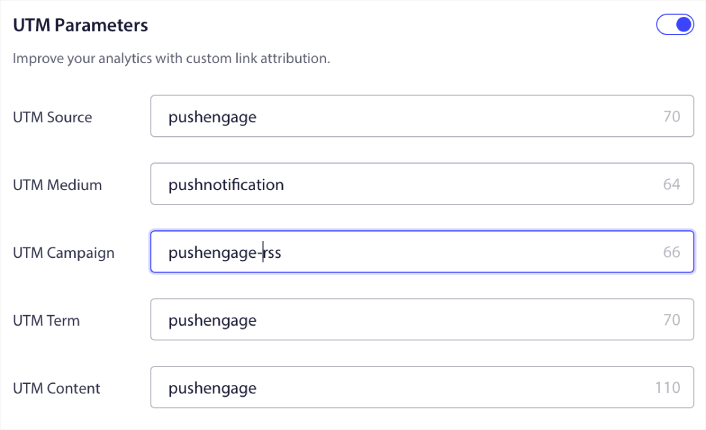
Set UTM Parameters

我们快完成了。向下滚动以设置您自己的 UTM 参数以跟踪推送通知

用于 RSS 推送通知的 UTM

这样,您就可以在 Google Analytics 中轻松地将这些推送通知的流量归因。

Select Audience Group

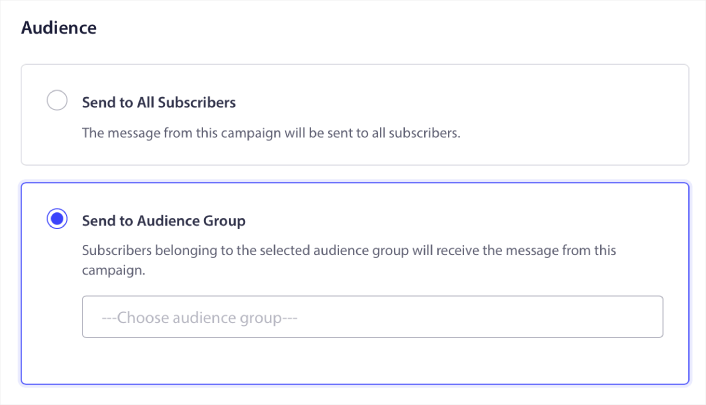
Finally, we’re going to select an Audience Group to send your RSS web push notification campaign. You can either send the RSS feed campaign to all your subscribers, or you can create Audience Groups to send personalized push notifications even from your RSS feed.

为 RSS 推送通知选择受众群组

就是这样!真的就这么简单。

现在,每次您发布新帖子时,所选受众群组中的任何推送通知订阅者都会自动收到有关您新内容的推送通知。

就是这样!您已全部设置完毕。每次发布新帖子时,它都会自动发送给所有订阅者。

#5. Automated Re-engagement Notifications

您可以为一段时间未与您的内容互动的订阅者设置自动化的再互动广告系列。

但您为什么要这样做呢?

怎么样:

  • 获取新客户的成本是留住现有客户的 5 倍
  • 我们可以轻松地定位和再营销给一个我们已经了解其个人偏好的已知受众。
  •  从长远来看,互动的客户为公司带来的业务比那些几乎不与您的品牌联系的人更多。

Ofertia 通过提供个性化优惠的推送通知,将其重复用户增加了 39%。他们不是唯一的例子。您可以有效地将此用于电子商务网站:
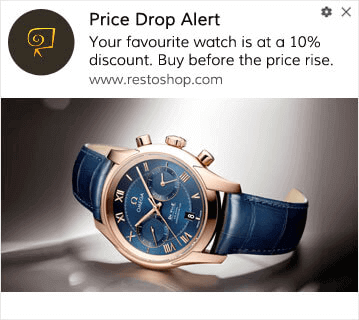
降价促销

有很多重新吸引订阅者的方法

Picture this:

  • A user visits your site. Sees a subtle opt-in. Clicks “Allow.”
  • Instantly gets a welcome notification with a discount or the next step.
  • Leaves your site…
  • Later that day, they see a reminder: “Still thinking about it?”
  • They click, come back, and buy.

That’s a basic push funnel — and you didn’t lift a finger once it was live.

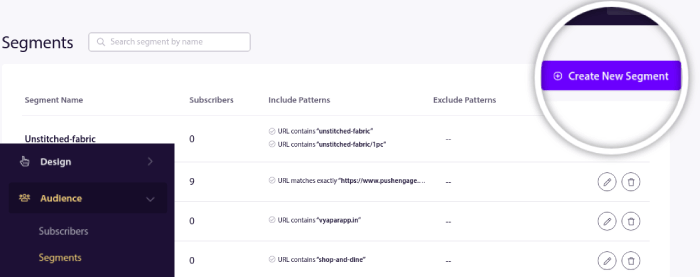
Now, imagine layering in segmentation and automated campaigns. That’s when it gets fun. Using dynamic segments, you can figure out a lot about your subscribers and send them personalized content that they’ll love.

在您的 PushEngage 仪表板中,转到细分并创建一个新的细分:

创建新细分

This allows you to create segments based on behavior and browsing patterns. You can actually set up a sequence of AND/OR operations that decide when certain segments receive automated push notifications.

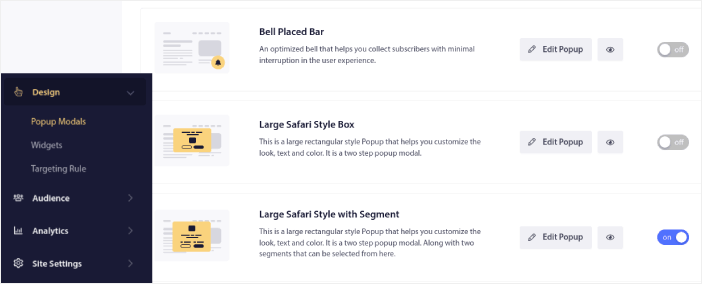
You can even segment your users when they subscribe to push notifications. Head over to Design » Popup Modals and select the Large Safari Style with Segment.

大型 Safari 风格(带细分)

如果您需要更多细分用户的方法,可以使用PushEngage Javascript API 根据用户操作创建自定义细分。

#6. Page Visit Web Push Notification Campaign

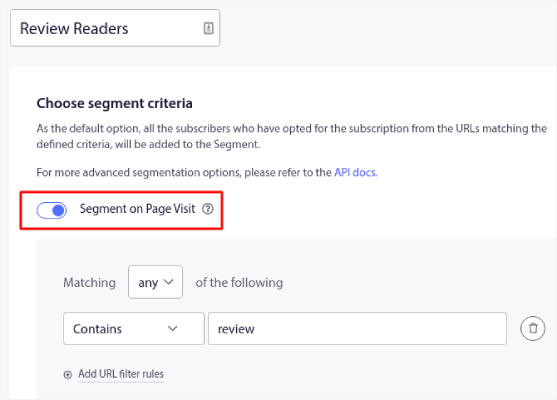
页面访问触发器是推送通知细分的扩展。您所要做的就是创建一个细分,当网站访问者浏览包含特定短语或模式的 URL 时。

Then, you just head over to Audience » Segments and set your audience to a specific segment:

保存细分

这使您可以创建真正个性化和自动化的推送通知。

基于用户行为的自动推送通知

And the best part is that you can create custom segments in PushEngage in a couple of minutes.

#7. Automated Push Notifications from Click-Through

您无法使用 PushEngage 创建在订阅者点击已发送的通知时触发的推送通知。 

但有一个非常巧妙的变通方法。

You can create a segment based on the URL that a particular notification leads to. Every time someone lands on this URL, they get added to the segment, and you can use this segment to send targeted notifications.

推送通知点击广告系列本质上是滴灌广告系列标准受众细分的延伸。

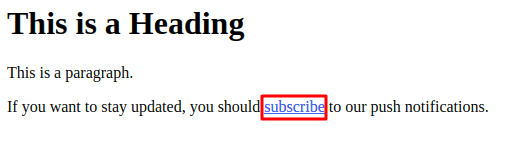
订阅链接

Check out this tutorial on how to create a click-to-subscribe button.

#8. Repeating Automated Push Notifications

想象一下,您有…… 

  • 每周的跳蚤市场促销;
  • 或周末促销; 
  • 或清仓促销; 
  • 或每月闪购。

为每次活动手动创建推送通知将是多么不方便?

幸运的是,您可以使用 PushEngage 设置重复通知。

重复通知是针对周期性事件安排的自动化推送通知。您可以一次设置它们,指定一个时间表,然后就完成了。

这只是 MyDeal 使用推送通知 的一种方式。请务必阅读完整的案例研究!

Head over to Campaign and add an automated notification in your PushEngage dashboard. Then, scroll down to the scheduling section and go to the Send/Schedule tab:

安排定期推送通知

只需设置好时间即可!

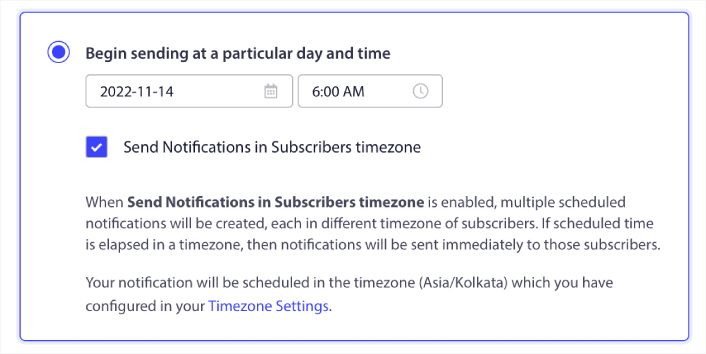
#9. Subscriber Timezone Notifications

Subscriber timezone notifications are exactly what they sound like. You send automated push notifications to your subscribers in their time zone.

这为什么如此重要?

订阅者时区通知的打开率更高。通常,即使您的订阅者离线,任何推送通知都会被发送。这些通知会堆积起来,当您的订阅者最终上线时就会被忽略。

On the other hand, a subscriber time zone web push notification campaign will get delivered when you KNOW your subscriber is most likely online.

订阅者时区通知感觉更加个性化。而且,如果您足够聪明,可以将它与地理位置数据结合起来,以进一步个性化您的通知。这正是 Phoot 在使用本地语言 来使其打开率飙升时所做的。

现在让我们在 PushEngage 中设置订阅者时区通知。

When you create a new notification, head to the scheduling options and click on the checkbox that says Send Notifications in Subscriber Timezone:

在订阅者时区安排推送通知

就这样!您也必须为您的滴灌广告系列执行相同的操作,但结果绝对值得为每个广告系列单击一个按钮的努力。

Start with 1–2 messages per week. Ramp up once you see what’s working.

Here’s a simple cadence to start with:

  • Week 1: Welcome message + 1 product or content push
  • Week 2: Reminder or discount follow-up
  • Week 3: New drop, blog post, or feature highlight

If users stop clicking, pull back. If they keep clicking? Double down.

#10. Email Opt-In Notifications

Email marketing has long been the best way to generate and nurture leads. The best part about automated push notifications is that you can generate more email subscribers using them.

It’s really simple to set up, and using a combination of email and web push notification campaigns is way more effective than using one or the other.

自动推送通知示例

你所要做的就是发送一个触发通知,要求用户选择接收电子邮件通知。

只需创建一个自定义号召性用语 (CTA) 按钮,并将订阅链接插入为按钮的 URL。这真的就是你所需要的一切。如果你不确定如何获取订阅按钮,请继续操作。

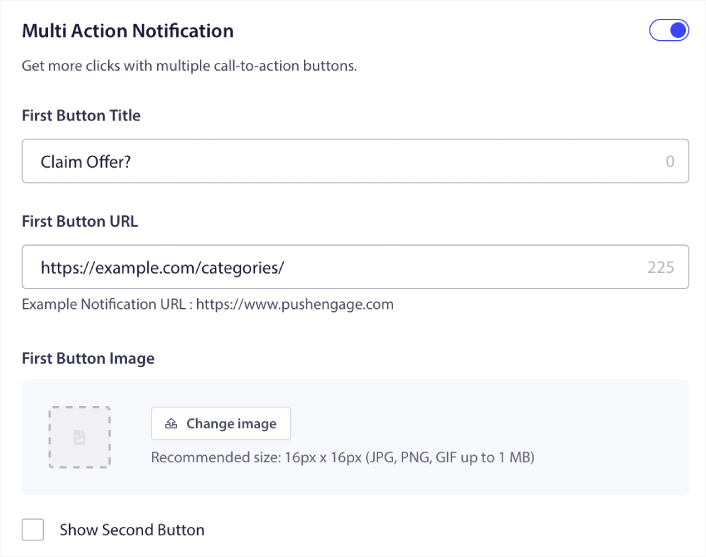
In any notification, you can scroll down and turn on Multi-action buttons:

Multi Action Notification Buttons

URL 应为电子邮件注册表单的链接。你可以使用几乎任何电子邮件服务提供商(如 Drip)创建一个。只需点击注册表单的共享选项并复制该 URL。然后,将其粘贴到推送通知的按钮 URL 中。

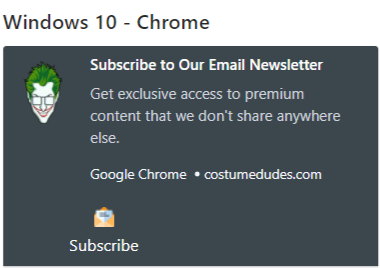
Check out our tutorial on multi-action buttons for more details. You can even add an email icon to your button to make it super-clear that you’re asking your users to subscribe to your email notifications:

自动推送通知示例

专业提示: 你可以使用相同的想法来发展你的 YouTube 频道。只需在你的频道 URL 末尾添加“?sub_confirmation=1”,然后将其粘贴到你的推送通知按钮 URL 中。 

每次有人点击推送通知上的订阅按钮时,他们都会被重定向到你的 YouTube 频道并收到订阅提示。

Segmentation Ideas You Can Steal

Segments are a really great way to send targeted push campaigns. And it should be a big part of your push notification marketing strategy. But how do you get started? What kinds of segments should you be creating?

首先,您不应只专注于创建一种类型的细分。我们将引导您了解我们发现最具影响力的不同类型的细分。

Here are a few high-impact segments worth setting up:

  • Engaged shoppers: People who clicked 2+ notifications in the past week
  • Cart abandoners: People who visited a product but didn’t purchase
  • Category fans: Users who keep checking one product category (e.g., “Sneakerheads”)
  • Geo-targeted: Tailor messages based on country or city

The more specific you get, the more clicks you’ll earn. If you’re an advanced marketer, you should craft segments the way you would for an email campaign with different segmentation models:

Dynamic segments let you talk to subscribers like real people… not just traffic stats.

And if you’d like to further personalize your messaging, you can use audience groups.

如何创建推送通知受众分组

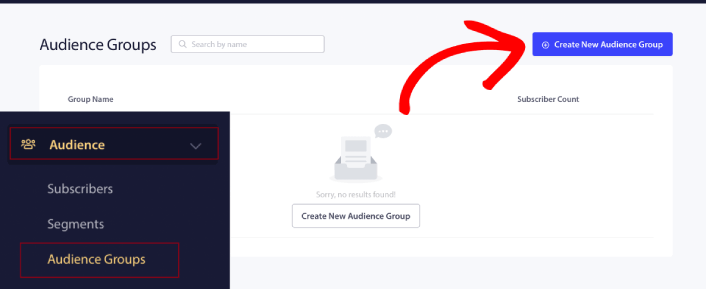
To get started, head over to your PushEngage dashboard and go to Audience » Audience Groups and click the Create New Audience Group button:

Create a New Push Notifications Audience Group

在使用受众分组发送定向推送广播之前,您需要创建一个带有规则的受众分组来创建该分组。您可以从受众分组的名称和描述开始。
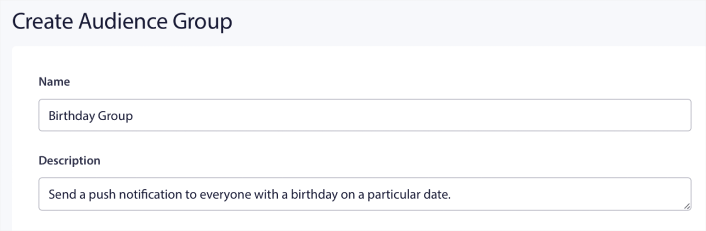
定义您的受众群体

创建选择标准

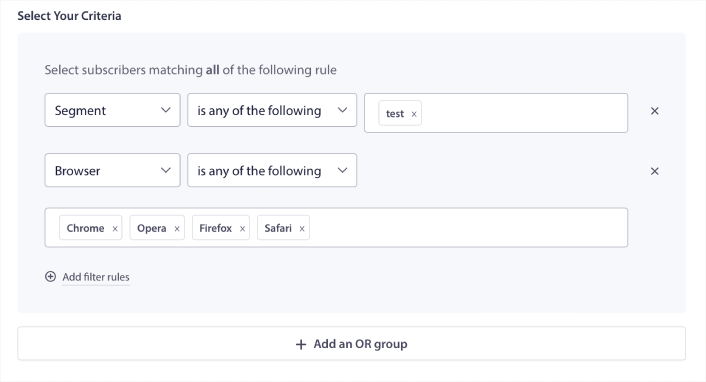
Next, create a selection criterion to filter and target the right audience:

选择受众群体标准

You can click Add filter rules to select subscribers who match ALL the filter rules or, you can click Add an OR group to create a filter where the subscribers meet at least one of the selection criteria.

用户行为是定位推送通知订阅者的最基本方式。正如我们之前所说,订阅者细分通常会对喜欢浏览相似内容的访问者进行分组。但即使在喜欢相同内容的订阅者群体中,你也可以进行一些小的个性化设置。

更重要的是,你可以将多个订阅者细分组合起来,向他们发送共同的、相关的信息。

按订阅者细分筛选

If you haven’t already, you should start segmenting your push notification subscribers right away. Otherwise, this filter simply won’t work. But if you already have segments, then you can select multiple segments as the base for your audience group.

为受众群体选择细分

之后,你可以添加其他过滤器来改进你的定位。

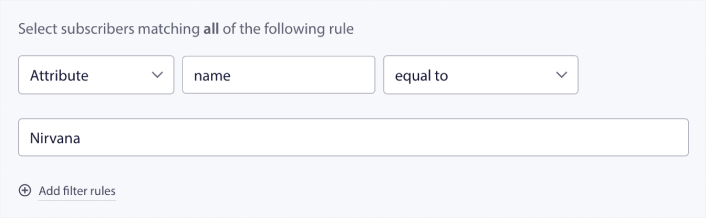
按订阅者属性筛选

While attributes are mostly for drip push notifications, you can use them for push broadcasts as well. Now, push notification attributes are mostly useful for eCommerce sites. But you can also use them to send personalized push notifications if you have a Customer Relationship Management (CRM) tool.

按受众群体的属性进行筛选

属性可以包含个人信息,例如订阅者姓名、出生日期、你在 CRM 中为个性化营销活动存储的任何其他信息。

按订阅者设备和浏览器筛选

在许多情况下,了解订阅者如何接收你的消息至关重要。

迈克尔·杰克逊有一个很棒的故事。每次他录制一首歌,他都会在收音机上听。不是在他价值百万美元的录音室里以顶级音质收听,而是在像他的大多数听众一样会使用的廉价收音机上收听。如果他觉得即使在市场上最便宜的设备上听起来也不错,他就会批准发布这首歌。

No wonder Billie Jean went Platinum 29 times!

对于你的推送通知来说,情况也一样。

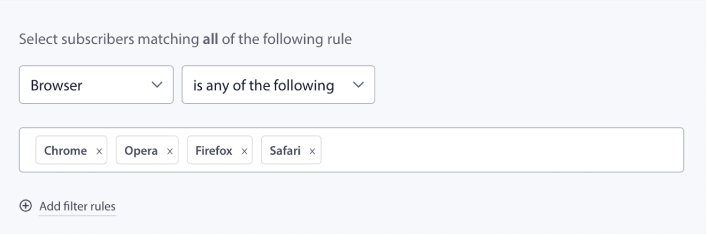
按订阅者浏览器筛选

Different browsers have different character limits for push notifications. So, when you send a push broadcast you need to be wary of these limits. The cool thing is that you can save different audience groups to retarget different browsers. You don’t need to create segments each time.

选择您的受众浏览器

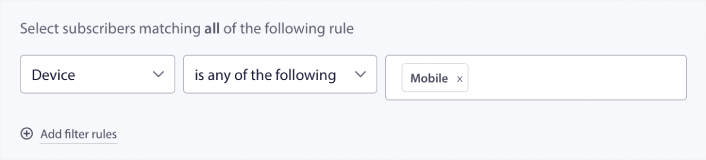
按订阅设备过滤

There’s a difference in the types of rich push notifications you can send to iOS, Android, and Windows devices. So, not every campaign you send out will look the same on all devices. In fact, many push notification types won’t even show up on all devices. Different devices also have different screen sizes. So, you may want to optimize how your push notifications look before sending them.

按设备筛选受众群体

但现在您可以按设备过滤受众,这应该不再是问题了。

如何按地理位置过滤

您还可以按地理位置过滤,以进一步个性化您的广告系列。此过滤器允许您按国家/地区、城市和州选择受众群体:
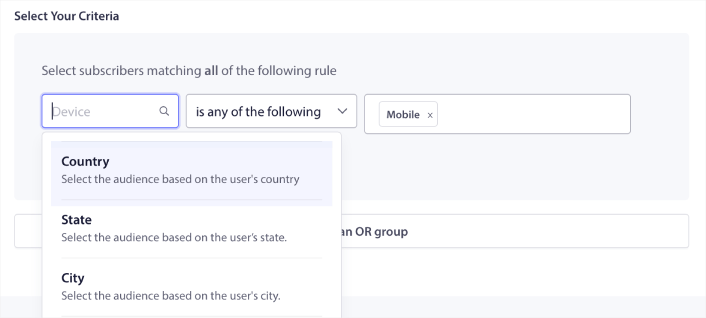
按地理位置筛选受众群体

Phooto used geolocation to send push notifications in local languages. And it helped them skyrocket their engagement rates quickly. Read the full case study.

如何按参与度指标过滤

受众群体最棒的功能之一是它可以帮助您使用推送通知创建再营销广告系列。您可以按以下条件过滤受众:

  • 订阅日期
  • 上次发送日期
  • 上次点击日期
  • 上次查看日期

使用这些指标可以帮助您重新定位参与度低的订阅者,或向参与度高的订阅者销售。

或者,您可以按以下条件过滤受众:

  • 总发送次数
  • 总查看次数
  • 总点击次数

这些数字可以帮助您找到从您那里收到的消息最少的订阅者,以便找到更好的方法来个性化通知。您还可以找到最常与您的推送通知互动的订阅者。

如何按标识符过滤

标识符是 PushEngage 识别您的订阅者的方式。由于 PushEngage 默认符合 GDPR 要求,我们的软件从不存储您任何订阅者的个人身份数据。相反,我们为每个订阅者分配一个配置文件 ID 和一个订阅者哈希。

Keep in mind, you’ll be using profile IDs and subscriber hashes mostly as part of advanced campaigns. In other words, you’ll need to use the PushEngage API to create custom campaigns that use these identifiers.

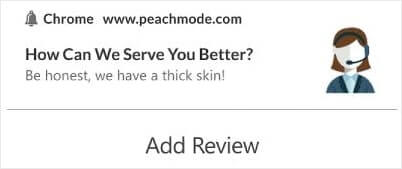
标识符非常适合发送交易性推送通知,例如此通知:

生成评论和客户反馈

They’re great for custom eCommerce push notifications. So, we don’t really recommend using them for anything besides testing push broadcasts from the dashboard.

What to Do After You Set Up Web Push Notification Campaigns

Launching a web push notification campaign won’t guarantee success. As with any marketing tool, you need to test and improve your messaging and your segments.

Don’t get lost in the weeds. Focus on three numbers:

  • Click-through rate (CTR): Are people engaging?
  • Opt-in rate: Is your prompt working?
  • Unsubscribes: Are you sending too much?

Bonus if you’re tracking revenue per send — but even without it, CTR and opt-in rate give you a fast feedback loop. Unfortunately, you can’t A/B test automated notifications directly. But these resources will help you get on the fast track:

Also, PushEngage comes with its fair share of integrations. You can even set up some custom triggers using Zapier. These are fairly advanced campaigns, and we recommend setting them up only once you’re familiar with our other built-in automation.

You should also know that the PushEngage Javascript API is very flexible, and you can set up custom triggers for pretty much any action on your website.

一旦你阅读了所有这些资源,你就会意识到 PushEngage 是市场上排名第一的推送通知软件。 
所以,如果你还没有开始,请 立即开始使用 PushEngage

添加评论

我们很高兴您选择留下评论。请记住,所有评论都将根据我们的隐私政策进行审核,并且所有链接都将是 nofollow。请勿在姓名字段中使用关键字。让我们进行一次个人化且有意义的对话。

在访客离开您的网站后与他们互动并挽留他们

通过难以忽略的推送通知,增加每次网站访问的价值。

  • 永久免费套餐
  • 轻松设置
  • 五星支持