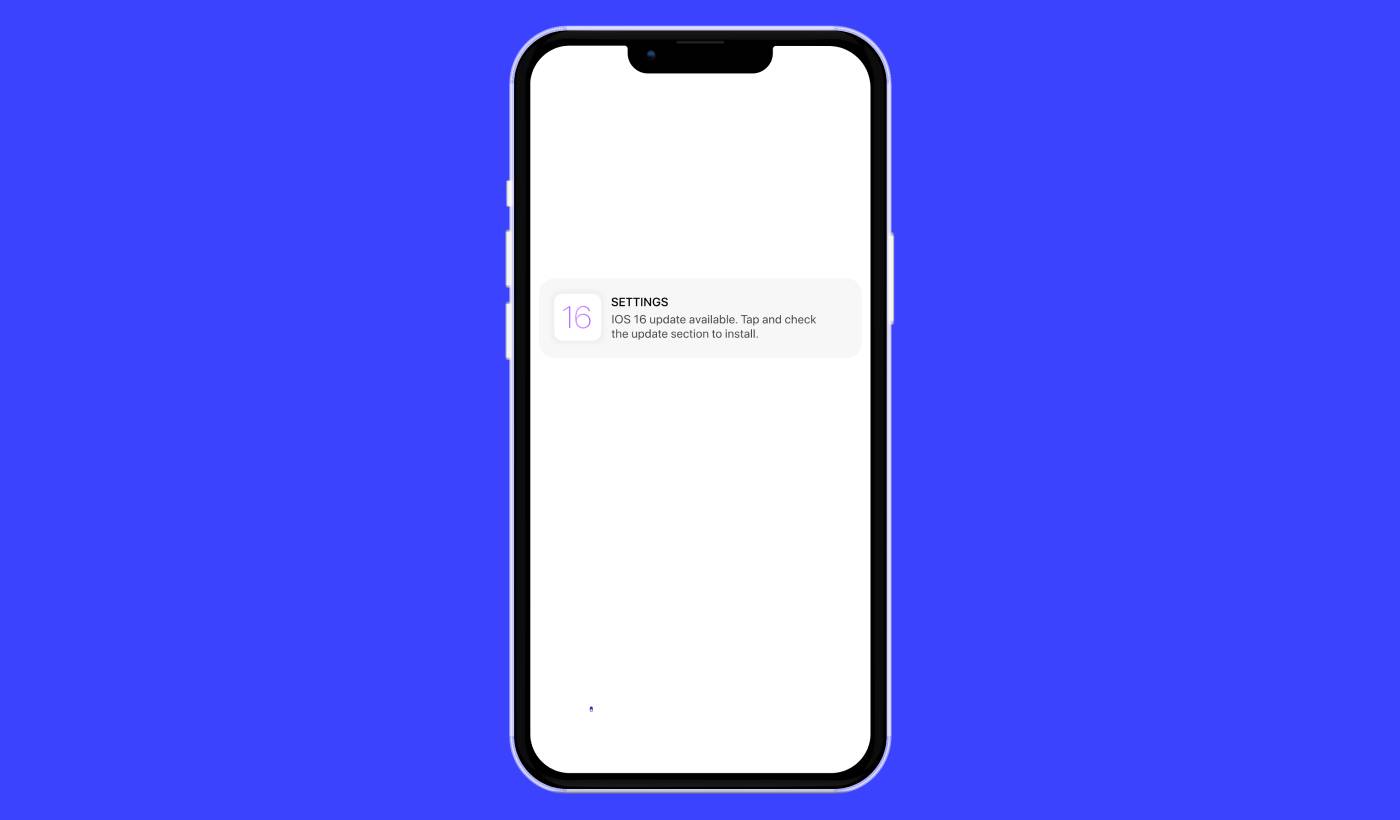
正在寻找 iOS 推送提醒广告系列(campaigns)的简单指南? iOS 推送提醒,那些弹出在您屏幕上的便捷小消息,如果使用得当,可以真正改变您的业务。
现在想象一下:您是一位企业主,刚刚在您的网站和应用程序上启动了限时抢购。您如何让客户立即涌向您的网站?很简单,通过发送一个 iOS 推送提醒。就像这样,购物者会收到关于促销活动的及时通知,您的网站和应用程序流量会飙升。
但 iOS 推送提醒究竟是什么?把它想象成您个人的、口袋大小的广告牌。它是由设备上安装的应用程序推送到 iOS 设备(iPhone、iPad)上的简短消息或通知。
最棒的是,您可以非常快速地完成所有这些设置!听起来很有趣,对吧?让我们深入了解一下。
什么是 iOS 推送提醒?
iOS 推送提醒就像一个显示在您的 Apple 移动设备上的小型数字备忘录。它可以来自您喜欢的社交媒体平台、新闻分发商或在线购物应用程序——所有这些都旨在让您随时了解情况、保持参与并保持联系。
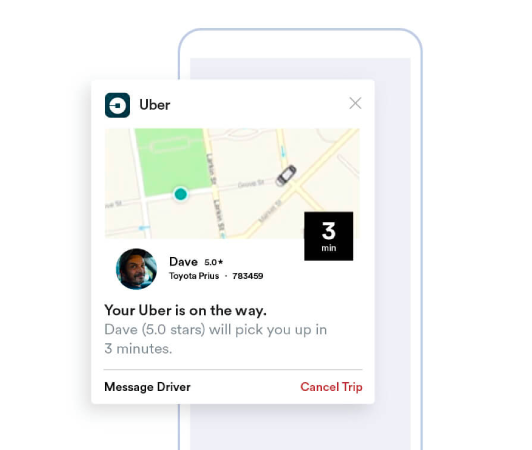
将这些迷你消息视为通过 Apple 推送通知服务 (APNs) 发送的、轻拍 iOS 设备肩头的温柔提醒。 (准备好选择供应商时,请比较最佳 iOS 推送通知服务。)这几乎就像应用程序在低声请求您的设备注意。iOS 推送提醒的显著特点是,您甚至不需要激活或使用该应用程序。仿佛是魔法,通知会弹出,即使在锁屏界面上,也能确保您不会错过重要的更新或提示。
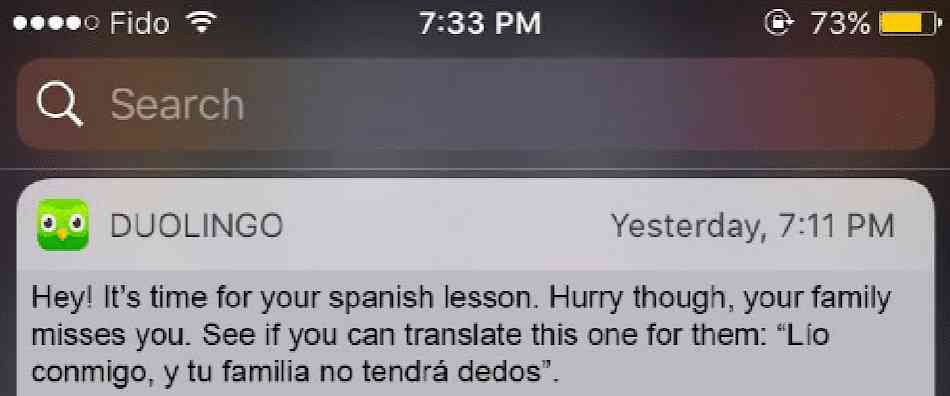
iOS 推送提醒提供了丰富的优势。首先,它们是让您随时了解最新信息的绝佳工具。想象一下来自在线购物应用程序的提醒,告知您当前的促销活动。

此外,它们还可以为您节省宝贵的时间。想象一下您的银行应用程序发送一条提醒,确认一笔成功的交易,无需手动登录查看。除了这些实际的好处之外,iOS 推送提醒还可以通过使您的应用程序体验更加生动和互动来增强您的整体应用程序体验。
像 PushEngage 这样的平台使导航这些通知变得用户友好。凭借复杂的功能,PushEngage 确保这些服务于您兴趣的简短信息能够及时到达您,并根据您的偏好进行优化。无论是通知频率还是警报类型;PushEngage 将控制权交到您手中。
在对 iOS 推送提醒及其工作原理有了基本了解之后,让我们更深入地探讨各种通知,并揭示应用程序如何利用它们来吸引和转化用户。
您可以使用的 iOS 推送提醒广告系列类型
有许多类型的 iOS 推送提醒可用于增加与受众的互动。通过了解这些不同类型,您可以提高其有效性,并创造更具个性化和互动性的用户体验。
- 应用内提醒:当用户积极使用您的应用时,可以发送这些提醒。例如,电子商务应用可以发送关于用户感兴趣的商品特别折扣的提醒。通过 PushEngage,企业可以轻松发送这些相关且及时的消息,以增加用户参与度。
- 基于位置的通知:这些提醒会根据用户的地理位置发送。它们非常适合零售店或活动等企业,希望通知附近用户独家优惠。PushEngage 使地理定位变得简单,确保企业无论身在何处都能有效地触达目标受众。
- 基于行为的提醒:这些通知会在用户在应用中采取(或未采取)特定操作后发送。例如,如果用户将商品添加到购物车但未购买,则可以发送基于行为的提醒来提醒他们。通过 PushEngage,企业可以精确管理这些类型的通知。
- 定时通知:这些推送提醒设置为在预定时间发送,可用于定期活动或通知。通过 PushEngage,可以提前安排这些通知,确保用户及时了解重要更新或活动。
成功的推送提醒广告系列需要适合其目标的正确类型的通知。因此,如果您希望通过 iOS 推送提醒广告系列来促进您的业务,您需要一个iOS 推送通知服务,其中有多种选择可供优化您的策略以实现最大程度的参与度。
iOS 推送提醒如何工作?
当您的 iOS 设备上的特定应用与 APNs 通信时,就会生成 iOS 推送提醒。一旦通知被创建并发送,APNs 会将其路由到目标设备——所有这些都在几微秒内完成。
现在让我们深入了解 iOS 推送提醒的世界。想象一下查看手机,您会立即收到来自您喜爱的新闻应用的通知,告知您突发新闻,或者您常用的购物应用会提醒您限时抢购。这些就是 iOS 推送提醒发挥作用的时刻。这些通知是应用发送的小消息,即使在不使用应用时,也会显示在设备的家庭屏幕或锁定屏幕上。
iOS 推送提醒是我们日常数字互动的重要组成部分。它们由苹果的推送通知服务(称为 APNs)提供支持。该服务协调从您的应用服务器到您的 Apple 设备的消息传递。此过程可确保您始终了解情况,无需手动检查即可接收来自您应用的实时更新。
这些提醒不仅提供信息,还能为您节省时间并保持联系。通过我们的合作伙伴 PushEngage,企业可以发送有针对性的 iOS 推送提醒,从而提高用户的多巴胺和参与度。例如,PushEngage 驱动的通知可以智能地提醒您购物车中剩余的商品,或在您期待已久的产品到货时发出警报。从这个意义上说,它们通过提供优化和个性化的通知来丰富整体用户体验。
可以这样想:iOS 推送通知就像友好的门卫,在您设备的门口提供有用的更新。更重要的是,随着时间的推移,它们的作用变得越来越多样化和令人兴奋。因此,通过使用 PushEngage 这样的强大工具,企业和用户都可以从这些复杂的警报系统中获得显著的好处。
如何为您的应用添加 iOS 推送提醒
与 AI 编码助手集成?开源的 PushEngage Agent Skills 可教会 Claude Code、Cursor 和任何兼容 SKILL.md 的助手集成和调试此 SDK。一旦您发布,PushEngage MCP 服务器即可让同一助手运行您的广告系列 — 分段、发送、A/B 测试和报告。在 Replit、Lovable 或 Bolt 中构建?开源的 vibe-coding kits 包括现成的演示商店、Flutter 入门程序以及预先连接了 PushEngage 的一键式演示。
iOS 推送提醒活动基本上有两种类型:
- iOS 网络推送提醒
- iOS 应用推送提醒
根据您的业务,您可能可以发送网页和应用推送通知。我们强烈建议您发送这两种类型的推送提醒。但在创建 iOS 推送提醒之前,您需要选择一个推送通知服务。 推送通知服务是一种软件,可让您在不进行任何编码的情况下创建推送活动。
我们推荐使用PushEngage。

PushEngage 是全球排名第一的推送通知插件。
推送通知可帮助您自动增加网站流量和参与度。如果您经营在线商店,PushEngage 还可以通过帮助您创建自动电子商务推送通知来帮助您增加销售额。
您可以免费开始使用,但如果您想认真发展业务,则应购买付费套餐。此外,在购买任何推送通知服务之前,您应该查看这篇关于 推送通知成本的指南。
PushEngage 提供以下功能,快速概览:
您会发现,如果您想为您的业务带来流量、参与度和销售额,PushEngage 绝对是最佳选择。而且,如果您预算有限,您总是可以 在推送通知方面发挥创意。
如何创建免费的 PushEngage 账户
前往 PushEngage 并点击 立即免费开始:
您可以从免费套餐开始。但如果您正在寻找最强大的浏览器通知,您应该根据您的业务需求选择付费套餐。一旦您知道您想要哪个套餐,请点击 开始使用 来创建您的PushEngage账户。
注册 PushEngage
现在,是时候创建您的 PushEngage 账户了。首先使用电子邮件地址或 Gmail ID 注册:

然后,填写您的账户详细信息:

并添加您的信用卡信息以购买您的套餐:

如果您选择了免费帐户,那么在您选择升级套餐之前,您的信用卡永远不会被收费。现在,您已准备好访问您的 PushEngage 仪表板。只需点击 完成注册并立即访问。
如果您以前使用过 OneSignal 或 PushAlert,您会发现 PushEngage 在仪表板上为您提供了更简洁的体验。OneSignal 仪表板并非为高级广告系列而设计。为此,您将需要 API 而不是 OneSignal 插件。
如何为您的网站添加网络应用 iOS 推送提醒活动
让我们开始从您的网站设置 iOS 推送提醒。这个想法很简单。我们将您的网站变成一个简单的网络应用,可以发送 iOS 和 iPadOS 推送通知。这种方法非常适合发送 网络应用推送通知。
第 1 步:为您的网站添加网络应用清单以发送网络推送通知
将 网络应用清单视为一个特殊文件,当您的网站安装在某人的手机或电脑上时,它就像一本指南。它使用一种称为 JSON 的语言编写,但您不必担心这一点。
清单文件包含有关您的渐进式网络应用 (PWA) 的重要信息,例如其名称、描述、图标和颜色。因此,当有人将您的网站添加到主屏幕或将其安装到设备上时,浏览器会使用此清单来了解您的应用应如何显示和运行。这使您可以发送 PWA 推送通知。
例如,清单会告诉浏览器在主屏幕或应用抽屉中使用哪个图标来代表您的应用,使其看起来美观且易于识别。它还指定了您应用的颜色和主题,以赋予其一致且吸引人的外观。
此外,清单还包括当有人启动您的应用时应打开的 URL。这样,浏览器就知道要首先向他们显示您网站的哪个页面或部分。
使用在线工具可以快速创建清单文件,这些工具会为您处理繁重的工作。我们建议使用此免费应用清单生成器,只需点击几下即可构建您的 Web 应用清单,无需编写任何代码。
准备好清单后,通常将其命名为“manifest.json”并将其上传到网站的根文件夹。
简而言之,Web 应用清单就像一本手册,可以让您的 Web 应用在用户设备上使用时看起来和感觉都恰到好处。它是为您的网站访问者创造出色用户体验的重要组成部分。
典型的清单看起来像这样:
{
	"name": "PushEngage",
	"short_name": "PushEngage",
	"start_url": "/",
	"display": "standalone",
	"theme_color": "#3b43ff",
	"background_color": "#ffffff",
	"icons": [
		{
			"src": "icon/icon-128x128.png",
				"sizes": "128x128",
				"type": "image/png"
		},
		{
			"src": "img/icon-192x192.png",
			"sizes": "192x192",
			"type": "image/png"
		},
		{
			"src": "img/icon-512x512.png",
			"sizes": "512x512",
			"type": "image/png"
		}
 	]
}
将清单文件添加到网站服务器的根文件夹后,您需要在网站的 HTML 头部添加一个代码片段。代码片段看起来会像这样:
<link rel="manifest" href="/manifest.json">如果您正在使用 WordPress 并且需要帮助将此代码片段添加到您网站的页眉,您可以使用 WPCode 上传清单文件。它是 WordPress 的最佳代码片段插件之一。
第 2 步:将 PushEngage 安装到您的 WordPress 网站
您已完成账户创建。现在,前往 PushEngage 仪表板 并按照说明进行操作。
注意:如果您没有运行 WordPress 网站,您应该查看我们的其他 安装指南。

点击 网站设置 » 网站详情 并点击 点击此处获取设置说明 按钮:

点击 WordPress 选项卡,然后点击 安装 PushEngage WordPress 插件 按钮,将插件安装到您的网站上。

精彩的部分来了: 当您创建 PushEngage 账户时,您已经将您的网站与 PushEngage 账户同步。因此,点击 PushEngage 仪表板中的安装链接,即可自动将 PushEngage WordPress 插件安装到您的网站。
第 3 步:将您的 WordPress 网站与 PushEngage 连接
安装并激活 PushEngage WordPress 插件后,您将看到 PushEngage 的入门向导:

该向导相当直接。如果您是新用户,请点击 新用户?认领您的免费帐户。如果您已经注册,请点击 连接您现有的帐户。
接下来,您可以在 连接已注册的网站 下的 选择网站 下拉菜单中选择您的网站,如果您在注册过程中已注册了网站:

或者,您可以点击 注册新网站 来添加新网站,如果您有 高级定价计划或更高版本。在下一步中,入门向导将提示您安装其他 必备的 WordPress 插件。

如果您正确遵循了每个步骤,您将从向导中看到此成功消息:

您现在可以创建广告系列和推送通知弹出窗口了。
第 4 步:测试您的网站清单
好的,让我们一步步来测试您的 Web 应用,确保一切运行顺畅。
首先,在您的 iPhone 或 iPad 上使用 Safari 浏览器打开您的网站。请确保您的设备运行的是 iOS 16.4 或更高版本。网站加载后,您会看到一个共享按钮。它看起来像一个带有向上箭头的正方形。点击该按钮以打开共享菜单。
在共享菜单中,您应该会找到一个名为添加到主屏幕的选项。点击该选项。
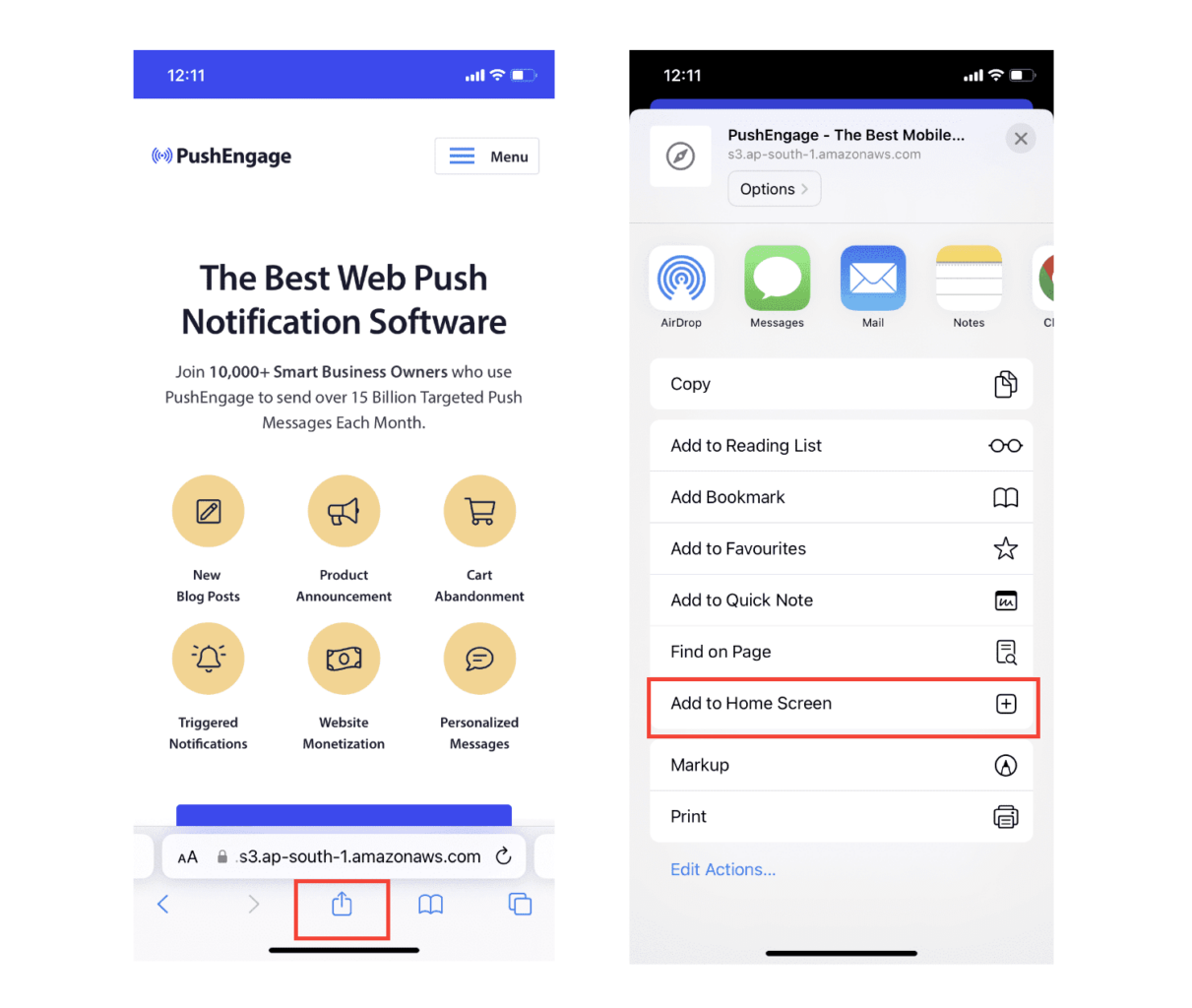
现在,Web 应用将像您从 App Store 下载的任何其他应用一样,保存到您设备的主屏幕上。
如果一切设置正确,当您从主屏幕打开应用时,它将不再在 Safari 浏览器中打开。相反,它将感觉就像在您的 iPhone 或 iPad 上使用普通应用程序一样。
为了让您的用户知道他们可以从您的应用中获得网页推送通知,您可以在屏幕上向他们展示一个横幅。此横幅将提示他们将您的应用添加到其主屏幕并订阅网页推送通知。这是一种让您的用户与您的应用保持互动并接收重要更新的便捷方式。
因此,请遵循这些步骤,您就可以为 iOS 设备上的用户提供流畅且类似应用的体验了!有关测试推送通知的完整演练,请参阅我们关于iOS 网络推送通知的文档。
如何为您的应用添加移动应用 iOS 推送提醒广告系列
从原生 iOS 应用发送移动 iOS 移动应用推送提醒的最简单方法是使用PushEngage iOS SDK。到目前为止,您必须使用骨架 SDK 来发送应用推送通知。使用这些 SDK 的问题在于它们非常基础。
理论上,您可以使用它们发送任何类型的移动应用推送广告系列。但是,您还必须构建:
- 管理您广告活动的界面
- 用于跟踪广告活动效果的分析套件
- 更好地支持富媒体和应用内重定向链接(或深度链接)
- 协调市场营销和开发团队的流程
一切都是为了引入单一的增长渠道。使用旧工具发送移动应用推送通知既繁琐、昂贵、耗费资源,又耗时。当然,这需要您的团队具备深厚的编码技能来开发和管理您构建的一切。
借助 PushEngage 的 Android 和 iOS SDK,您可以使用相同的可靠软件发送移动应用推送,以获得出色的送达率。但我们在此基础上构建了多层结构,可以非常轻松地与您的应用构建自定义集成。而且 PushEngage 会管理整个 SDK。因此,您甚至不必花费大量时间和金钱来管理您的集成。
您要做的就是构建!
设置好应用以使用 PushEngage 的 SDK 发送移动应用推送通知后,您可以直接从您的 PushEngage 控制面板 发送广播通知。是的,您仍然需要为您的应用添加代码,并开发您的应用与 PushEngage API 之间的连接器。但一旦完成,您就可以轻松地从预构建的软件界面创建移动应用推送广告系列,该界面还附带:
- 高度吸引人的推送广告系列类型
- 经过验证的营销活动模板,转化率高
- 自动化营销活动,在您发布内容时推广您的内容
- 多种定位和营销活动调度选项
- 网络推送营销活动,作为补充增长渠道
- 通过基于数据的个性化提高受众留存率
- 目标跟踪和高级分析
- 智能 A/B 测试
- 专属客户成功经理
以及更多。PushEngage 为您为应用开发 Android 和 iOS 移动推送广告系列消除了痛苦。
我们创建了一个详细的分步指南,介绍为 PushEngage 设置 iOS 应用推送通知。立即查看以开始发送 iOS 应用推送提醒。
为您的 iOS 应用添加推送通知
这是实际的集成,使用了PushEngage iOS SDK 1.0。您需要 iOS 12+、Xcode 15+、一个已上传到 PushEngage 控制面板的 APNs 密钥(APNs 证书和密钥说明会用五分钟时间涵盖这一点),以及大约一下午的时间。该 SDK 包含两个模块:用于您的应用目标的 PushEngage 和用于通知扩展目标的 PushEngageExtension。一旦完成这些连接,营销活动就会转移到控制面板,不再是工程工单。
步骤 1:添加软件包
在 Xcode 中,转到 文件 → 添加软件包依赖项,然后输入存储库 URL,或使用 CocoaPods:
# Swift Package Manager
https://github.com/awesomemotive/pushengage-ios-sdk

# CocoaPods
target 'YourApp' do
  pod 'PushEngage', '~> 1.0.0'
end
target 'YourNotificationServiceExtension' do
  pod 'PushEngageExtension', '~> 1.0.0'
end
步骤 2:配置应用组
将应用组功能添加到您的应用目标和每个通知扩展目标,使用相同的组 ID,并在每个目标的 Info.plist 中声明它:
<key>PushEngage_App_Group_Key</key>
<string>group.com.yourcompany.yourapp</string>
应用及其扩展通过此容器共享订阅者状态。跳过此步骤是最常见的集成错误。没有它,您的扩展在每次传递时都会为空白。
步骤 3:初始化并请求权限
import PushEngage

@main
class AppDelegate: UIResponder, UIApplicationDelegate {
    func application(_ application: UIApplication,
                     didFinishLaunchingWithOptions launchOptions: [UIApplication.LaunchOptionsKey: Any]?) -> Bool {
        PushEngage.setAppID(id: "YOUR_APP_ID")
        PushEngage.setInitialInfo(for: application, with: launchOptions)
        return true
    }
}

// Later, at a value moment — not on first launch:
PushEngage.requestNotificationPermission { granted, error in
    if granted { /* subscribed */ }
}
放置此权限调用的位置比本节中的任何其他行都更重要。iOS 每次安装只授予您一次原生提示,权限预热指南涵盖了保护它的软询问模式。
富媒体推送:图像、按钮和声音
富媒体需要一个通知服务扩展,这是一个小型目标,它会拦截每个通知并在显示前附加媒体。在 Xcode 中添加目标,将其链接到 PushEngageExtension,并转发两个生命周期调用:
import PushEngageExtension

class NotificationService: UNNotificationServiceExtension {
    override func didReceive(_ request: UNNotificationRequest,
                             withContentHandler contentHandler: @escaping (UNNotificationContent) -> Void) {
        PushEngageExtension.didReceiveNotificationExtensionRequest(request,
                                                                   bestContentHandler: contentHandler)
    }

    override func serviceExtensionTimeWillExpire() {
        // hand back the best content prepared so far
    }
}
从这里开始,富媒体将成为控制面板功能。您的营销团队在构建营销活动时会附加产品图片,扩展会渲染它。每个营销活动无需更改应用。
识别用户并附加属性
// Identify the signed-in user (12 predefined fields supported)
PushEngage.identify(fields: [
    "first_name": "Priya",
    "email": "[email protected]",
    "profile_id": "user-42",
    "city": "Austin"
]) { success, error in }

// Attach custom attributes for segmentation
PushEngage.addSubscriberAttributes([
    "favorite_category": "outerwear",
    "loyalty_tier": "gold"
]) { success, error in }

// On sign-out, clear PII but keep the anonymous subscription
PushEngage.logout(fieldNames: nil) { success, error in }
使用不变的数据重复识别调用会在本地短路,因此每次启动时调用都是安全的。一旦属性流动,像德州的金牌外套购物者这样的细分市场就会成为控制面板中的已保存受众,而不是数据请求。
深度链接:将每次点击引导到正确的屏幕
PushEngage.setNotificationOpenHandler { result in
    // actionID is nil when the SDK already opened the URL itself
    guard let deepLink = result.notificationAction.actionID else { return }
    DispatchQueue.main.async {
        router.navigate(to: deepLink)   // e.g. myapp://cart
    }
}设置一次处理程序,并根据每次营销活动携带的深度链接进行路由。营销人员将链接粘贴到营销活动表单中;您的处理程序会进行导航。包括通用链接在内的完整模式,请参阅深度链接指南。
从应用事件触发营销活动
PushEngage.trackEvent(name: "cart_updated",
                      properties: ["cart_value": 89.50, "item_count": 2],
                      profileId: currentUserId,
                      provider: nil, eventType: nil) { _, _ in }
trackEvent 调用会将任何应用内行为转化为营销活动触发器:废弃的购物车、已完成的入职步骤、浏览过的类别。一次性配置事件,营销人员即可无限期地围绕它迭代营销活动。事件触发的营销活动指南 包含购物车、入职和挽回客户的配置方法,而设置文档 则会引导您完成后续的每个仪表板屏幕。
如何个性化您的广告系列
在创建广告系列之前,您应该设置细分和受众群体,以发送个性化的推送消息。
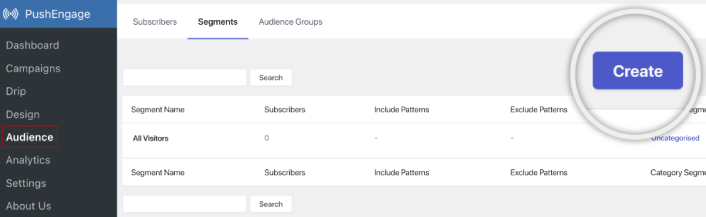
通过为您的推送通知订阅者创建细分和受众群组,您可以获得无与伦比的个性化体验。前往 PushEngage » 受众 并立即开始创建细分和受众群组。
在 Segments 选项卡下,您可以创建新细分或编辑现有细分:
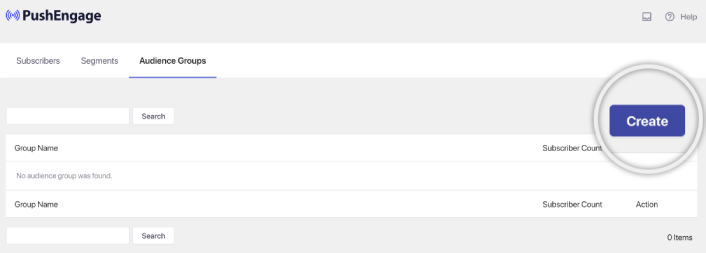
如果您需要更深入的个性化设置,请在 Audience Groups 选项卡中创建一个受众群体:
如果您是首次接触推送通知细分和 个性化推送通知,建议您阅读我们的文章 如何创建细分 以及关于 高级受众分组 的公告。
最酷的部分是,您可以通过为仅限 iOS 和 iPadOS 用户创建受众群体来创建有针对性的推送广告系列:
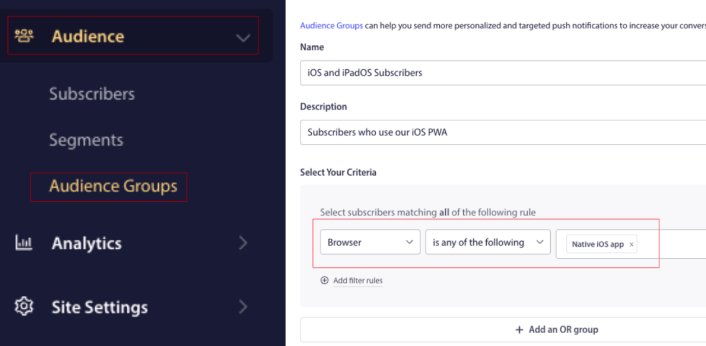
您可以在此受众群体中用于您的自动回复广告系列和广播。
如何创建推送通知自动回复广告系列
转到PushEngage仪表板,然后导航到广告系列 » 滴灌自动回复器,然后点击创建新的滴灌自动回复器:

然后,为您的广告系列命名(我们建议使用类似“欢迎滴灌”的名称),然后在内容下,选择显示“用户订阅后立即发送通知”的选项):

此时,您可以点击通知旁边的箭头来编辑通知内容。
如果您拥有 PushEngage 的高级或企业版套餐,您将能够添加多个通知来创建一系列自动欢迎消息。只需点击添加新通知并编辑内容。
完成后,点击邮件序列设置并选择将您的欢迎广告系列发送给所有订阅者的选项:

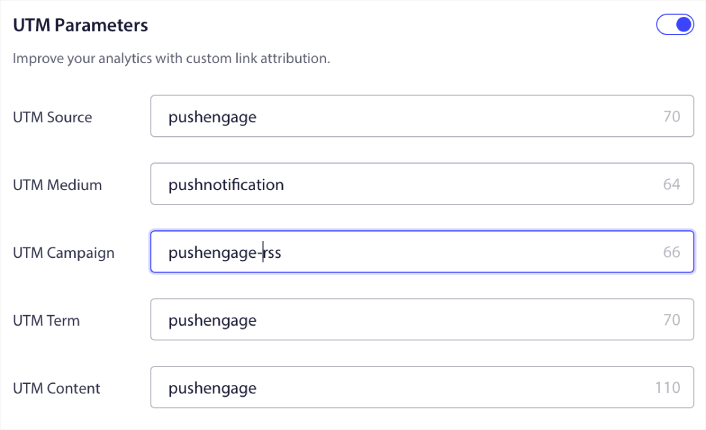
然后,向下滚动以设置您自己的 UTM 参数以跟踪推送通知:
完成后,滚动回顶部并点击激活自动回复器按钮:

您就完成了!
如何发送 iOS 网络推送广播
前往您的PushEngage 控制面板,然后转到 **Campaign » Push Broadcasts**,并点击 **Create a New Push Broadcast** 按钮:

在 **Content** 选项卡下,添加您的推送通知内容:
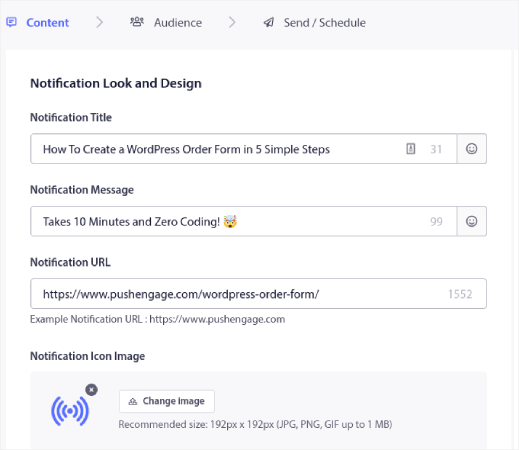
您还可以设置 A/B 测试以提高您的点击率,或者您可以安排您的推送广播以获得更多浏览量。无论哪种情况,您都应该查看我们的推送通知最佳实践以获得最佳效果。
如何创建 iOS 推送通知弹出模态框
推送通知弹出窗口是一个出现在网站或移动应用程序界面之上的小型窗口,用于向网站访问者显示消息或通知。
弹出窗口可以由各种事件触发。您可以设置在访问页面、滚动深度甚至自定义操作(例如 点击按钮)时触发的弹出窗口。
通常,您会在弹出窗口中看到一个号召性用语,例如“订阅”或“允许”,以征得访问者发送推送通知的同意。如果您遵循本教程,您可以创建一个类似这样的弹出窗口:
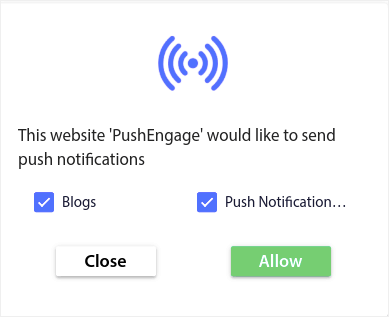
您可以创建可以直接细分订阅者的弹出窗口,或者创建仅收集具有地理位置和浏览器等默认属性的订阅者的常规弹出窗口。
返回您的 WordPress 仪表板。转到 PushEngage » 设计:
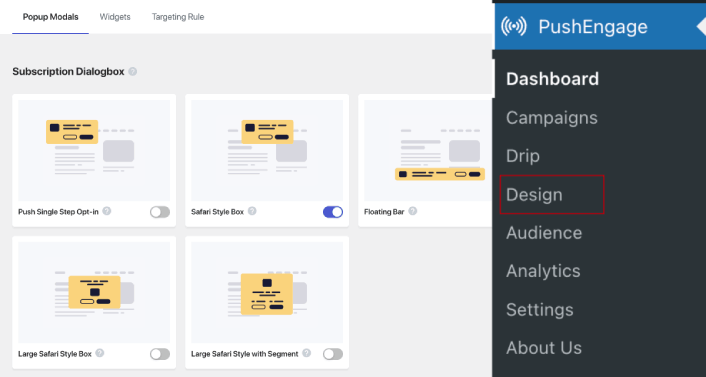
您可以根据需要创建任意数量的弹出窗口。当然,您可以确保它们在每个弹出窗口的显示选项下在不同时间触发。
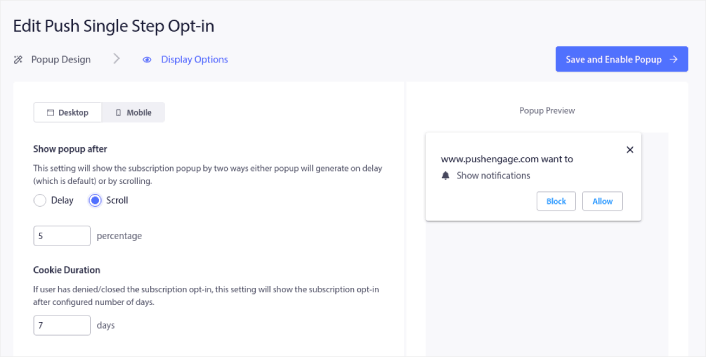
这里的想法是为您的访问者提供订阅的充分理由。如果您需要这方面的帮助,请查看我们关于 如何创建自定义推送通知选择加入的文章。
如果您想创建更具针对性的弹出窗口,可以使用目标规则选项卡下的目标规则:
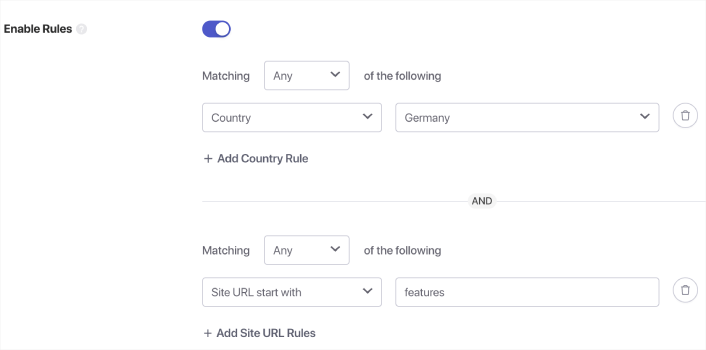
这些是全局目标规则,将优先于单个弹出窗口的目标规则。但是,如果您愿意,可以通过编辑它们为每个弹出窗口创建强大的目标规则。
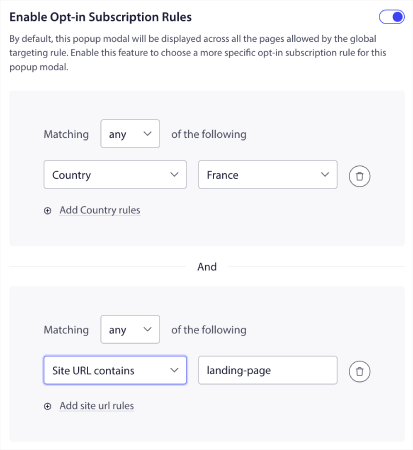
例如,您可以创建不同语言的弹出窗口,以定位来自不同国家的访问者。
如果您想要一些点击率高的模板来开始,您应该查看这篇关于 高转化率的推送通知选择加入的文章。
发送 iOS 推送提醒之前该做什么
您已接近完成。
在开始为 iOS 和 iPadOS 发送网络推送通知之前,您需要为您的网站设置订阅选择加入。您的选择加入会将网站访问者转化为推送通知订阅者。因此,这是关键要素。
如果您需要一些灵感,可以查看这篇关于高转化率的推送通知选择加入的文章。设置好选择加入后,您的网站就可以收集订阅者了。但您怎么知道您的选择加入是否正常工作呢?
因此,明智的做法是设置欢迎推送通知。
专业提示:您应该花一些时间对推送通知进行全面测试。这将解决最常见的问题,并且您不必浪费时间以后再解决问题。
发送 iOS 推送提醒之后该做什么
好了,各位,本次分享就到这里!
如果您觉得这篇文章有帮助,请务必在下方留言。
开始使用推送通知可能看起来令人生畏。但是,如果您密切关注目标跟踪和分析,您应该会没事的。更重要的是,您将通过推送通知广告系列获得更多利润。以下是一些可以帮助您入门的酷炫资源:
- 如何使用重定向推送通知将收入翻倍
- 如何对推送通知进行排序并找到成功的营销活动
- 如何清理推送通知订阅者列表(简单方法)
- 如何自动发送 RSS 推送通知
- 如何使用推送通知推广新闻网站
- 如何使用交叉销售推送通知将您的销售额提高一倍
- 如何使用浏览放弃推送通知(4 个步骤)
如果您是推送通知的新手,您应该尝试 PushEngage。要深入了解策略,我们的应用推送营销指南是您接下来自然要阅读的内容。PushEngage 是市场上排名第一的推送通知软件。您的营销活动将是安全的。
所以,如果您还没有,请立即开始使用 PushEngage!


