
Şelale anlık bildirim kampanyaları oluşturmak için bir rehber mi arıyorsunuz?
Şelale bildirimleri bu günlerde büyük popülerlik kazanıyor. Uzun bir süre boyunca yalnızca şelale e-posta kampanyaları gönderebiliyordunuz. Ancak şimdi, aynı etkili kampanyaları yeniden oluşturabilir ve şelale anlık bildirimleri göndermek için anlık bildirim yazılımındaki hedefleme seçeneklerini kullanabilirsiniz.
Peki nasıl başlıyorsunuz? Şelale kampanyalarıyla ilgili deneyime ihtiyacınız var mı? Anlık bildirim kampanyaları kurma konusunda herhangi bir deneyime ihtiyacınız var mı?
Bu makalede, bir örnek kullanarak şelale anlık bildirim kampanyaları oluşturmanıza yardımcı olacağız. Ayrıca şelale anlık bildirimleriyle ilgili tüm sorularınızı yanıtlayacağız.
Kulağa hoş geliyor? Hadi dalalım.
Şelale Anlık Bildirim Kampanyaları Nedir?
Şelale anlık bildirim kampanyası, mobil cihazlar için bir reklam kampanyası türüdür. Şu şekilde çalışır: bir grup insana anlık bildirimler gönderirsiniz, ancak hepsini aynı anda değil. Bunun yerine, bildirime en çok etkileşim gösterme ve istediğiniz eylemi gerçekleştirme olasılığı en yüksek olan kişilere önce bildirimi gönderirsiniz.
Bu kişiler yanıt vermezse, bir sonraki insan grubuna geçersiniz ve bu böyle devam eder.
Amaç, en az parayı harcayarak mümkün olduğunca çok insanın bildirimle etkileşim kurmasını sağlamaktır. Buna "şelale" denir çünkü ağın her adımda farklı insan gruplarını hedefleyerek geçtiği bir dizi adıma benzer.
Açıklayayım.
Yürüttüğünüz herhangi bir işletmede, son derece ilgili bir abone grubunuz olacaktır. Sattığınız her şeyi satın alırlar, memnuniyetle referanslar ve incelemeler sunarlar ve size yeni müşteriler yönlendirirler.
Ve sonra tekrar, işletmenizle ilgili hiçbir şeyle ilgilenmeyen aboneleriniz olacaktır.
Anlık bildirim kampanyaları ayrıntılı analizlerle birlikte gelir. Böylece her iki grubu da abone listenizde oldukça net bir şekilde görebilirsiniz. Ve harika olan şey, her iki tür aboneyi de yeniden hedeflemek için PushEngage'de Kitle Grupları oluşturabilmenizdir.
Ardından, gönderdiğiniz her bildirimde belirli bir davranışı yeniden hedeflemek için anlık bildirimleriniz için hedefleme seçenekleri oluşturabilirsiniz. Örneğimize girdiğimizde, davranış hedeflemenin bir şelale anlık bildirim kampanyasını nasıl etkilediğini daha net göreceksiniz. Şimdilik, tüm anlık bildirim şelale kampanyalarının iki temel bileşeni olduğunu bilmelisiniz:
- Ortak bir hedefi olan bir dizi anlık bildirim
- Farklı türdeki aboneleri yeniden hedeflemek için kitle grupları
Şimdi şelale anlık bildirim kampanyalarının neden bu kadar etkili olduğunu inceleyelim.
Neden Şelale Anlık Bildirim Kampanyaları Göndermelisiniz?
Markanızı büyütmek için şelale anlık bildirim kampanyalarını kullanmanın birkaç avantajı vardır:
- Reklam bütçesinin verimli kullanımı: En değerli kullanıcıları önce hedefleyerek ve ardından öncelik listesinde aşağı doğru ilerleyerek, bir şelale anlık bildirim kampanyası reklam harcamalarınız için yatırım getirisini (ROI) en üst düzeye çıkarmanıza yardımcı olabilir. Bu, reklam bütçenizin mümkün olan en etkili şekilde kullanılmasını sağlar.
- Daha yüksek etkileşim oranları: Reklamla etkileşim kurma olasılığı daha yüksek olan kullanıcıları hedefleyerek, daha yüksek tıklama ve dönüşüm oranları elde etme şansınızı artırırsınız, bu da gelirin artmasına yol açabilir.
- Özelleştirilebilir hedefleme: Bir şelale anlık bildirim kampanyasıyla, demografik bilgilerine, davranışlarına ve diğer faktörlere göre farklı kullanıcı segmentleri oluşturabilirsiniz. Bu, mesajlarınızı her gruba uyarlamanıza ve başarı olasılığını artırmanıza olanak tanır.
- Gerçek zamanlı optimizasyon: Bir şelale anlık bildirim kampanyasıyla, her segmentin performansını gerçek zamanlı olarak izleyebilir ve hedefleme stratejinizi buna göre ayarlayabilirsiniz. Bu, her zaman mümkün olan en iyi sonuçlar için optimize ettiğinizden emin olmanızı sağlar.
Genel olarak, şelale anlık bildirim kampanyaları, hedef kitlenize ulaşmak ve harcanan reklam bütçesini en aza indirirken etkileşimi ve dönüşümleri artırmak için etkili bir yol olabilir.
Şelale Anlık Bildirimleri Nasıl Gönderilir
Şelale anlık bildirim kampanyasının ne olduğunu ve neden oluşturmanız gerektiğini bildiğimize göre, şimdi bir tane oluşturmak için adım adım talimatlarla gerçek bir örneğe bakalım.
Şelale anlık bildirimleri göndermeye başlamadan önce bir anlık bildirim hizmeti seçmeniz gerekir. PushEngage kullanmanızı öneririz.
Adım #1: Ücretsiz Bir PushEngage Hesabı Oluşturun
PushEngage adresine gidin ve Şimdi Ücretsiz Başlayın:'a tıklayın.

Ücretsiz planla başlayabilirsiniz. Ancak en güçlü tarayıcı bildirimlerini arıyorsanız, iş ihtiyaçlarınıza göre ücretli bir plan seçmelisiniz:
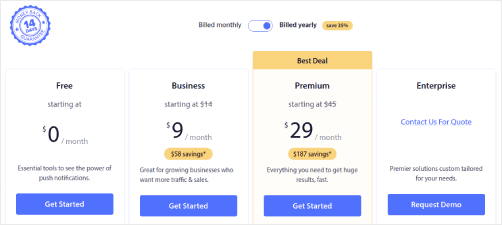
Hangi planı istediğinizi bildiğinizde, PushEngage hesabınızı oluşturmak için Başlayın'a tıklayın.
Adım #2: PushEngage'a Kaydolun
Şimdi PushEngage hesabınızı oluşturma zamanı. Bir e-posta adresi veya Gmail kimliği ile kaydolarak başlayın:

Ardından, hesap bilgilerinizi doldurun:

Ve planınızı satın almak için kredi kartı bilgilerinizi ekleyin:

Ücretsiz hesabı seçtiyseniz, planınızı yükseltmeyi seçene kadar kredi kartınızdan asla para çekilmeyecektir. Ve şimdi, PushEngage kontrol panelinize erişmek için hazırsınız. Sadece Kaydı Tamamlayın ve Anında Erişim Sağlayın'a tıklayın.
Daha önce OneSignal veya PushAlert kullandıysanız, PushEngage'ın kontrol panelinden çok daha temiz bir deneyim sunduğunu göreceksiniz. OneSignal kontrol paneli gelişmiş kampanyalar için tasarlanmamıştır. Bunun için OneSignal eklentisinden çok API'ye ihtiyacınız olacak.
Adım #3: Web Bildirimleri WordPress Eklentisini Yükleyin
Hesabınızı oluşturmayı bitirdiniz. Bu yüzden PushEngage kontrol paneline gidin ve takip edin:

Site Ayarları » Site Detayları'na tıklayın ve Kurulum Talimatları İçin Buraya Tıklayın düğmesine tıklayın:

WordPress sekmesine tıklayın ve eklentiyi web sitenize yüklemek için PushEngage WordPress Eklentisini Yükle düğmesine tıklayın.

İşte harika kısım: PushEngage hesabınızı oluşturduğunuzda, web sitenizi zaten PushEngage hesabınızla senkronize etmişsinizdir. Bu nedenle, PushEngage WordPress eklentisini web sitenize otomatik olarak yüklemek için PushEngage kontrol panelindeki yükleme bağlantısına tıklayın.
Adım #4: WordPress Sitenizi PushEngage ile Bağlayın
PushEngage WordPress eklentisini yükleyip etkinleştirmeyi bitirdiğinizde, PushEngage karşılama sihirbazını göreceksiniz:

Sihirbaz oldukça basittir. Yeni bir kullanıcıysanız, Yeni mi? Ücretsiz Hesabınızı Talep Edin'e tıklayın. Zaten kaydolduysanız, Mevcut Hesabınızı Bağlayın'a tıklayın.
Ardından, kayıt sırasında bir site kaydettiyseniz, Kayıtlı bir site bağlayın altındaki Site Seçin açılır menüsünden sitenizi seçebilirsiniz:

Veya, Premium fiyatlandırma planınız veya daha üstü varsa yeni bir site eklemek için Yeni bir site kaydedin'e tıklayabilirsiniz. Bir sonraki adımda, karşılama sihirbazı diğer olmazsa olmaz WordPress eklentilerini yüklemenizi isteyecektir.

Her adımı doğru bir şekilde takip ettiyseniz, sihirbazdan bu başarı mesajını göreceksiniz:

Artık kampanyalar oluşturmaya hazırsınız.
Adım #5: Şelale Anlık Bildirim Kampanyaları Oluşturma
Son olarak, örneğimiz için sıra geldi. Şelale anlık bildirim kampanyaları için gerçek bir kullanım örneği göstermek üzere, Kara Cuma promosyonları örneğini ele alacağız. Amacımız Kara Cuma teklifimizdeki dönüşümleri en üst düzeye çıkarmak.
Abonelerimizi davranışlarına göre yeniden hedeflemek için tüm abonelerimize bir yayın göndereceğiz. Ardından, etkileşim düzeylerine göre, yeniden hedefleme için farklı Kitle Grupları oluşturacağız.
Bildiriminizi Tüm Abonelere Gönderme
3 bildirim için maksimum erişim istiyoruz:
- Erken Black Friday Duyurusu
- Black Friday Flaş Satış
- Cyber Monday İndirimi
Bu nedenle, bu 3 bildirimi herkese gönderiyoruz. Hedef Kitle sekmesinde, Tüm Abonelere Gönder'i seçin:

Herkese Yayınlanan Bildirime Tıklamayan Aboneleri Yeniden Hedefleme
Bildirimi tüm abonelere göndermiyorsanız, bir Kitle Grubu oluşturmanız gerekir. Örneğin, herkese yapılan yayına tıklamayan aboneleri hedeflemek istiyorsanız, yeni bir Kitle Grubu oluşturmanız gerekir.
WordPress kontrol panelinizde Kitle » Kitle Grupları'na gidin ve Yeni Kitle Grubu Oluştur'a tıklayın:
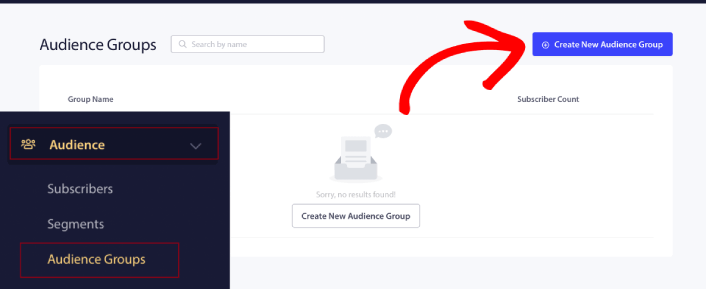
Son bildirime tıklamayan aboneleri hedeflemek için Son tıklama tarihine göre filtrelemeniz gerekecektir:
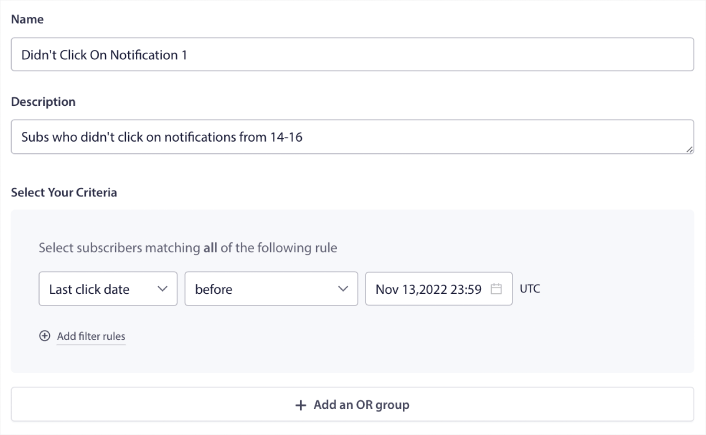
Önceki bildiriminizi gönderdiğiniz tarihten önceki son tıklama tarihine göre filtreleyin. Yani, son anlık bildirimi 14 Kasım'da gönderdiyseniz, yalnızca 13 Kasım gece yarısından önceki bildirimlere tıklayan aboneler için filtreleyin.
NOT: E-posta kampanyasının aksine, son bildirime göre tıklama oranına göre filtreleme yapamazsınız. En yakın yaklaşım, bir tarih aralığındaki tıklamalar için filtrelemektir.
İşiniz bittiğinde, Bildirimi Kaydet'e tıklayın.
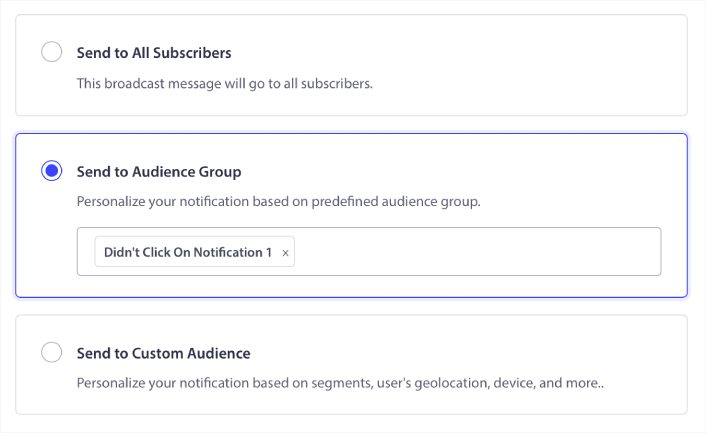
Ardından, anlık bildirim yayınınınıza geri dönün ve Hedef Kitle Grubuna Gönder'i seçin. Açılır menüden Grubunuzu seçin:
Herkese Yayınlanan Bildirime Tıklayan Aboneleri Yeniden Hedefleme
Son bildiriminize tıklayan aboneleri hedeflemek istiyorsanız, başka bir Kitle Grubu oluşturabilirsiniz.
Abonelerinizi, önceki bildiriminizi gönderdiğiniz tarihten sonra VE bir sonraki bildiriminizi göndermek istediğiniz tarihten önce olarak filtreleyin:
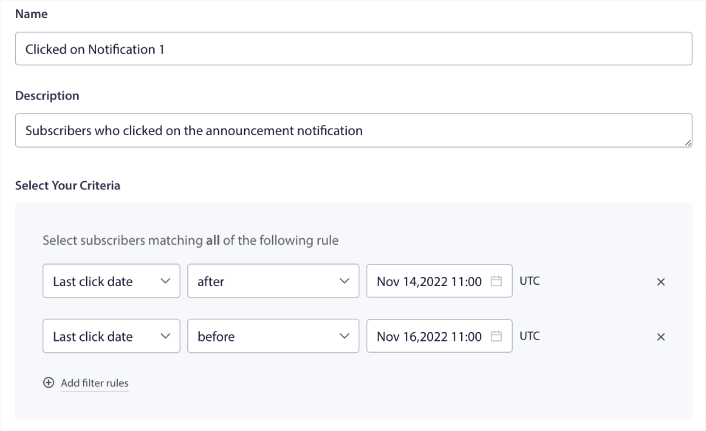
Filtre kuralları ekle'ye tıklayarak filtrenize VE kriterleri ekleyebilirsiniz. Bunun gibi bir filtre, çapraz satış yapan anlık bildirimler için harikadır.
Bu Kitle Gruplarının sonucu daha ayrıntılı hedeflemedir. Böylece, dönüşüm oranlarınızı iyileştirmek için her seferinde farklı teklifler gönderebilirsiniz.
Şelale Anlık Bildirim Kampanyaları Oluşturduktan Sonra Ne Yapmalı
Şelale anlık bildirim kampanyaları hakkında hatırlanması gereken en önemli şeylerden biri, bu metodolojiyi yalnızca toplu anlık bildirimlerde kullanabilmenizdir. Anlık bildirimlerdeki damla kampanyaları henüz bu kadar ayrıntılı hedefleme seçeneklerine sahip değildir.
Bu nedenle, anlık bildirimlerinizi A/B testi yapmayı unutmayın. Ayrıca makalelerimizi okumak ve otomatik anlık bildirimlerinizi nasıl güçlendireceğinizi öğrenmek için biraz zaman ayırmanızı öneririz. Anlık bildirim en iyi uygulamaları hakkındaki makalemizle başlayın.
Anlık bildirimlere yeniyseniz, yayına geçmeden önce kapsamlı bir anlık bildirim test sürecini izlemelisiniz. Ziyaretçileriniz bunları görmeden ve bozuk bir kullanıcı deneyimi hakkında şikayet etmeye başlamadan önce yaygın sorunları gidermenize yardımcı olacaktır. Ve kesinlikle Google Analytics'i anlık bildirimleri izlemek için ayarlamalısınız.
Tıklayan veya tıklamayan aboneleri hedeflemek için anlık bildirimleri yeniden hedefleme. Bunun sizin için nasıl çalıştığını bize bildirin. Bu arada, bu kaynaklara göz atın:
- Merak Uyandırarak Anlık Bildirimlerinizdeki Tıklamaları Nasıl Artırırsınız
- Her Anlık Bildirimi Nasıl Kişiselleştirirsiniz
- Anlık Bildirimlerinizde Zengin Medya ile Nasıl Öne Çıkarsınız
- Dormant Anlık Bildirim Abonelerini Nasıl Yeniden Aktifleştirirsiniz
- Müşterileri Bilgilendirmek İçin Anlık Bildirimleri Nasıl Kullanırsınız
- Daha Yüksek Tıklama Oranları İçin Anlık Bildirimlerinizde Emojileri Nasıl Kullanırsınız
- Aciliyet Hissi Yaratarak Dönüşümleri Nasıl Artırırsınız
Henüz yapmadıysanız, PushEngage ile başlayın.


