
Satışlarınızı artırmak için damla kampanyaları oluşturma rehberi mi arıyorsunuz?
Otomasyon olmadan pazarlama bugün eksiktir. Elbette, aboneler toplayabilir ve anlık bildirimler ile e-postalar gönderebilirsiniz. Sonra ne olacak? Her bültenle işletmenize satış yapmaya devam edip abonelerinizin dönüşmesini mi umacaksınız?
Şu yollarla yapamazsınız:
- Kampanyalarınızı kişiselleştirin
- Yeni müşterileri otomatik olarak kazanın
- Mevcut müşterileri içeriğinizle elde tutun
- Ürünleri yükseltin veya çapraz satış yapın
- Kaybedilen satışları kurtarın
Tabii... dönüşüm sağlayan damla kampanyaları kullanmadığınız sürece.
Bu makalede, damla kampanyalarını nasıl kuracağınızı ve onlardan en iyi şekilde nasıl yararlanacağınızı göstereceğiz. En iyi yanı mı? Önceden herhangi bir deneyime ihtiyacınız yok.
Kulağa hoş geliyor? Hadi dalalım.
Damla Kampanyaları Nedir?
Damla kampanyalarını, bahçe sulama sistemine benzer şekilde, otomatik olarak gönderilecek bir dizi e-posta veya hatta anlık bildirim ayarlamak gibi düşünün. Bitkileri sulamak yerine, söylediklerinizi veya sattıklarınızı dinleyen insanlara mesaj gönderiyorsunuz.
Nasıl çalıştığı aşağıda açıklanmıştır:
- Bu sihir değil, otomasyon: Kurulumu yaptıktan sonra bu mesajlar kendi kendine gönderilmeye devam eder. Manuel olarak göndermeye devam etmeniz gerekmez.
- Doğru kişilerle konuşabilirsiniz: Farklı insan gruplarına farklı mesajlar gönderebilirsiniz. Örneğin, yeni kaydolan biri samimi bir "merhaba" mesajı alırken, uzun süredir sizinle olan başka biri özel fırsatlar veya güncellemeler alabilir.
- Kişiseldir: Bu mesajlar kişinin adını kullanabilir veya ilgi gösterdiği konular hakkında konuşabilir. Herkese aynı şeyi göndermediğinizi, gerçekten onlarla konuştuğunuzu hissettirir.
- Zamanlama her şeydir: Mesajlar en mantıklı zamanlarda gönderilir – örneğin, biri kaydolduktan hemen sonra veya sitenizde bir şeye baktıktan sonra.
- Her mesajın bir görevi vardır: Her e-posta veya bildirim, insanların ürününüzü daha iyi tanımasına yardımcı olmak veya satın almadıkları bir şeyi hatırlatmak gibi belirli bir şey yapmak üzere tasarlanmıştır.
- Nasıl gittiğini görebilirsiniz: Mesajları kaç kişinin açtığı veya içindeki bağlantılara tıkladığı gibi şeyleri kontrol edebilirsiniz. Bu, mesajlarınızın iyi çalışıp çalışmadığını bilmenize yardımcı olur.
Damla kampanyaları yalnızca e-postalar için değildir; uygulama içi anlık bildirimler ve web anlık bildirimleri için de işe yarar. Sizi ilgilendiren kişilerle, onları bunaltmadan iletişimde kalmak için harikadır. İnsanları meşgul ve yaptıklarınızla ilgilenmelerini sağlamanın akıllıca bir yoludur.
Damla Kampanyası Türleri
Farklı damla kampanyası türlerine dalalım. Tıpkı dondurmanın her türlü çeşidi olduğu gibi, damla kampanyalarının da farklı türleri vardır. Her tür, belirli bir amaç veya kitle için özel olarak tasarlanmıştır. İşte en yaygın olanlardan bazıları:
- Hoş Geldiniz Serisi: Bu, yeni birine “Merhaba!” demek gibidir. Biri e-postalarınıza veya bildirimlerinize kaydolduğunda, onlara markanızı veya hizmetinizi tanıtmak için birkaç samimi mesaj gönderirsiniz. Yeni misafirlerinizi kırmızı halıyla karşılamak gibidir.
- İşe Alım Kampanyaları: Bunu yardımsever bir rehber olarak düşünün. Biri bir ürün satın aldığında veya bir hizmete kaydolduğunda, bu mesajlar ona nasıl kullanacağını anlatır, faydalı ipuçları sunar veya bilmediği şeyleri gösterir. Yeni bir şehre gelen birine şehir turu yaptırmak gibidir.
- Terk Edilmiş Sepet Hatırlatıcıları: Hiç çevrimiçi alışveriş sepetinize bir şey koyup sonra unuttuğunuz oldu mu? Bu kampanyalar, insanların ilgilendiği ancak satın almadığı şeyler hakkında onları nazikçe hatırlatan küçük dürtmelerdir. “Hey, bunu unuttun mu?” diyen nazik bir omuz dokunuşu gibidir.
- Yeniden Etkileşim Kampanyaları: Bunlar, markanızla eskiden etkileşimde bulunan ancak bir süredir etkileşimde bulunmayan kişilere ulaşmak içindir. Eski bir arkadaşını arayıp “Hey, buluşalım mı!” demek gibidir. Onlara özel bir teklif sunabilir veya sadece markanızı hatırlatabilirsiniz.
- Eğitim İçeriği: Burada amaç, kitlenize ürününüz veya sektörünüzle ilgili değerli bir şey öğretmektir. Küçük, sindirilebilir mesajlarla sunulan mini bir kurs gibidir. Eğlenceli ve bilgilendirici bir dizi ders olarak düşünün.
- Ürün Güncellemeleri: Yeni veya geliştirilmiş bir şeyiniz mi var? Bu tür kampanyalar, kitlenizi yeni özellikler, ürünler veya hizmetler hakkında bilgilendirir. En son gadget'ınızı arkadaşlarınıza göstermek gibidir.
- Etkinlik Davetleri: Bir web semineri, atölye çalışması veya başka bir etkinlik mi düzenliyorsunuz? Bu kampanyalar, insanları heyecanlandırmak ve etkinliklerinize kaydolmalarını sağlamakla ilgilidir. Bir partiye harika davetiyeler göndermek gibidir.
- Mevsimsel Kampanyalar: Bunlar, tatiller, mevsimler veya özel etkinlikler gibi yılın belirli zamanlarına bağlıdır. Noel için mağazanızı dekore etmek veya yaz indirimi yapmak gibidir.
Her damla kampanya türünün kendine özgü bir çekiciliği ve amacı vardır. Doğru kampanya türünü kitleniz ve hedeflerinizle eşleştirerek, anlamlı bağlantılar kurabilir ve kitlenizi doğal ve aşırı satış odaklı olmayan bir şekilde meşgul tutabilirsiniz.
Anlık Bildirim Damla Kampanyaları Nasıl Oluşturulur
Bir web sitesine anlık bildirim yüklemek zor değildir. Ancak birkaç adımı vardır ve bu kılavuzu adım adım takip etmek isteyeceksiniz.
Hiçbir zaman zamanın önüne geçmeyin ve iyi olacaksınız.
Bir hoş geldiniz anlık bildirim kampanyası oluşturmadan önce, bir anlık bildirim hizmeti seçmeniz gerekir. Anlık bildirim hizmeti, kodlama yapmadan anlık bildirim kampanyaları oluşturmanıza olanak tanıyan bir yazılımdır.
Kullanmanızı öneririz PushEngage.

PushEngage, dünyadaki 1 numaralı anlık bildirim eklentisidir.
Anlık bildirimler, web sitesi trafiğinizi ve etkileşiminizi otomatik olarak artırmanıza yardımcı olur. Ve bir çevrimiçi mağaza işletiyorsanız, PushEngage ayrıca otomatik e-ticaret anlık bildirimleri oluşturmanıza yardımcı olarak satışlarınızı artırmanıza da yardımcı olur.
Ücretsiz başlayabilirsiniz, ancak işletmenizi büyütme konusunda ciddiyseniz, ücretli bir plan satın almalısınız. Ayrıca, herhangi bir anlık bildirim hizmeti satın almadan önce, anlık bildirim maliyetleri hakkındaki bu kılavuza göz atmalısınız.
PushEngage ile nelerin geldiğine hızlı bir bakış:
- Yüksek dönüşüm sağlayan otomatik kampanyalar
- Birden fazla hedefleme ve kampanya zamanlama seçeneği
- Hedef takibi ve gelişmiş analizler
- Akıllı A/B testi
- Özel Bir Başarı Yöneticisi
İşletmeniz için trafik, etkileşim ve satış oluşturmak istiyorsanız, PushEngage'in tartışmasız en iyi seçenek olduğunu göreceksiniz. Ve bütçeniz kısıtlıysa, anlık bildirimlerinizle biraz yaratıcı olabilirsiniz.
NOT: WordPress siteniz varsa, PushEngage WordPress eklentisini kurmalı ve etkinleştirmelisiniz.
Hadi gidelim!
Adım #1: Ücretsiz Bir PushEngage Hesabı Oluşturun
PushEngage'a gidin ve Şimdi Ücretsiz Başlayın:'a tıklayın
Ücretsiz planla başlayabilirsiniz. Ancak hedefli anlık bildirimler göndermek istiyorsanız, Büyüme Planını seçmelisiniz. Hangi planı istediğinizi bildiğinizde, PushEngage hesabınızı oluşturmak için Başla'ya tıklayın.
Adım #2: PushEngage'a Kaydolun
Şimdi PushEngage hesabınızı oluşturma zamanı. Bir e-posta adresi veya Gmail kimliği ile kaydolarak başlayın:

Ardından, hesap bilgilerinizi doldurun:

Ve planınızı satın almak için kredi kartı bilgilerinizi ekleyin:

Ücretsiz hesabı seçtiyseniz, planınızı yükseltmeyi seçene kadar kredi kartınızdan hiçbir ücret alınmayacaktır. Ve şimdi, PushEngage kontrol panelinize erişmek için hazırsınız. Sadece Kaydı Tamamlayın ve Anında Erişim Sağlayın'a tıklayın.
Daha önce OneSignal veya PushAlert kullandıysanız, PushEngage'ın kontrol panelinden çok daha temiz bir deneyim sunduğunu göreceksiniz. OneSignal kontrol paneli gelişmiş kampanyalar için tasarlanmamıştır. Bunun için OneSignal eklentisinden çok API'ye ihtiyacınız olacak.
Adım #3: Web Bildirimleri WordPress Eklentisini Yükleyin
NOT: WordPress sitesi kullanmıyorsanız, başlamak için kurulum kılavuzlarımıza göz atmalısınız.
Hesabınızı oluşturdunuz. Bu nedenle, PushEngage kontrol paneline gidin ve takip edin:

Site Ayarları » Site Detayları'na tıklayın ve Kurulum Talimatları İçin Buraya Tıklayın düğmesine tıklayın:

WordPress sekmesine tıklayın ve eklentiyi web sitenize yüklemek için PushEngage WordPress Eklentisini Yükle düğmesine tıklayın.

İşte harika kısım: PushEngage hesabınızı oluşturduğunuzda, web sitenizi zaten PushEngage hesabınızla senkronize ettiniz. Bu nedenle, PushEngage WordPress eklentisini web sitenize otomatik olarak yüklemek için PushEngage kontrol panelindeki kurulum bağlantısına tıklayın.
Adım #4: WordPress Sitenizi PushEngage ile Bağlayın
PushEngage WordPress eklentisini yükleyip etkinleştirmeyi bitirdiğinizde, PushEngage karşılama sihirbazını göreceksiniz:

Sihirbaz oldukça basittir. Yeni bir kullanıcıysanız, Yeni mi? Ücretsiz Hesabınızı Talep Edin'e tıklayın. Zaten kaydolduysanız, Mevcut Hesabınızı Bağlayın'a tıklayın.
Ardından, kayıt sırasında bir site kaydettiyseniz, Kayıtlı bir site bağla altında Bir Site Seçin açılır menüsünden sitenizi seçebilirsiniz:

Veya, Premium fiyatlandırma planınız veya daha üstü varsa yeni bir site eklemek için Yeni bir site kaydet'e tıklayabilirsiniz. Bir sonraki adımda, karşılama sihirbazı sizi diğer mutlaka sahip olunması gereken WordPress eklentilerini yüklemeniz için yönlendirecektir.

Her adımı doğru bir şekilde takip ettiyseniz, sihirbazdan bu başarı mesajını göreceksiniz:

Artık kampanyalar oluşturmaya ve anlık bildirim açılır pencereleri göndermeye hazırsınız.
Adım 4: Kişiselleştirilmiş Otomatik E-posta Kampanyaları Gönderin
Bir kampanya oluşturmadan önce, kişiselleştirilmiş anlık iletiler göndermek için segmentler ve hedef kitle grupları ayarlamalısınız.
Anlık bildirim aboneleriniz için segmentler ve kitle grupları oluşturarak elde edebileceğiniz kişiselleştirme düzeyini hiçbir şey geçemez. PushEngage » Kitle'ye gidin ve hemen segmentler ve kitle grupları oluşturmaya başlayın.
Segmentler sekmesi altında yeni segmentler oluşturabilir veya mevcut olanları düzenleyebilirsiniz:
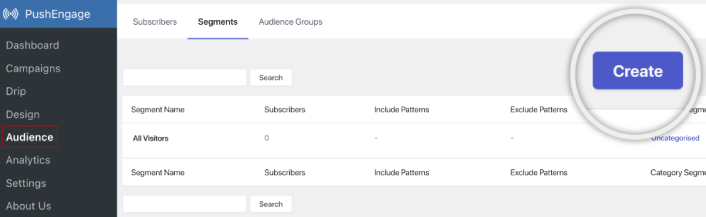
Ve daha derin kişiselleştirmeye ihtiyacınız varsa, Kitle Grupları sekmesinde bir kitle grubu oluşturun:
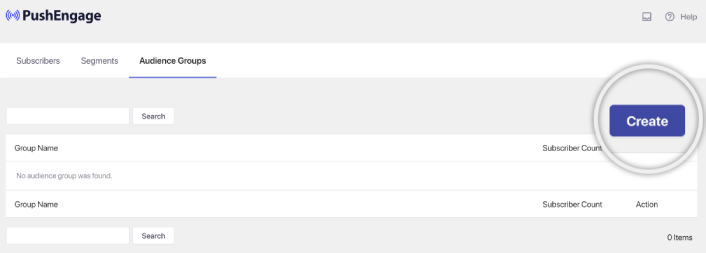
Anlık bildirim segmentleri ve kişiselleştirilmiş anlık bildirimler konusunda yeniyseniz, segment oluşturma hakkındaki makalemizi ve gelişmiş kitle gruplama duyurumuzu incelemelisiniz.
Adım 5: Otomatik E-posta Anlık Bildirim Kampanyası Oluşturun
PushEngage kontrol paneline gidin ve Kampanya » Otomatik Yanıtlayıcılar bölümüne giderek Yeni Otomatik Yanıtlayıcı Oluştur'a tıklayın:

Ardından, kampanyanıza bir ad verin (Hoş Geldiniz Damlası gibi bir şey öneririz) ve İçerik altında, “Kullanıcı abone olduktan hemen sonra bildirim gönder“ seçeneğini seçin):

Bu noktada, bildirimin içeriğini düzenlemek için bildirimin yanındaki oka tıklayabilirsiniz.
PushEngage ile Premium veya Enterprise planınız varsa, otomatik karşılama mesajları dizisi oluşturmak için birden fazla bildirim ekleyebileceksiniz. Yalnızca Yeni Bildirim Ekle'ye tıklayın ve içeriği düzenleyin.
İşiniz bittiğinde Otomatik Yanıtlayıcı Ayarları'na tıklayın ve hoş geldin kampanyasını tüm abonelere gönderme seçeneğini belirleyin:

Ardından, anında iletme bildirimlerini takip etmek için kendi UTM parametrelerinizi ayarlamak üzere aşağı kaydırın:
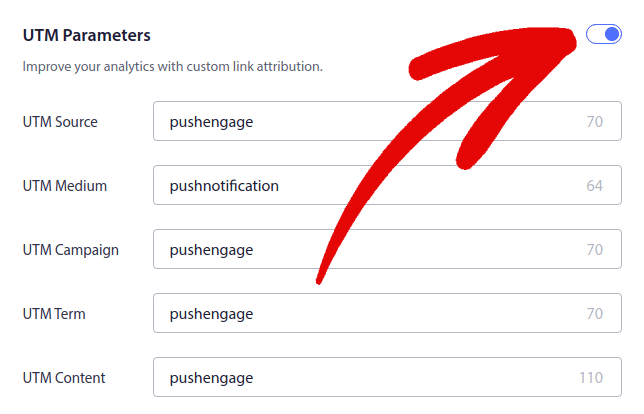
İşiniz bittiğinde, yukarı kaydırın ve Otomatik Yanıtlayıcıyı Etkinleştir düğmesine tıklayın:

Ve işte bu kadar!
E-posta Otomatik Kampanyaları Nasıl Oluşturulur
WordPress'te bu kullanışlı otomatik e-posta kampanyalarını mı kuruyorsunuz? Bunu bir e-posta pazarlama aracıyla kolayca yapabilirsiniz. Bu kılavuzun geri kalanını takip edin ve hazırsınız!
Adım 1: Bir E-posta Otomatik Hizmeti Seçin
Kısa bir süre için Constant Contact'ı denemenizi öneririz. E-posta pazarlama hizmetlerinin süperstarı gibidir. Süper kullanıcı dostudur ve e-postaları hazırlamak için sürükle ve bırak özelliğine sahiptir.

Constant Contact işletmeniz için otomatik yanıtlayıcılar ayarlamak üzere en iyi e-posta pazarlama hizmetidir. Kullanımı çok kolaydır ve e-posta kampanyalarınızı iyileştirmek için tonlarca otomasyon özelliği sunar.
Constant Contact'ı e-posta pazarlama kampanyaları ayarlamak için bu kadar harika bir seçim yapan şey şunlardır:
- E-postalar oluşturmak için kolay sürükle ve bırak oluşturucu
- Yüzlerce önceden tasarlanmış e-posta şablonu
- Hoş geldiniz mesajları, doğum günü teklifleri ve terk edilmiş sepet otomatik yanıtlayıcıları
- Kitlenizi büyütmek için liste oluşturma araçları ve kayıt formları
- Hedefli e-postalar için bölünmüş test
- CRM'ler ve üçüncü taraf hizmetlerle entegrasyonlar
- Canlı sohbet ve telefon aracılığıyla mükemmel destek
Söz konusu bile, Constant Contact'ın müşteri adayları oluşturmak için kullanabileceğiniz WordPress için bir form eklentisi vardır. Otomatik yanıtlayıcılarla müşteri adaylarınızı besleyebilir ve kapatabilirsiniz.
Ama hey, bu piyasadaki tek seçenek değil. E-posta pazarlama hizmetlerinin çoğu, Brevo (Sendinblue olarak da biliyor olabilirsiniz), HubSpot ve diğerleri gibi, bu otomatik e-posta büyüsüne de sahip.
Birkaç tıklamayla, bu otomatik e-postaları abonelerinize gönderebilirsiniz. Ayrıca, Constant Contact, WPForms ve OptinMonster gibi WordPress eklentileriyle uyumlu çalışır. E-ticaret ile ilgileniyorsanız, WooCommerce veya Shopify kullanıyorsanız, yeni müşterilere ulaşmak veya sepetlerinde bıraktıkları ürünleri hatırlatmak için size yardımcı olur.
Denemeye hazır mısınız? Constant Contact web sitesine gidin, kaydolun ve tahmin edin ne olacak? 60 günlük ücretsiz deneme süresiyle deneyebilirsiniz. Bu, ödeme planına karar vermeden önce uygun olup olmadığını görebilmeniz için e-posta pazarlaması için bir araba denemek gibidir.
Adım 2: Bir E-posta Listesi Oluşturun
Bir hesap oluşturduktan sonra, bir iletişim listesi oluşturmak için Constant Contact kontrol paneline gidebilirsiniz.
Constant Contact sizin için varsayılan bir liste oluşturmuş olacaktır. Ancak, üst menüdeki Kişiler sekmesine gidip Liste Oluştur düğmesine tıklayarak kendi listenizi oluşturabilirsiniz.

WordPress bülten formunuzu Constant Contact ile bağlayabilir ve bir e-posta listesi oluşturmaya başlayabilirsiniz. Ayrıca bir WordPress blog abonelik widget'ı ekleme hakkındaki blog yazımızı da incelemelisiniz.
Adım 3: Pazarlama Otomatik Kampanyaları Oluşturun
Artık abonelerinizi Constant Contact listenize eklediğinize göre, bir sonraki adım otomatik bir kampanya oluşturmaktır. Pazarlama Kampanyaları sekmesine gidin ve ardından Oluştur düğmesine tıklayın.


Constant Contact, bir kampanya oluşturmak için size birden fazla seçenek sunacaktır. Otomasyonlar kampanyasını seçin.

Buradan, bir damla kampanya ayarlamak için önceden oluşturulmuş birkaç kampanya şablonu arasından seçim yapabilirsiniz. Sıfırdan başlamak için Özel Otomasyon oluşturabilir veya kampanya şablonlarından herhangi birini kullanarak hızlıca başlayabilirsiniz.
Bu eğitim için, başlamak üzere Özel yol oluştur şablonunu seçeceğiz. E-postalara abone olanlar seçeneğini seçin ve ardından İleri düğmesine tıklayın.
Özel yolunuza bir ad verin ve hazırsınız! Bu şablon, e-posta listenize yeni biri abone olduğunda bir damla kampanya tetikleyecektir. Bu nedenle, bir karşılama kampanyası için mükemmeldir. Bir başlangıç kampanyası oluşturmak istiyorsanız, onları ayrı bir damla kampanyaya yerleştirmek için etiketleri kullanabilirsiniz.
Adım 4: Bir Kampanya Akışı Oluşturma
Ancak, eylemleri ve kuralları soldaki menüden yola sürükleyip bırakabilirsiniz. Örneğin, iş akışınıza bir e-posta gönderme veya SMS gönderme gibi farklı eylemler ekleyebilirsiniz.
Otomasyonunuzu özelleştirmenize yardımcı olan farklı kurallar da vardır. Bir zaman gecikmesi ekleyebilir ve bir sonraki e-postanın ne zaman gönderileceğini belirleyebilirsiniz. Benzer şekilde, Evet ve Hayır koşulları ayarlamanıza ve yolu ayırmanıza olanak tanıyan koşullu bir ayırma seçeneği de vardır.

Otomatik iş akışınızı ayarlamak da çok kolaydır. Üç nokta simgesini bulun ve tıklayın. Değişiklik yapmak için Düzenle'yi seçin. Örneğin, E-posta gönder eylemini değiştirmek istediğinizi varsayalım.
Bunu yaptıktan sonra bir açılır pencere görünür. Burası yepyeni bir e-posta oluşturabileceğiniz veya zaten oluşturduğunuz birini kullanabileceğiniz yerdir.
Bu iş akışını ilk kez ayarladığınız için, Yeni bir e-posta oluştur'u seçin. E-postanız için harika bir ad girin, ardından Devam'a basın. Ve işte bu kadar, e-posta iş akışınızı özelleştirme yolunda ilerliyorsunuz!
Adım 5: E-posta Kampanyanızı Oluşturma
Bir şablonu duruma göre arayabilir veya sıfırdan bir e-posta oluşturmak için boş bir şablon kullanabilirsiniz.

Bir şablon seçtiğinizde e-posta düzenleyici başlatılacaktır.

İşiniz bittiğinde, üstteki Kaydet ve Kapat düğmesine basın. Bu sizi Constant Contact'taki Yol Oluşturucu'ya geri götürecektir. Yola istediğiniz kadar eylem ve kural ekleyerek ve her birini düzenleyerek otomasyon yolunuzu tamamlayın.

Otomatik bir iş akışı oluşturduktan sonra, üstteki Etkinleştir düğmesine basmanız yeterlidir. Ve hazırsınız!
Bir Damla Kampanya Oluşturduktan Sonra Ne Yapmalı
Bu kadar, millet!
Bu makaleyi faydalı bulduysanız, aşağıya bir yorum bırakmayı unutmayın.
Damla kampanyalara başlamak göz korkutucu görünebilir. Ancak hedef takibi ve analitik'e dikkat ederseniz, iyi olursunuz. Daha da önemlisi, anlık bildirim kampanyalarının yardımıyla çok daha fazla kar edeceksiniz. İşte başlamanıza yardımcı olacak birkaç harika kaynak:
- Gelirinizi 2 Katına Çıkarmak İçin Yeniden Hedefleme Anlık Bildirimleri Nasıl Kullanılır
- Anlık Bildirimlerinizi Nasıl Sıralarsınız ve Kazanan Kampanyaları Bulursunuz
- Anlık Bildirim Aboneli Listelerini Temizleme (Kolay)
- Otomatik Olarak RSS Anlık Bildirimleri Gönderme
- Bir Haber Sitesini Tanıtmak İçin Anlık Bildirimleri Kullanma
- Satışlarınızı 2 Katına Çıkarmak İçin Çapraz Satış Anlık Bildirimlerini Kullanma
- Göz Atma Terk Etme Anlık Bildirimlerini Kullanma (4 Adım)
Anlık bildirimlere yeni başlıyorsanız, PushEngage'i denemelisiniz. PushEngage, piyasadaki 1 numaralı anlık bildirim yazılımıdır. Ve kampanyalarınız güvende olacaktır.
Bu nedenle, henüz yapmadıysanız, bugün PushEngage ile başlayın!


