
Hızlı ve kolay bir şekilde bağlı pazarlama anlık bildirimleri ayarlamak mı istiyorsunuz?
Akıllı telefon kullanıcılarının %52'sinin cihazlarında anlık bildirimleri etkinleştirmiş olmasıyla, her işletme trafiği, etkileşimi ve satışları artırmak için bu güçlü pazarlama aracını kullanabilir. Peki, anlık bildirimlerin potansiyelini bağlı pazarlama için nasıl kullanabilirsiniz?
Başlamak için bir geliştiriciye ihtiyacınız var mı? Bir anlık bildirim hizmeti nasıl seçersiniz? Anlık bildirim kampanyalarınızın karlı olup olmadığını nasıl takip edersiniz?
Bu makalede, işletmenizi büyütmenize yardımcı olmak için bağlı pazarlama anlık bildirimleri konusunda size yol göstereceğiz. Ve şunları yapmış olsanız bile faydalı olacağına söz veriyoruz:
- Daha önce hiç anlık bildirim kampanyası denememiş;
- Bağlı pazarlama için anlık bildirim kampanyalarını denemiş ve başarısız olmuş;
- Daha önce anlık bildirim kampanyaları kullanmış ancak sonuçları optimize etmek için yardıma ihtiyacı olan;
Kulağa hoş geliyor? Hadi dalalım.
- Bağlı Pazarlama Anlık Bildirimlerinin Faydaları
- Bağlı Pazarlama Anlık Bildirimleri İçin En İyi Trafik Kaynakları
- Anlık Bildirimlerle Kaçınılması Gereken Yaygın Hatalar
- Bağlı Pazarlama Anlık Bildirimlerini Anlamak
- Bağlı Pazarlama Anlık Bildirimlerine Hazırlanmak
- Adım #1: Anlık Bildirim Hizmeti Seçimi
- Adım #2: Anlık Bildirimleri Diğer Pazarlama Kanallarıyla Entegre Etme
- Adım #3: Anlık Bildirim Ayarlarını Yapılandırma
- Adım #4: Test Etme ve Optimizasyon
- Adım #5: Anlık Bildirim Performansını Veri ve Metriklerle Analiz Etme
- Adım #6: Bağlı Pazarlama Anlık Bildirim Kampanyanızı Başlatma
- Bağlı Pazarlama Anlık Bildirimleri Gönderdikten Sonra Ne Yapmalı?
Bağlı Pazarlama Anlık Bildirimlerinin Faydaları
Günümüzün pazarlama ortamında, anlık bildirimler işletmelerin hedef kitleleriyle bağlantı kurmaları için değerli bir araç olarak önemli bir çekiş kazanmıştır.
Anlık bildirimler, bağlı pazarlamada da önemli bir rol oynamaktadır. Sadece satışları artırmak ve ürünleri tanıtmakla kalmaz, aynı zamanda güven oluşturmaya ve marka itibarını güçlendirmeye de yardımcı olurlar.

Anlık bildirimleri, hızlı tempolu bağlı pazarlama dünyasında güvenilir müttefikiniz olarak düşünün. Hedef kitlenizle etkileşim kurmanın ve markanızın varlığını ve etkisini artırmanın sofistike ama ulaşılabilir bir yoludur.
Bağlı pazarlamada anlık bildirim kullanmanın bazı faydaları şunlardır:
- Artan tıklama oranları: Anlık bildirimlerin, diğer dijital pazarlama biçimlerine göre daha yüksek tıklama oranlarına sahip olduğu gösterilmiştir. Bu, kullanıcıların içeriğinizle etkileşim kurma ve harekete geçme olasılığının daha yüksek olduğu anlamına gelir.
- Daha yüksek dönüşüm oranları: Anlık bildirimler, özellikle kişiselleştirilmiş ve hedeflenmiş olduklarında dönüşüm sağlamada oldukça etkili olabilir. Bu, kullanıcıların bir satın alma yapma veya bir hizmete kaydolma olasılığının daha yüksek olduğu anlamına gelir.
- Gelişmiş müşteri ve okuyucu etkileşimi: Anlık bildirimler, işletmelerin hedef kitleleriyle akılda kalmalarına yardımcı olabilir ve müşteri etkileşimini artırabilir. Anlık bildirimler aracılığıyla değerli içerikler sunarak, işletmeler hedef kitleleriyle güven ve marka itibarı oluşturabilir, bu da artan müşteri sadakati ve tekrar iş anlamına gelir.
- Maliyet Etkin: Anlık bildirimler, hedef kitlenize ulaşmanın ve satışları artırmanın maliyet etkin bir yoludur. Diğer dijital pazarlama biçimlerinin aksine, anlık bildirimlerin etkili olması için büyük bir bütçe veya kapsamlı kaynaklara ihtiyaç duyulmaz.
- Kişiselleştirme: Anlık bildirimler, kullanıcı davranışlarına, tercihlerine ve demografik bilgilerine göre yüksek oranda kişiselleştirilebilir. Hedef kitlenize kişiselleştirilmiş mesajlar göndererek, bir dönüşüm olasılığını artırabilir ve müşteri etkileşimini iyileştirebilirsiniz.
İnsanlar bu anlık bildirimleri almayı seçtiğinde, bu sanki “Hey, sitemize geri gel!” diyen sanal bir omza dokunuş gibidir. Ve biliyor musunuz? Gerçekten işe yarıyor.
Anlık bildirimlere kaydolan kişiler, bir web sitesine daha sık geri dönme ve daha uzun süre kalma eğilimindedir.
Ama işte gizli sosu: mesajları akılda kalıcı ve kişisel hale getirmelisiniz. Eski bir dosta samimi bir mesaj göndermek gibi düşünün.
Doğru notalara basan mesajlar hazırlamak, önceki müşterilerinizi geri getirebilir, markanız hakkında sıcak ve samimi hissetmelerini sağlayabilir ve tabii ki uzun vadeli kârlarınıza güzel bir küçük destek verebilir.
Yani, yaratıcı olun, etkileşimde kalın ve sihrin gerçekleşmesini izleyin!
Bağlı Pazarlama Anlık Bildirimleri İçin En İyi Trafik Kaynakları
Web siteniz gibi tek bir trafik kaynağını bağlı pazarlama anlık bildirimleriniz için kullanabilir veya daha fazla bağlı gelir elde etmek için reklam platformlarıyla ortaklık kurabilirsiniz.
Verileriniz üzerinde daha fazla kontrol sahibi olmak ve markanıza olduğu kadar tanıttığınız işletmelere karşı güven oluşturmak için genellikle kendi web sitenizde kalmanızı öneririz. Ve sitenizde Google AdSense'e alternatif olarak anlık reklamları entegre etmeniz gerekirse, PushEngage hesabınızdan para kazanabilirsiniz.
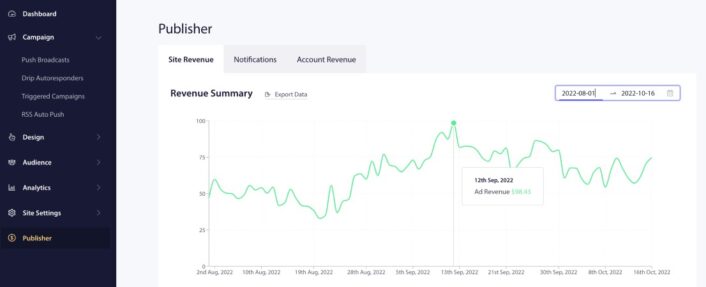
Abonelerinize reklam sunmak için Taboola ve Outbrain dahil olmak üzere dünyadaki en iyi reklamverenlerle ortaklık kuruyoruz. Bir parmağınızı bile oynatmadan reklam geliri elde edebilirsiniz.
Anlık Bildirimlerle Kaçınılması Gereken Yaygın Hatalar
Başlamadan önce, bağlı pazarlama anlık bildirimleriyle ilgili en yaygın tuzaklardan bazılarını bilmeniz gerektiğini düşündük. Her ay 15 milyardan fazla anlık bildirim gönderen binlerce müşterimiz var. Bu nedenle, anlık bildirim en iyi uygulamalarımızı kesinlikle incelemelisiniz.
Ayrıca, aşağıdakilerden kaçınmaya çalışın:
- Çok fazla bildirim göndermek
- Genel mesajlaşma kullanmak
- Hedef kitlenizi doğru şekilde segmentlere ayırmamak
Bu sorunlarla nasıl başa çıkabileceğinizi bu makalenin ilerleyen kısımlarında konuşabiliriz. Şimdilik bu sorunları aklınızda bulundurun. Bunlar çok yaygın hatalardır ve anlık kampanya etkinliğinizi baltalayabilirler.
Bağlı Pazarlama Anlık Bildirimlerini Anlamak
Satış ortağı pazarlaması anlık bildirimleri, kayıt yaptıran kullanıcılara gönderilen, satış ortağı teklifleri içeren tıklanabilir mesajlardır. Bu bildirimler, ürün ve hizmetleri tanıtmak, satış ortağı tekliflerine trafik çekmek ve marka itibarını oluşturmak için kullanılır.
Anlık bildirimler, satış ortağı pazarlamacıları için satış ortaklığı programlarını güçlendirmek ve daha iyi sonuçlar elde etmek isteyenler için güçlü bir müttefik olarak ortaya çıkmıştır. Anlık bildirimleri satış ortağı pazarlama stratejinize dahil ettiğinizde, hedef kitlenizle bağlantı kurmanın ve dönüşümlerinizi hızlandırmanın dinamik bir yolunu açarsınız.
İşte dikkate alınması gereken temel noktaların bir dökümü:
- Hedeflenmiş Anlık Bildirimlerle Müşteri Tutmayı Artırın: Anlık bildirimler, müşteri tutma konusunda altın bileziktir. Bu kısa mesajlar, hedef kitlenizle doğrudan konuşmanıza olanak tanır. Onları yeni ürünler, promosyonlar ve özel fırsatlar hakkında bilgilendirin. Bunu yaparak, tekrar satın almayı teşvik edecek ve marka sadakatini besleyeceksiniz.
- Zamanında Mesajlarla Bilgilendirin ve Cezbedin: Anlık bildirimler, müşterileri yeni ürünler, güncellemeler ve sınırlı süreli teklifler hakkında zamanında bilgilendirmek için gizli silahınızdır. Dikkatlerini çekecek ve kişiselleştirilmiş hissettirecek mesajlar hazırlayın. Bu, yalnızca ilgilerini çekmekle kalmayacak, aynı zamanda harekete geçmelerini sağlayarak satış ortaklığı satışlarını artıracaktır.
- Kullanıcı Dostu Anlık Bildirim Platformlarından Yararlanın: PushEngage gibi kullanıcı dostu anlık bildirim platformları sayesinde şanslısınız. Bu platformlar hayatınızı kolaylaştırmak için tasarlanmıştır. Potansiyel müşteri toplamanıza, hedef kitlenizi segmentlere ayırmanıza ve zahmetsizce anlık bildirimler göndermenize olanak tanır. Sonuç? Satış ortaklığı pazarlama kampanyalarınız her zamankinden daha güçlü hale gelir.
- Tarayıcı Bildirimlerinin Büyüsünü Kullanın: Bir kullanıcının tarayıcısında açılan küçük mesajlar olan tarayıcı bildirimlerinin gücünü küçümsemeyin. Hedef kitlenizle doğrudan, gerçek zamanlı bir bağlantıdır. Hedef kitlenizi satış ortaklığı tekliflerinize yönlendirmek ve dönüşüm oranlarınızı artırmak için onları kullanın.
Anlık bildirimleri satış ortaklığı pazarlama stratejinize dahil ederek, müşteri etkileşimini güçlendirecek, tıklama oranlarını yükseltecek ve nihayetinde satış ortaklığı satışlarınızı önemli ölçüde artıracaksınız.
Mesajı kişisel ve ilgi çekici tutun, doğru anlık bildirim platformlarını bulun ve anlık bildirim pazarlama çabalarınızdan en iyi şekilde yararlanmak için en iyi uygulamalar hakkında güncel kalın.
Bağlı Pazarlama Anlık Bildirimlerine Hazırlanmak
Satış ortaklığı pazarlama stratejinizde anlık bildirimlere hazırlanırken, etkinliklerini sağlamak için belirli adımları izlemeniz önemlidir. İşte dikkate alınması gereken bazı temel noktalar:
- Net hedefler belirleyin: Hedeflerinizi ve anlık bildirim kampanyalarınızla neyi başarmayı amaçladığınızı tanımlayın. İster web sitesi trafiğini artırmak, ister dönüşümleri yönlendirmek veya belirli teklifleri tanıtmak olsun, net hedeflere sahip olmak stratejinize rehberlik edecektir.
- Hedef kitlenizi belirleyin: Hedef kitlenizi belirleyin ve tercihlerini, ilgi alanlarını ve davranışlarını anlayın. Bu, anket bildirimlerinizi onlarla rezonansa girecek ve etkileşimi artıracak şekilde uyarlamanıza yardımcı olacaktır.
- Etkileyici mesajlar hazırlayın: Anket bildirimleriniz için kısa ve etkileyici içerikler oluşturun. Mesajınızı etkili bir şekilde iletmek ve kullanıcıları harekete geçmeye teşvik etmek için açık ve net bir dil kullanın.
- Zamanlamayı optimize edin: Anket bildirimleri söz konusu olduğunda zamanlama çok önemlidir. Hedef kitlenizin alışkanlıklarına ve tercihlerine göre bildirim göndermek için en iyi zamanları göz önünde bulundurun. Kullanıcıların rahatsız olmasını önlemek için çok sık veya uygun olmayan zamanlarda bildirim göndermekten kaçının.
- Bildirimlerinizi kişiselleştirin: Hedef kitlenizin dikkatini çekmek için kişiselleştirme anahtardır. Kullanıcının ilgi alanları ve davranışlarıyla uyumlu, hedeflenmiş ve alakalı anket bildirimleri sunmak için verileri ve segmentasyonu kullanın.
- Test edin ve analiz edin: Performanslarını optimize etmek için anket bildirim kampanyalarınızı sürekli olarak test edin ve analiz edin. Mesajların, zamanlamanın ve hedeflemenin farklı varyasyonlarını A/B testiyle test etmek, hedef kitlenizle en iyi neyin rezonansa girdiğini belirlemenize ve genel stratejinizi geliştirmenize yardımcı olabilir.
Bu adımları izleyerek, ortak pazarlama kampanyalarınızda anket bildirimleri için etkili bir şekilde hazırlanabilirsiniz. Hedeflerinizi uyumlu hale getirmeyi, hedef kitlenizi anlamayı, etkileyici mesajlar hazırlamayı, zamanlamayı optimize etmeyi, bildirimlerinizi kişiselleştirmeyi ve daha iyi sonuçlar elde etmek için sürekli olarak test edip analiz etmeyi unutmayın.
Başka dikkate alınması gereken noktalar da var. Öyleyse, ne yapmanız gerektiğine daha yakından bakalım.
Adım #1: Anlık Bildirim Hizmeti Seçimi
Eğer henüz anlık bildirim abonesi toplamıyorsanız, hemen kaçırmayı bırakmalısınız. Anlık bildirim abonelerini hemen toplamaya başlamak için PushEngage kullanmanızı öneririz.

PushEngage, dünyadaki 1 numaralı anlık bildirim eklentisidir. Diğer en iyi anlık bildirim hizmetleriyle karşılaştırırsanız, açıkça öne çıktığını göreceksiniz.
Anlık bildirimler, web sitesi trafiğinizi ve etkileşiminizi otomatik olarak artırmanıza yardımcı olur. Ve bir çevrimiçi mağaza işletiyorsanız, PushEngage ayrıca otomatik e-ticaret anlık bildirimleri oluşturmanıza yardımcı olarak satışlarınızı artırmanıza da yardımcı olur.
Ücretsiz başlayabilirsiniz, ancak işletmenizi büyütme konusunda ciddiyseniz, ücretli bir plan satın almalısınız. Ayrıca, herhangi bir anlık bildirim hizmeti satın almadan önce, anlık bildirim maliyetleri hakkındaki bu kılavuza göz atmalısınız.
PushEngage ile nelerin geldiğine hızlı bir bakış:
- Yüksek dönüşüm sağlayan otomatik kampanyalar
- Birden fazla hedefleme ve kampanya zamanlama seçeneği
- Hedef izleme ve gelişmiş analizler
- Akıllı A/B testi
- Özel Bir Başarı Yöneticisi
İşletmeniz için trafik, etkileşim ve satış oluşturmak istiyorsanız, PushEngage'in tartışmasız en iyi seçenek olduğunu göreceksiniz. Ve bütçeniz kısıtlıysa, anlık bildirimlerinizle biraz yaratıcı olabilirsiniz.
Ve çok daha fazlası!
Adım #2: Anlık Bildirimleri Diğer Pazarlama Kanallarıyla Entegre Etme
Anket bildirimlerini kullanmak, diğer pazarlama kanallarından vazgeçmeniz gerektiği anlamına gelmez. Aslında, anket gönderim kampanyalarını şunlarla birlikte memnuniyetle kullanabilirsiniz:
- E-posta kampanyaları
- Sosyal medya kampanyaları
- SMS kampanyaları
Ve anlık bildirim abonelerinizi hızla büyütmek istiyorsanız, insanları anlık bildirim kampanyalarınıza abone olmaya davet etmek için diğer pazarlama kanallarınızı kullanmalısınız. Bunu başarmanın çok havalı bir yolu, sitenizde anlık bildirim abonelerini toplayan bir blog abonelik widget'ı kullanmaktır:

Hatta sitenizde bunun gibi anlık bildirim abonelerini toplamak için açılır pencereler oluşturabilirsiniz:
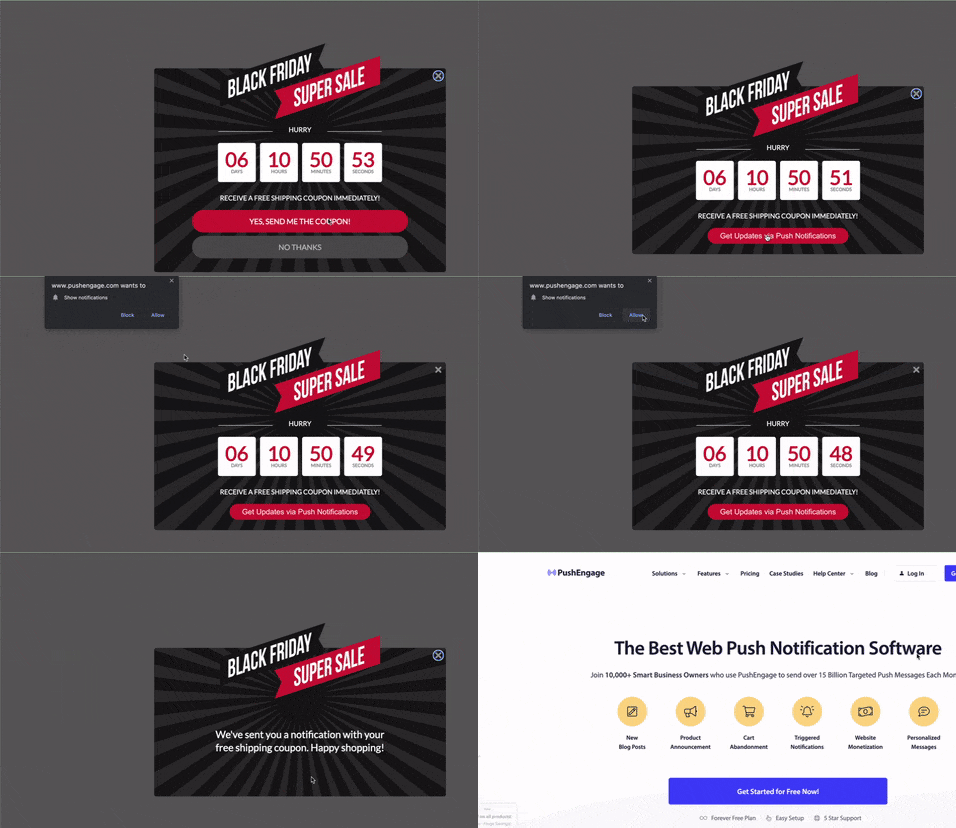
Ya da anlık bildirim abonelerini toplayan, tıklanabilir bir abone ol düğmesiyle açılış sayfaları oluşturabilirsiniz.
Adım #3: Anlık Bildirim Ayarlarını Yapılandırma
Ortak pazarlama anket bildirimleri göndermeden önce, birkaç küçük şeyi ayarlamanız gerekir. En yüksek dönüşüm sağlayan anket bildirimleri kişiselleştirilmiş ve hedeflenmiş olanlardır. Öyleyse, bunu nasıl yapabileceğinize bakalım.
Aboneleri Segmentlere Ayırma
Segmentler, hedeflenmiş anlık bildirim kampanyaları göndermek için gerçekten harika bir yoldur. Ve anlık bildirim pazarlama stratejinizin büyük bir parçası olmalıdır. Anlık bildirimlerin en havalı yanlarından biri, daha yüksek etkileşim oranları için dinamik segmentler oluşturabilmenizdir.
Coğrafi segmentasyon ile kolayca başlayabilirsiniz:
PushEngage kontrol panelinde, abonelerinizin bulunduğu ülkeleri Demografik Genel Bakış altında görebilirsiniz.
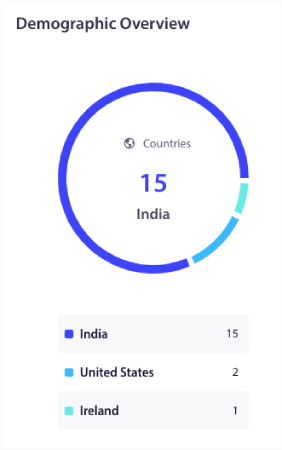
Coğrafi segmentler oluşturmak için bu ülke listesini kullanabilirsiniz. Coğrafi segmentasyon şunları yapmanıza olanak tanır:
- Daha iyi etkileşim için abonelerinizin saat dilimlerinde anlık bildirim kampanyaları gönderin
- Daha yüksek dönüşüm oranları için yalnızca o müşteri segmentiyle ilgili yerel teklifler çalıştırın
- Daha yüksek tıklama oranları için yerel dillerde kampanyalar oluşturun
Veya demografik segmentasyonu deneyebilirsiniz:
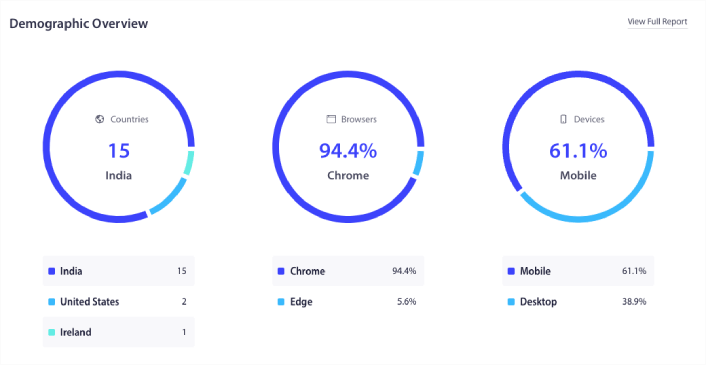
Bu verileri, abonelerinizin kullandığı tarayıcı ve cihaza göre demografik segmentler oluşturmak için kullanabilirsiniz. Bir anlık bildirim yayını veya kampanyası gönderdiğinizde, aşağı kaydırıp Özel Kitleye Gönder'e gidin ve hedefleme kurallarını ekleyin.
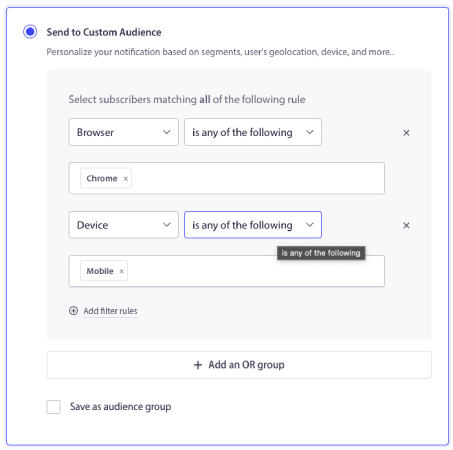
Coğrafi segmentasyonda olduğu gibi, hedef kitle demografisi için yeni bir segment oluşturmanıza gerek yoktur. Bunların hepsi varsayılan segmentlerdir. Davranışsal segmentler bile oluşturabilirsiniz. Kitle » Segmentler'e gidin ve Yeni Bir Segment Oluştur'a tıklayın:
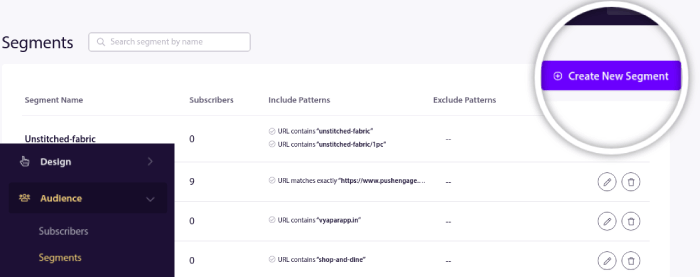
Ve abonelerinizi gezdikleri URL'lere göre otomatik olarak segmentlere ayıran bir kural oluşturun:
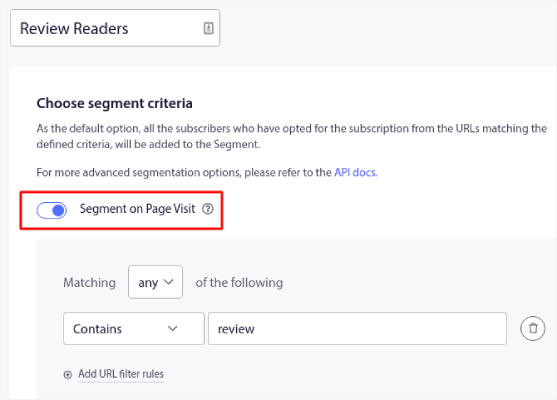
Örnekte, "örnekler" kelimesini içeren sitenizdeki URL'leri ziyaret ettiklerinde aboneleri otomatik olarak segmentlere ayıran "Örnek Segment" adlı bir segment oluşturduk. Burada istediğiniz herhangi bir anahtar kelimeyi kullanabilirsiniz.
Ve hepsi bu kadar değil. Hedefli anlık bildirim kampanyaları göndermek için otomatik olarak birden fazla segment oluşturabilirsiniz. Abonelerinizi otomatik olarak nasıl segmentlere ayıracağınız hakkındaki makalemize göz atın.
Etkileyici Anlık Bildirim İçeriği Oluşturma
Herhangi bir anlık bildirim kampanyası için şunu hatırlamalısınız:
Kişiselleştirilmiş Öneriler + Hikaye Odaklı Metin = Yüksek Etkileşim.
Kullanabileceğiniz tüm anlık bildirim metin örneklerinin bir listesi var. Gidip ona göz atın. Ve anlık bildirim kampanyaları oluşturma konusunda yardıma ihtiyacınız olursa, şablonlarımıza göz atmalısınız.
Kampanyalar » Anlık Bildirim Yayınları'na gidin ve Şablonlardan Seç düğmesine tıklayın:
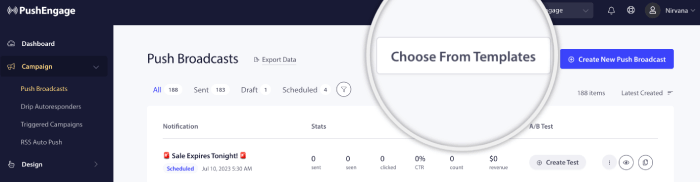
Ve kanıtlanmış kampanyalar kütüphanemizden bir anlık bildirim şablonu seçebilirsiniz:
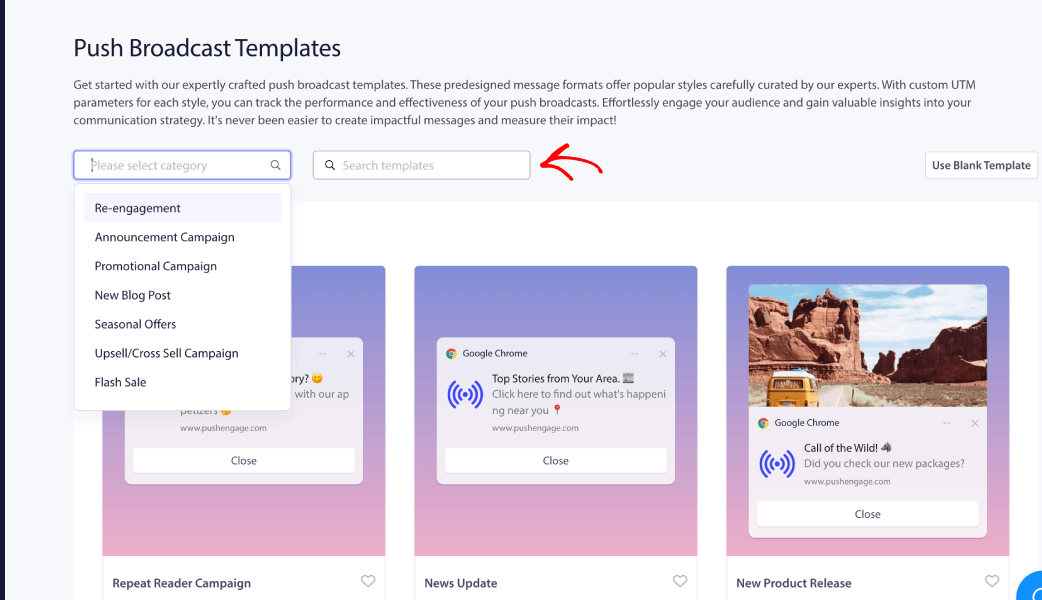
Daha fazla ilhama ihtiyacınız olursa, bu anket bildirim örnekleri listesine göz atmalısınız.
Yeniden Hedefleme Stratejileri
Dönüşümlerinizi artırmanın kolay bir yolu yeniden hedefleme anlık bildirim kampanyaları ayarlamaktır.
Bildirimi tüm abonelere göndermiyorsanız, bir Kitle Grubu oluşturmanız gerekir. Örneğin, herkese gönderilen yayına tıklamayan aboneleri hedeflemek istiyorsanız, yeni bir Kitle Grubu oluşturmanız gerekir.
WordPress kontrol panelinizde Kitle » Kitle Grupları bölümüne gidin ve Yeni Kitle Grubu Oluştur'a tıklayın:
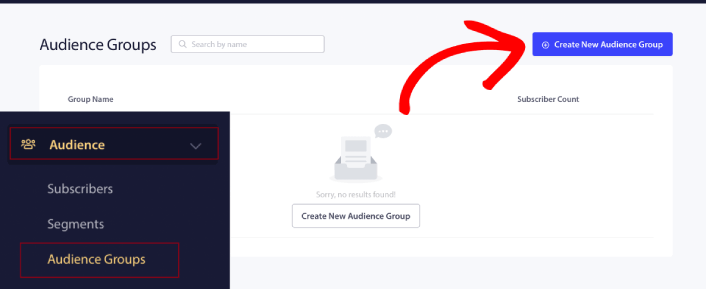
Son bildiriminize tıklayan aboneleri hedeflemek istiyorsanız, başka bir Kitle Grubu oluşturabilirsiniz.
Abonelerinizi Son tıklama tarihi önceki bildiriminizi gönderdiğiniz tarihten sonra VE önce bir sonraki bildiriminizi göndermek istediğiniz tarihten önce olarak filtreleyin:
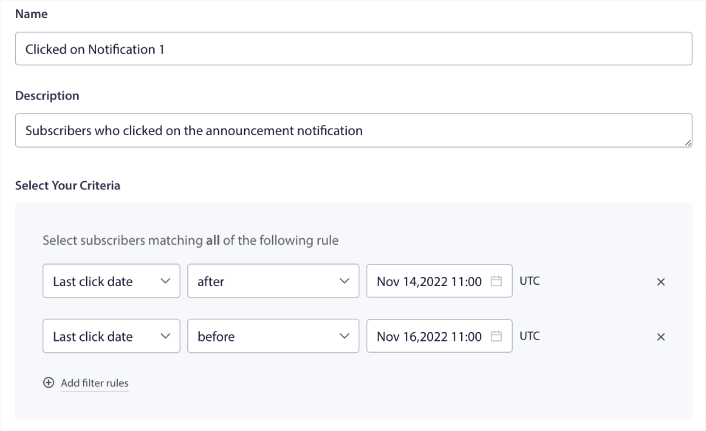
Filtre kuralları ekle'ye tıklayarak filtrenize VE kriterleri ekleyebilirsiniz. Bunun gibi bir filtre, çapraz satış anlık bildirimleri göndermek için harikadır. Bu Kitle Gruplarının sonucu daha ayrıntılı hedeflemedir. Böylece, dönüşüm oranlarınızı iyileştirmek için her seferinde farklı teklifler gönderebilirsiniz.
Hedefli Bağlı Tanıtımları İçin Anlık Bildirim Gönderme
Şimdiye kadar, doğru müşteri segmentlerini ve hedef gruplarını oluşturdunuz. Hatta işe yaradığı kanıtlanmış harika anket bildirim örnekleriniz ve şablonlarınız var. Yani şimdi yapmanız gereken tek şey tüm bu bileşenleri bir araya getirmek.
Ortak ürün ve hizmetleri doğru segmentlere ve hedef gruplara eşleştirdiğiniz basit bir egzersiz yapın. Ardından, yüksek dönüşüm sağlayan kampanyalar için her hedefleme seçeneği için bir kampanya ayarlamanız yeterlidir.
Tanıtımınız etrafında bir anlatı oluşturmak için damla anket kampanyaları bile ayarlayabilirsiniz. Bir web bildirimleri WordPress eklentisi kurarak başlayın.
PushEngage eklentinize giriş yapın ve Kampanya » Damla Otomatik Yanıtlayıcılar bölümüne gidin ve Damla Otomatik Yanıtlayıcı Oluştur'a tıklayın:
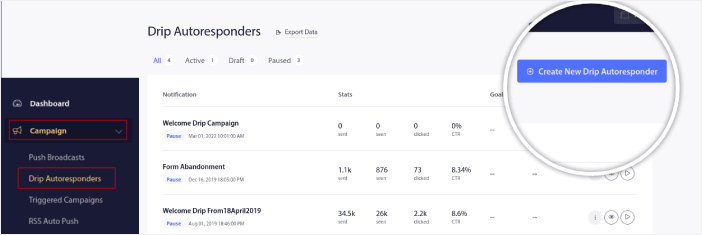
Başlamanız için gerçekten harika bir damla (drip) fikir, bir hoş geldin anlık bildirim kampanyasıdır. Farklı hedef kitle segmentleri ve grupları için farklı hoş geldin damlaları kurabilirsiniz. Başlamak için yardıma ihtiyacınız olursa, web sitesi hoş geldin mesajı örnekleri hakkındaki makalemize göz atmalısınız.
Hatta damla kampanyalarınızı öznitelikler kullanarak özelleştirebilirsiniz. Ancak bu daha gelişmiş bir seçenektir ve bunu sizin için kurması amacıyla bir geliştirici kullanmanızı öneririz.
İpucu: Otomatik olarak kayıp potansiyel müşterileri kurtarmak için form terk etme anlık bildirim kampanyaları kurun.
Uyumluluk Sorunlarını Çözme
GDPR'ye göre, bir AB sakini veya vatandaşının kişisel bilgilerini toplamadan veya işlemeden önce açık rıza almanız gerekir.
Şimdi, anında bildirimler e-postalara çok benzer ancak daha da kısıtlıdır. Yalnızca abonelerinize anında bildirim gönderebilirsiniz. E-postalardan farklı olarak, abone olmayan birine rastgele tek bir anında bildirim gönderemezsiniz.
GDPR'nin anında bildirim yazılımıyla buluştuğu yer, aboneleri toplamanızdır. Yani bir anlamda tüketici verilerini topluyorsunuz.
Elbette, bir e-posta onayına benzemez. Bir e-posta onayı ile e-posta adresini yakalamanız gerekir, ancak ÇOK daha fazla ek veri yakalayabilirsiniz. HubSpot'un bu örneğine bakın:
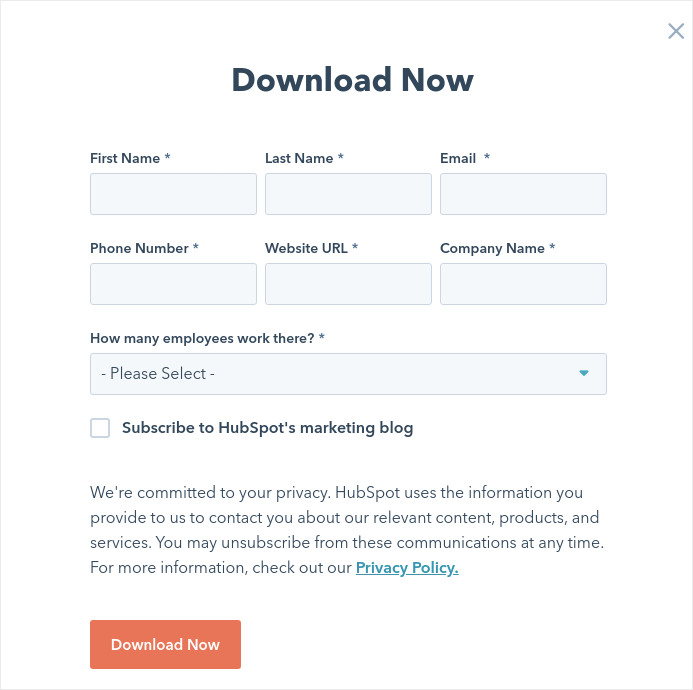
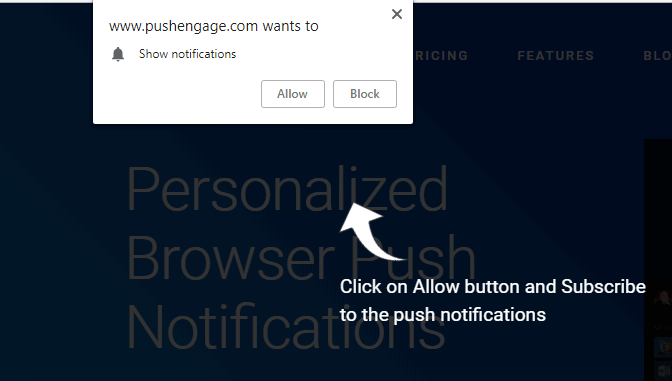
Ancak anında bildirimlerle, müşterinin cihazına özgü bir anahtar oluşturmak için cihaz ve IP adresi kombinasyonunu yakalarsınız. İnsanlar 'İzin Ver'e tıklayarak anında bildirimlerinizi seçtiğinde olan budur:
Ek olarak, PushEngage abonelerinizin coğrafi konumunu saklayabilir, böylece kişiselleştirilmiş anında bildirim kampanyaları oluşturabilirsiniz. Bu, abonelik sırasında ülkeyi, eyaleti ve şehri içerir.
Ancak muhtemelen anlayabileceğiniz gibi, bu tamamen rızaya dayanmaktadır. Birisi push bildirimlerini seçtiğinde, size pazarlama bildirimleri gönderme izni verir. Dolayısıyla, push bildirimleri, rıza öncelikli bir paradigma üzerinde çalıştıkları için tanım gereği zaten GDPR uyumludur.
Adım #4: Test Etme ve Optimizasyon
Anında bildirim A/B testi, anında bildirim kampanyalarınızdan elde ettiğiniz dönüşümleri optimize etme yöntemidir. Hangi tür sonuçları iyileştirmek istediğinize bağlı olarak anında bildirimlerinizin farklı bölümlerini optimize etmeyi seçebilirsiniz.
Anında bildirim A/B testi ile daha büyük soruyu yanıtlama zamanı. Bir anında bildirimde neleri bölünmüş test edebilirsiniz?
Anında bildirimler için en yaygın performans metrikleri şunlardır:
- Tıklama oranı: Bir anlık bildirimin tıklama oranı, abonelerinizin anlık bildiriminizi ne sıklıkla gördüğü ve ardından tıkladığıdır.
- Görüntülenme oranı: Bir anlık bildirimin görüntülenme oranı, bir abonenin anlık bildiriminizi ne sıklıkla aldığı ve süresi dolmadan önce gördüğüdür.
- Hedef dönüşümleri: Kampanyalarınız için hedefler belirleyebilir ve kampanyalarınız için hedef takibi kurabilirsiniz. Hedef dönüşümleri, hedefinize kaç kez ulaştığınızın bir ölçüsüdür.
Görüntülenme oranlarınızı artırmak için push bildirimlerinizde büyük bir resim kullanmak istersiniz. Bildirimlerinizde görseller kullanmak, onu anında daha çekici hale getirir.
Bir Anlık Bildirim Yayını Ekle
PushEngage kontrol panelinize gidin ve Campaign » Push Broadcasts bölümüne gidin ve Create a New Push Broadcast düğmesine tıklayın:

Content sekmesi altında, anlık bildirim içeriğinizi ekleyin:
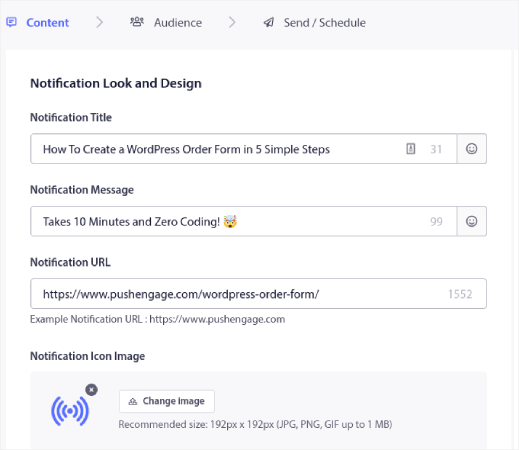
Bir Anlık Bildirim A/B Testi Ekle
Anlık bildiriminiz için anında bir A/B testi oluşturmak üzere A/B Testi Ekle bağlantısına tıklayın:
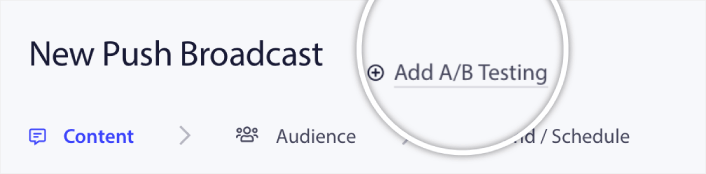
Ve ardından, anlık bildiriminizin iki sürümünü kolayca oluşturabilirsiniz:
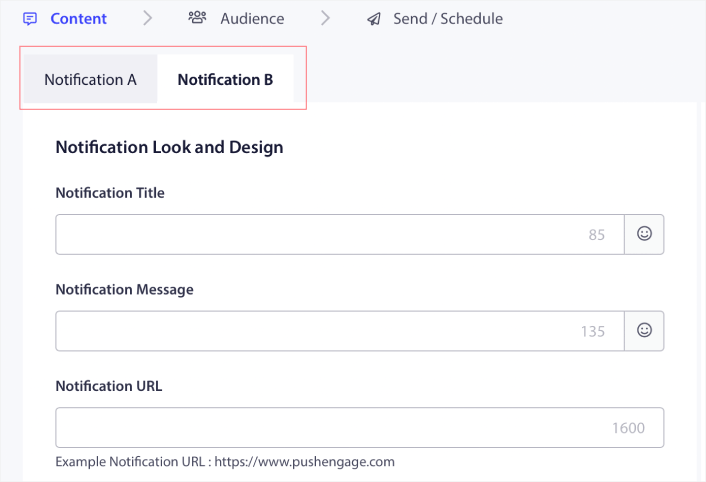
Ve B sürümünüzde istediğiniz herhangi bir şeyi değiştirebilirsiniz. Aşağı kaydırırsanız, anlık bildirim eylem düğmelerinizi bile bölerek test edebilirsiniz. İki sürümdeki içeriği ayarlamayı bitirdiğinizde, Kaydet ve Segmentleri Seç düğmesine tıklayın.
Burada özel bir kitle seçebilirsiniz:
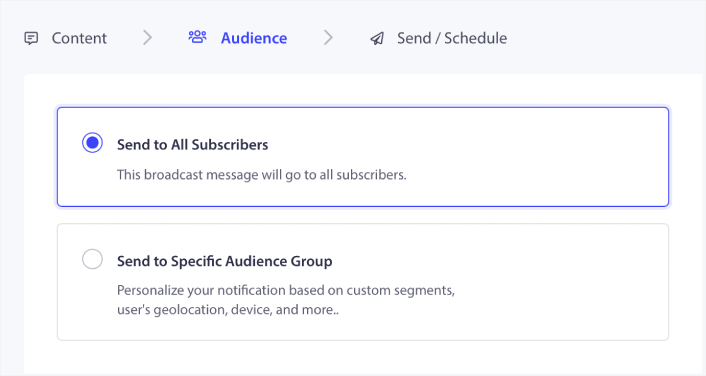
Veya tüm anlık bildirim abonelerinize gönderebilirsiniz. Bitirdiğinizde, Gönder/Zamanla düğmesine tıklayın.
Akıllı Bir A/B Testi Kurun
Bir Akıllı A/B Testinde, testi toplam kitlenizin bir bölümü üzerinde çalıştırırsınız. Kitlenizin %30'u üzerinde bir Akıllı A/B Testi çalıştırmanızı öneririz. Bu şekilde, kitlenizin %15'ine A sürümünü ve diğer %15'ine B sürümünü gönderirsiniz. Hangi anında bildirim daha iyi performans gösterirse, otomatik olarak kitlenizin geri kalanına gönderilir.
Yani, Akıllı A/B Testinde, kazanan anında bildirimi %50'sine göndermek yerine kitlenizin %85'ine gönderebilirsiniz. Bu, genel kampanya performansınızı anında iyileştirir ve kurulumu çok basittir.
Burada Akıllı A/B Testini etkinleştirebilirsiniz:
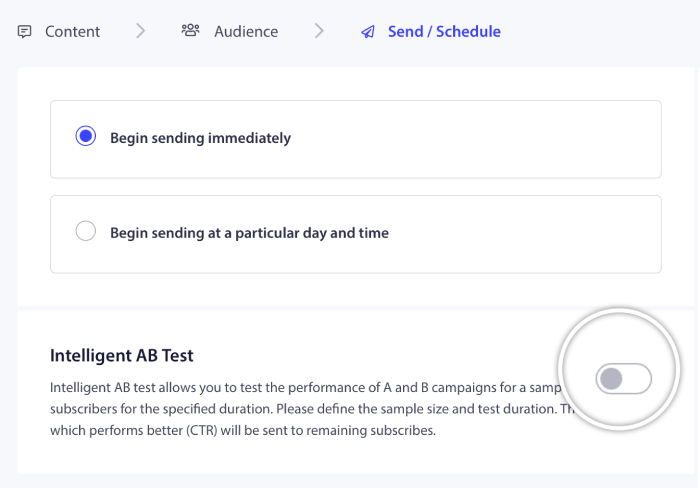
Akıllı A/B testini açın ve test için örneklem boyutunu ayarlayın.
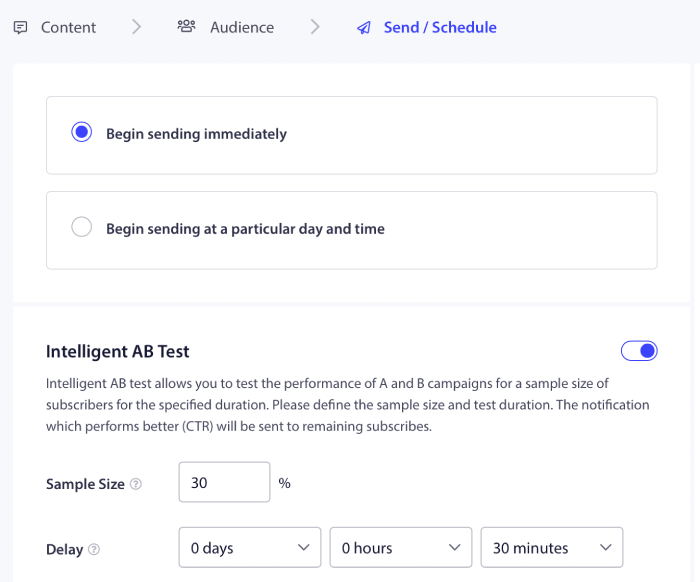
Ve anlık bildiriminizi zamanlayın veya gönderin. İşiniz bitti!
Adım #5: Anlık Bildirim Performansını Veri ve Metriklerle Analiz Etme
Her anlık bildirim kampanyası veya tek yayın, kendi analiz verilerine sahiptir. Bakmak isteyeceğiniz şeyler şunlardır:
- Tıklama oranı (CTR): CTR, anlık bildiriminizi gören ve ardından tıklayan kişilerin yüzdesidir.
- Hedef sayısı: Hedef sayınız, bildirimini tıkladıktan sonra istediğiniz eylemi gerçekleştiren kişilerin sayısıdır.
- Gelir: Anlık bildirim kampanyalarınız için, özellikle bir e-ticaret mağazası işletiyorsanız, bir gelir hedefiniz olmasını şiddetle tavsiye ederiz.
Bakabileceğiniz başka metrikler de var:
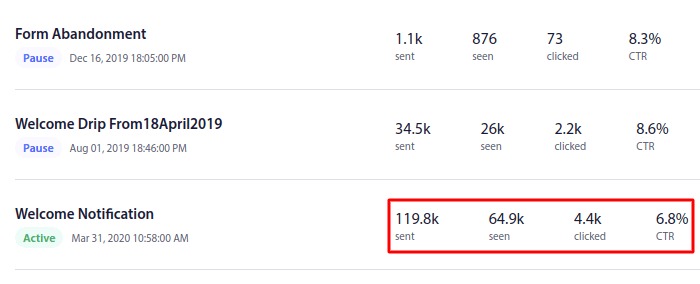
Anlık bildirim aboneliklerinin de çok özel analizleri vardır.
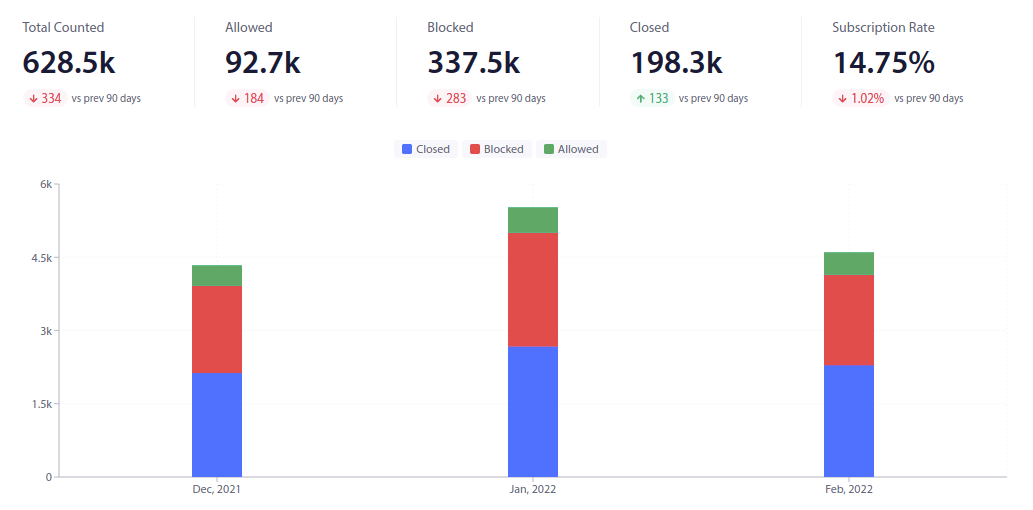
Odaklanmak istediğiniz şey abonelik oranınızdır. Tamamen yeni başlayan biriyseniz, diğer sayılar dikkat dağıtıcı olabilir. Bunu daha basit terimlerle açıklayalım.
Hedef Takibi ile kampanyalarınızın yatırım getirisini (ROI) takip edebilirsiniz. Örneğin, sitenizde yapılan satın alımlar için bir gelir hedefi belirlersek, anlık bildirimlerle hedef takibi şunları izleyebilir:
- Dönüşüm sayısı
- Ve dolar değeri
Her bir satış için bir anlık bildirim kampanyasından!
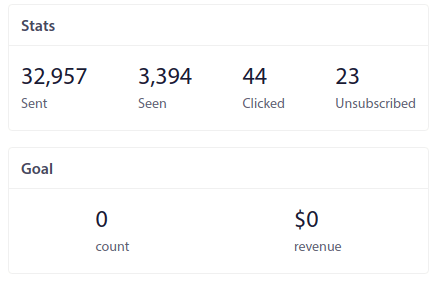
Bu rapora dayanarak kampanyalarınızın yatırım getirisini (ROI) hesaplayabilirsiniz.
İpucu: Kazanan kampanyaları bulmak için anlık bildirimlerinizi filtreleyebilir ve sıralayabilirsiniz. Bu, hedef kitleniz için neyin işe yaradığını anlamanın kolay bir yoludur.
Adım #6: Bağlı Pazarlama Anlık Bildirim Kampanyanızı Başlatma
Geriye kalan tek şey, affiliate marketing anlık bildirimlerinizi zamanlamak. PushEngage'de her yeni anlık bildirim oluşturduğunuzda, onu tarih ve saate göre zamanlama seçeneği sunulur:
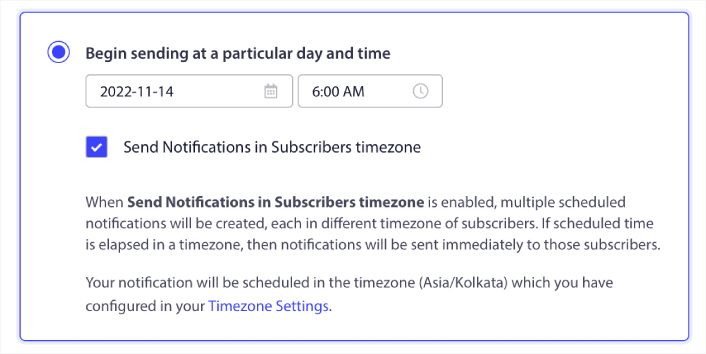
Hatta haftalık satışlar gibi tekrarlayan etkinlikler için tekrarlayan anlık bildirimler ayarlayabilirsiniz:

Tekrarlayan programın ne kadar süreyle çalışacağını seçmek isterseniz, tarihleri ayarlamak için Zamanlama Aralığı'nın yanındaki takvime tıklayın. Hepsi bu kadar!
Bağlı Pazarlama Anlık Bildirimleri Gönderdikten Sonra Ne Yapmalı?
Bu kadar, millet!
Bu makaleyi faydalı bulduysanız, aşağıya bir yorum bırakmayı unutmayın.
Hedefli anlık bildirimlerle başlamak göz korkutucu görünebilir. Ancak hedef takibi ve analitiklerine dikkat ederseniz, iyi olmalısınız. Daha da önemlisi, anlık bildirim kampanyalarının yardımıyla çok daha fazla kâr edeceksiniz. Başlamanıza yardımcı olacak birkaç harika kaynak:
- Gelirinizi 2 Katına Çıkarmak İçin Yeniden Hedefleme Anlık Bildirimleri Nasıl Kullanılır
- Anlık Bildirimlerinizi Nasıl Sıralarsınız ve Kazanan Kampanyaları Bulursunuz
- Anlık Bildirim Aboneli Listelerini Temizleme (Kolay)
- Otomatik Olarak RSS Anlık Bildirimleri Gönderme
- Bir Haber Sitesini Tanıtmak İçin Anlık Bildirimleri Kullanma
- Satışlarınızı 2 Katına Çıkarmak İçin Çapraz Satış Anlık Bildirimlerini Kullanma
- Göz Atma Terk Etme Anlık Bildirimlerini Kullanma (4 Adım)
Anlık bildirimlere yeni başlıyorsanız, PushEngage'i denemelisiniz. PushEngage, piyasadaki 1 numaralı anlık bildirim yazılımıdır. Ve kampanyalarınız güvende olacaktır.
Bu nedenle, henüz yapmadıysanız, bugün PushEngage ile başlayın!


