Sanningen är att du kan använda nästan alla olika kampanjer på varierande sätt för att växa nästan vilken verksamhet som helst. Men det kräver lite erfarenhet och expertis inom marknadsföring för att känna till dessa användningsfall.
Spännande nyheter: Vi har just uppdaterat vår Shopify-app-prissättning och inkluderat några spännande nya funktioner. Och det är enklare än någonsin att växa din e-handelsverksamhet till superöverkomliga priser!
Låter spännande? Det finns mycket att ta reda på här. Så, låt oss dyka in.
Vad är den nya Shopify-prissättningen för PushEngage?
Vi har nu två prissättningsplaner: En gratisplan och en tillväxtplan.
Gratisplanen är perfekt för nya e-handelsföretag som tjänar mindre än 100 USD/månad i vinst. Den fungerar också bra för att testa PushEngage-instrumentpanelen.
Tillväxtplanen, å andra sidan, börjar på endast 4 USD/månad för 5 000 prenumeranter och du kan uppgradera ditt konto upp till 100 000 prenumeranter. För allt utöver 100 000 prenumeranter kan du prata med oss för ett Enterprise-konto.
Men det finns mycket mer att ta reda på här. För det första tar vi betalt baserat på din prenumerantlista och inte på dina klick och skickade push-meddelanden. Och det är en stor skillnad eftersom du med PushEngage får:
- Förutsägbara kostnader: Med en prenumerantbaserad prissättningsmodell vet du exakt hur mycket du kommer att betala baserat på storleken på din prenumerantlista. Detta gör budgetering och kostnadsprognoser mycket enklare jämfört med en impressionsbaserad modell där kostnaderna kan fluktuera oförutsägbart.
- Fokus på kvalitet framför kvantitet: När du betalar per visning finns det ett incitament att skicka så många notiser som möjligt, även till oengagerade eller inaktiva användare, för att få mer värde. Med prenumerantbaserad prissättning skiftar fokus till att bygga en högkvalitativ, engagerad prenumerantbas snarare än att mätta användare med notiser.
- Bättre anpassning till mål: Huvudsyftet med push-notiser är att effektivt nå och engagera din prenumerantbas. Att betala per prenumerant anpassar prissättningsmodellen direkt till detta mål, snarare än att basera kostnader på den svårdefinierade metoden för visningar.
- Undvik överdebitering: Med intrycksbaserad prissättning kan du sluta med att betala för aviseringar som aldrig faktiskt ses eller engageras med av användare, vilket leder till slösade utgifter. Prenumerationsbaserad prissättning säkerställer att du bara betalar för din aktiva, samtyckande publik.
- Transparens och kontroll: Att veta att dina kostnader enbart baseras på ditt antal prenumeranter ger dig mer transparens och kontroll över dina utgifter för push-aviseringar, istället för att kostnaderna bestäms av en metrik (intryck) som kan påverkas av många externa faktorer.
Dessutom kan du också städa upp din prenumerantlista för att ta bort inaktiva prenumeranter för att betala mindre och maximera din sändningsvolym (mer om detta senare).
Hur man skapar Shopify Push-kampanjer
När du är klar med att installera PushEngage Shopify-appen, sök efter den i Shopifys sökfält:

Klicka på PushEngage Push Notifications för att gå till PushEngage-instrumentpanelen.

Här kan du skapa vilken e-handels push-aviseringkampanj som helst.
Hur man skickar högkonverterande Shopify-kampanjer
E-handelskampanjer är där Shopify-integrationen verkligen lyser. Det är superenkelt och lätt. Gå till din PushEngage-instrumentpanel och gå till Kampanjer » Utlösta kampanjer:
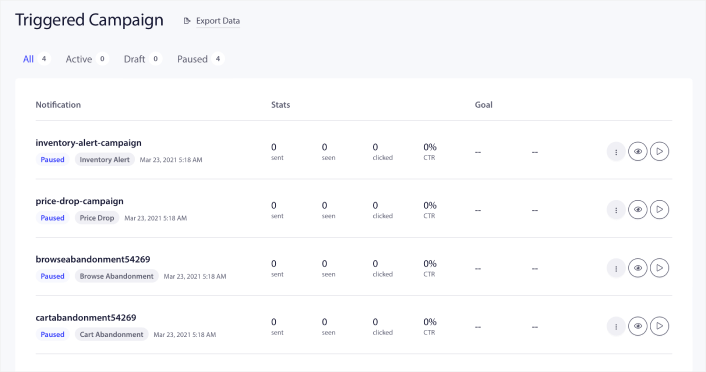
Du kommer att se att ditt konto levereras med 4 förbyggda utlösta kampanjer som standard:
- Meddelande om prissänkning
- Lagerpåminnelse
- Kampanj vid övergiven surfning
- Kampanj för övergiven kundvagn
Allt du behöver göra är att redigera varje kampanj och fylla i Innehåll-avsnittet och aktivera dem. Dina förbyggda kampanjmallar levereras redan med ganska högkonverterande texter. Men vi ber alla våra kunder att redigera innehållet för att passa deras marknadsföringsstrategi.
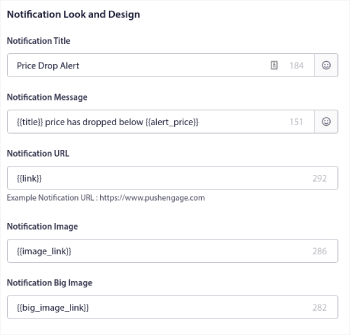
När du klickar på något av push-meddelandena i sekvensen kan du anpassa meddelandet i vilken grad du vill:
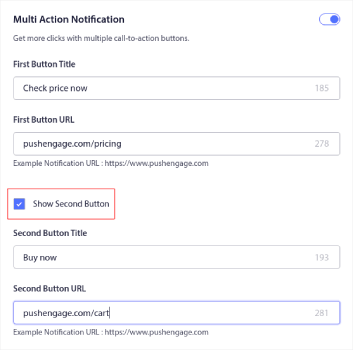
Du kan också lägga till flera knappar för en smidigare konvertering:
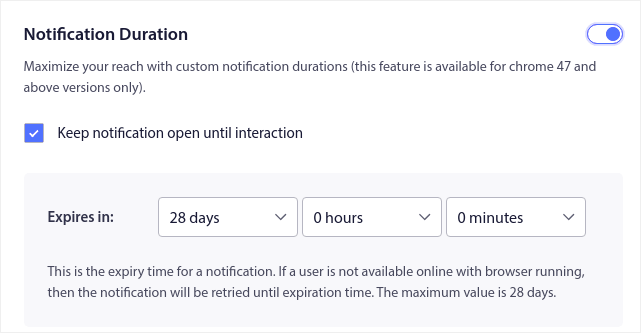
Och du kan ställa in en anpassad aviseringstid under Aviseringstid:
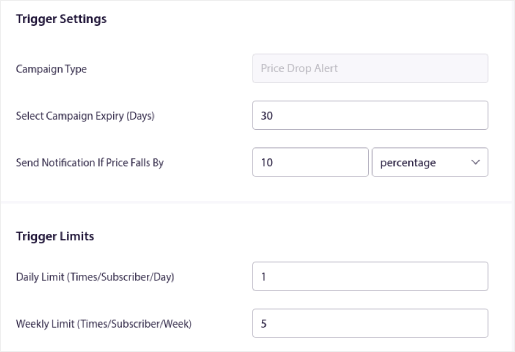
När du är klar med Innehåll-fliken, klicka på Utlösningsinställningar-knappen och konfigurera när dina push-aviseringar skickas.
Denna process är densamma för alla e-handelskampanjer. Allt du behöver göra är att anpassa din kampanj och aktivera den. Inga API-nycklar, inga manuella kodintegrationer och inga hinder för att komma igång på 10 minuter eller mindre!
OBS: För din kampanj för övergiven kundvagn får du också en förbyggd intäktsspårare som rapporterar konverteringar och intäkter som genereras från din kampanj. Du behöver inte göra något för att aktivera den här funktionen. Kör bara din kampanj för övergiven kundvagn.
Hur man skickar push-sändningar
Ibland vill du kanske börja med att skicka en push-sändning för att tillkännage specifika tidsbegränsade erbjudanden och kampanjer. Gå till Kampanjer » Sändning och klicka på Skapa ny push-sändning:

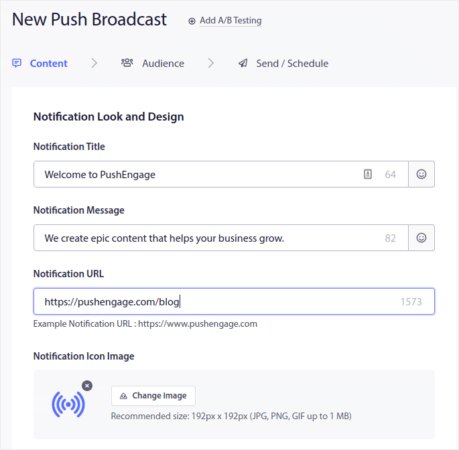
Skapa sedan en ny push-avisering att skicka. Anpassa innehållet under Innehåll-fliken:
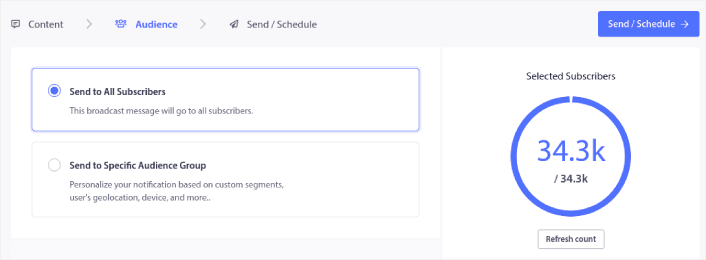
Välj sedan din målgrupp under Målgrupp:
Och slutligen, under Skicka/Schemalägg, kan du schemalägga aviseringen som en återkommande push-avisering:

Du kan enkelt skapa vilket schema du vill för dina push-notiser inklusive anpassade dagar, datum och tider.
Hur man ställer in RSS Auto Push-kampanjer
Att ständigt skapa innehåll och hantera en blogg är hårt arbete. Men om du driver ett seriöst företag vet du att det inte räcker att bara skapa innehåll. Du måste också kunna marknadsföra ditt innehåll. Men hur skalar man e-handelsintäkterna genom att automatiskt marknadsföra innehåll?
Och pushnotiser är ett utmärkt sätt att skaffa prenumeranter på ett kostnadseffektivt sätt. Det som gör pushnotiser så bra som ett marknadsföringsverktyg är att de kan automatiseras helt. Det är där RSS pushnotiser kommer in i bilden.
Gå till din PushEngage-instrumentpanel och navigera till Kampanj » RSS Auto Push:
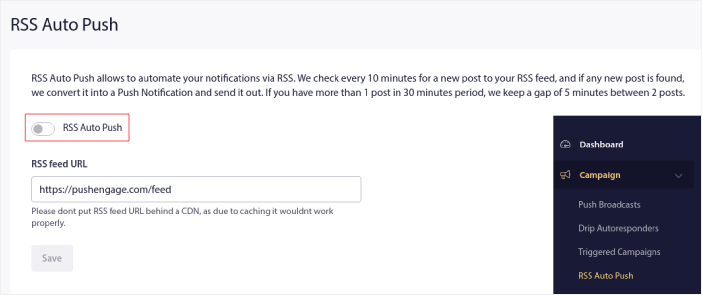
Klicka på växlingsknappen för att aktivera RSS Auto Push och klistra in din RSS-flödes URL. När det är gjort, klicka på Verifiera RSS för att bekräfta att ditt RSS-flöde har accepterats. När du är klar, tryck helt enkelt på Spara.
Nu, varje gång du publicerar ett nytt inlägg, kommer dina push-notisprenumeranter automatiskt att få en push-notis om ditt nya innehåll.
Hur man minskar dina prenumerantkostnader i Shopify
Du kan minska kostnaderna för din PushEngage-plan i Shopify genom att radera dina inaktiva prenumeranter. Eftersom du betalar per prenumerant ville vi också ge dig möjlighet att ta bort oönskade prenumeranter så att du inte blåser upp dina kostnader utan anledning.
Gå helt enkelt till PushEngage-instrumentpanelen och gå till Målgrupp » Prenumeranter för att få samma alternativ. Du kan ta bort prenumeranter som inte har mottagit, visat eller klickat på dina notiser under ett valfritt antal dagar.
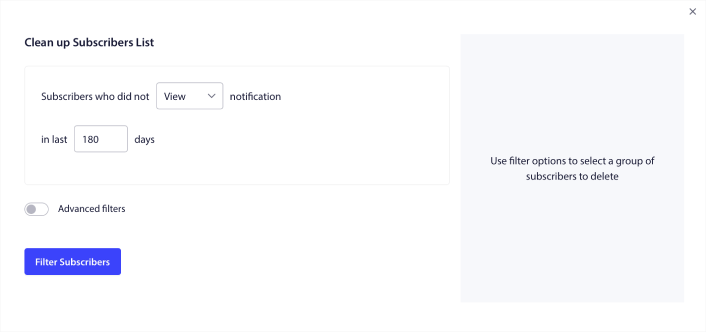
Vi rekommenderar att radera prenumeranter som inte har sett dina meddelanden på 240 dagar. Du kan också använda avancerade filter för ännu mer specifika borttagningar.
Avancerade filter inkluderar:
- Attribut: Radera prenumeranter med specifika attribut som plattform eller annan identifierande data.
- Segment: Radera ett helt segment eller en uppsättning segment
- Webbläsare: Radera prenumeranter från en specifik webbläsare.
- Enhet: Radera prenumeranter som interagerar från stationära eller mobila enheter.
- Land: Radera prenumeranter från ett specifikt land.
- Stat: Radera prenumeranter från en specifik stat.
- Stad: Radera prenumeranter från en specifik stad.
- Prenumerationsdatum: Rikta in dig på de som prenumererade före eller efter ett visst datum. Perfekt för att återinrikta nya prenumeranter som inte är engagerade.
- Senast skickat: Rikta in dig på prenumeranter som senast mottog ett meddelande före en viss tidsgräns.
- Senast visad: Rikta in dig på prenumeranter som senast såg ett meddelande före en viss tidsgräns.
- Senast klickad: Rikta in dig på prenumeranter som senast klickade på ett meddelande före en viss tidsgräns.
- Totalt antal skickade: Rikta in dig på prenumeranter vars totala antal mottagna meddelanden under livstiden är mindre än eller lika med ett visst antal. Perfekt för att rikta in sig på prenumeranter som inte ens längre mottar dina push-meddelanden
- Totalt antal visningar: Rikta in dig på prenumeranter vars totala antal visade meddelanden under livstiden är mindre än eller lika med ett visst antal. Avsett för att rikta in sig på prenumeranter som mottar dina meddelanden, men inte ens kollar på dem.
- Totalt antal klick: Rikta in dig på prenumeranter vars totala antal klickade meddelanden under livstiden är mindre än eller lika med ett visst antal. Filtrera prenumeranter som inte klickar på dina meddelanden alls.
- Prenumerant-hash: Avsedd att ta bort en specifik prenumerant fr extit{å}n din lista. Det extit{är} liknande att ta bort ett e-postmeddelande fr extit{å}n en lista.
Individuellt kanske dessa filter inte verkar logiska. Men du kan kombinera flera filter för att välja specifika målgruppsmedlemmar. Låt oss till exempel säga att du vill ta bort prenumeranter som har varit prenumeranter i över ett år men aldrig klickat på dina aviseringar. Du kan kombinera filtret Prenumerationsdatum med filtret Totalt antal klick.
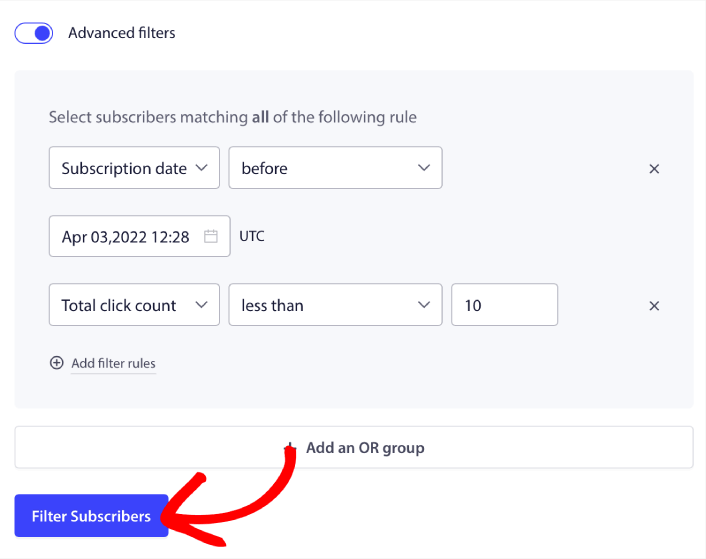
Och om du vill filtrera flera typer av inaktiva användare kan du klicka på knappen + Lägg till en ELLER-grupp och rikta in dig på flera typer av användare.
Hur man skapar en widget för prenumerationshantering i Shopify
Prenumerationshanteringswidgeten är en unik funktion i PushEngage som låter dina prenumeranter och webbtrafik välja vilken typ av notiser de vill ta emot.
Gå till PushEngage-instrumentpanelen och gå till Design » Widgets och aktivera Prenumerationshanteringswidgeten:

Klicka på knappen Redigera widget för att anpassa din widget. Börja med att anpassa utseendet på din widget så att den matchar ditt varumärkes designtema under Utseende och design:
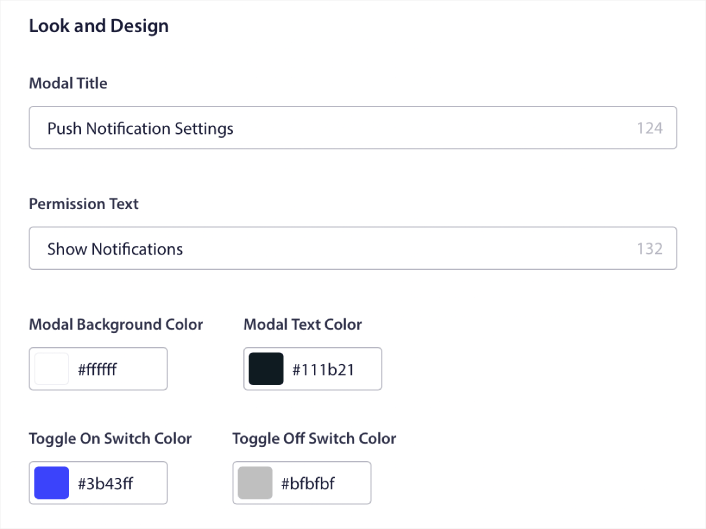
Du kan skapa en helt anpassad popup-modul som stannar kvar även när dina besökare inte prenumererar från din standardpopup-modul. Om storleken på popup-utlösarknappen känns fel för dig kan du även anpassa den under Utlösarknapp:
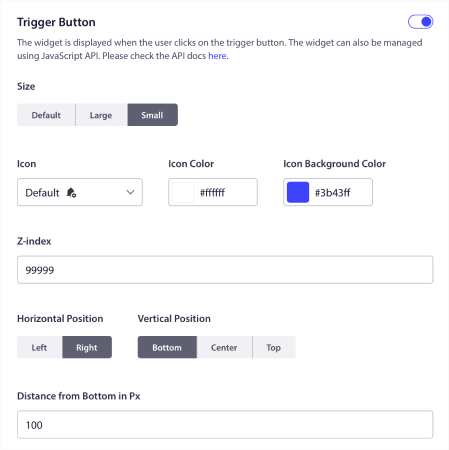
Och det coolaste är att du också kan välja specifika sidor där widgeten ska visas under Regler för visning av utlösarknapp:

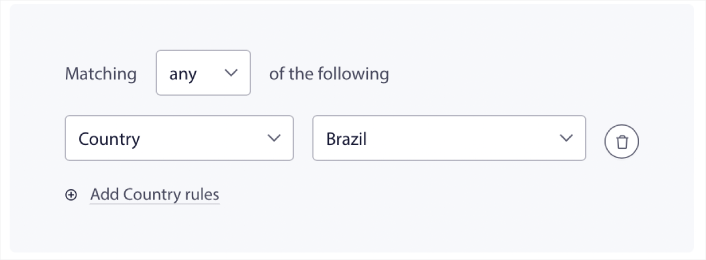
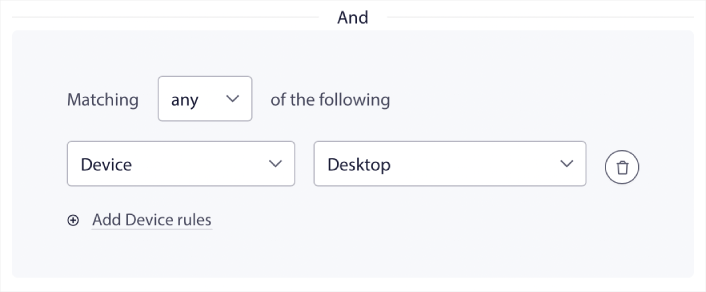
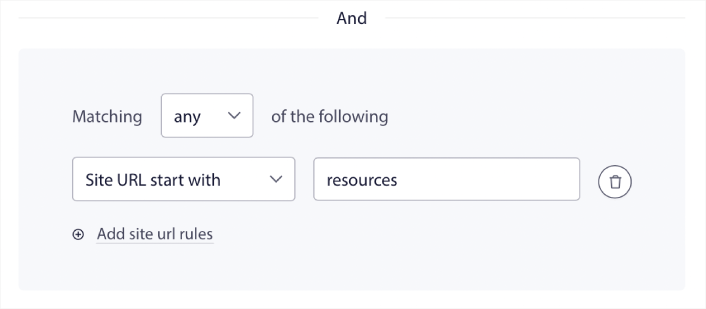
Som standard visas knappen på alla sidor. Men du kan skapa anpassade målinriktningsregler för att visa specifika versioner av widgeten genom att rikta in dig på specifika:
Platser:
Enheter:
Och URL:er på din webbplats:
För att ta saker till nästa nivå kan du också låta dina prenumeranter välja vilka typer av notiser de vill ta emot under Segmentinställningar:
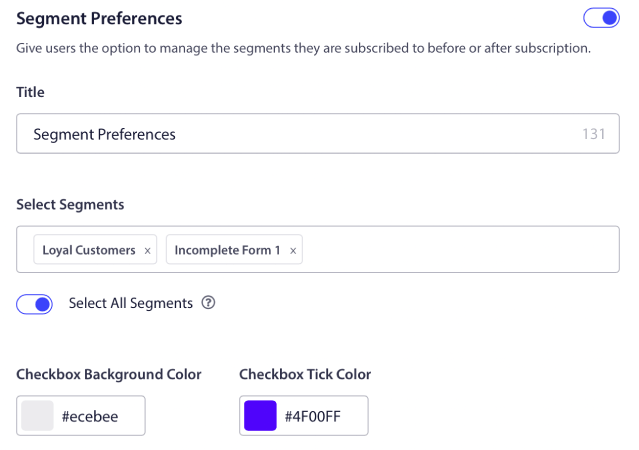
Om du aktiverar Välj alla segment, kommer dina prenumeranter automatiskt att läggas till i alla valda segment som standard:
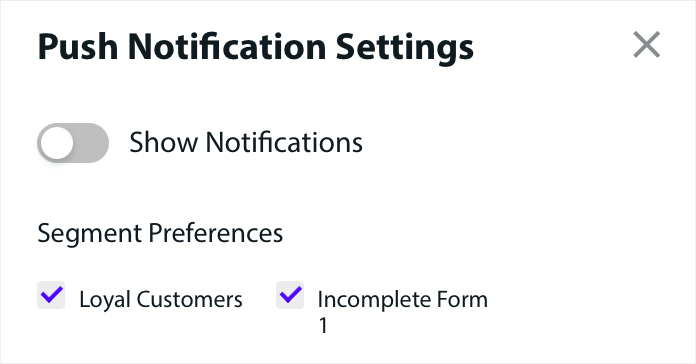
Detta är ett fantastiskt sätt att bygga en retargeting-lista.
Om du kör några e-handels pushnotiser på din webbplats, kommer många av dem att vara utlösta pushnotiser. Detta inkluderar:
- Push-aviseringar för övergivna webbläsningar
- Push-aviseringar för övergiven kundvagn
- Prisfallsmeddelanden
- Meddelanden om åter i lager
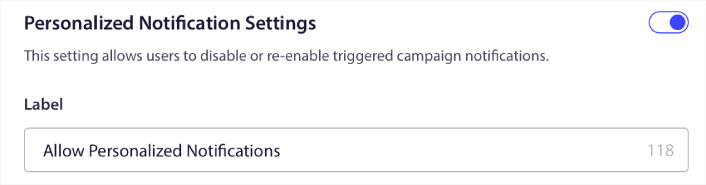
Och till och med anpassade utlösta pushnotiskampanjer. Med vår prenumerationshanteringswidget kan du nu låta dina prenumeranter välja om de vill se personliga notiser:

Aktivera bara alternativet under Inställningar för personliga notiser:
Hur man växer din verksamhet med app-push-notiser
Om du också driver en Android- eller iOS-app eller till och med en webbapp för din butik, kan du öka din försäljning ännu snabbare med hjälp av pushnotiser för mobilappar och pushnotiser för webbappar.
OBS: Du kan lägga till push-notiser för mobiler i dina Android- och iOS-appar med hjälp av PushEngages kraftfulla SDK:er. Det finns inget behov av att bygga och hantera ett gränssnitt för att skicka och hantera dina kampanjer. Och du kan göra allt från samma instrumentpanel.
Pushmeddelanden för mobilappar är meddelanden som skickas från en app direkt till en användares mobila enhet, och ger uppdateringar, påminnelser eller personligt innehåll, även när appen inte aktivt används. De förbättrar användarengagemanget genom att leverera aktuell och relevant information direkt till användarens fingertoppar.
Naturligtvis är detta bara användbart för dig om du har en app eller håller på att lansera en mobilapp för din verksamhet i framtiden. Om du har tvekat om att lansera en app för att växa din verksamhet, kan detta vara rätt tidpunkt för dig. En av de största utmaningarna som appar står inför är kundengagemang. Och PushEngage kan nu hjälpa dig att helt ta bort den smärtan.
För djupare, mer frekvent engagemang är app-pushmeddelanden att föredra. För tillfälliga uppdateringar eller varningar är webb-pushmeddelanden effektiva. I detta syfte erbjuder kampanjer med app-notifikationer bättre rich media och interaktivt innehåll. App-pushmeddelanden förlitar sig på data som webb-pushmeddelanden helt enkelt inte kan använda mestadels av tiden.
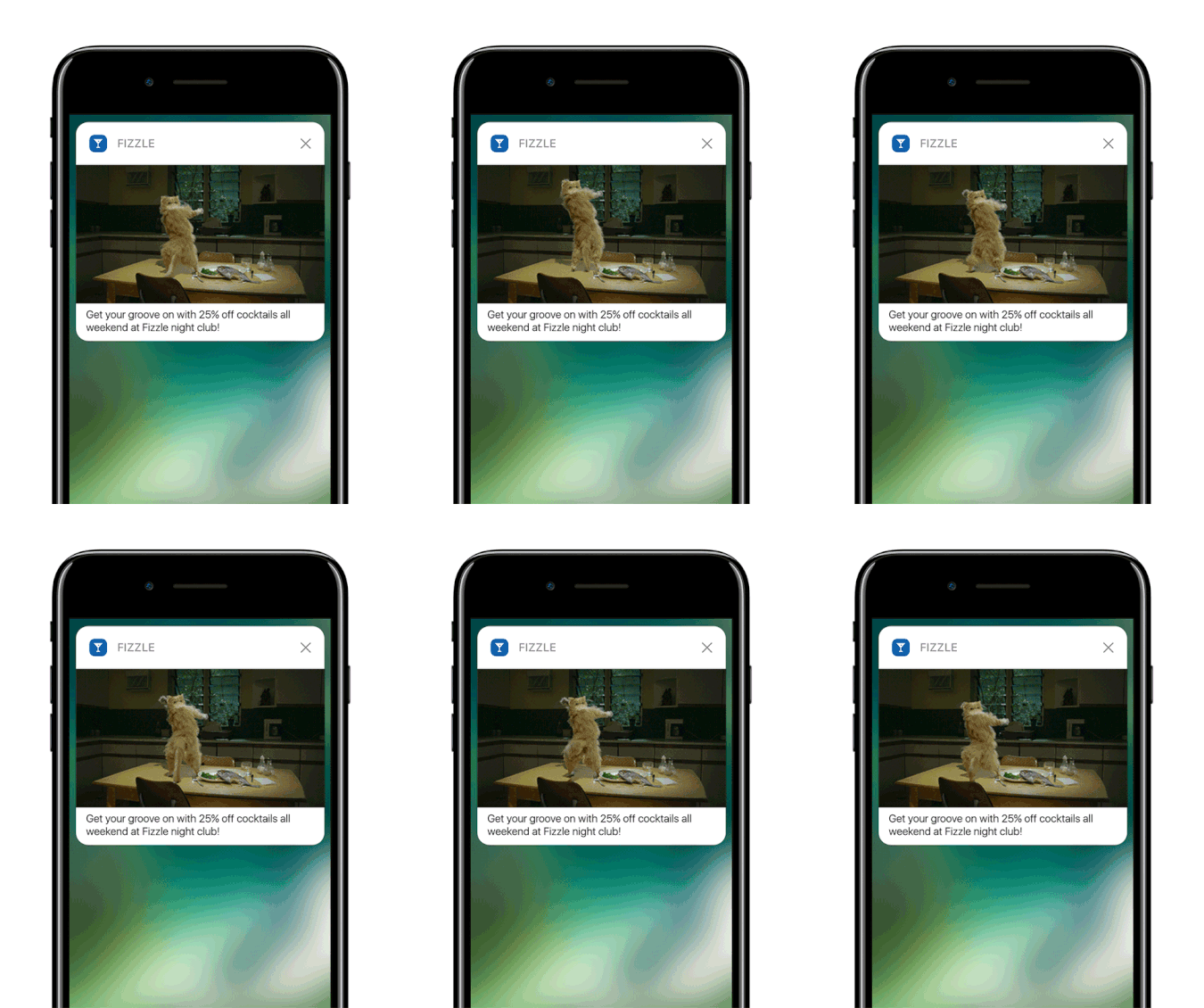
För att vara rättvis: Du kan skapa personliga webb-pushmeddelanden. Men app-push kan gå MYCKET djupare in i personalisering.
Push-meddelanden för mobilappar går utöver att bara vara ett verktyg för kommunikation; de är en kraftfull mekanism för att förbättra användarupplevelsen, driva engagemang och bygga en personlig koppling med användarna.
De möjliggör en nivå av interaktivitet och personalisering som avsevärt kan bidra till en apps effektivitet när det gäller att behålla och engagera sina användare.
- Förbättrat användarengagemang:
- Kontextuell relevans: App-pushmeddelanden kan vara otroligt kontextkänsliga. De använder användardata som plats, beteende och preferenser för att skicka aktuella och relevanta meddelanden. Till exempel kan en träningsapp skicka ett motiverande meddelande precis när du vanligtvis går ut och springer.
- Beteendebaserade utlösare: Aviseringar kan utlösas av specifika användaråtgärder eller underlåtenheter. Detta gör dem mycket effektiva för att uppmuntra önskade beteenden, som att påminna en användare om att slutföra ett köp som de lämnat i sin kundvagn.
- Rik användarupplevelse:
- Multimedia-integration: Till skillnad från grundläggande textmeddelanden kan appaviseringar inkludera bilder, ljud och till och med video. Denna integration av rik media gör dem mer engagerande och njutbara.
- Interaktiva element: Vissa aviseringar tillåter användare att interagera direkt från låsskärmen eller aviseringsområdet. Detta kan inkludera åtgärder som att svara på ett meddelande, gilla ett inlägg eller till och med styra musikuppspelning.
- Personlig kommunikation:
- Skräddarsytt innehåll: Genom att använda dataanalys kan appar skicka aviseringar som är mycket personliga. Detta kan vara så enkelt som att använda ditt namn eller så komplext som att rekommendera produkter baserat på din webbhistorik.
- Segmentering och inriktning: Appar kan segmentera sina användare baserat på olika kriterier och skicka riktade aviseringar. Detta säkerställer att användarna får aviseringar som är relevanta för deras intressen och behov.
- Kundlojalitet och retention:
- Regelbundet engagemang: Genom att hålla användarna informerade och engagerade kan appaviseringar avsevärt förbättra kundretentionen.
- Lojalitetsbelöningar: Aviseringar är ett effektivt sätt att informera användare om lojalitetsprogram, specialerbjudanden och belöningar, vilket därigenom ökar kundlojaliteten.
- Analytiska insikter:
- Användarsvarsdata: Appar kan spåra hur användare interagerar med aviseringar, vilket ger värdefulla insikter om användarnas preferenser och beteenden.
- A/B-testning: Dessa data kan användas för att A/B-testa olika aviseringsstrategier för att se vad som fungerar bäst, vilket leder till mer effektiv kommunikation.
- Drifteffektivitet:
- Automatiserad kommunikation: Aviseringar kan automatiseras baserat på vissa kriterier, vilket minskar behovet av manuell intervention och säkerställer tidig kommunikation.
Genom att utnyttja användardata och beteende kan push-meddelanden för appar transformera hur företag interagerar med sina kunder, vilket gör kommunikationen mer relevant, aktuell och effektiv. Denna djupgående engagemang och personalisering är vad som skiljer push-meddelanden för appar åt och gör dem till en värdefull tillgång i den digitala kommunikationsstrategin för alla mobilapplikationer.
Och om du behöver en mer detaljerad guide bör du kolla in vår dokumentation om hur man ställer in push-notiser för iOS-appar och hur man ställer in push-notiser för Android-appar.
Vad mer?
Vi vet att det är hårt arbete att växa ett företag. På PushEngage strävar vi alltid efter att förbättra vår produkt och din upplevelse. Vi lanserade den här nya funktionen för att hjälpa dig att få ännu mer värde ur din PushEngage-prenumeration.
Tack så mycket för att du läste detta meddelande.
Om du har några frågor finns vårt Customer Success-team här för att hjälpa dig. Starta bara en konversation på Live Chat eller kolla in vår kontaktsida.
Och tack för att du använder PushEngage. Oavsett om du använder gratisversionen eller Enterprise-versionen är du lika viktig för oss. De nya kodavsnitten är avsedda att hjälpa dig att lyckas och vi önskar dig allt gott.
Vi kommer med ännu fler episka integrationer för att göra ditt liv enklare. Så låt oss veta vad du tycker i kommentarerna nedan. Du kan begära specifika integrationer som du vill se i framtiden.
Och om du inte redan har gjort det, kom igång med PushEngage idag!


