Push Notification Performance Metrics

5 Push Notification Performance Metrics to Measure Success

What push notification performance metrics should you use to measure success?

Are you even looking at the right numbers? Also, how do you benchmark your performance for push notification campaigns?

Using data to make marketing decisions is a great way to keep growing your business. 

But there’s so much data to look at. 

Where do you even start?

Don’t worry, you’re not the only one asking these questions. In this article, we’re going to help you narrow your data using 5 concrete push notification performance metrics to look at.

Sounds good? Awesome.

让我们开始吧!

5 Push Notifications KPIs to Help Your Business Grow

The first step to setting push notification performance metrics is to have real goals. Otherwise, none of this matters.

For eCommerce push notifications, your goal could be to generate more revenue. In that case, you should probably check out our article on eCommerce push notification examples.

Again, it all depends on what you’re expecting to achieve from your push notifications.

Maybe you’d like to optimize a particular revenue stream such as abandoned cart recovery

In such cases, a specific monthly revenue is definitely a good goal to have. But that’s not all you can do with your push notifications.

For instance, if you’re running a website that doesn’t directly sell things, you may want to consider other goals such as gaining new users or getting more monthly traffic. The good news is that push notifications cost very little.

In this article, we’ll even show you how to check these KPIs on PushEngage. PushEngage is the #1 push notification software in the market. But these KPIs will work no matter what vendor you’re using.

Pro-Tip: Assign a number to all your goals. If your goal is to get more traffic, try to have a specific number such as, “I want 1,000 more monthly visits to my website from push notifications”.

Now that you have a specific goal in mind, let’s check out the push notification performance metrics to look at.

#1. Push Notification Opt-In Rate

The opt-in rate for your campaigns is the number of people who opted for push notifications out of all the people who saw your opt-in popup.

In simpler terms:

Opt-in rate = number of subscribers/number of unique visitors

If your opt-in rate is low, then it’s a good indicator that there may be something wrong with your opt-in popup. Here’s a good example of a high-converting opt-in for your push notifications:

Large Safari Opt-In Example

But the bigger question right now is… 

What’s a low opt-in rate?

If your opt-in rate is below 5%, you need to start optimizing your subscription opt-in right away.

For Android or iOS app push notifications, 60% opt-in rates are pretty standard. Although, you will get a higher opt-in rate for Android than for iOS.

Web push is a different story. Anything higher than 6% is good. This is more than 3x the typical email subscription rate.

那么,你能做什么?

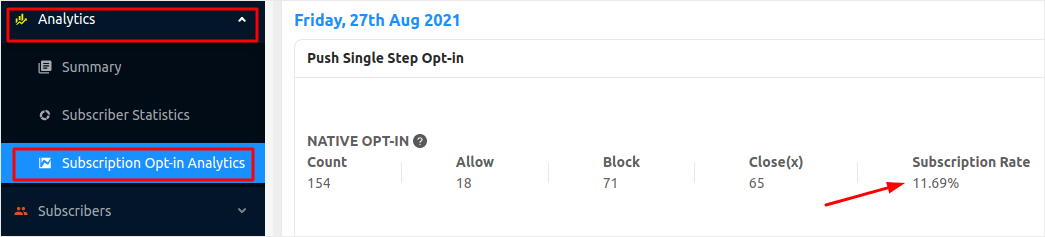
前往您的PushEngage仪表板,然后转到分析 » 订阅选择加入分析

Push Notification Performance Metrics

了解您的选择加入率后,请查看我们的高转化率选择加入列表,以优化您的订阅选择加入。

#2. 推送通知查看率

查看率是指在收到推送通知的总人数中,看到您通知的人数。查看意味着注意到您已收到推送通知。这与点击推送通知不同。

不过,查看率是推送通知性能中一个相当重要的指标。

简单来说就是:

查看率 = 看到通知的人数/收到通知的人数

推送通知的良好查看率在 45% – 90% 之间。电子邮件的等效指标是打开率,其中 15% – 30% 是相当标准的。

您可以直接从 PushEngage 仪表板查看推送通知的查看率:

PushEngage View Count

如果您的推送通知查看率低于 45%,您真的需要查看我们的推送通知最佳实践指南。 

#3. 推送通知点击率

推送通知点击率或点击率是指看到并点击您的推送通知以查看您内容的用户的百分比。

对于大多数网站来说,这是最重要的推送通知性能指标之一。

对于网页推送广告系列,良好的点击率 (CTR) 为 12%。如果您包含自动推送通知,可以将点击率提高到 15%。在最佳情况下,如果您使用富推送通知,您的点击率可能会提高 3%。

同样,这会因您所在的行业而异。高度定位和交易性广告系列可以获得高达 30% 的点击率。但这对几乎所有行业来说都极其罕见。 

大多数情况下,您应该争取所有推送通知广告系列至少 5% 的点击率。

如果您做得比这更差,那么是时候进行一些快速技巧了。

首先使用这个推送通知字符限制备忘单。通过发送字符数最优的推送通知,您可以极大地提高每个通知的影响力。

此外,是时候重新评估何时发送通知了。查看此关于发送推送通知的最佳时间的指南。

#4. 推送通知收入

是的,收入主要是目标。

但它也可以是一个很好的 KPI。特别是考虑到推送通知分析可以显示每个通知产生的收入。

如果您经营电子商务业务,收入就是您的北极星。

在 PushEngage 中,您只需前往仪表板 » 通知 » 已发送通知即可查看收入:
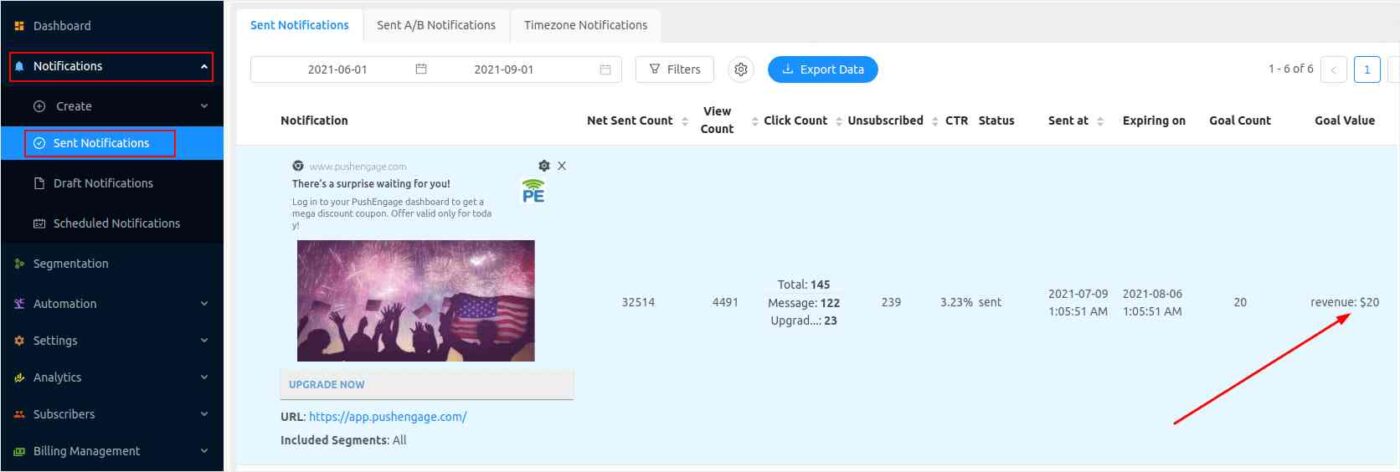
PushEngage Revenue

您始终可以使用销售促销创意来增加收入。

#5. 推送通知活跃订阅者

Active subscribers are the number of push notification subscribers who actively check and/or open your notifications. Of course, 100% of your subscribers won’t open absolutely every notification you send out.

But you should keep an eye on your subscribers.

In PushEngage, all you have to do is log in to your dashboard to see how many active subscribers you have:

Active Push Notification Subscribers

Remember: Having a huge list of subscribers is useless if they don’t really want to see your notifications.

One of the biggest factors that go into developing an active subscriber base is engagement. If you’re struggling with this, you should check out our list of website engagement tools.

At the same time, you should also be deleting inactive subscribers from your list. Thankfully, PushEngage allows you to do this is just a few clicks. Here’s how you can remove inactive subscribers and keep your list healthy.

总结

各位,本次分享就到这里。

If you’re struggling to get the most use out of your push notifications, you should get in touch with our Customer Success team. We can help you with all things related to push notifications.

We’ll even help you set up your campaigns.

PushEngage is the best push notification software in the world. So, it’s a perfect fit for seasoned marketers and complete beginners alike.

如果您还没有,请立即 开始使用 PushEngage

添加评论

我们很高兴您选择留下评论。请记住,所有评论都将根据我们的隐私政策进行审核,并且所有链接都将是 nofollow。请勿在姓名字段中使用关键字。让我们进行一次个人化且有意义的对话。

在访客离开您的网站后与他们互动并挽留他们

通过难以忽略的推送通知,增加每次网站访问的价值。

  • 永久免费套餐
  • 轻松设置
  • 五星支持