How To Automatically Segment Your Subscribers Using URL Patterns, For Targeted Web Push Notifications

Do you want to automatically segment subscribers using URL patterns? In this article, we will show you how to segment subscribers automatically based on URL.

立即提高点击率

You are getting users to your website from multiple sources. They land on your page and like the content. The push notification optin appears and they subscribe to it as they liked the content. These are potential leads and you should segment them.

Earlier, the way to segment such subscribers was a little tricky and manual. You had to put a small code on your landing page to segment subscribers. Now with the new release, you do not need to put any code. Now you can automatically segment your subscribers in PushEngage, and then send them targeted notifications. Targeted Push Notifications leading to higher click through rates and low unsubscribe rates. We wrote earlier about the 4 ways to segment your users in PushEngage,  and just released automatic segmentation based on URL patterns, which is an easy to use and a very useful feature.

Here is how it works:  

A visitor who lands on your website’s Electronics category page, and subscribe to push notifications, is apparently is interested in Electronics related push notifications.  Now you can define URL patterns and rules to automatically subscribe a user to a segment.

Let’s us take a live example from website GateStudy.com, which focusses on GATE ECE study material and uses PushEngage. They have separate sections where students can watch Videos, or download the Multiple-Choice Questions.

以下是需要遵循的步骤 –

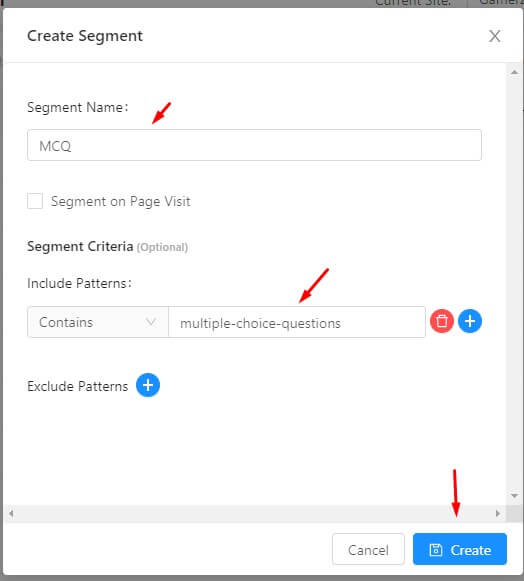
Go to Segmentation and click on Create Segment.

Name the segment. Define the rule. Here we have used MCQ as segment name for all subscribers whose URL at time of subscription contains multiple-choice questions.

为滴灌创建细分

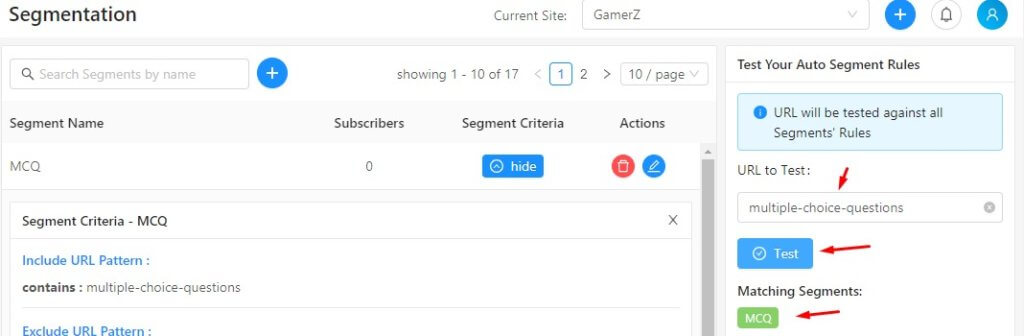
Finally, if you want to test, if your rules for URL were defined correctly or not, you can use our feature to Test your existing URL pattern rules. Note this section appears only once you have a URL rule to auto-segment.

细分网址测试

That’s it, now you can sit back and see how your subscribers keep adding to your new segments

Later while sending use the Select Audience and send notifications only to a segment.

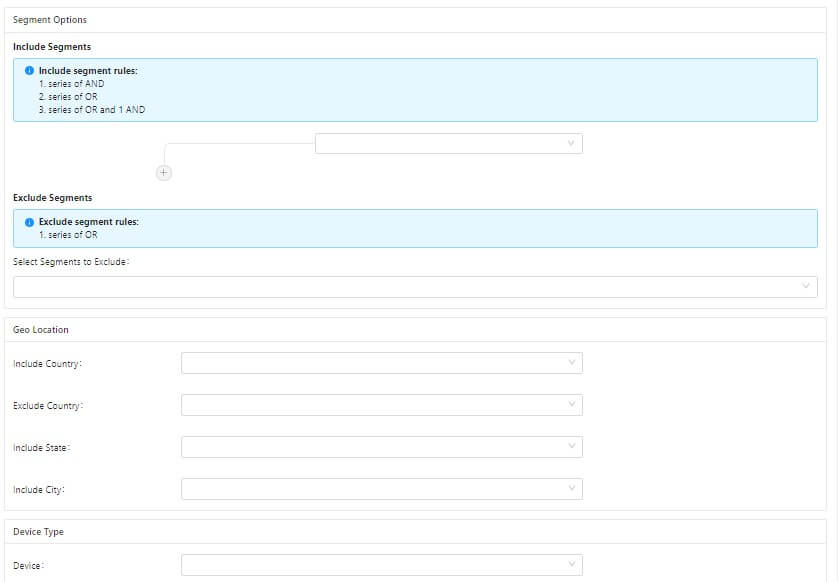
We also provide the following additional segment data for all your subscribers

  • Desktop vs. Mobile vs. Tablet – When a user subscribes to the push notifications for your site, we capture the device type he is subscribing from.
  • The Country, State, and City Level Geo Location – At the time of subscription, we also provide the data about the City, State, and Country from where the website user subscribed. This is based on the IP address of the user at the time of subscription.
Web 推送中的细分选项

您还在等什么?试试看,通过添加的细分,提高通知的点击率。 如果您还没有注册 PushEngage,请立即注册。 如果您有任何反馈或意见,请在此处留下或发送电子邮件至 [email protected]

添加评论

我们很高兴您选择留下评论。请记住,所有评论都将根据我们的隐私政策进行审核,并且所有链接都将是 nofollow。请勿在姓名字段中使用关键字。让我们进行一次个人化且有意义的对话。

如何使用 URL 模式自动细分订阅者以获得定向网页推送通知”的 1 条评论

在访客离开您的网站后与他们互动并挽留他们

通过难以忽略的推送通知,增加每次网站访问的价值。

  • 永久免费套餐
  • 轻松设置
  • 五星支持