Easy Digital Downloads är ett mångsidigt och användarvänligt e-handelsplugin utformat specifikt för WordPress-webbplatser. Alla e-handelsbutiker står inför utmaningar som kundvagns- och webbläsaravhopp. PushEngage erbjuder en innovativ lösning som möjliggör kampanjer som direkt engagerar sig med din produktström och omvandlar potentiella förluster till konverteringar med hjälp av WPCode.
Dina kunder kan få push-meddelanden som påminnelser efter att de har övergett sin varukorg eller webbläsning, och det kan uppmuntra dem att slutföra köpet.
Innan du börjar
Här är några saker att tänka på innan du börjar:
- Vår WooCommerce-integration kräver en PushEngage Growth-prenumeration för att skapa en kampanj för övergiven kundvagn och övergivet webbläsarbesök med hjälp av vår funktion för utlösarkampanjer.
- Den här guiden förutsätter att du redan har installerat pluginsen WooCommerce och WPCode på din WordPress-webbplats.
Skapa utlösarkampanj i PushEngage-instrumentpanelen
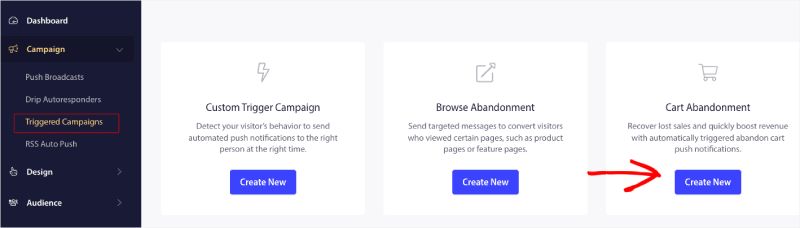
Du måste logga in på din instrumentpanel och navigera till Kampanj » Utlösta kampanjer.
Välj Kampanj för övergiven varukorg/webbläsning och klicka på Skapa ny.
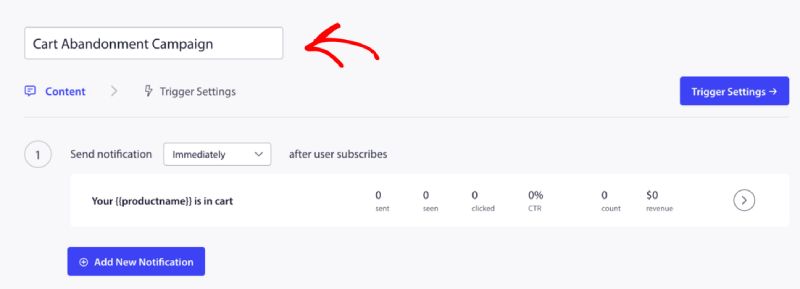
Du kan nu ange Kampanjnamn.
Lägg till kampanjinnehåll
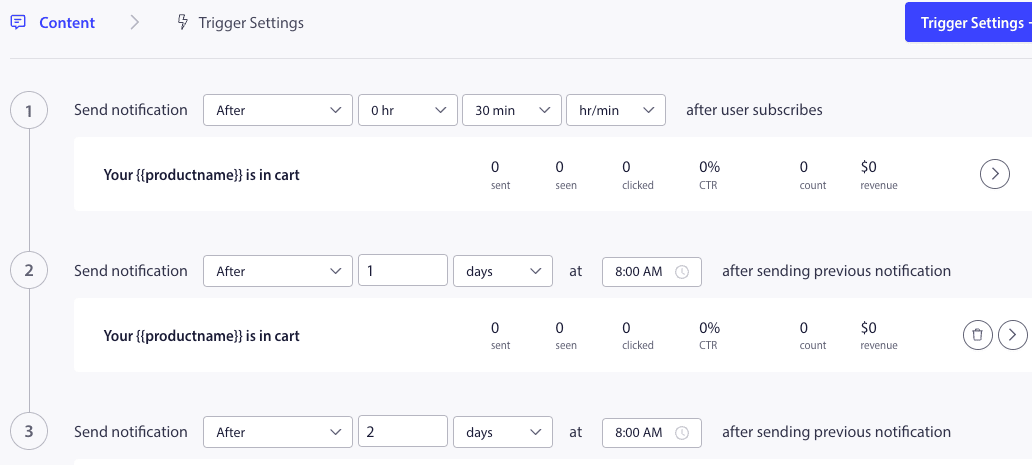
Nästa steg är att konfigurera kampanjschemat – Du kan välja något av alternativen omedelbart, efter n timmar och minuter, eller efter en viss dag.
Vanligtvis rekommenderar vi inte att tiden schemaläggs omedelbart. Du bör ha minst 15 eller 30 minuters mellanrum för den första kampanjen i serien.
När du ställer in en serie kan du ha minst tre kampanjer. Du kan anpassa titeln och meddelandet för varje kampanj i serien. Se till att du inte ändrar variabler om du vill använda dessa variabler i kampanjen.
Standardvariablerna som läggs till i koden enligt kampanjen är – {{productname}}, {{price}} och {{notificationurl}}
Hantera utlösarinställningar
När du har lagt till notifieringsinnehåll kan du gå vidare till Utlösarinställningar.
Här är utlösarna fördefinierade. Kampanjen startar om en person lägger produkten i kundvagnen och inte slutför kassan. Om han slutför kassan kommer han inte att få meddelandet om avbruten kundvagn. Men detta är bara definierade händelser; de kan inte köras om de inte placeras på webbplatsen.
Utlösarna här är Starta kampanj om – lägg-i-kundvagn och Stoppa kampanj om – kassa.
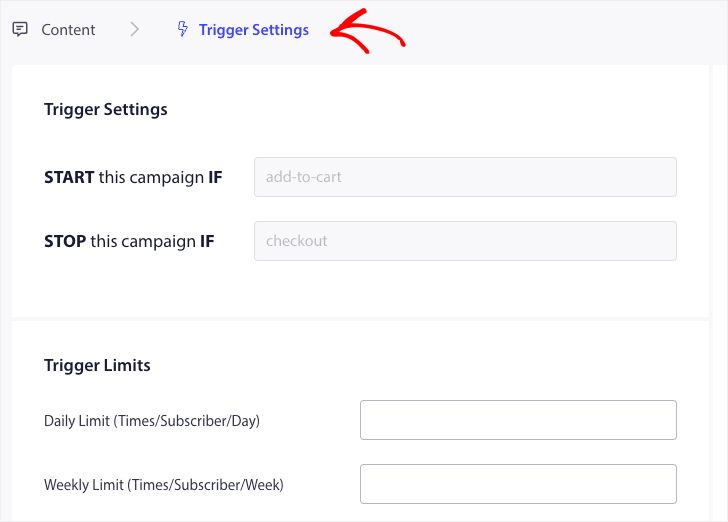
Nästa steg är att lägga till dagliga och veckovisa gränser för utlösare. Detta definierar det totala antalet aviseringar som en prenumerant kan få dagligen och veckovis. Till exempel – Om två aviseringar är dagliga, då bör det vara 14 veckovisa; på så sätt kommer frekvensen att begränsas även om fler än två produkter överges.
Redigera och aktivera kodavsnitt i WPCode
För att komma igång, besök fliken Code Snippets i din WordPress Dashboard.
Här behöver du två kodavsnitt att redigera baserat på din kampanj.
- För kampanj för övergiven kundvagn – Vid händelse av lägg till i kundvagn i EDD och Efter utcheckningshändelse i EDD.
- För kampanj för övergiven webbläsning – Vid surfning av EDD-produkter och Vid händelse av lägg till i kundvagn i EDD.
Välj baserat på din kampanj och klicka på Använd kodavsnitt när du har kodavsnittet öppet i redigeraren.
Lägg till kampanjnamnet
Se till att rätt kampanjnamn läggs till för båda händelserna. Du behöver inte ändra platsen; låt kodavsnittet läggas till över hela webbplatsen.
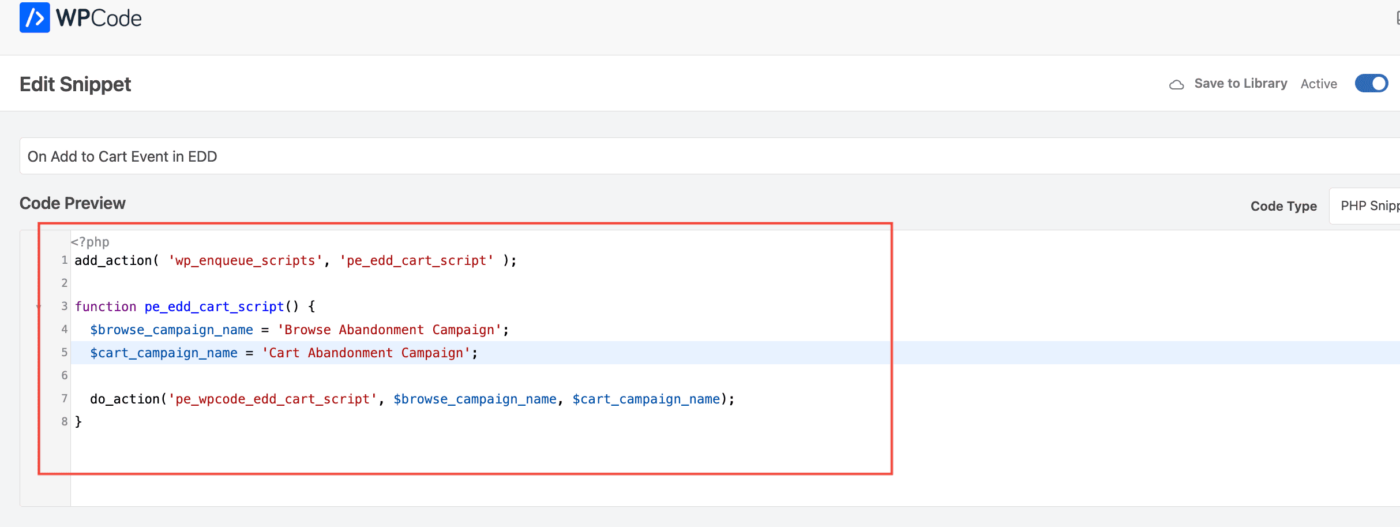
När kodavsnittet är klart kan du aktivera det. Utan aktivering kommer kodavsnittet inte att fungera.
Felsökning av utlösarkampanjer
- Kampanjnamnet måste vara detsamma i koden och på PushEngage-instrumentpanelen.
- PushEngage-installationskoden bör finnas där koden för kampanj för övergiven varukorg finns, annars kommer kampanjerna inte att utlösas utan den.
- Se till att kampanjen är aktiv på instrumentpanelen efter att du har placerat koden på din webbplats.
- Du måste vara en webb-push-prenumerant på din webbplats, annars kan du inte testa om du får kampanjer för övergiven varukorg på ditt system.
Det var allt! Du har nu aktiverat en kampanj för övergiven varukorg/webbläsning på din WooCommerce-butik med hjälp av WPCode.
Om du stöter på några problem, tveka inte att kontakta oss genom att klicka här. Vårt supportteam skulle kunna hjälpa dig