Service worker-filen er nøglefilen til at fuldføre abonnementet og sikrer, at abonnenter indsamles på dit domæne. Hvis du bruger den native opt-in, er tilføjelse af service-worker.js-filen til rod- eller undermappen et vigtigt installationstrin. Hvis du ikke har adgang til rodmappen, men til en undermappe, kan du stadig tilføje service-worker.js-filen og fuldføre installationen. Her er trinene, du skal følge –
- Tilføj service-worker.js-filen til din undermappe eller en separat mappe, og kopier stien til den mappe.
- Log ind på dit PushEngage-dashboard, og naviger til Sideindstillinger > Avancerede indstillinger
- Tilføj stien til din service-worker.js-fil, og gem ændringerne.
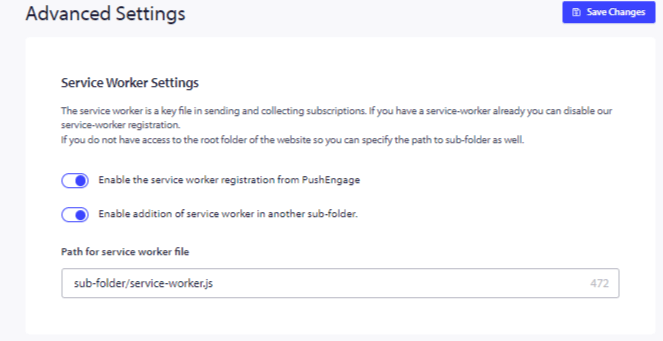
Det er det, når disse ændringer er gemt, er din installation fuldført.
Din registrering af en service worker vil være fra PushEngage og gennem en undermappe i stedet for rodmappen.
Hvis du alligevel støder på problemer, er du velkommen til at kontakte os ved at klikke her. Vores supportteam vil kunne hjælpe dig.