في حساب PushEngage الخاص بك، يمكنك تحديث تفاصيل الموقع مثل اسم الموقع وعنوان URL وشعار الموقع في أي وقت.
سيرشدك هذا الدليل خلال عملية تحديث/تغيير تفاصيل الموقع مباشرة من لوحة التحكم الخاصة بك
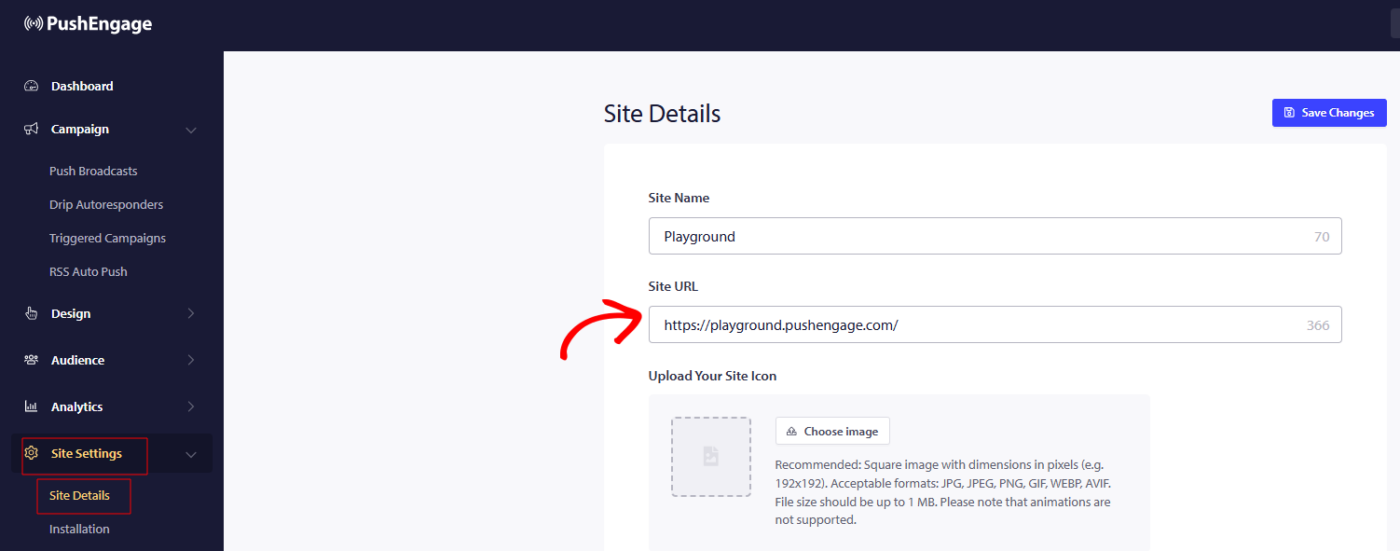
يمكنك الانتقال إلى إعدادات الموقع » تفاصيل الموقع وتحديث أي تفاصيل ترغب في تحديثها.
يتم أيضًا ذكر أبعاد شعار الموقع، لذا يُتوقع استخدام نفس النسبة والحجم حتى لا يتم اقتصاص الشعار في صورة الاشتراك أو صورة الإشعار.
T
G
بمجرد إجراء التغييرات، يرجى تذكر النقر فوق حفظ التغييرات لتطبيق التحديثات
إذا واجهت أي مشكلات، يرجى الاتصال بنا بالنقر هنا. سيكون فريق الدعم لدينا قادرًا على مساعدتك.