单击按钮收集订阅者的指南

You can collect subscribers on page load by displaying the subscription/permission Opt-in, but there is also an option available to collect subscribers over an element click. The HTML element could also be a button/link or an image. The good part is you only need to know the ID of the element, but you do not have to add any code.

In this guide, you can learn how to do it from the dashboard itself.

Adding Subscription Opt-in Trigger

Navigate to the Design » Popup Modal, and click on the Edit Popup button.

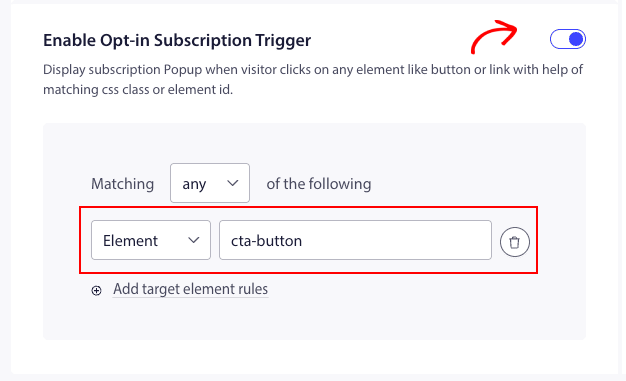
You can scroll to Enable Subscription Opt-in Trigger and toggle it on.

Now you need to fetch the ID of the element and add it to the matching criteria filter.

Once it is added, you can click Save and Enable Popup.

This is going to show the Optin on the click of an element or a button after the page load.

This is it, you can now test by clicking on that element on your website if the Popup shows up.

如果您遇到任何问题,请 联系我们 。我们的支持团队将能够帮助您。

仍然卡住了?我们能帮您什么?
最后更新于 2026 年 3 月 9 日

在访客离开您的网站后与他们互动并挽留他们

通过难以忽略的推送通知,增加每次网站访问的价值。

  • 永久免费套餐
  • 轻松设置
  • 五星支持