
Looking for a quick guide to track SEO keyword rankings in WordPress?
Tracking your SEO rankings is one of the most important parts of any SEO campaign. If you can’t track your rankings, you can’t improve your traffic and conversions.
And WordPress has a ton of SEO plugins. But which one allows you to track SEO keywords? Do you need to buy a premium SEO tool like SEMrush or Ahrefs? Do you need a developer to integrate rank tracking into your WordPress site?
The short answer is: No!
You can simply install a WordPress plugin to track SEO keyword rankings. And in this article, we’re going to show you how.
Başlayalım.
Why Should You Track SEO Keyword Rankings?
Let’s talk about why it’s a good idea to keep track of your website’s keyword rankings for SEO.
Think of it like keeping an eye on your garden to see how well your plants are growing. Just like you want your plants to flourish, you want your website to show up well when people search for stuff on the internet.
PushEngage, dünyada 1 numaralı anlık bildirim eklentisidir. Ücretsiz alın!
Here’s why tracking your SEO keyword rankings is like tending to your online garden:
- See What’s Blooming: By tracking your keyword rankings, you can see how your website is doing in search results. Are your keywords (the words people use to search) helping your site appear on the first page of results? It’s like checking to see if your flowers are blooming nicely.
- Measure Your Green Thumb: You can tell if your SEO efforts are working. If your keyword rankings are going up, it means you’re doing a good job. It’s like getting a thumbs-up for taking care of your garden well.
- Spot the Weeds: If your rankings drop, it’s a sign that something might be wrong. Maybe a new competitor popped up, or your content needs a little makeover. Just like spotting weeds early in your garden and getting rid of them.
- Stay Ahead of the Game: You can keep an eye on what your competitors are doing. If they’re using certain keywords that work well, you might want to consider using them too. It’s like learning from your gardening neighbors about which plants thrive best in your area.
- Tweak and Prune: When you see which keywords are doing great and which ones need a bit of help, you can make changes. It’s like adjusting how much water or sunlight your plants get to make them happier.
- Harvest the Fruits: High rankings mean more people see your site. When more folks visit, you might get more clicks and visitors. It’s like having a lot of people stop by to admire your garden.
- Plant New Seeds: If you notice some keywords are getting popular, you can create more content around them. It’s like planting new seeds in your garden to add more beauty.
- Celebrate Growth: Watching your rankings rise is exciting! It’s like watching your garden grow and flourish. You can pat yourself on the back for a job well done.
So, tracking SEO keyword rankings is like taking care of your website’s garden. You nurture it, watch it grow, and make sure it looks beautiful to everyone passing by (or searching online).
How to Track SEO Keyword Rankings
Now that we understand why we should track SEO keyword rankings, let’s check out how you can do it for your WordPress site.
Step #1: Install an SEO Rank Tracker WordPress Plugin
Before you can track SEO keyword rankings for your WordPress site, you need to pick the right WordPress SEO plugin. We recommend using All In One SEO.

All in One SEO (AIOSEO), WordPress topluluğundaki en beğenilen SEO eklentilerinden biridir. Orijinal sürüm, bir sürü yeni özellik ve eklenti eklemek için tamamen yeniden düzenlendi. Bu nedenle, geçmişte AIOSEO kullandıysanız, eklentiyi tekrar kontrol etmeniz gerekir.
AIOSEO yalnızca en son SEO en iyi uygulamalarını uygulamak için yeterince güçlü SEO özelliklerine sahip olmakla kalmaz, aynı zamanda belirli SEO sorunlarını kutudan çıktığı gibi çözmek için gelişmiş SEO ayarlarına de sahip olursunuz. Buna şunlar dahildir:
- Yerel bir kitleye sahip küçük işletmeler için Yerel SEO modülleri
- Çevrimiçi mağazalar için WooCommerce SEO
- WordPress düzenleyiciniz içinde bir SEO iyileştirici
- Arama Motorlarında anında indeksleme için Akıllı Site Haritaları
- İçeriğinizin Zengin Snippet'lerde sıralanmasını sağlamak için bir Schema eklentisi
And of course, you also get a built-in SEO rank tracker to stay on top of your SEO rankings.
Kısacası: All in One SEO, bir uzman kiralamak zorunda kalmadan WordPress SEO'yu düzgün bir şekilde kurmanızı sağlar. Ve eğer All in One SEO'nun 3 milyondan fazla müşterisi (bizim de dahil olduğumuz) inanılacaksa, AIOSEO her SEO gereksinimi için harika bir Arama Motoru Optimizasyonu yazılımıdır.
Blog yazarları ve küçük işletme sahipleri için mükemmeldir çünkü bir profesyonel kiralamak zorunda kalmadan SEO ile ilgilenmenize yardımcı olur. Bunu All in One SEO incelememizde bizim sözümüze alabilir veya AIOSEO'nun işletmelerin arama sonuçlarında trend olmasına yardımcı olma konusundaki etkisini okuyabilirsiniz.
Unutmayın: Google Search Console'u yalnızca All in One SEO ile entegre edebilirsiniz. Daha ayrıntılı web sitesi analizlerine ihtiyacınız varsa, MonsterInsights eklentisini kurmayı ve Google Analytics'i WordPress sitenize yüklemeyi düşünmelisiniz.
Step #2: Get an Overview of Keyword Rankings
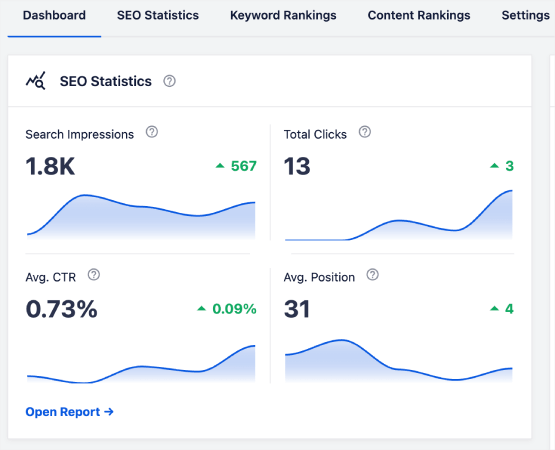
Head over to the Search Statistics section in the WordPress plugin to see an overview of your keyword rankings:
Ana kontrol panelinde ayrıca En İyi Anahtar Kelimeler ve En İyi Kazanan/Kaybeden anahtar kelimelerin bir özetini gösteren bir Anahtar Kelime Sıralamaları bölümü bulunur.
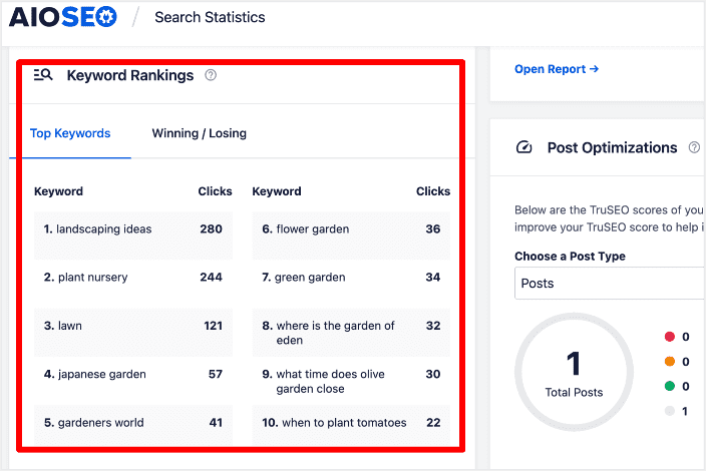
Sıralamalarda düşen anahtar kelimelerin hangileri olduğunu anlamak, eksik yapboz parçalarınızın nerede olduğunu bulmak gibidir. Bu, o sayfaların durumu hakkında ne olduğunu anlamanıza ve o konumları geri kazanmak için bir strateji planlamanıza yardımcı olur.
And guess what? When you do that, you’ll see more people visiting your site, which means more money in your pocket. It’s like solving a puzzle to make your website even better!
On the other hand, the Top Winning keywords can give you insight into the SEO tactics that are producing results so you can replicate them.
Step #3: Dive Deep into the Keyword Rankings Report
Anahtar kelime performansınız hakkında genel bir fikriniz olduğunda, bir sonraki adım Anahtar Kelime Sıralamaları raporunu açmaktır. İçeriğinizin sıralamaları için ayrıntılı istatistikleri de burada görebilirsiniz.
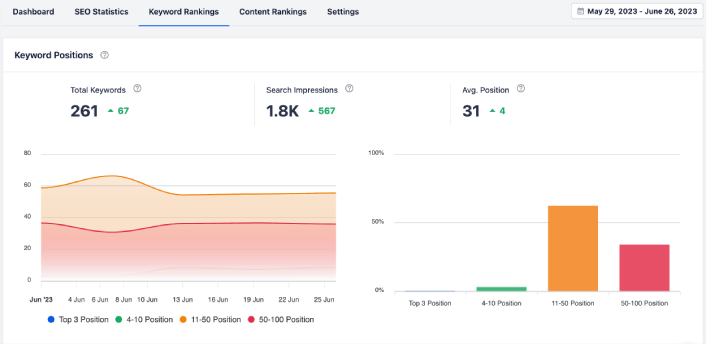
If you scroll down further, you can even see the exact posts that are gaining or losing search rankings. More than that, you can filter your best keywords by clicks and check their rankings instantly.
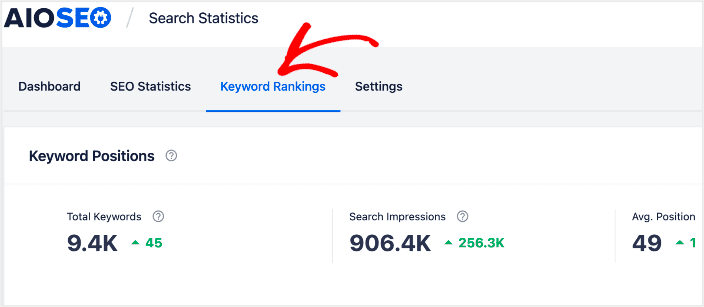
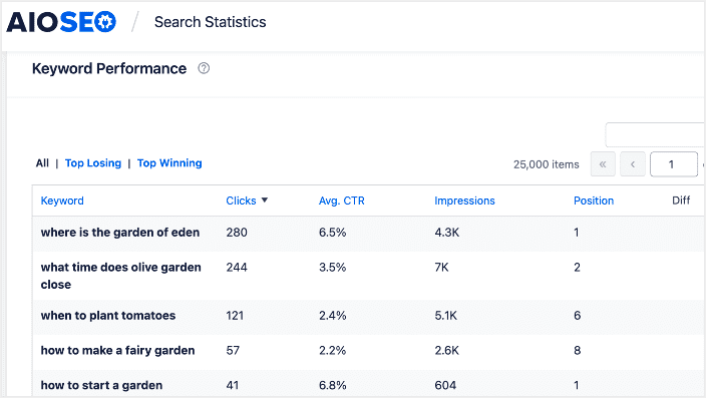
This is where you get a detailed report of all your keywords and their performance on SERPs. Scrolling down to the Keyword Performance section gives you a deeper look at how individual keywords are performing.
This is the spot where you get a full report about all the words you’re using and how well they’re doing in search results. When you scroll down to the Keyword Performance part, you dive deeper into how each word is doing all on its own.
If you click on the Top Winning tab, you see the keywords that are improving in rankings.
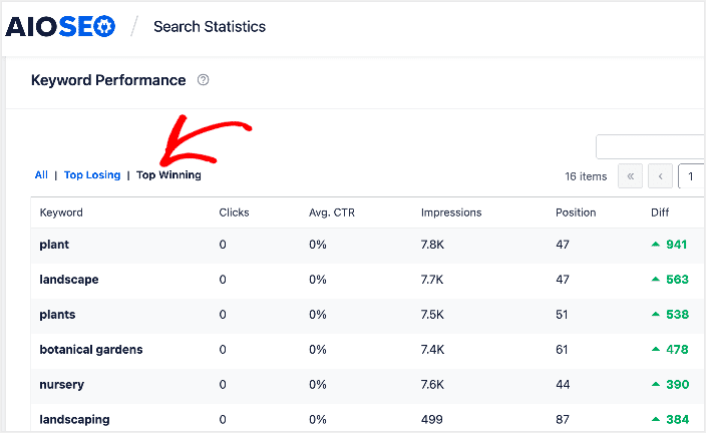
These show that you’ve optimized well for the target keywords and that your SEO strategy is working.
Step #4: Check Your Top Losing Keywords
Besides checking your Top Winning keywords, you can also track your Top Losing keywords. Click the Top Losing tab in the Keyword Performance report to do that.
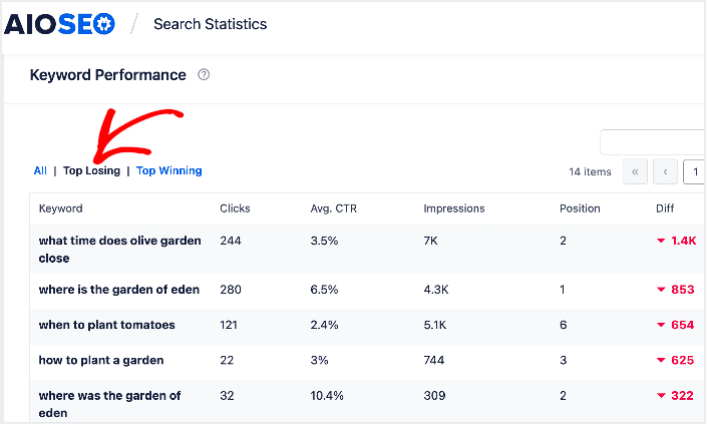
Bu bölüm, sıralaması düşen anahtar kelimeleri göstermektedir. Bu, optimize edilmesi gereken anahtar kelimeleri ve içeriği gösterdiği için hayati bilgidir. Anahtar kelime sıralamalarınız düşüyorsa, içeriğinizi hemen güncellemeniz gerekir.
What to do After You Track SEO Keyword Rankings
Tracking your SEO rankings is only one part of the puzzle. Our top recommendation is to use All in One SEO to optimize your website content. The right tools can help you with getting repeat traffic, engagement, and sales. For that, we recommend using push campaigns.
Anlık bildirimler, büyüyen işletmeler için güçlü bir pazarlama aracı olabilir. İkna olmadınız mı? Bu harika kaynaklara göz atın:
- Müşteri Etkileşimini Artırmak İçin 7 Akıllı Strateji
- Anlık Bildirimler Etkili mi? 7 İstatistik + 3 Uzman İpucu
- Sitenize Bir Web Bildirimleri WordPress Eklentisi Nasıl Eklenir
- Terk Edilmiş Sepet Anlık Bildirimleri Nasıl Ayarlanır (Kolay Eğitim)
Anlık bildirim kampanyalarınızı oluşturmak için PushEngage'ı kullanmanızı öneririz. PushEngage, dünyanın 1 numaralı anlık bildirim yazılımıdır. Bu nedenle, henüz yapmadıysanız, bugün PushEngage'ı kullanmaya başlayın!


