WooCommerce mağazanızda web anlık bildirimleriyle müşterilerinizi son siparişleriyle ilgili güncellemelerden haberdar etmek, satın alma isteklerini yeniden denemeleri için onları teşvik etmek veya mağazanızın incelemelerini artırmak mı istiyorsunuz?
Eğer öyleyse, doğru yerdesiniz! Bu kılavuzda, WooCommerce mağazanızdaki müşterileriniz için web anlık bildirimlerini ayarlama ve etkili bir şekilde yönetme adımlarında size yol göstereceğiz.
Başlamadan Önce
PushEngage Eklentisinin WooCommerce mağazanıza yüklü olduğundan emin olun. Bu kılavuz, zaten WooCommerce ve PushEngage
Birçok kullanım durumu için müşterilere gönderebileceğiniz birden fazla kampanya vardır –
- Varsayılan Kampanyalar
- Anlık Yayınlar ve Şablonlar
- Sıralı Otomatik Yanıtlayıcılar
- Tetikleyici Kampanyalar ve Otomasyon
Varsayılan Bildirim Ayarlarını Yönetme
WooCommerce » Ayarlar'a gidebilirsiniz
Ardından Anlık Bildirimler Sekmesine gidin

Bu sekme altında, şimdilik etkinleştirmek istediğiniz tüm bildirim türlerini açabilirsiniz. Bu alan ayrıca yalnızca yöneticiye mi yoksa müşterilere mi göndermek istediğinize karar vermenizi sağlar.
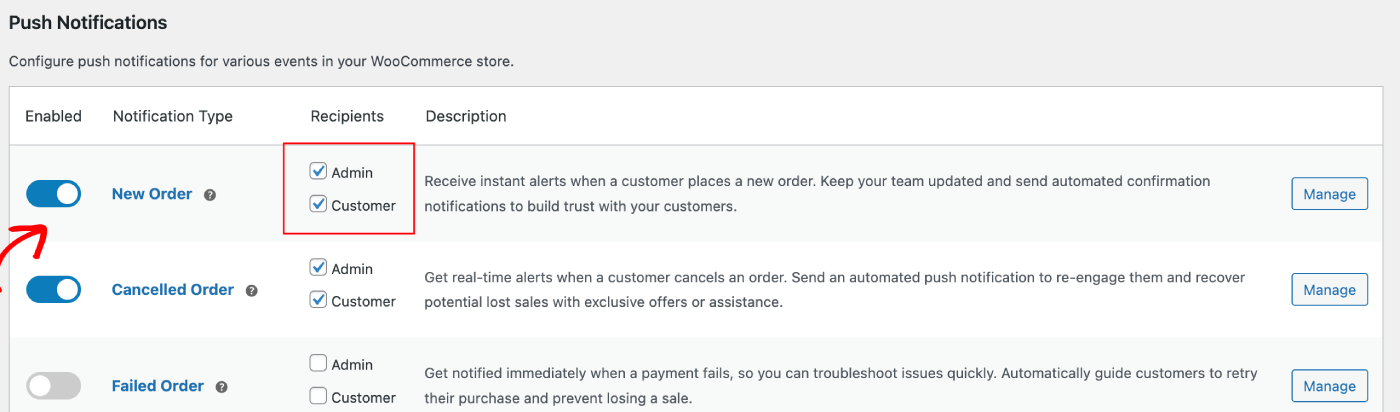
Düzenlemek istediğiniz kampanyayı seçebilir ve Yönet Düğmesine tıklayabilirsiniz. Kampanyaları müşterilere göndermeyi sağlayan kutucuğu işaretleyebilirsiniz. Örneğin, burada Tekrar Satın Alma İsteği için Anlık Bildirimleri ayarlıyoruz.
Bildirim Başlığını ve Mesajını ödeme sayfası URL'si ile birlikte ayarlayabilirsiniz.
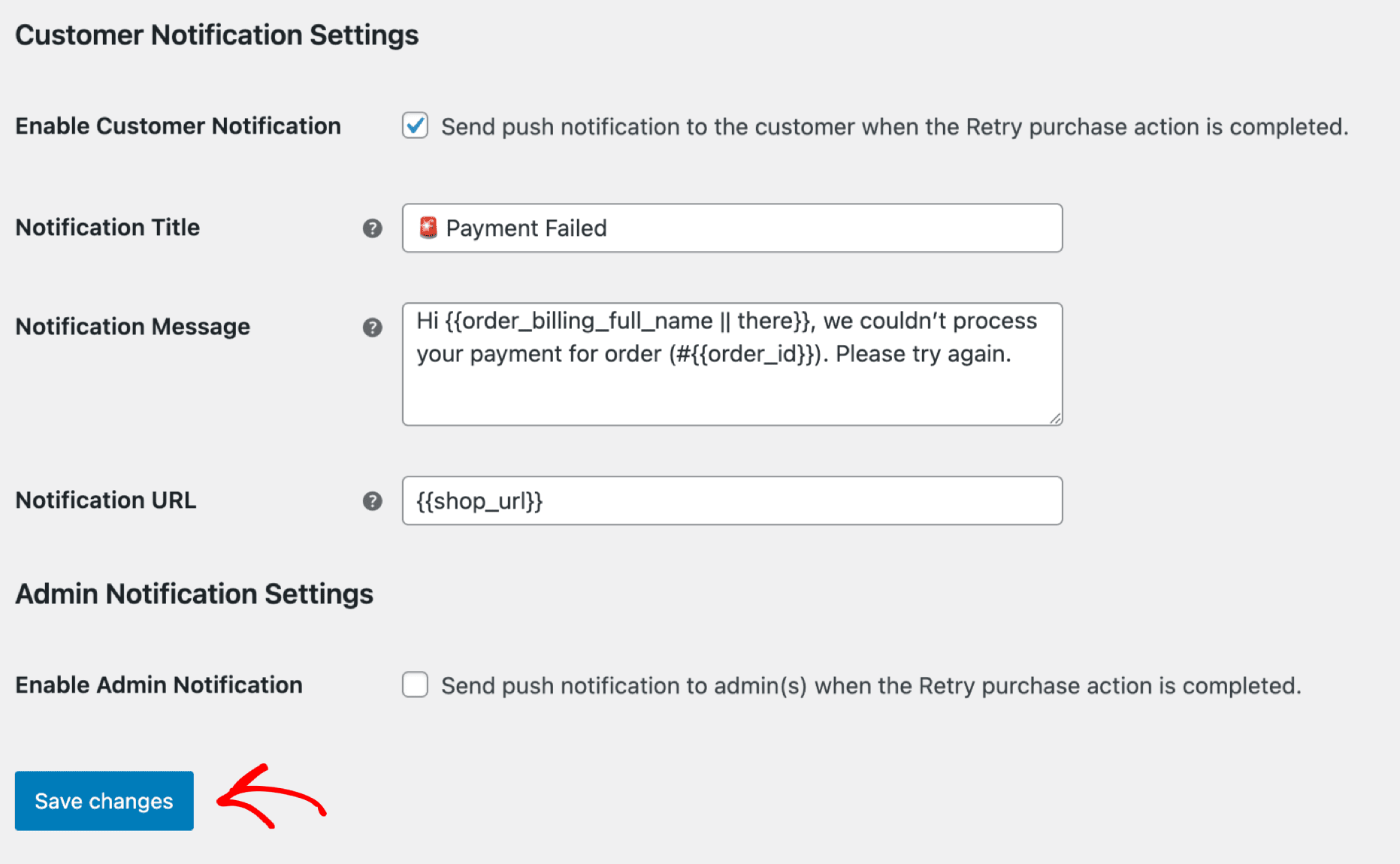
Detayları güncelledikten sonra Değişiklikleri Kaydet Düğmesine tıklayabilirsiniz.
Anlık Yayınlar ve Şablonlar
Flash satışlar, mevsimsel teklifler veya ürünlerin üst satışları için Anlık Yayınlar gönderebilirsiniz.
PushEngage Kontrol Paneline giriş yapabilir ve ardından Anlık Yayınlar bölümüne gidebilirsiniz. Çeşitli şablonlar ve kategoriler arasından seçim yapmanıza yardımcı olacaktır ve Kitleyi ve Gönderme/Zamanlama seçeneklerini özelleştirebilirsiniz.
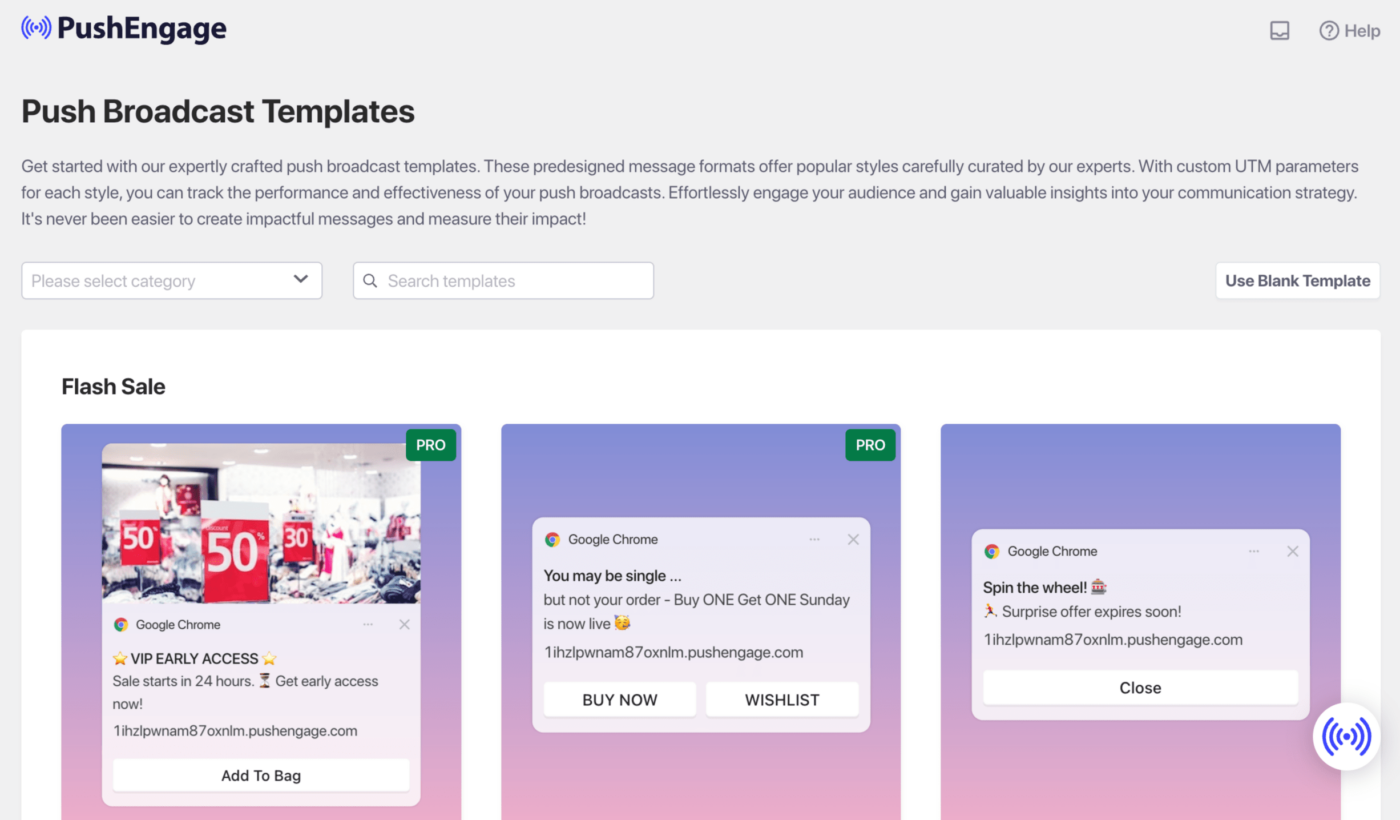
WordPress kontrol panelinde anlık kampanyalar oluşturmak için başvurabileceğiniz kılavuz burada.
Sıralı Otomatik Yanıtlayıcılar
Bir Web Anlık Bildirim Otomatik Yanıtlayıcı kampanyası etkinleştirebilir ve bunu PushEngage'deki tüm abone kullanıcılara veya bir kullanıcı listesine/segmentine gönderebilirsiniz. Kullanıcılarınızı, belirli sayfalarda veya kullanıcının bir bildirim müfredatına abone olması durumunda oluşan belirli listelere ayırın.
Bu, indirim kuponuyla bir Hoş Geldiniz Serisi göndermek veya çapraz satış kampanyaları, inceleme istekleri ve mevsimsel teklifler göndermek için mükemmeldir.
Bir seri kampanyası oluşturmanıza yardımcı olacak kılavuz burada.
Tetikleyici Otomasyon Kampanyaları
Olaylara özel kampanyalar olan Tetiklenmiş Kampanyalarımız var. Hedeflere özeldir, bazı örnekler şunlardır: Sepet ve Göz Atma Terk Etme Kampanyaları. Bu kampanyalar mağazanız için önceden oluşturulmuştur. Mağazanız bağlandıktan sonra kampanyaların etkinleştirildiğinden emin olmanız yeterlidir.
Sepet ve Göz Atma Terk Etme Ayarlarını Etkinleştirme
Mağazanızın ürün akışıyla doğrudan entegre edilmiş otomatik bir Sepet ve Göz Atma Terk Etme Kampanyamız var. Amaçlanan hedef tamamlandıktan sonra daha fazla bildirimin gönderilmesini önlemek için bir başlangıç ve bitiş olayımız var.
Entegrasyonunuz tamamlandıktan sonra, WooCommerce Mağazanız için sepet ve göz atma terk etme ayarlarınızı yönetebilirsiniz.
Ayarlar » Entegrasyonlar Sekmesine ve WooCommerce bölümünün altına gidin.
Anahtarı açarak 'Sepet Terk Etme' ve 'Göz Atma Terk Etme'yi etkinleştirin.
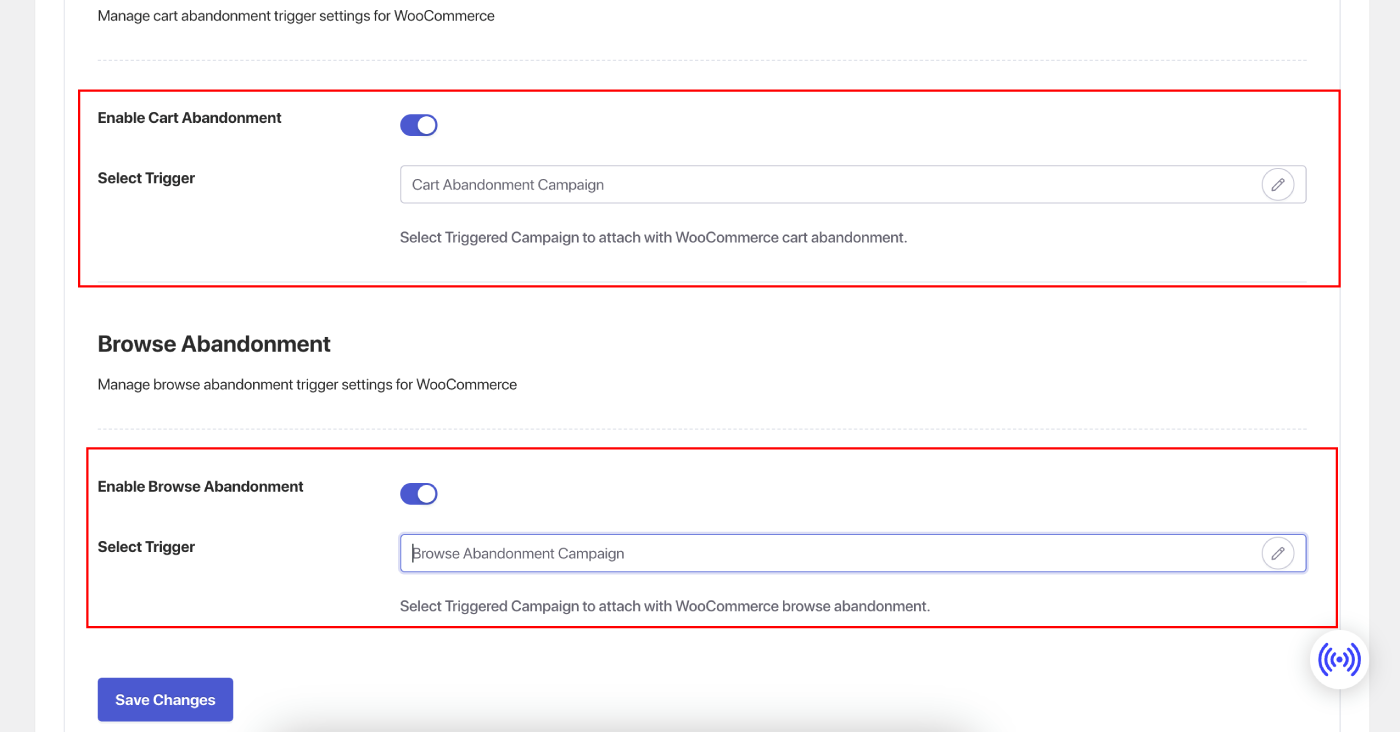
Kampanyaları Özelleştirme
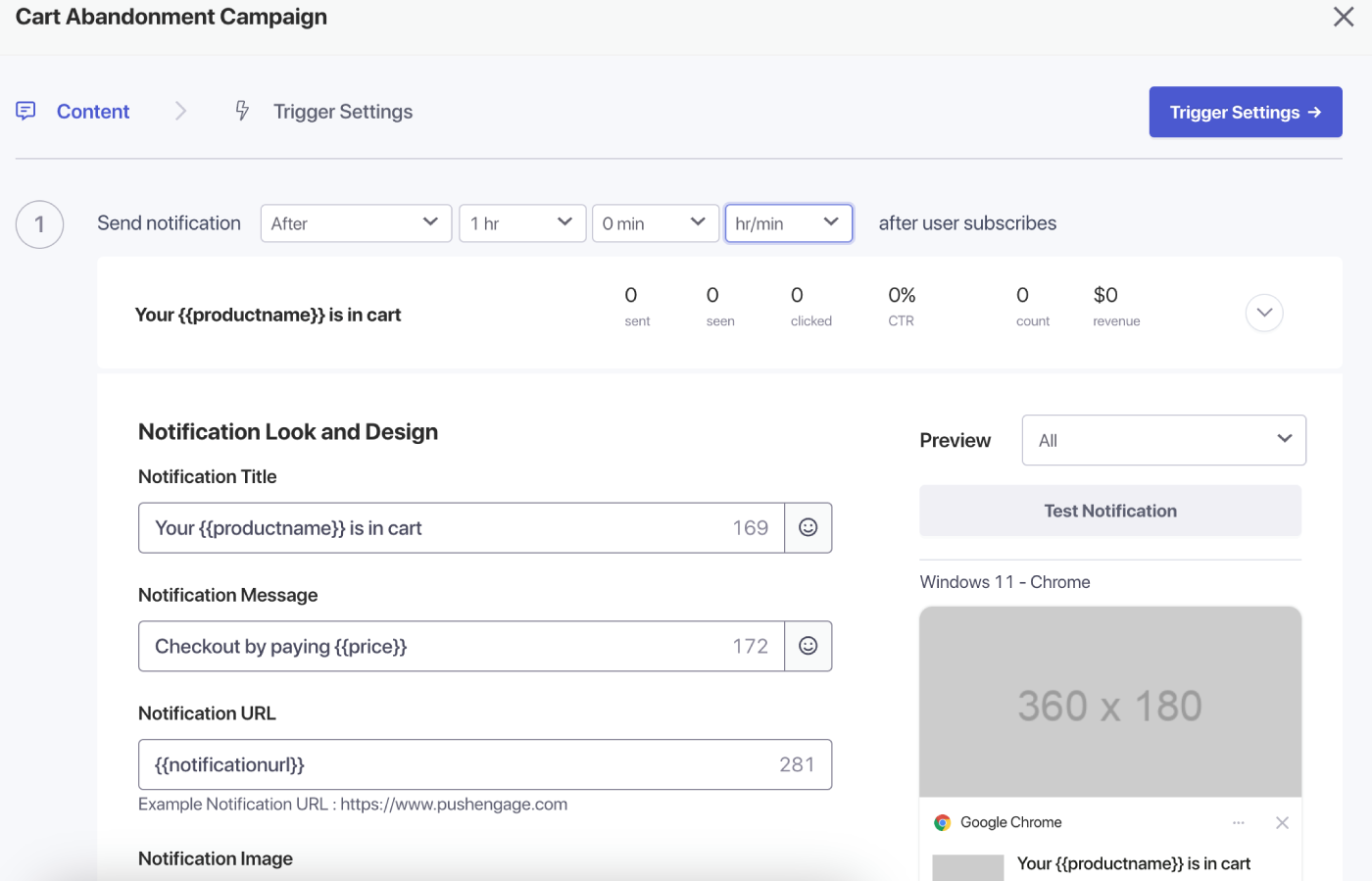
'Tetiklenen Kampanyalar' bölümüne gidin ve kampanyanıza birden fazla bildirim ekleyin.
Her bildirim için gecikmeyi ve koşulları belirtin ve yedek değişkenler ekleyin.
Tetikleyici Ayarları
'Tetikleyici Ayarları' altında, müşterilerinize spam göndermeyi önlemek için bildirimlerin sıklığını sınırlayın. Burada günlük veya haftalık bir sınır seçebilirsiniz. Örneğin, günlük bir sınır için 2 bildiriminiz varsa, haftalık sınır için 14 ekleyin, böylece insanlar günde 2'den fazla ürünü terk etse bile tüm anlık bildirimlerle spamlanmazlar.
Bu kampanyalar için UTM Parametreleri de ekleyebilirsiniz, böylece Google Analytics'te izlemeniz daha kolay olur.
Tetikleyicileri ayarladıktan sonra, değişikliklerinizi kaydedin ve kampanyaları etkinleştirin. Etkinleştirilirse, kampanya analizlerini görüntüleyebilir ve hedef gelirin dönüşümünü görebilirsiniz.
İşte bu kadar, WooCommerce Mağazanız için güçlü kampanyalar oluşturdunuz.
Eğer herhangi bir sorunla karşılaşırsanız, lütfen buraya tıklayarak bize ulaşmaktan çekinmeyin. Destek ekibimiz size yardımcı olabilir.