
Do you want to embed YouTube videos in your WordPress blog posts?
Videos help to increase the time your users spend on your website, and some visitors may even prefer to watch a video than reading written text. But uploading them directly to your site is a bad idea. If your video goes viral, it will crash your server. So, a better way is to upload your video to YouTube and then embedding them in your WordPress site.
The biggest worry that most bloggers have is that they may have to code in HTML to embed videos. But WordPress actually makes it super easy to embed videos from video hosting sites like YouTube, Vimeo, Facebook, Twitter, and many others.
In this article, we’re going to show you step-by-step how to embed YouTube videos in WordPress.
Låt oss dyka in.
Method #1: How to Directly Embed a Single Video in WordPress
WordPress comes with an amazing feature called auto-embed. With Gutenberg, you can directly fetch a video on any page in your site.
All you have to do is copy and paste the URL of the video directly in the content area:
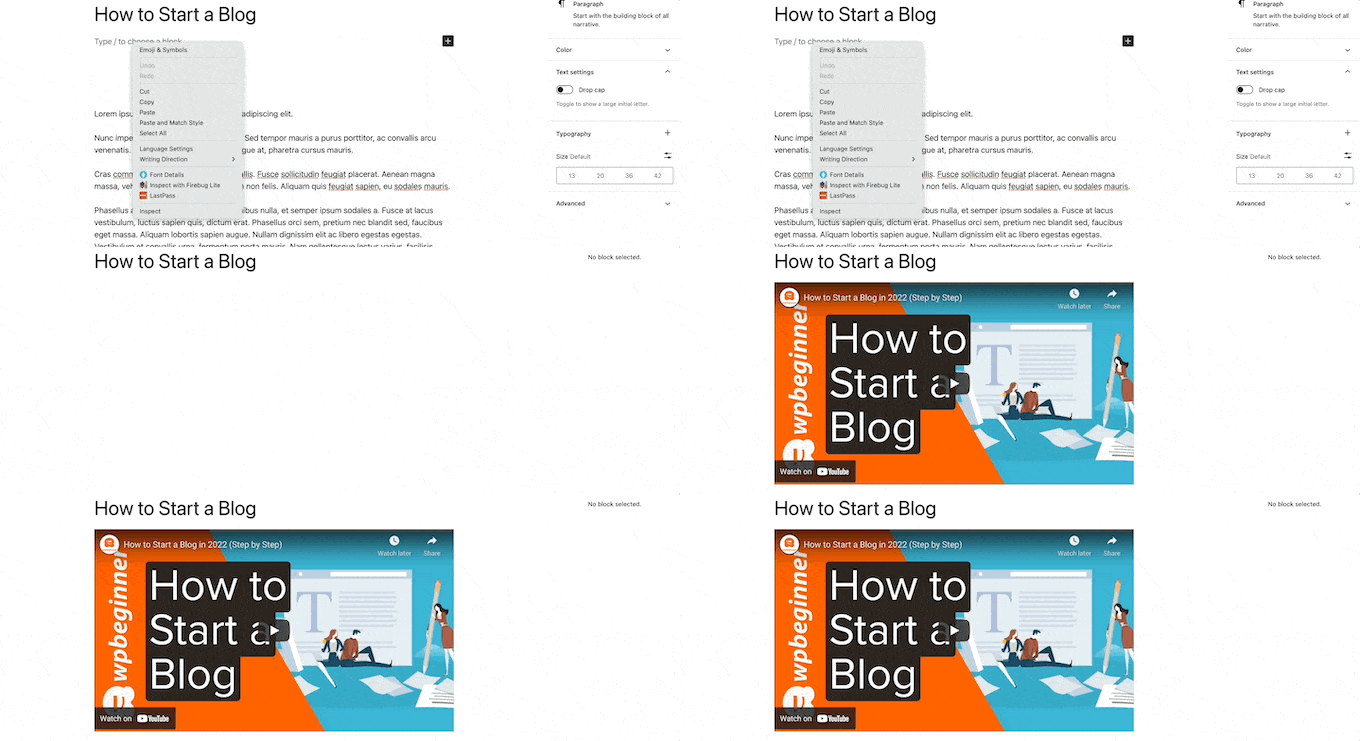
And WordPress will automatically fetch the YouTube video and embed it in your content.
Method #2: How to Embed Videos in WordPress Sidebar Widgets
Go to Appearance » Widgets in your WordPress admin area and then click the Plus add block icon. And search for Video in the search bar:
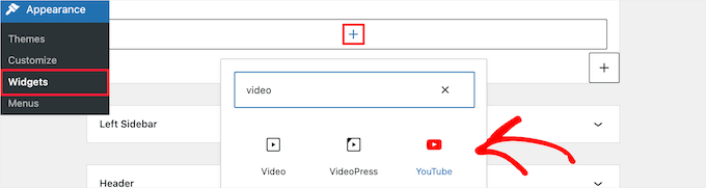
Then, all you have to do is click the ‘Update’ button, and the video widget will go live on your website:
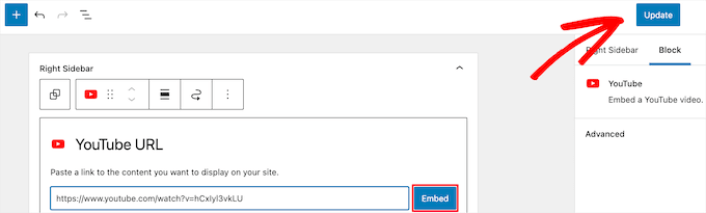
The size of the video will scale automatically based on the size of your widget area.
Method #3: Using WordPress Video Embed Plugins to Embed Videos
You can use WordPress video embed plugins to embed a YouTube video on your site. A plugin can help you automatically embed all of your YouTube channel videos in a customizable gallery format.
We recommend using Smash Balloon to embed your WordPress videos.

Smash Balloon är ett enkelt WordPress-plugin som låter dig visa dina sociala medier-flöden på din webbplats utan att använda någon kod alls. Att visa dina sociala flöden på din webbplats är ett utmärkt sätt att omvandla din webbtrafik till följare på sociala medier och hålla dem engagerade under lång tid.
Det bästa med Smash Balloon är att det inte krävs någon kodning. Allt du behöver göra är att installera pluginet och sedan ansluta dina sidor på sociala medier till din webbplats.
Du kan använda Smash Balloon för att:
- Använd dina hashtag-flöden på din webbplats som socialt bevis
- Visa interaktiva Twitter-flöden för att öka webbplatsengagemanget
- Bädda in dina YouTube-videor på din webbplats för att öka dina YouTube-prenumeranter
- Lägg till autentiska recensioner från Facebook Business Page på din webbplats för att öka konverteringarna
Och mycket mer!
Check out our review of Smash Balloon or just get started. First thing you need to do is install the YouTube Feed Pro plugin. For more details, see our step by step guide on how to install a WordPress plugin.
Go to Feeds for YouTube » Feeds for YouTube and then click the Connect to YouTube to Create a Feed button:
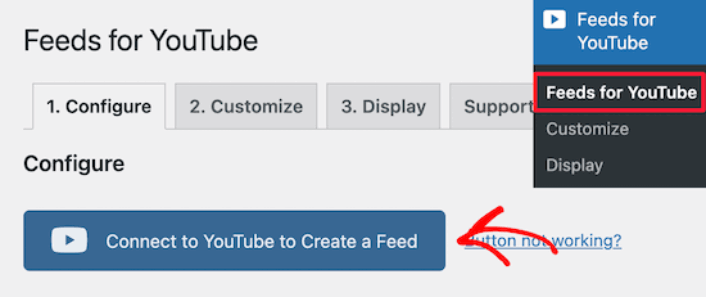
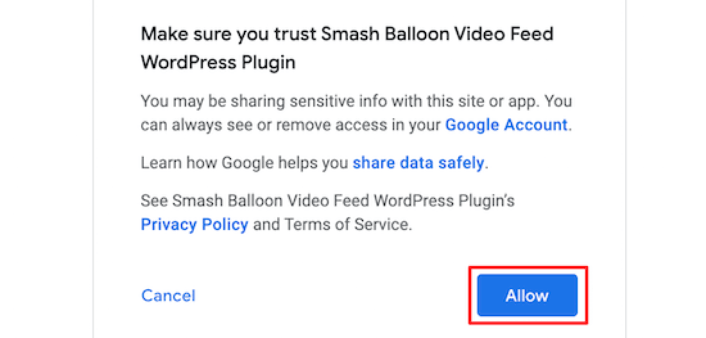
You’ll see a prompt to login using Google. Go ahead connect the right Google account to Smash Balloon. Then, click on Allow:
Then, click on the Customize tab:
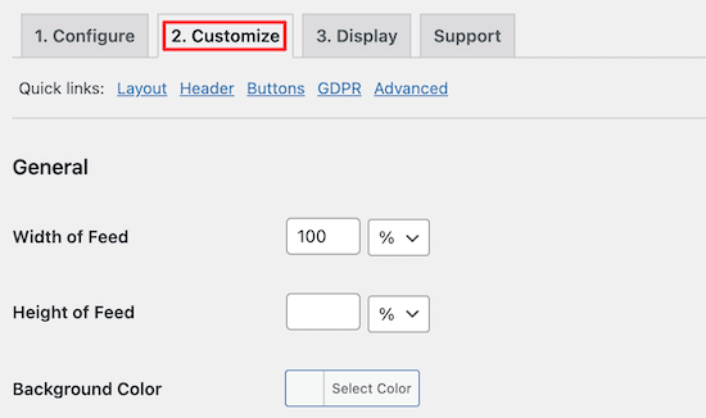
Here, you can customize the look and feel for your YouTube embed without a single line of code. You can embed multiple videos at a time, create a gallery, and even select a layout to display your videos.
Once you’re done, you can embed a customized YouTube feed on your WordPress site instantly using the YouTube Feeds block for Gutenberg Editor:
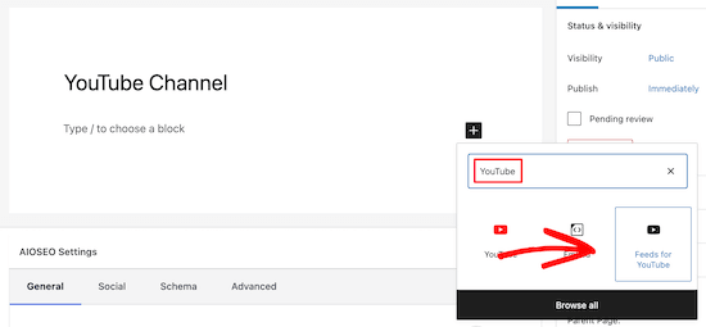
This will automatically add your YouTube feed to your page. Finally, click the Publish or Update button to make your page live.
What to do After You Embed a YouTube Video in WordPress
That’s all for this one, folks! By now, you’ve managed to embed a YouTube video in WordPress. You should also check out how to embed Instagram photos in WordPress. And how to set up a viral giveaway to supercharge your social media following.
Därefter återstår bara att generera trafik till din webbplats så att dina kontaktformulär kan börja fungera. Ett enkelt sätt att göra det är att börja använda push-meddelanden. Att skicka push-meddelanden är ett utmärkt sätt att generera återkommande trafik till din webbplats. Om det är något du är intresserad av bör du även titta på dessa artiklar:
- Kostnad för pushmeddelanden: Är det verkligen gratis? (Prisanalys)
- Hur du får mer trafik till din WordPress-blogg (9 enkla sätt)
- Hur du ökar din webbpush-notis opt-in-frekvens (7 sätt)
- Hur man lägger till ett WordPress-plugin för webbnotiser på din webbplats
Vi rekommenderar att använda PushEngage för att skicka dina pushmeddelanden. PushEngage är den främsta pushmeddelandemjukvaran i världen. Så om du inte redan har gjort det, kom igång med PushEngage idag.


