
Looking for a quick and easy way to sell event tickets on WordPress?
Getting ticket sales is a difficult business. And it’s super difficult to scale offline. One of the easier ways to sell a ton of tickets is to sell tickets to your events online.
But how do you do that? Do you need to learn how to code? Do you need an expensive designer to create a landing page for you? How do you collect payments?
Fortunately, there’s an easy way to sell event tickets on WordPress. In this article, we’re going to help you start selling event tickets in less than 15 minutes.
Är du redo? Låt oss dyka in.
How to Sell Event Tickets on WordPress
Before we start selling event tickets on WordPress, you’ll need a WordPress site. If you don’t have one, you should check out our guide on how to create a WordPress site. WordPress gives you all the control you need to create beautiful pages to promote your event as well as the technical specs you need to sell tickets online.
What’s even better is that you don’t need any coding experience to use WordPress. You can install plugins to do most of the heavy lifting for you and start selling tickets in a matter of a few hours.
To sell event tickets on WordPress, we recommend using Sugar Calendar.
Sugar Calendar is a simple, easy to use events calendar plugin for WordPress. The best part about Sugar Calendar is how many different features it has. You can use Sugar Calendar for:
- Evenemangshantering
- Evenemangsbiljetter
- Återkommande evenemang
- Flera dagars evenemang
- Webbinarier
- Offentliga visningar
- Fester
- Utställningar
- Open Mic-kvällar
- Demonstrationer
- Produktlanseringar
And more! The beauty of the plugin is that you can use it directly from the WordPress dashboard using the WordPress editor. Check out our Sugar Calendar review for a detailed breakdown of its features. When you’re done, let’s get started with selling tickets.
Step #1: Install and Activate Sugar Calendar
Du måste installera och aktivera Sugar Calendar-tillägget. Om du är osäker på hur du gör det bör du läsa den här artikeln om hur man installerar ett WordPress-tillägg.
Gå sedan till din Sugar Calendar-instrumentpanel och gå till Dina licenser:
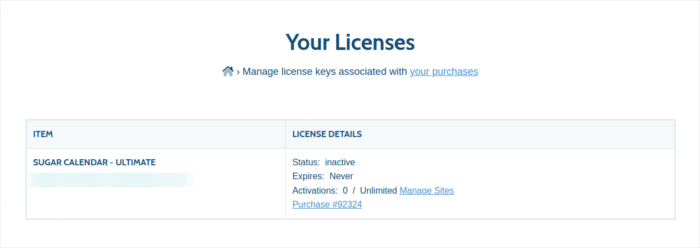
Kopiera din licensnyckel. När det är gjort, gå till din WordPress-instrumentpanel och gå till Kalender » Inställningar » Licens:
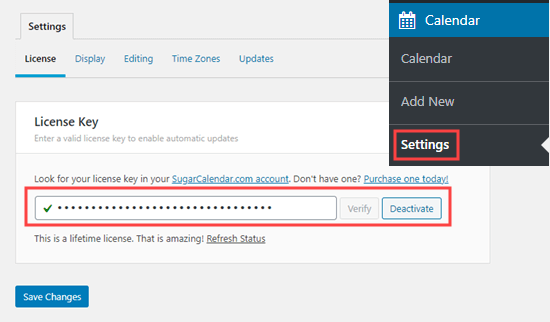
Och klistra in din licensnyckel. När du är klar, klicka på Spara ändringar.
Step #2: Create a New Event in WordPress
Let’s start by creating the event you want to sell tickets for inside your WordPress site. Go to Calendar » Add New. You can name the event, add a description, and configure the dates:
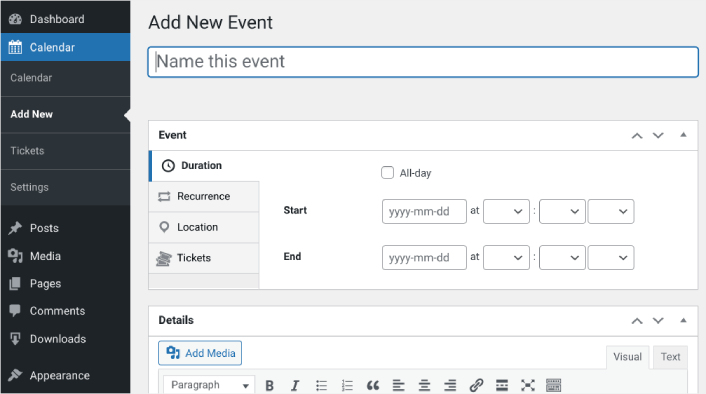
Next, navigate to the Tickets tab. Then click on Enable Ticket Sales:
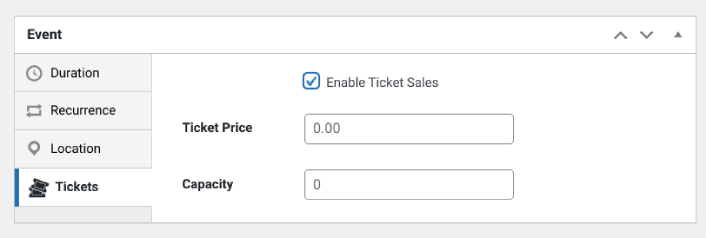
Then you can enter a ticket price and set the capacity, meaning the quantity of tickets available. If you want to sell unlimited tickets, you can leave this value at 0.
Step #3: Start to Sell Tickets Online with WordPress
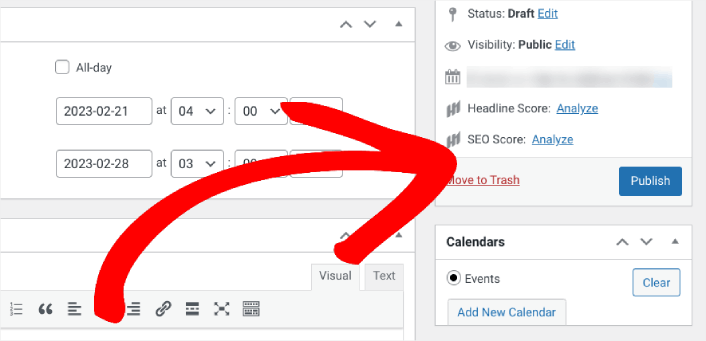
When you’re done configuring the event and enabling tickets, the only thing left to do is to start selling. In the right-hand settings panel under Calendar, select your calendar or click on Add New Calendar. Then click Publish:
Then you can preview the event to see how it looks on your WordPress site:
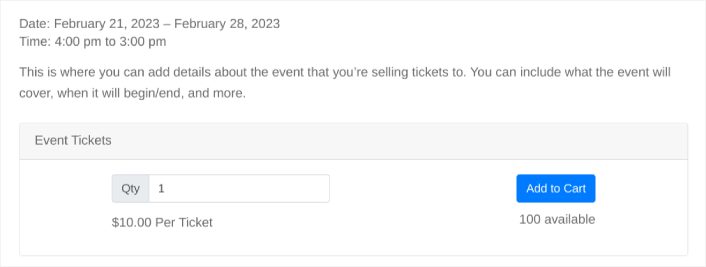
Congratulations! You can now start selling event tickets on your WordPress site.
How do You Sell Event Tickets on WordPress Even Faster?
Now that your event is live and you can sell tickets to the event, it’s time to work on your traffic, engagement, and sales. You should try using push notifications on your site. Push notifications are a great marketing tool that can help you grow your business.
Ta en titt på dessa episka resurser så förstår du vad vi menar:
- 7 smarta strategier för att öka kundengagemanget
- Är push-notiser effektiva? 7 statistik + 3 experttips
- Hur du ställer in pushmeddelanden för övergivna kundvagnar (Enkel handledning)
Vi rekommenderar att använda PushEngage för att skapa dina push-notiskampanjer. PushEngage är den främsta push-notisprogramvaran i världen. Så, om du inte redan har gjort det, kom igång med PushEngage idag!


