
Looking for a quick guide to add local business Schema in WordPress?
If you’re running a brick and mortar business and marketing on search engines to get more footfalls to your store, then local business Schema is going to be super helpful for you. But, how do you do it?
Isn’t Schema a lot of code snippets? Do you need to write code to add Schema to your site? Should you hire a developer?
The short answer is: No!
You can simply install a WordPress plugin to add local business Schema. And in this article, we’re going to show you how.
Låt oss börja.
Step #1: Select a Local Business Schema WordPress Plugin
Before you can add local business Schema to your WordPress site, you need to pick a WordPress plugin. We recommend using All In One SEO.

All in One SEO (AIOSEO) är ett av de mest hyllade SEO-pluginen i WordPress-communityt. Den ursprungliga versionen har totalrenoverats för att lägga till en mängd nya funktioner och tillägg. Så, om du har använt AIOSEO tidigare måste du titta på pluginet igen.
AIOSEO har inte bara SEO-funktioner som är tillräckligt kraftfulla för att implementera de senaste bästa SEO-metoderna, utan du får också avancerade SEO-inställningar för att lösa specifika SEO-problem direkt ur lådan. Detta inkluderar:
- Lokala SEO-moduler för småföretag med en lokal publik
- WooCommerce SEO för onlinebutiker
- En SEO-optimerare inuti din WordPress-redigerare
- Smarta Sitemaps för omedelbar indexering på sökmotorer
- Ett Schema-plugin för att få ditt innehåll att rankas i Rich Snippets
Och mycket mer!
Kort sagt: All in One SEO gör det möjligt för dig att korrekt konfigurera WordPress SEO utan att någonsin behöva anlita en expert. Och om de 3+ miljoner kunderna av All in One SEO ska tro på (inklusive oss), är AIOSEO en fantastisk mjukvara för sökmotoroptimering för alla SEO-krav.
Det är perfekt för bloggare och småföretagare eftersom det hjälper dig att ta hand om SEO utan att behöva anlita en professionell.
Remember: You can only integrate the Google Search Console with All in One SEO. If you need more detailed website analytics, you should consider installing the MonsterInsights plugin to install Google Analytics to your WordPress site.
Step #2: Add Location Schema (Single Location Business)
Once you’ve installed AIOSEO, go to the AIOSEO menu » Local SEO. This will open a page where you can input your location and business information.
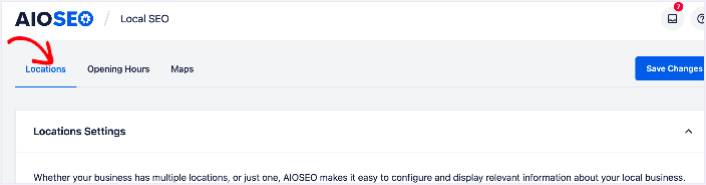
Next, you need to select whether your business is in one location or many.
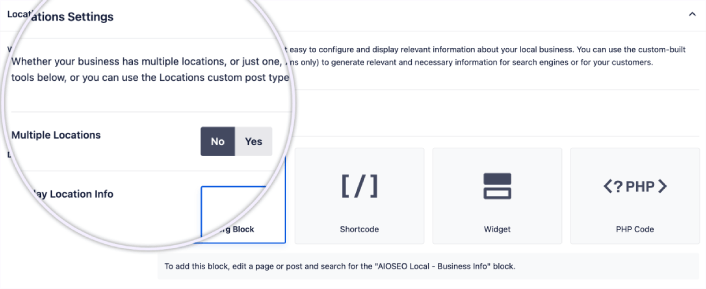
If yours is a single-location business, leave the Multiple Locations toggle set to No.
You can also choose whether you want your location information to be displayed as a:
- Gutenberg Block
- Shortcode
- Widget
- PHP code
Then, add other business information like name, logo (image), business type, and address.
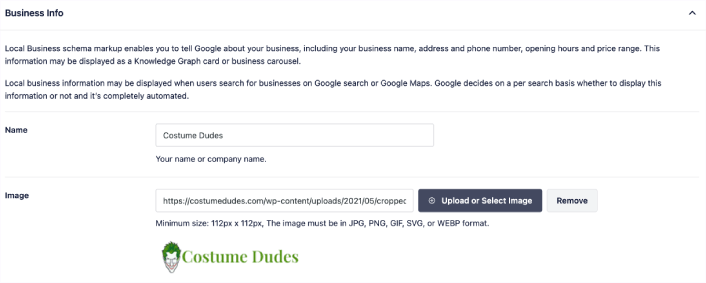
You can also add other information like a map of your location (more on this in a moment), contact information, VAT and Tax IDs, payment information, and the areas you serve.
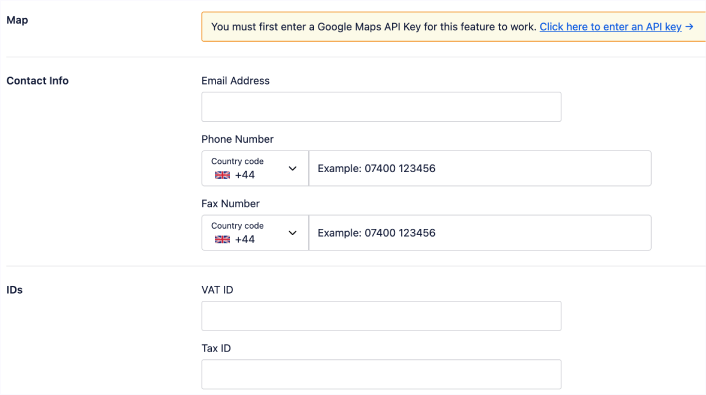
You can also add your payment info under Payment Info and showcase your store locations under Areas Served.
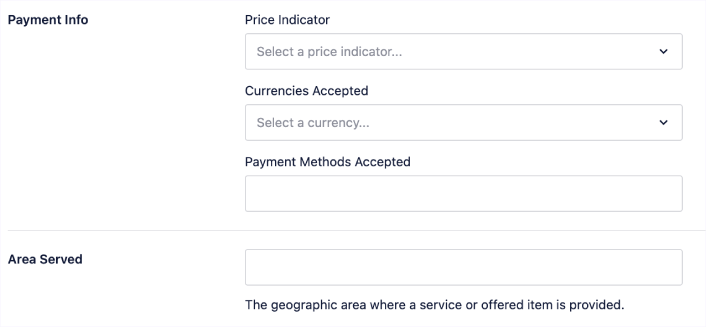
When you’re done, go ahead and hit the Save Changes button.
Step #3: Add Opening Hours
The next step to adding Local Business schema is to add your business hours. Go to the AIOSEO menu » Local SEO » Opening Hours. This will open a window where you can add your opening hours.
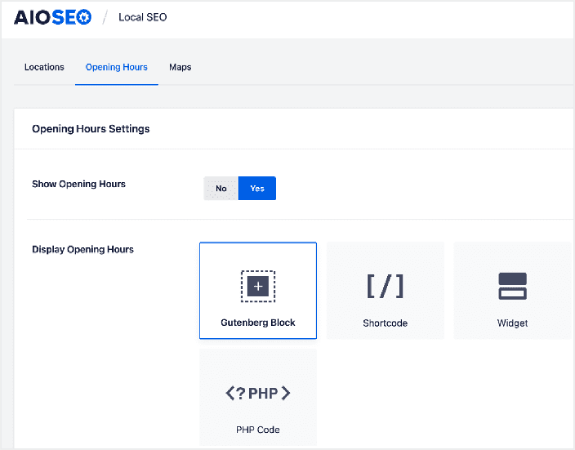
Set the Show Opening Hours toggle to Yes, and you can get options for displaying your opening hours.
If your business is open 24 hours, you can set the toggle to Open 24/7, and that’s it. You’ve added business hours to your Local Business schema.
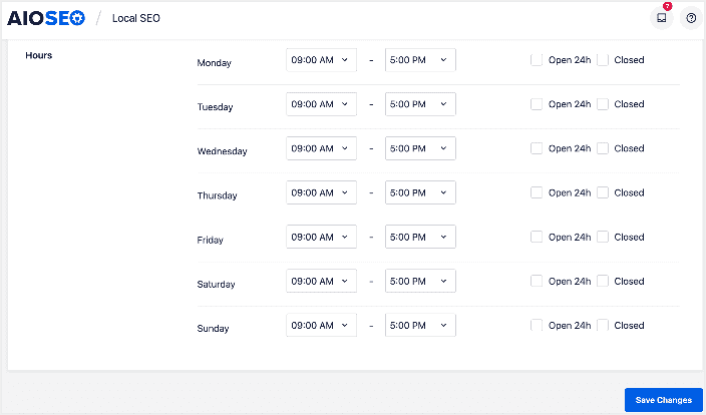
Once you’re done, click Save Changes, and your operating hours will be set.
Step #4: Add Google Maps
The final step to setting your Local Business schema is adding Google Maps, so you can visually display your location. To do that, go to the AIOSEO menu » Local SEO » Maps.
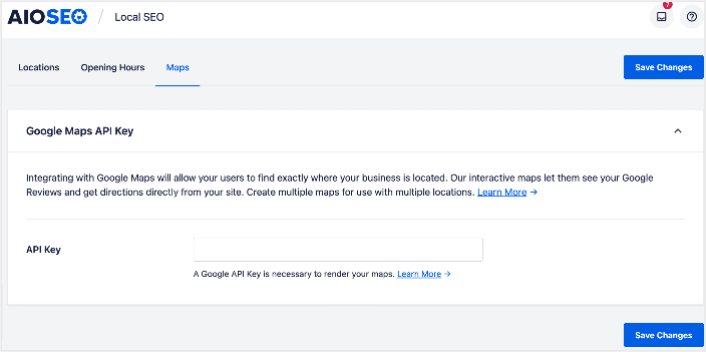
You’ll have to add a Google Maps API key in the API Key field for search engines to render your map.
Once done, click Save Changes.
And that’s it!
What to do After Adding Local Business Schema in WordPress
Adding local business schema is only one part of the puzzle. Our top recommendation is to use All in One SEO to optimize your website content. The right tools can help you with getting repeat traffic, engagement, and sales. For that, we recommend using push campaigns.
Push-notiser kan vara ett kraftfullt marknadsföringsverktyg för växande företag. Inte övertygad? Kolla in dessa episka resurser:
- 7 smarta strategier för att öka kundengagemanget
- Är push-notiser effektiva? 7 statistik + 3 experttips
- Hur du ställer in pushmeddelanden för övergivna kundvagnar (Enkel handledning)
Vi rekommenderar att använda PushEngage för att skapa dina push-notiskampanjer. PushEngage är den främsta push-notisprogramvaran i världen. Så, om du inte redan har gjort det, kom igång med PushEngage idag!


