UTM-parametrar gör det möjligt för Google Analytics att berätta var klick har kommit ifrån och vilken kampanj som dirigerade klick till din webbplats. Detta kan analysera vanliga meddelanden, A/B-testning och Drip & Trigger-kampanjer. Detta kan göras på din webbplats genom att följa stegen nedan:
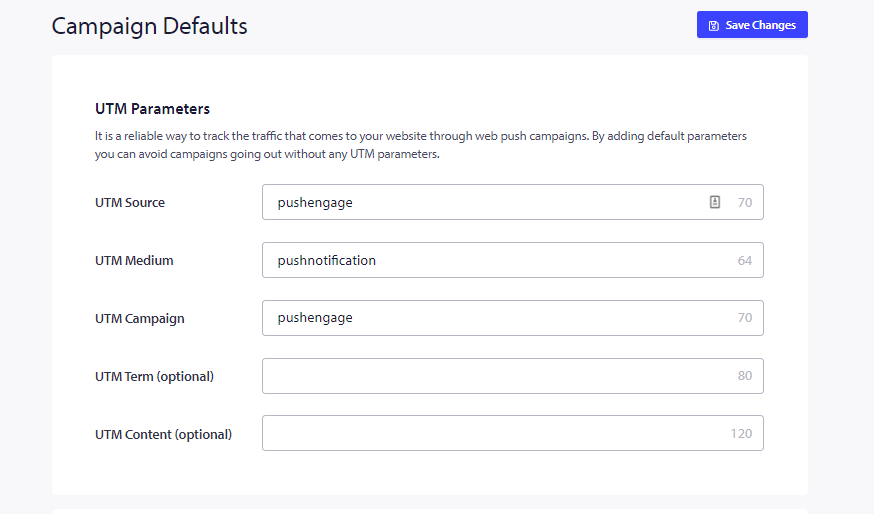
Navigera till Webbplatsinställningar » Kampanjstandarder » UTM-parametrar. Fyll i alla obligatoriska uppgifter på den här sidan & klicka på Spara ändringar.
De uppgifter som du kan lägga till listas nedan:
1. UTM-källa (obligatorisk)
2. UTM-medium (obligatorisk)
3. UTM-kampanj (obligatorisk)
4. UTM-term
5. UTM-innehåll
Mer om UTM: Funktionen med UTM är att hjälpa till att spåra och analysera användarna. Med UTM kommer du att kunna veta allt om trafiken som når din webbplats, från vilken länk som helst. Det spelar ingen roll om dessa länkar kommer från Facebook, Twitter, ett meddelande på sociala medier eller ett e-postmeddelande; Google Analytics kommer att plocka upp all data och visa den för dig mycket koncis.
Om du stöter på några problem, tveka inte att kontakta oss genom att klicka här. Vårt supportteam kan hjälpa dig.