
Ψάχνετε για μια πλήρη κριτική του WP Simple Pay;
Η ενσωμάτωση του Stripe στον ιστότοπό σας WordPress είναι ένας από τους ευκολότερους τρόπους αποδοχής πληρωμών με πιστωτικές κάρτες. Αλλά τι γίνεται αν θέλετε περισσότερα; Τι γίνεται αν χρειάζεστε περισσότερα νομίσματα, γλώσσες και τύπους πληρωμών;
Το WP Simple Pay μπορεί να σας βοηθήσει να αξιοποιήσετε στο έπακρο τις πληρωμές Stripe.
Σε αυτό το άρθρο, θα βάλουμε το plugin στο μικροσκόπιο και θα φτάσουμε στην ουσία αυτών των ερωτήσεων.
Ας ξεκινήσουμε.
Μια Γρήγορη Επισκόπηση του WP Simple Pay
Το WP Simple Pay είναι ακριβώς αυτό που ακούγεται. Κάνει τις online πληρωμές απλές στον ιστότοπό σας WordPress. Είναι εύκολο στη χρήση, εξαιρετικά αξιόπιστο και δεν απαιτεί καθόλου κωδικοποίηση για τη ρύθμισή του.
Το καλύτερο κομμάτι; Το WP Simple Pay σας βοηθά να εστιάσετε στη δημιουργία προϊόντων και στην πώλησή τους χωρίς να ανησυχείτε για την αποδοχή πληρωμών από όλο τον κόσμο.
Όλες οι πληροφορίες πελατών και πληρωμών αποθηκεύονται στον λογαριασμό σας Stripe, όχι στον ιστότοπό σας WordPress. Ως αποτέλεσμα, το plugin δεν θα επιβαρύνει τον ιστότοπό σας όπως άλλες εναλλακτικές λύσεις. Το WP Simple Pay προσφέρει τον απλούστερο τρόπο προσθήκης πληρωμών Stripe στον ιστότοπό σας WordPress.
Και η ρύθμιση του WP Simple Pay είναι εξαιρετικά απλή.
Ας ρίξουμε μια γρήγορη ματιά.
Πώς να Ρυθμίσετε το WP Simple Pay
Το WP Simple Pay είναι όπως κάθε άλλο πρόσθετο WordPress. Το μόνο που χρειάζεται να κάνετε είναι να το εγκαταστήσετε και να το ενεργοποιήσετε. Αν δεν είστε σίγουροι πώς να το κάνετε, δείτε αυτό το άρθρο σχετικά με το πώς να εγκαταστήσετε ένα πρόσθετο WordPress.
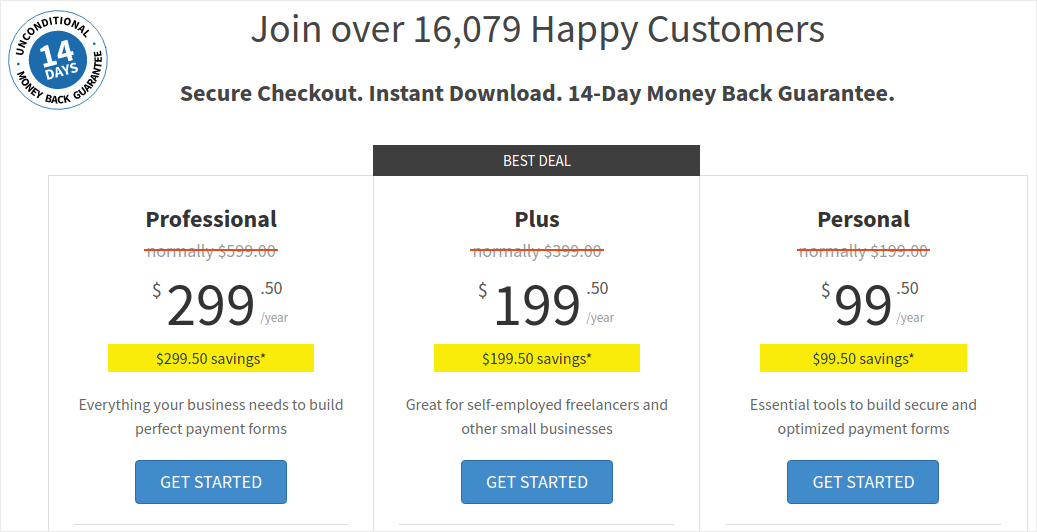
Ξεκινήστε πηγαίνοντας στο WP Simple Pay και επιλέξτε το πλάνο σας:
Μόλις εγκαταστήσετε το πρόσθετο, στον πίνακα ελέγχου του WordPress, μεταβείτε στο WP Simple Pay » Ρυθμίσεις και επικολλήστε το κλειδί άδειας χρήσης σας:
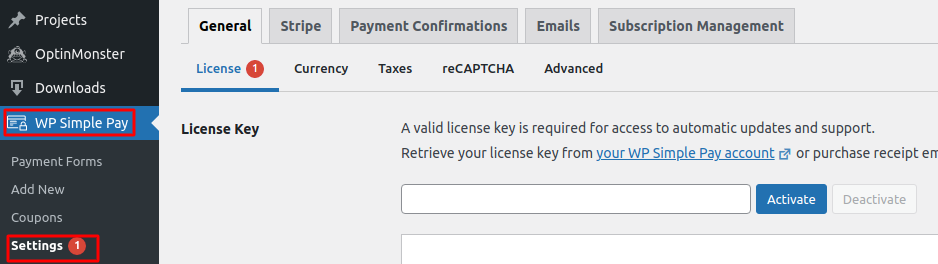
Όταν τελειώσετε, κάντε κλικ στο Ενεργοποίηση.
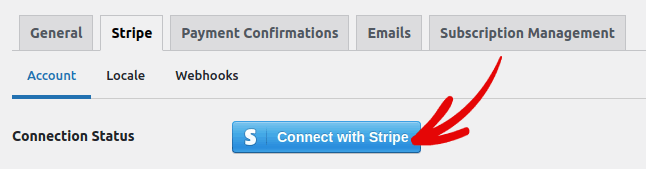
Στη συνέχεια, μεταβείτε στην καρτέλα Stripe και κάντε κλικ στο Σύνδεση με το Stripe:
Και αυτό είναι όλο. Ολοκληρώσατε τη ρύθμιση του πρόσθετου. Στη συνέχεια, θα πρέπει να εξερευνήσετε τις διάφορες δυνατότητες του πρόσθετου.
Τι Μπορεί να Κάνει το WP Simple Pay για την Επωνυμία σας;
Το WP Simple Pay σας βοηθά να δημιουργήσετε απλές φόρμες για να δέχεστε πληρωμές για τα προϊόντα σας. Μπορείτε να δημιουργήσετε φόρμες άμεσης πληρωμής και μια σειρά από ευέλικτους τύπους πληρωμών για να τις συνοδεύσετε. Το πιο εντυπωσιακό είναι ότι όλα είναι εύκολα στη ρύθμιση και εύκολα στη χρήση για τους πελάτες σας.
Ας δούμε κάθε μία από αυτές τις δυνατότητες και ας αναλύσουμε τι κάνει το πρόσθετο υπέροχο.
#1. Δημιουργός Φόρμας Πληρωμής
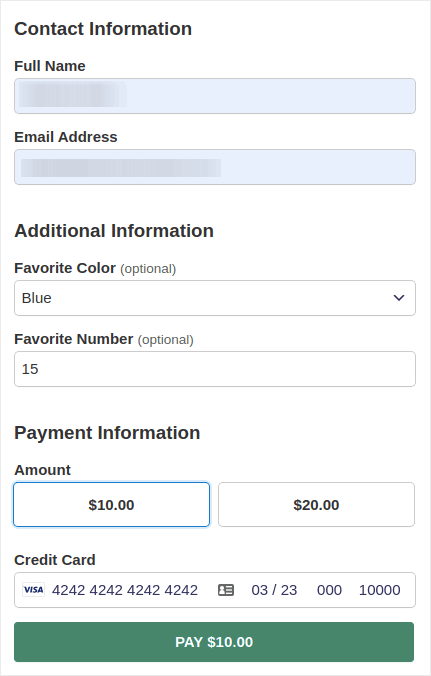
Μπορείτε να δημιουργήσετε μια προσαρμοσμένη φόρμα πληρωμής με λίγα κλικ με το WP Simple Pay. Και μπορείτε να επιλέξετε διαφορετικούς τύπους φόρμας όπως:
Ενσωματωμένες φόρμες:
Ή μια φόρμα πληρωμής pop-up:
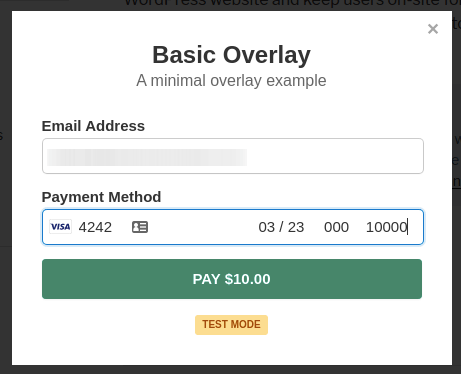
Και χρειάζονται κυριολεκτικά 5 λεπτά για να δημιουργήσετε μια φόρμα πληρωμής απευθείας από τον πίνακα ελέγχου του WordPress.
#2. Σελίδες Πληρωμής Stripe Checkout
Αν δεν σας ενδιαφέρει να δημιουργήσετε μια προσαρμοσμένη φόρμα πληρωμής, μπορείτε να χρησιμοποιήσετε και την προεπιλεγμένη φόρμα πληρωμής Stripe:
Είναι απλή, κομψή και μπορείτε να ρυθμίσετε τόσο επαναλαμβανόμενες όσο και εφάπαξ πληρωμές χρησιμοποιώντας την προεπιλεγμένη φόρμα πληρωμής Stripe.
#3. Πληρωμές Προσαρμοσμένου Ποσού
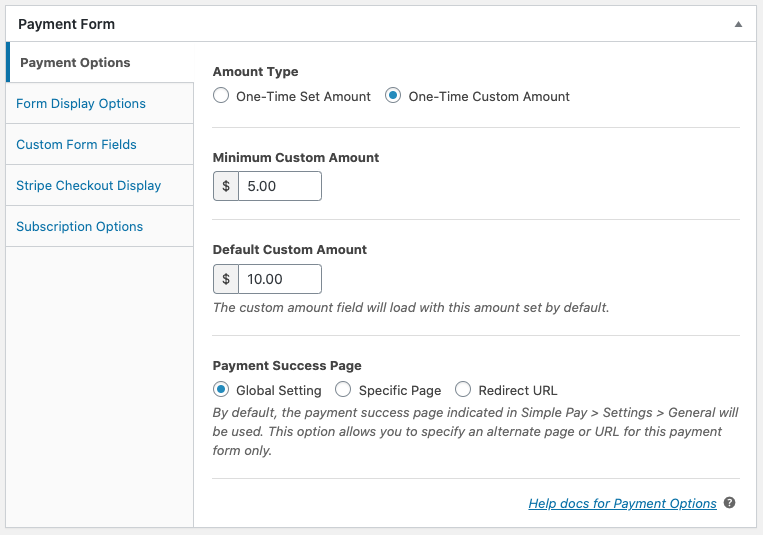
Μπορείτε να ορίσετε ένα εφάπαξ ποσό για τα προϊόντα σας. Ή, θα μπορούσατε να καθορίσετε ελάχιστα και προεπιλεγμένα ποσά για μοντέλα "πληρώστε ό,τι θέλετε".
#4. Προσθήκη και Προσαρμογή Επιλογών Συνδρομής
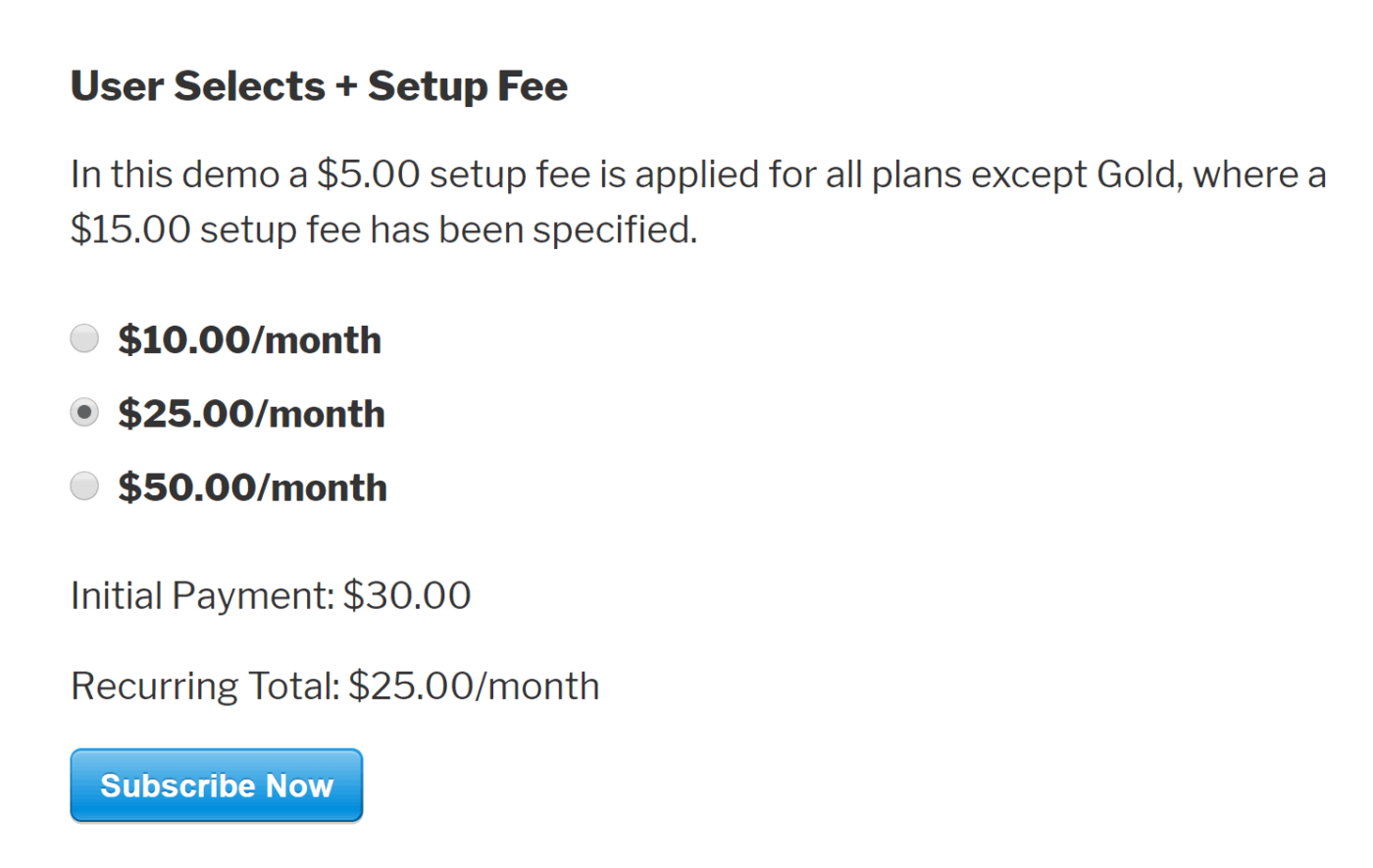
Η ρύθμιση συνδρομών είναι εξαιρετικά εύκολη με το WP Simple Pay. Μπορείτε να προσθέσετε μια επιλογή προσαρμοσμένου ποσού, να χρεώσετε ένα τέλος εγκατάστασης ή να προσφέρετε δωρεάν δοκιμαστικές περιόδους.
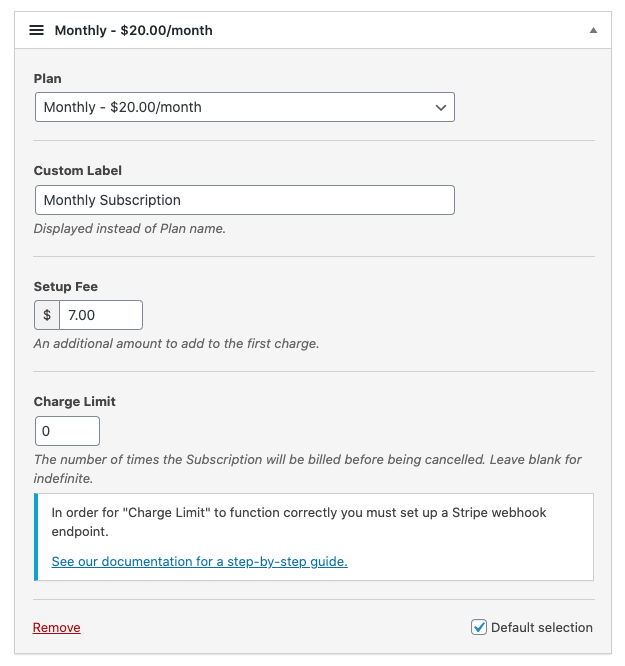
Μπορείτε ακόμη και να ρυθμίσετε σχέδια δόσεων για να τερματίσετε τις συνδρομές μετά από έναν συγκεκριμένο αριθμό χρεώσεων.
#5. Προσφορά Εκπτώσεων με Κωδικούς Κουπονιών
Βεβαίως, μπορείτε να δημιουργήσετε εκπτώσεις στο WooCommerce και στο Easy Digital Downloads. Αλλά το WP Simple Pay καθιστά εξαιρετικά εύκολη τη δημιουργία κωδικών κουπονιών για πληρωμές συνδρομών.
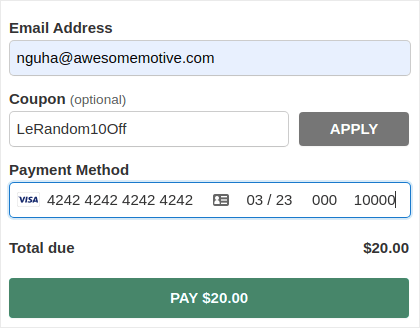
#6. Εναλλακτικοί Τρόποι Πληρωμής
Εκτός από τις συνηθισμένες πληρωμές με πιστωτική κάρτα, μπορείτε επίσης να ρυθμίσετε διάφορους εναλλακτικούς τρόπους πληρωμής. Μπορείτε να δέχεστε πληρωμές χρησιμοποιώντας Apple Pay και Google Pay:
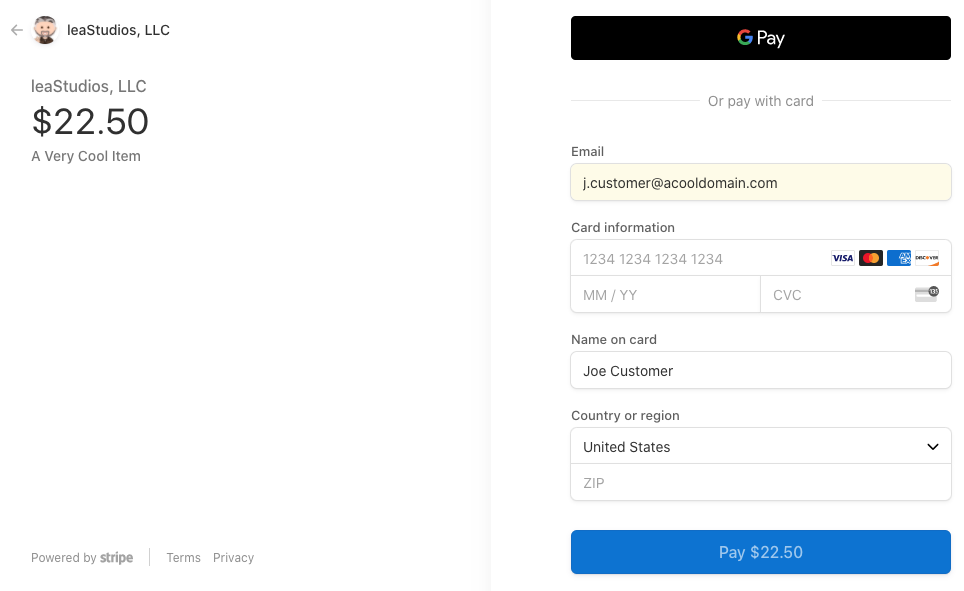
Ή, θα μπορούσατε ακόμη και να δεχτείτε πληρωμές με χρέωση ACH:
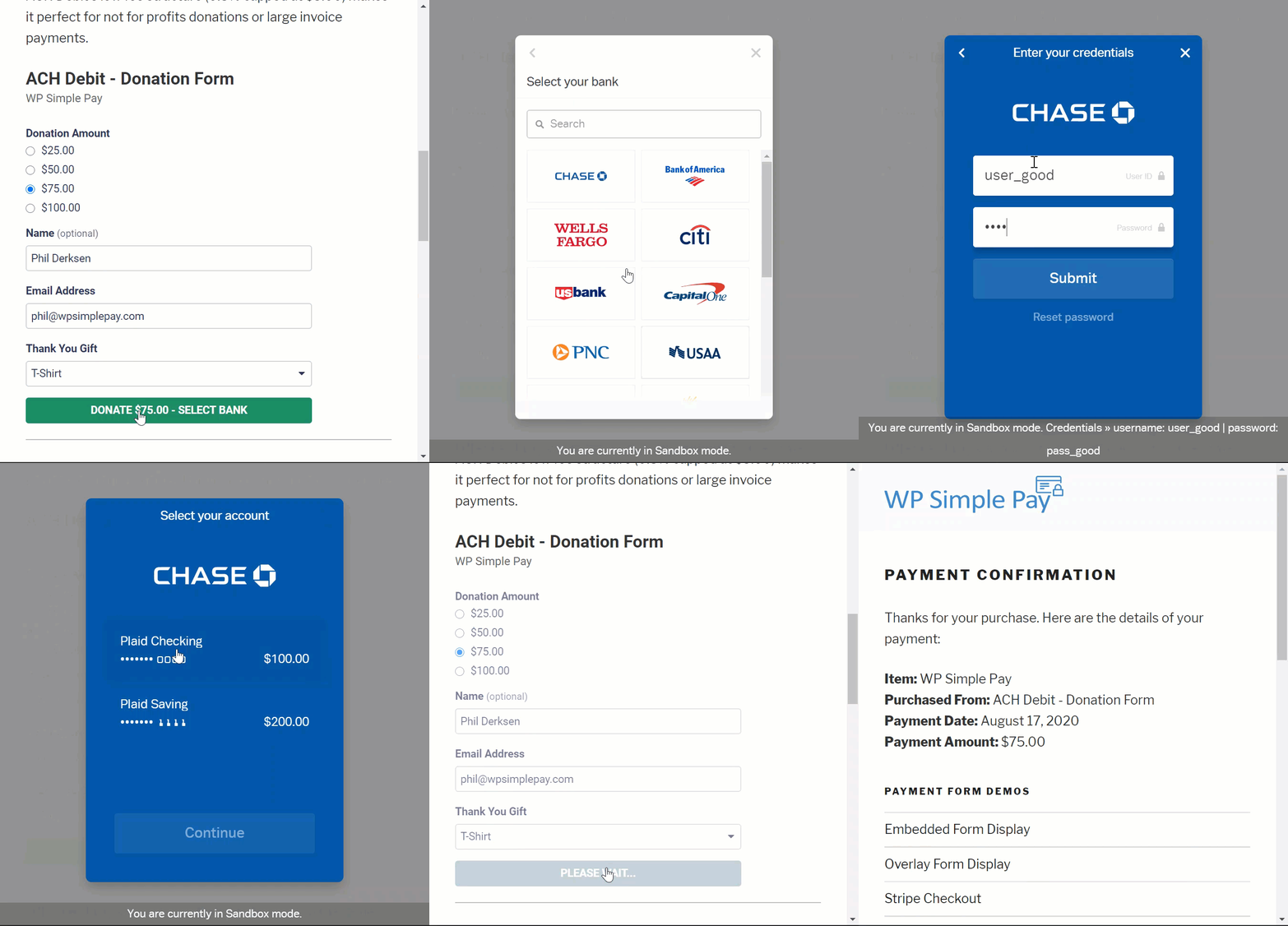
Το WP Simple Pay μπορεί επίσης να σας βοηθήσει να δέχεστε πληρωμές χρησιμοποιώντας:
- iDEAL
- SEPA Άμεση Χρέωση
- Alipay
- Bancontact
- giropay
- Przelewy24
Και πολλά άλλα!
#7. Προσαρμοσμένες Λεπτομέρειες Επιβεβαίωσης Πληρωμής
Το χειρότερο κομμάτι των περισσότερων λογισμικών επεξεργασίας πληρωμών είναι ότι στέλνουν φρικτές προτυποποιημένες απαντήσεις μέσω email. Και δεν υπάρχουν πολλά πράγματα που μπορείτε να επεξεργαστείτε σε αυτό το email. Έτσι, τα email που αποστέλλονται αισθάνονται εντελώς εκτός του brand.
Με το WP Simple Pay, μπορείτε να δημιουργήσετε ένα προσαρμοσμένο πρότυπο για τα email επιβεβαίωσης πληρωμής.
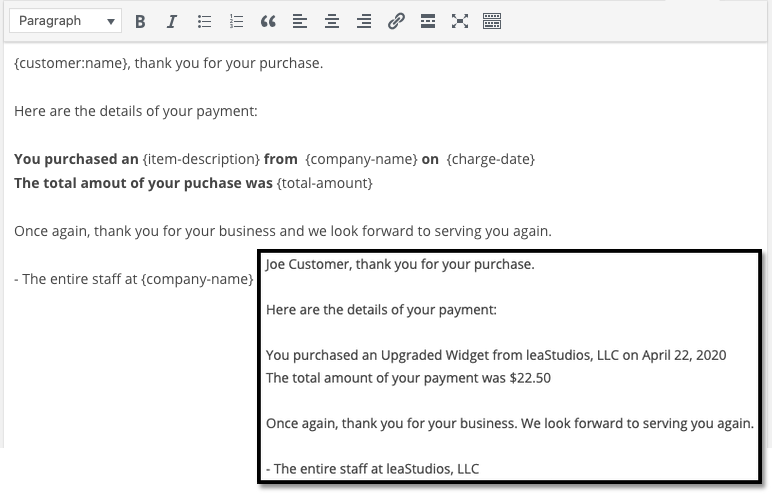
Για να παραμείνετε εντός του brand, μπορείτε απλά να δημιουργήσετε ένα πρότυπο που ταιριάζει με τη μηνυματολογία και το στυλ της μάρκας σας. Αν θέλετε να γίνετε πιο περίτεχνοι, μπορείτε ακόμη και να στείλετε επιπλέον πληροφορίες, όπως κλειδιά άδειας χρήσης, χρησιμοποιώντας προσαρμοσμένα πεδία.
#8. Ρυθμίσεις Τοποθεσίας και Νομίσματος
Ένα άλλο μεγάλο πρόβλημα με πολλά plugins της Stripe είναι ότι μπορείτε να δέχεστε πληρωμές μόνο στο τοπικό σας νόμισμα. Αυτό δεν είναι πρόβλημα που προκαλείται από τη Stripe. Η Stripe δέχεται 30+ γλώσσες, 45+ χώρες και 135+ νομίσματα. Η σύγκρουση προέρχεται από κακογραμμένα plugins.
Έτσι, αν βρίσκεστε στην Ινδία, εξ ορισμού ΠΡΕΠΕΙ να δημιουργήσετε φόρμες πληρωμής που δέχονται πληρωμές σε INR, ακόμη κι αν θέλετε να τιμολογήσετε το προϊόν σας σε USD.
Με το WP Simple Pay, μπορείτε να ορίσετε την τοπική σας γλώσσα και νόμισμα, καθώς και το προτιμώμενο νόμισμα.
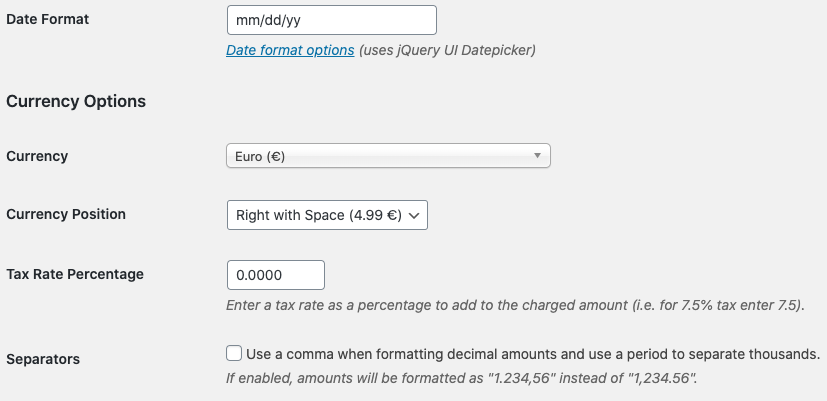
Είναι τόσο απλό!
Τιμολόγηση
Υπάρχει μόνο ένας τελικός παράγοντας που πρέπει να λάβουμε υπόψη πριν δώσουμε την τελική μας ετυμηγορία.
Πόσο κοστίζει πραγματικά το WP Simple Pay;
Στην πραγματικότητα, είναι αρκετά προσιτό:
Μπορείτε να ξεκινήσετε με το πακέτο Personal στα 99,50 $/έτος. Και αν χρειάζεστε περισσότερες λειτουργίες ή αν χρειάζεστε πληρωμές Stripe για πολλούς ιστότοπους, αποκτήστε το πακέτο Professional στα 299,50 $/έτος ή το πακέτο Plus στα 199,0 $/έτος.
Το WP Simple Pay έχει επίσης μια δωρεάν έκδοση Lite. Έτσι, αν θέλετε να πάρετε μια γεύση από το plugin πριν το αγοράσετε, πηγαίνετε να το δείτε. Αλλά αν είστε σοβαροί σχετικά με την ανάπτυξη της επιχείρησής σας, συνιστούμε να αποκτήσετε ένα από τα επί πληρωμή πακέτα.
Τελική Ετυμηγορία
Είναι το WP Simple Pay το #1 plugin πληρωμών Stripe για το WordPress;
Η ετυμηγορία μας: Ναι, είναι.
Η πληθώρα προηγμένων λειτουργιών που παίρνετε ακόμη και με το πακέτο Personal είναι εκπληκτική. Αν έπρεπε να το αναπτύξετε κατά παραγγελία για τον ιστότοπό σας, θα κόστιζε έναν τόνο χρημάτων. Και δεν παίρνετε καν πολλές από τις λειτουργίες πληρωμών συνδρομών με πολλά plugins Stripe εκεί έξω.
Έτσι, αν είστε σοβαροί σχετικά με το να κερδίζετε χρήματα στον ιστότοπό σας, συνιστούμε να χρησιμοποιήσετε το WP Simple.
Και ενώ μιλάμε για το να βγάζετε χρήματα, θα πρέπει επίσης να ρυθμίσετε ειδοποιήσεις push στον ιστότοπό σας. Μπορείτε να χρησιμοποιήσετε ειδοποιήσεις push για να αυξήσετε την επισκεψιμότητα, την αφοσίωση και τις πωλήσεις σας αυτόματα.
Απλά ρίξτε μια ματιά σε αυτούς τους πόρους και θα δείτε τι εννοούμε:
- 7 Αποδεδειγμένοι Τρόποι για να Κερδίσετε Χρήματα από το Blog σας το 2021
- Πότε να χρησιμοποιήσετε (και πότε ΟΧΙ να χρησιμοποιήσετε) ειδοποιήσεις push (2021)
- Πώς να Προσθέσετε Ειδοποιήσεις Push στο Πρόγραμμα Περιήγησης στον Ιστότοπό σας WordPress
Συνιστούμε το PushEngage για να ξεκινήσετε τις καμπάνιες ειδοποιήσεων push. Το PushEngage είναι το λογισμικό ειδοποιήσεων push #1 στον κόσμο.
Λοιπόν, αν δεν το έχετε κάνει ήδη, ξεκινήστε με το PushEngage σήμερα.


