
Δεν είναι κάθε επισκέπτης έτοιμος να συνομιλήσει τη στιγμή που μπαίνει στον ιστότοπό σας. Στην πραγματικότητα, η εμφάνιση ενός widget συνομιλίας πολύ νωρίς οδηγεί συχνά σε χαμηλότερη αλληλεπίδραση και υψηλότερα ποσοστά εγκατάλειψης.
Μια πιο έξυπνη προσέγγιση είναι η ενεργοποίηση της συνομιλίας μόνο όταν ο επισκέπτης έχει κάνει κύλιση στο 50% της σελίδας—ένα σήμα ότι είναι αφοσιωμένος, ενδιαφέρεται και είναι πιο πιθανό να αλληλεπιδράσει.
Το widget συνομιλίας του PushEngage το κάνει απίστευτα εύκολο.
Αυτός ο σύντομος οδηγός θα σας καθοδηγήσει στο γιατί λειτουργούν οι ενεργοποιήσεις βάσει κύλισης και πώς να τις ρυθμίσετε με λίγα μόνο κλικ.
Στείλτε Μηνύματα Πολλαπλών Καναλιών Σήμερα!
Τα μηνύματα Push και WhatsApp είναι εξαιρετικά αποτελεσματικά, χαμηλού κόστους εργαλεία μάρκετινγκ για να σας βοηθήσουν να αυξήσετε την επαναλαμβανόμενη επισκεψιμότητα, την αφοσίωση και τις πωλήσεις σας αυτόματα.
- Γιατί λειτουργεί η Ενεργοποίηση Κύλισης στο 50%
- Πώς το PushEngage Διαχειρίζεται τις Ενεργοποιήσεις Συνομιλίας βάσει Κύλισης
- Πώς να Ενεργοποιήσετε το Widget Συνομιλίας σας στο 50% Κύλισης (Βήμα προς Βήμα)
- Επαγγελματική Συμβουλή: Συνδυάστε την Ενεργοποίηση Κύλισης + Στόχευση Σελίδας
- Βέλτιστες Πρακτικές για Ενεργοποιήσεις Συνομιλίας στο 50% Κύλισης
- Τι να κάνετε μετά τη ρύθμιση των Γραφικών Στοιχείων Συνομιλίας
Γιατί λειτουργεί η Ενεργοποίηση Κύλισης στο 50%
Ένας επισκέπτης που φτάνει στο 50% μιας σελίδας έχει δείξει σαφή πρόθεση. Έχει επενδύσει χρόνο, έχει απορροφήσει το περιεχόμενό σας και έχει σηματοδοτήσει περιέργεια.
Μια ενεργοποίηση στο 50% σας βοηθά να:
- Αποφύγετε την διακοπή των αναγνωστών πολύ νωρίς
- Πιάστε τους επισκέπτες όταν είναι πλήρως προετοιμασμένοι
- Αυξήστε τα ποσοστά ανοίγματος συνομιλίας
- Βελτιώστε την ποιότητα των leads
- Μειώστε τον φόρτο εργασίας των πρακτόρων από συνομιλίες χαμηλής πρόθεσης
Αυτό είναι ιδιαίτερα αποτελεσματικό για:
- Μεγάλα άρθρα blog
- Σελίδες σύγκρισης προϊόντων
- Απόλυτοι οδηγοί
- Σελίδες FAQ
- Οδηγοί χρήσης
Πώς το PushEngage Διαχειρίζεται τις Ενεργοποιήσεις Συνομιλίας βάσει Κύλισης
Το PushEngage περιλαμβάνει ενσωματωμένους Κανόνες Συμπεριφοράς για τα widgets συνομιλίας. Αυτοί οι κανόνες καθορίζουν πότε εμφανίζεται ένα widget συνομιλίας βάσει των ενεργειών του επισκέπτη.
Ένας από τους πιο χρήσιμους είναι: Εμφάνιση Όταν ο Επισκέπτης Κυλάει X%
Αυτό σας επιτρέπει να καθυστερήσετε το widget μέχρι οποιοδήποτε όριο κύλισης επιλέξετε — το 50% είναι μία από τις ρυθμίσεις με την καλύτερη απόδοση για σελίδες με πληροφορίες ή περιεχόμενο.
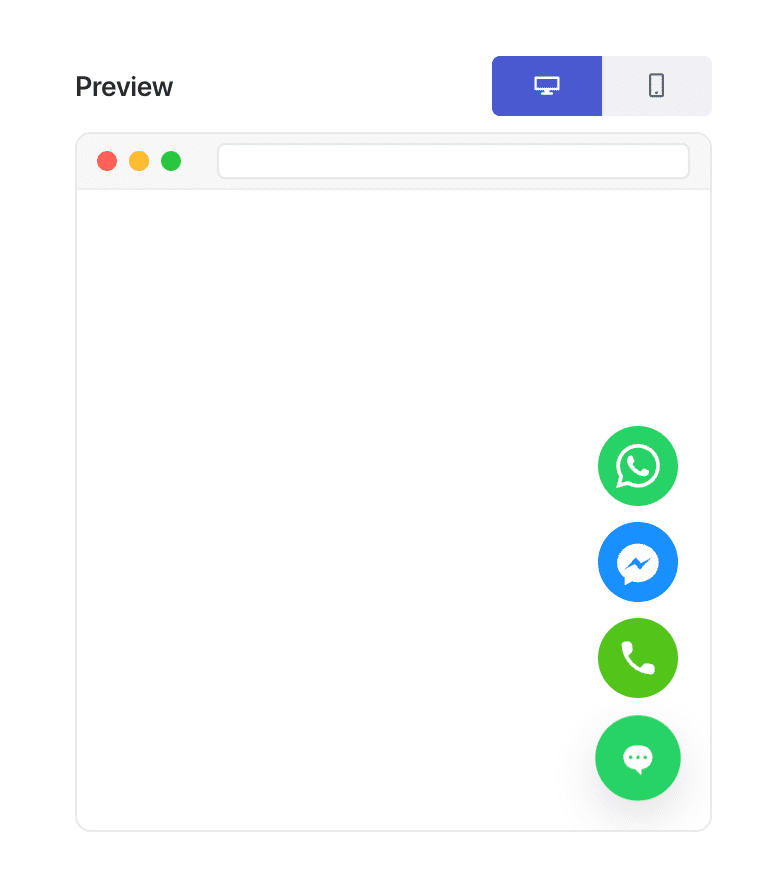
Αυτή η ευελιξία είναι ακριβώς αυτό που καθιστά δυνατή την «εξατομίκευση βάσει τύπου σελίδας».
Πώς να Ενεργοποιήσετε το Widget Συνομιλίας σας στο 50% Κύλισης (Βήμα προς Βήμα)
Βήμα 1: Δημιουργήστε ή Επεξεργαστείτε ένα Widget Συνομιλίας
Στον πίνακα ελέγχου του WordPress σας:
Μεταβείτε στο PushEngage » Chat Widgets και κάντε κλικ στο Create New Widget ή Edit σε ένα υπάρχον.
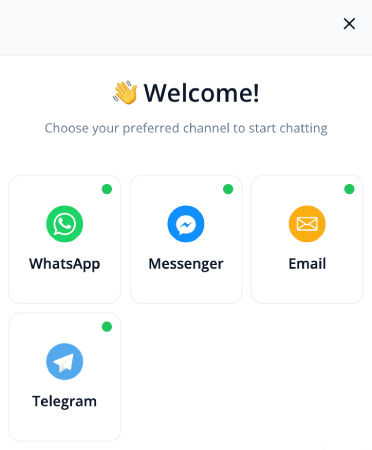
Ρυθμίστε το μήνυμά σας, τα κανάλια και το σχέδιο όπως συνήθως.
Βήμα 2: Ανοίξτε την Καρτέλα Συμπεριφοράς
Μέσα στον επεξεργαστή widget, μεταβείτε στο Triggers. Αυτό ελέγχει πότε εμφανίζεται το widget.
Από το αναπτυσσόμενο μενού ενεργοποίησης, επιλέξτε Display after scroll %:
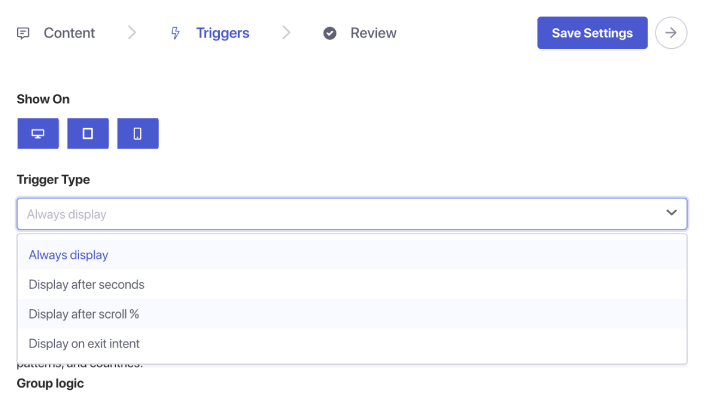
Θα εμφανιστεί ένα πεδίο εισαγωγής ποσοστού. Ορίστε το βάθος κύλισης στο 50%. Αυτό λέει στο PushEngage να περιμένει μέχρι ο χρήστης να έχει κυλήσει μέχρι τη μέση της σελίδας πριν εμφανίσει το widget συνομιλίας.
Βήμα 3: Αποθηκεύστε και Δημοσιεύστε
Κάντε κλικ στο Save Widget.
Στη συνέχεια, βεβαιωθείτε ότι το widget είναι ενεργοποιημένο και στοχεύει στις σελίδες που θέλετε. Το widget συνομιλίας σας θα ενεργοποιηθεί τώρα ακριβώς στο σημείο κύλισης 50% σε κάθε εκχωρημένη σελίδα.
Επαγγελματική Συμβουλή: Συνδυάστε την Ενεργοποίηση Κύλισης + Στόχευση Σελίδας
Οι ενεργοποιήσεις βάσει κύλισης γίνονται ακόμη πιο ισχυρές όταν συνδυάζονται με κανόνες στόχευσης.
Μπορείτε να εμφανίσετε το widget:
- Μόνο σε άρθρα blog
- Μόνο σε κατηγορίες προϊόντων WooCommerce
- Μόνο σε περιεχόμενο μεγάλης φόρμας
- Μόνο για επιστρέφοντες επισκέπτες
- Μόνο σε σελίδες τιμολόγησης
Απλώς μεταβείτε στην καρτέλα Triggers και ορίστε συνθήκες σελίδας.
Βέλτιστες Πρακτικές για Ενεργοποιήσεις Συνομιλίας στο 50% Κύλισης
Για να έχετε τα καλύτερα αποτελέσματα:
1. Μην συνδυάζετε το 50% κύλισης με άμεσες ενεργοποιήσεις
Αναιρεί τον σκοπό της δέσμευσης βάσει πρόθεσης.
2. Κρατήστε το μήνυμα χρήσιμο, όχι πιεστικό
Παραδείγματα:
- «Χρειάζεστε βοήθεια για να κατανοήσετε αυτήν τη σελίδα;»
- «Θέλετε εξατομικευμένες προτάσεις;»
- «Έχετε μια ερώτηση; Είμαι εδώ για να βοηθήσω!»
3. Αποφύγετε τη χρήση πολλαπλών widgets που ενεργοποιούνται με κύλιση ταυτόχρονα
Ένα widget ανά σελίδα διατηρεί την εμπειρία καθαρή.
4. Δοκιμάστε σε κινητά και επιτραπέζιους υπολογιστές
Το βάθος κύλισης μπορεί να διαφέρει ανάλογα με τις συσκευές.
Τι να κάνετε μετά τη ρύθμιση των Γραφικών Στοιχείων Συνομιλίας
Μια ενεργοποίηση κύλισης 50% είναι ένας από τους απλούστερους τρόπους για να εμφανίσετε τη συνομιλία τη στιγμή που πρέπει — *αφού* ο επισκέπτης έχει δεσμευτεί αλλά *πριν* φύγει.
Με τους κανόνες συμπεριφοράς του PushEngage, η ρύθμιση αυτού διαρκεί λιγότερο από ένα λεπτό και βελτιώνει άμεσα την ποιότητα και την πρόθεση των εισερχόμενων συνομιλιών.
Με το PushEngage, μπορείτε να το ρυθμίσετε σε λίγα λεπτά — και να αρχίσετε αμέσως να βλέπετε καλύτερη δέσμευση, υψηλότερες μετατροπές και πιο αποτελεσματικούς φόρτους εργασίας για τους πράκτορες.
- Οι πελάτες βλέπουν πάντα κάποιον online
- Οι χρόνοι απόκρισης μειώνονται
- Οι μετατροπές προ πωλήσεων αυξάνονται
- Η υποστήριξη φαίνεται ταχύτερη και πιο αξιόπιστη
- Το κατάστημά σας είναι έτοιμο για τον κόσμο
Μόλις οριστούν τα προγράμματα, η ομάδα σας μπορεί να λειτουργήσει πιο αποτελεσματικά — και οι πελάτες σας λαμβάνουν την εμπειρία που περιμένουν.
Αν δεν έχετε ήδη ορίσει προφίλ και προγράμματα πρακτόρων στο PushEngage, τώρα είναι η ώρα.
Δεν πειστήκατε; Ρίξτε μια ματιά σε αυτούς τους καταπληκτικούς πόρους για καμπάνιες μάρκετινγκ πολλαπλών καναλιών:
- Πώς να αυξήσετε τις πωλήσεις ξενοδοχείων σε χαμηλή σεζόν
- Πώς να κάνετε πολυκαναλικό μάρκετινγκ για ξενοδοχεία το 2026
- Πώς να Μετατρέψετε Συνδρομητές σε Αγοραστές Χρησιμοποιώντας Ειδοποιήσεις Web Push
- Πώς να ειδοποιείτε τους συνδρομητές για νέες αναρτήσεις στο WordPress
- Πώς να στέλνετε ειδοποιήσεις επαναφοράς αποθέματος για να αυξήσετε τις πωλήσεις
- Πώς να καθαρίσετε τις λίστες συνδρομητών ειδοποιήσεων push (Εύκολο)
- Πώς να στέλνετε αυτόματα ειδοποιήσεις push RSS
- Πώς να χρησιμοποιείτε ειδοποιήσεις push για την προώθηση ενός ειδησεογραφικού ιστότοπου
- Πώς να χρησιμοποιείτε ειδοποιήσεις push cross-selling για να διπλασιάσετε τις πωλήσεις σας
- Πώς να χρησιμοποιείτε ειδοποιήσεις push εγκατάλειψης περιήγησης (4 βήματα)


