Ψάχνετε για έναν γρήγορο και εύκολο τρόπο να ταξινομήσετε τις ειδοποιήσεις push και να βρείτε τις καμπάνιες σας με την καλύτερη απόδοση;
Η ταξινόμηση των καμπανιών push σας με βάση μετρήσεις απόδοσης σας βοηθά να καταλάβετε τι λειτουργεί και τι όχι. Το πιο σημαντικό, μπορείτε να χρησιμοποιήσετε τις καλύτερες καμπάνιες σας ως βάση για νέες καμπάνιες.
Η λειτουργία ταξινόμησης δεν είναι στάνταρ για όλες τις υπηρεσίες ειδοποιήσεων push. Ακόμα κι αν έχετε τη λειτουργία, μπορεί να μην μπορείτε να τη χρησιμοποιήσετε χωρίς να χρησιμοποιήσετε την υπηρεσία API τους. Αυτό σημαίνει ότι θα χρειαστείτε έναν προγραμματιστή για να το κάνει για εσάς.
Αν έχετε έναν εσωτερικό προγραμματιστή, αυτό είναι εντάξει. Αλλά αν δεν έχετε, συνιστούμε ανεπιφύλακτα να μεταβείτε στο PushEngage. Το PushEngage σας επιτρέπει να φιλτράρετε τις καμπάνιες σας με μερικά απλά κλικ.
Σε αυτό το άρθρο, θα σας δείξουμε βήμα προς βήμα πώς να ταξινομήσετε τις ειδοποιήσεις push και να βρείτε τις καλύτερες καμπάνιες σας.
Γιατί Θα Θέλατε να Φιλτράρετε και να Ταξινομήσετε τις Ειδοποιήσεις Push;
Μπορείτε να φιλτράρετε και να ταξινομήσετε τις ειδοποιήσεις push για να βρείτε τις καμπάνιες με την καλύτερη απόδοση ή ακόμα και τις καμπάνιες με τη χειρότερη απόδοση.
Το επικό πράγμα σχετικά με αυτά τα φίλτρα είναι ότι μπορείτε να δείτε:
- Τύπους ειδοποιήσεων push που στέλνετε τους περισσότερους
- Πόσο καλά αποδίδουν συγκεκριμένοι τύποι ειδοποιήσεων
- Προσδιορίστε εποχικές τάσεις στην απόδοση των καμπανιών
- Τι είδους καμπάνιες χρειάζονται βελτιστοποίηση άμεσα
Και μπορείτε να το κάνετε με μερικά απλά κλικ!
Μπορείτε επίσης να ταξινομήσετε τις ειδοποιήσεις push κατά Πιο Πρόσφατα Δημιουργημένες ή Παλαιότερα Δημιουργημένες. Με αυτόν τον τρόπο, μπορείτε να κάνετε εξαιρετικά εύκολη την εύρεση συγκεκριμένων καμπανιών ακόμα και μετά το φιλτράρισμα κατά ημερομηνία.
Επιτρέπει η Υπηρεσία Ειδοποιήσεων Push σας την Ταξινόμηση Καμπανιών;
Δεν επιτρέπει κάθε υπηρεσία ειδοποιήσεων push να φιλτράρετε και να ταξινομείτε τις ειδοποιήσεις push. Τουλάχιστον, όχι άμεσα. Μερικές φορές, μπορείτε να το κάνετε χρησιμοποιώντας την υπηρεσία API τους. Αλλά αυτό είναι δύσκολο να γίνει αν δεν έχετε έναν εσωτερικό προγραμματιστή.
Ένας καλός τρόπος επαλήθευσης είναι απλώς να ρωτήσετε τον πάροχο της υπηρεσίας σας αν έχουν επιλογή καθαρισμού. Αλλά οι πιθανότητες είναι ότι δεν θα έχουν κάποια με προσβάσιμες επιλογές.
Συνιστούμε να μεταβείτε αμέσως στο PushEngage.

Το PushEngage είναι η καλύτερη υπηρεσία ειδοποιήσεων push στον κόσμο. Και δεν μιλάμε μόνο για τη δωρεάν έκδοση. Σας επιτρέπει να συνδεθείτε με επισκέπτες αφού φύγουν από τον ιστότοπό σας με στοχευμένα μηνύματα push.
Το PushEngage είναι η πρώτη μας επιλογή για υπηρεσίες και εργαλεία ειδοποιήσεων push επειδή είναι:
- Είναι τόσο εύκολο στη χρήση
- Αποτελεσματικό σε ιστότοπους HTTP και HTTPS
- Έρχεται με έναν οπτικό κατασκευαστή που απαιτεί λίγο ή καθόλου κώδικα για τη ρύθμιση
- Ρυθμίστε εύκολα πλήρως αυτοματοποιημένες καμπάνιες ειδοποιήσεων push για οποιονδήποτε τύπο ιστοτόπου
- Διαθέτει πολλαπλές επιλογές για την αποστολή εξατομικευμένων ειδοποιήσεων push για υψηλότερα ποσοστά κλικ
- Εξοπλισμένο με προσαρμοσμένη παρακολούθηση στόχων, παραμέτρους UTM και προηγμένα αναλυτικά στοιχεία
Και αυτό είναι μόνο η αρχή. Ελέγξτε την πλήρη λίστα των λειτουργιών του PushEngage πριν προχωρήσετε παραπέρα.
Το πιο απίστευτο κομμάτι του PushEngage είναι ότι διαθέτει ένα δωρεάν πρόγραμμα για πάντα που μπορείτε να δοκιμάσετε πριν λάβετε απόφαση αγοράς.
Το δωρεάν πρόγραμμα του PushEngage είναι αρκετά καλό για να φτάσει η επιχείρησή σας σε ένα σημείο όπου μπορείτε εύκολα να αντέξετε οικονομικά τα επί πληρωμή προγράμματα. Ξεκινούν από 9$/μήνα για τον πρώτο χρόνο (1.000 συνδρομητές, χρεώνονται ετησίως) και κλιμακώνονται με τον αριθμό των συνδρομητών σας· 100.000 συνδρομητές είναι το πρόγραμμα Premium, και τα τρέχοντα στοιχεία βρίσκονται στη σελίδα τιμολόγησης.
Το συνολικό κόστος μετάβασης είναι αρκετά χαμηλό. Επομένως, σας ενθαρρύνουμε ιδιαίτερα να μεταβείτε στο PushEngage αμέσως. Η λειτουργία καθαρισμού δεν είναι ο μόνος λόγος για να αγοράσετε ένα πρόγραμμα PushEngage. Λαμβάνετε πολλές προηγμένες λειτουργίες που άλλα εργαλεία ειδοποιήσεων push απλά δεν προσφέρουν.
Πώς να Φιλτράρετε και να Ταξινομείτε τις Ειδοποιήσεις Γρήγορα
Τώρα που μεταβήκατε στο PushEngage, ήρθε η ώρα να καθαρίσετε τη λίστα συνδρομητών ειδοποιήσεων push.
Αν είστε νέοι στην παρακολούθηση της απόδοσης των ειδοποιήσεων push, έχουμε πολύ καλά νέα για εσάς. Μπορείτε να ταξινομήσετε και να φιλτράρετε τις εκπομπές push σας εύκολα.
Πηγαίνετε στο dashboard του PushEngage και μεταβείτε στις Εκπομπές Push:

Εδώ, θα παρατηρήσετε ότι υπάρχει μια επιλογή φίλτρου:
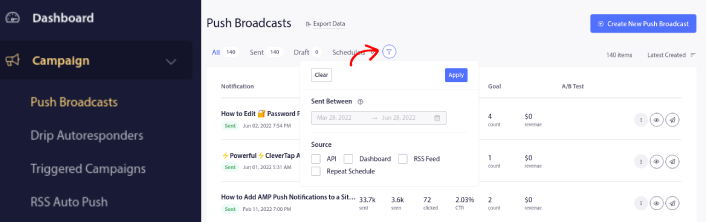
Μπορείτε να φιλτράρετε τις εκπομπές push που στείλατε κατά ημερομηνία και πηγή:
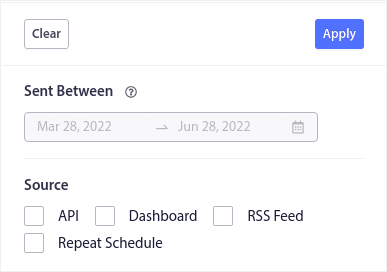
Ας υποθέσουμε ότι έχετε μια καμπάνια ειδοποιήσεων push Black Friday που εκτείνεται σε πολλές ημέρες.
Τώρα, μπορείτε να έχετε μια σαφή εικόνα για το ποιες ειδοποιήσεις είχαν την καλύτερη απόδοση και ποιες δεν αποδίδουν πολύ καλά. Και αυτές οι πληροφορίες μπορούν να σας βοηθήσουν να βελτιστοποιήσετε τις τρέχουσες εκπομπές και καμπάνιες σας.
Αν είστε νέοι στη χρήση ειδοποιήσεων push, θα πρέπει να γνωρίζετε ότι μπορείτε μόνο να κάνετε A/B testing στις εκπομπές push. Αλλά μπορείτε να χρησιμοποιήσετε τις επιλογές ταξινόμησης και φιλτραρίσματος για να εφαρμόσετε βελτιστοποιήσεις ακόμη και στις αυτοματοποιημένες καμπάνιες σας. Είναι ένας πολύ έξυπνος τρόπος για να ορίσετε βέλτιστες πρακτικές ειδοποιήσεων push για τον κλάδο και την επωνυμία σας.
Τι να κάνετε Αφού Ταξινομήσετε τις Ειδοποιήσεις Push
Αφού ταξινομήσετε τις ειδοποιήσεις push, μπορείτε να εξετάσετε λεπτομερή αναλυτικά στοιχεία και στη συνέχεια να επιστρέψετε στη βελτιστοποίηση των καμπανιών ειδοποιήσεων push και στην ανάπτυξη της επιχείρησής σας.
Προτείνουμε επίσης να αφιερώσετε λίγο χρόνο για να διαβάσετε τα άρθρα μας και να μάθετε πώς να ενισχύσετε τις αυτοματοποιημένες ειδοποιήσεις push σας. Ξεκινήστε με το άρθρο μας σχετικά με τις βέλτιστες πρακτικές ειδοποιήσεων push.
Αν είστε νέοι στις ειδοποιήσεις push, θα πρέπει να ακολουθήσετε μια πλήρη διαδικασία δοκιμής ειδοποιήσεων push πριν μεταβείτε σε λειτουργία. Θα σας βοηθήσει να αντιμετωπίσετε κοινά προβλήματα πριν τα δουν οι επισκέπτες σας και αρχίσουν να παραπονιούνται για μια προβληματική εμπειρία χρήστη. Και σίγουρα θα πρέπει να ρυθμίσετε το Google Analytics για να παρακολουθείτε τις ειδοποιήσεις push.
Επαναστόχευση ειδοποιήσεων push για να στοχεύσετε τους συνδρομητές που έκαναν κλικ σε αυτές ή όχι. Ενημερώστε μας πώς λειτουργεί αυτό για εσάς. Εν τω μεταξύ, ελέγξτε αυτούς τους πόρους:
- Πώς να αυξήσετε τα κλικ στις ειδοποιήσεις push σας με την περιέργεια
- Πώς να εξατομικεύσετε κάθε ειδοποίηση push
- Πώς να ξεχωρίσετε με πλούσια μέσα στις ειδοποιήσεις push σας
- Πώς να επανενεργοποιήσετε αδρανείς συνδρομητές push
- Πώς να χρησιμοποιήσετε τις ειδοποιήσεις push για να κρατάτε τους πελάτες ενήμερους
- Πώς να χρησιμοποιήσετε emojis στις ειδοποιήσεις push σας για υψηλότερα ποσοστά κλικ
- Πώς να αυξήσετε τις μετατροπές δημιουργώντας αίσθηση επείγοντος
Και αν δεν το έχετε κάνει ήδη, ξεκινήστε με το PushEngage.


