Η εγκατάλειψη καλαθιού φέρνει πάντα δυσφορία σε οποιαδήποτε βιομηχανία ηλεκτρονικού εμπορίου. Το ποσοστό εγκατάλειψης καλαθιού κυμαίνεται από 69% έως 81% σε οποιαδήποτε βιομηχανία. Αυτό συνεχίζει να αυξάνεται ακόμη και όταν εκτελείτε πολλές εκστρατείες εκπτώσεων, εκστρατείες μείωσης τιμών κ.λπ.
Για να ανακτήσετε αυτό το καλάθι που εγκαταλείπεται, υπάρχουν διάφορες καμπάνιες εγκατάλειψης καλαθιού. Χρησιμοποιώντας το PushEngage, μπορείτε να υλοποιήσετε την ίδια καμπάνια εγκατάλειψης καλαθιού και να στείλετε υπενθυμίσεις ή ειδοποιήσεις στους συνδρομητές που χρησιμοποιούν τη φόρμα με ειδοποίηση push στο πρόγραμμα περιήγησης για να ολοκληρώσουν την πληρωμή.
Τι είναι η Παρακολούθηση Εσόδων;
Με τη νέα μας ενημέρωση, μπορείτε όχι μόνο να δείτε πόσες πωλήσεις έχετε πραγματοποιήσει χρησιμοποιώντας την καμπάνια εγκατάλειψης καλαθιού, αλλά μπορείτε επίσης να υπολογίσετε τα έσοδα που δημιουργήθηκαν χρησιμοποιώντας την ίδια.
Προς το παρόν, δεν εμφανίζουμε το νόμισμα, αλλά υπολογίζουμε το συνολικό ποσό των αντικειμένων που ανακτήθηκαν χρησιμοποιώντας την καμπάνια εγκατάλειψης καλαθιού.
Μπορείτε ακόμη και να παρακολουθείτε την απόδοση επένδυσης (ROI) της καμπάνιας σας ρυθμίζοντας την παρακολούθηση στόχων. Θα σας βοηθήσει να παρακολουθείτε τις μετατροπές καθώς και τον αριθμό των συναλλαγών από την καμπάνια εγκατάλειψης καλαθιού.
Πώς να Υλοποιήσετε την Παρακολούθηση Εσόδων;
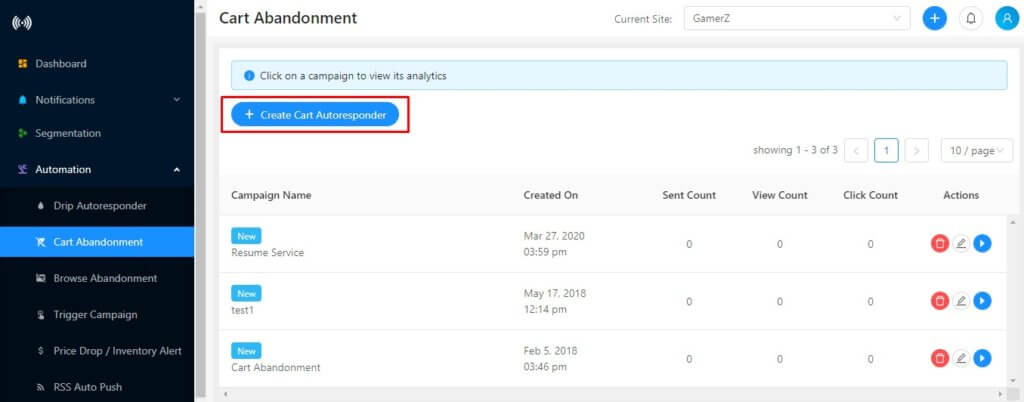
Βήμα 1 – Συνδεθείτε στο Πίνακα Ελέγχου PushEngage και μεταβείτε στο Αυτοματισμός > Εγκατάλειψη Καλαθιού > Δημιουργία Αυτόματου Αποστολέα Καλαθιού.
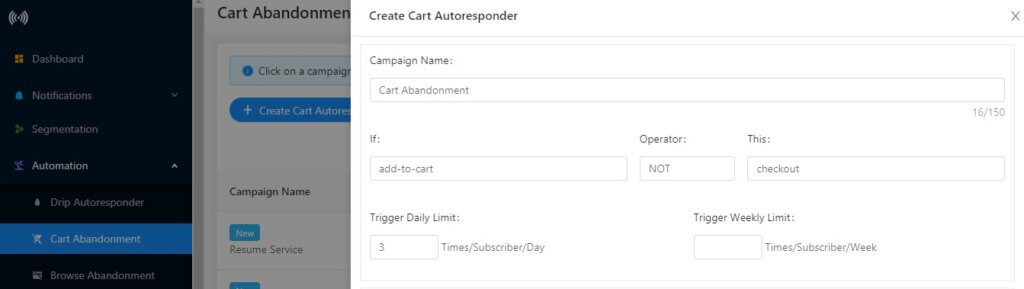
Βήμα 2 – Προσθέστε το Όνομα Καμπάνιας και οι ενεργοποιητές είναι προκαθορισμένοι εκεί, όπως Προσθήκη στο Καλάθι και Ολοκλήρωση Αγοράς. Μπορείτε επίσης να ορίσετε το όριο ενεργοποίησης.
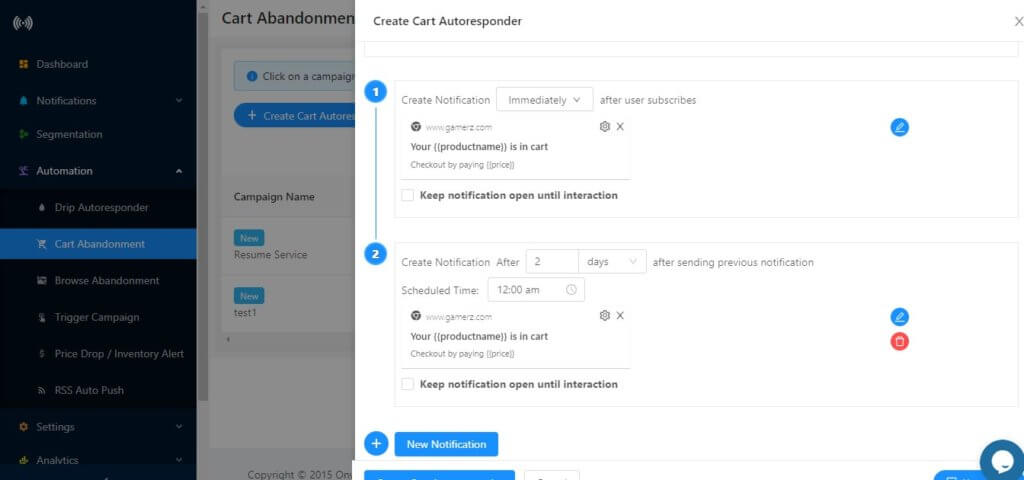
Βήμα 3 – Δημιουργήστε μια σειρά ειδοποιήσεων ή τον αριθμό των φορών που θα θέλατε να στείλετε ειδοποιήσεις στους συνδρομητές σας όταν εγκαταλείπουν το καλάθι.
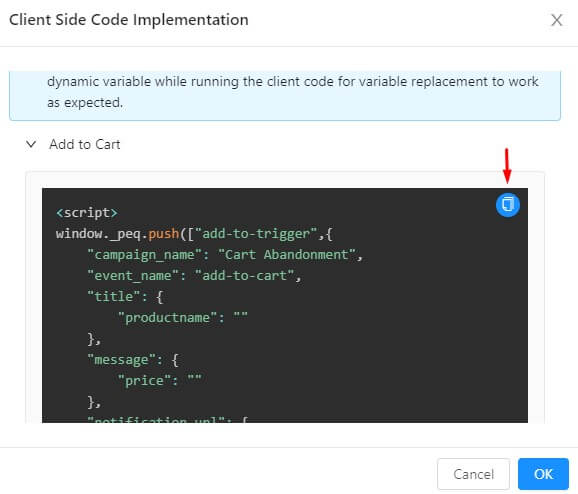
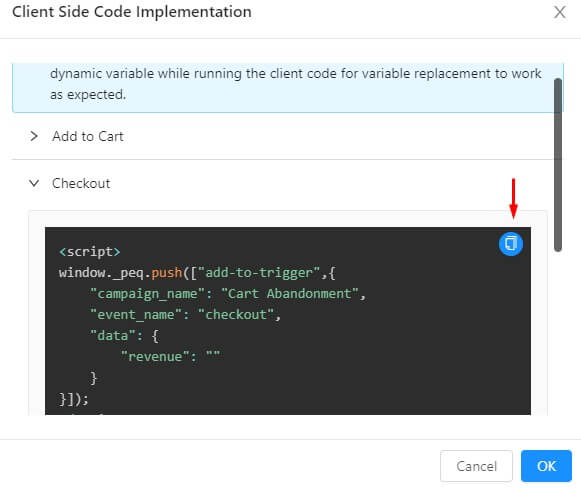
Βήμα 4 – Κάντε κλικ στο κουμπί Ο Κώδικάς σας και αντιγράψτε τον κώδικα που αναφέρεται εκεί. Ο κώδικας Προσθήκη στο Καλάθι πρέπει να εκτελείται κατά το Γεγονός Ενεργοποίησης Προσθήκη στο Καλάθι και ο κώδικας Ολοκλήρωσης Αγοράς πρέπει να εκτελείται κατά το Γεγονός Ενεργοποίησης Ολοκλήρωσης Αγοράς.
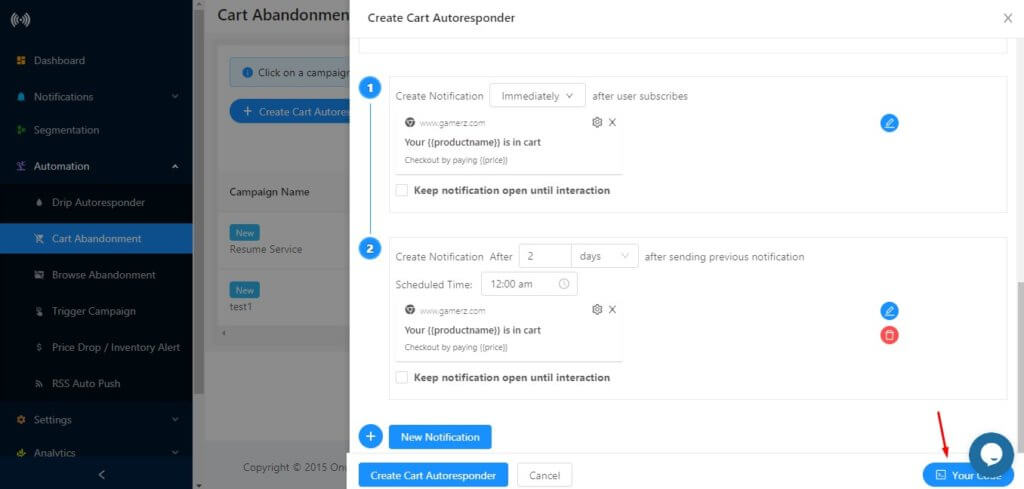
Κώδικας Προσθήκη στο Καλάθι: Κάντε κλικ στο Προσθήκη στο Καλάθι και κάντε κλικ για να αντιγράψετε τον κώδικα.
Κώδικας Ολοκλήρωσης Αγοράς: Κάντε κλικ στο Ολοκλήρωση Αγοράς και Κάντε κλικ για να αντιγράψετε τον κώδικα.
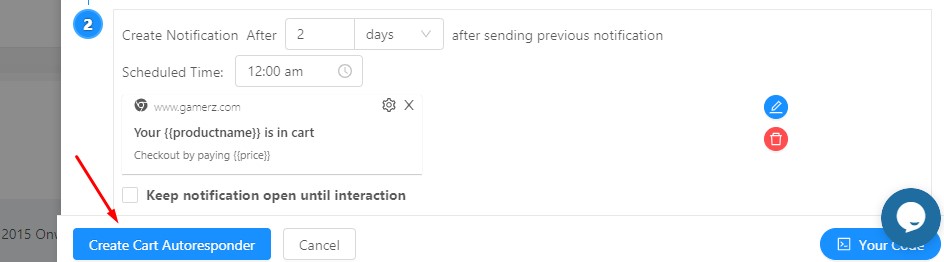
Βήμα 5 – Μόλις ολοκληρωθεί, κάντε κλικ στο “Δημιουργία Αυτόματου Αποστολέα Καλαθιού”.
Αυτό θα ήταν όλο. Μπορείτε να ελέγξετε τα αναλυτικά στοιχεία μεταβαίνοντας στο Αυτοματισμός > Εγκατάλειψη Καλαθιού. Κάντε κλικ στην καμπάνια και θα εμφανίσει τα Αναλυτικά στοιχεία.
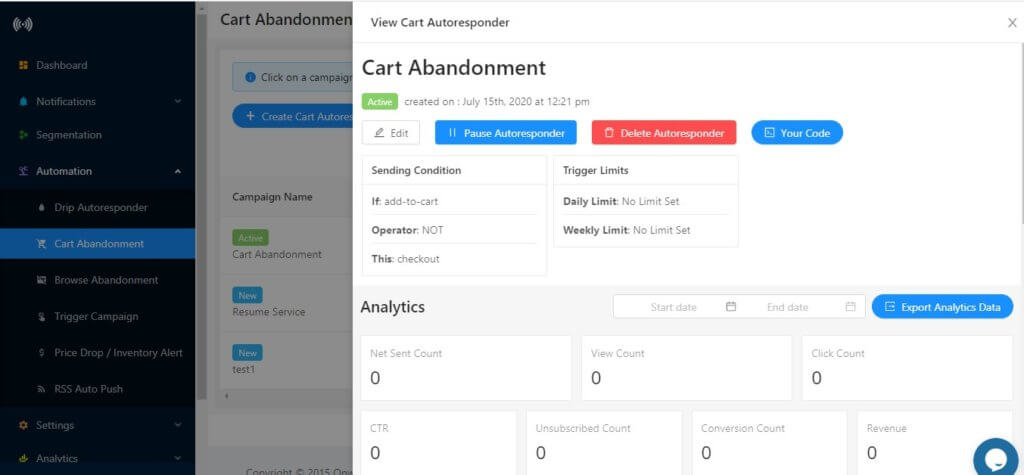
Κάτω από την παρακολούθηση εσόδων, μπορείτε να ελέγξετε τα έσοδα που έχετε δημιουργήσει χρησιμοποιώντας την καμπάνια εγκατάλειψης καλαθιού του PushEngage.
Μελλοντική Βελτίωση –
Οι προγραμματιστές μας εργάζονται στην υλοποίηση της ίδιας λειτουργίας, δηλαδή της παρακολούθησης εσόδων για καμπάνιες εγκατάλειψης προγράμματος περιήγησης.


Γεια,
Αυτό είναι το καλύτερο plugin για μένα, είναι πολύ χρήσιμο για την ιστοσελίδα μου για να αναπτύξω πελάτες
και κέρδη. το αγαπώ πραγματικά αυτό
.
.