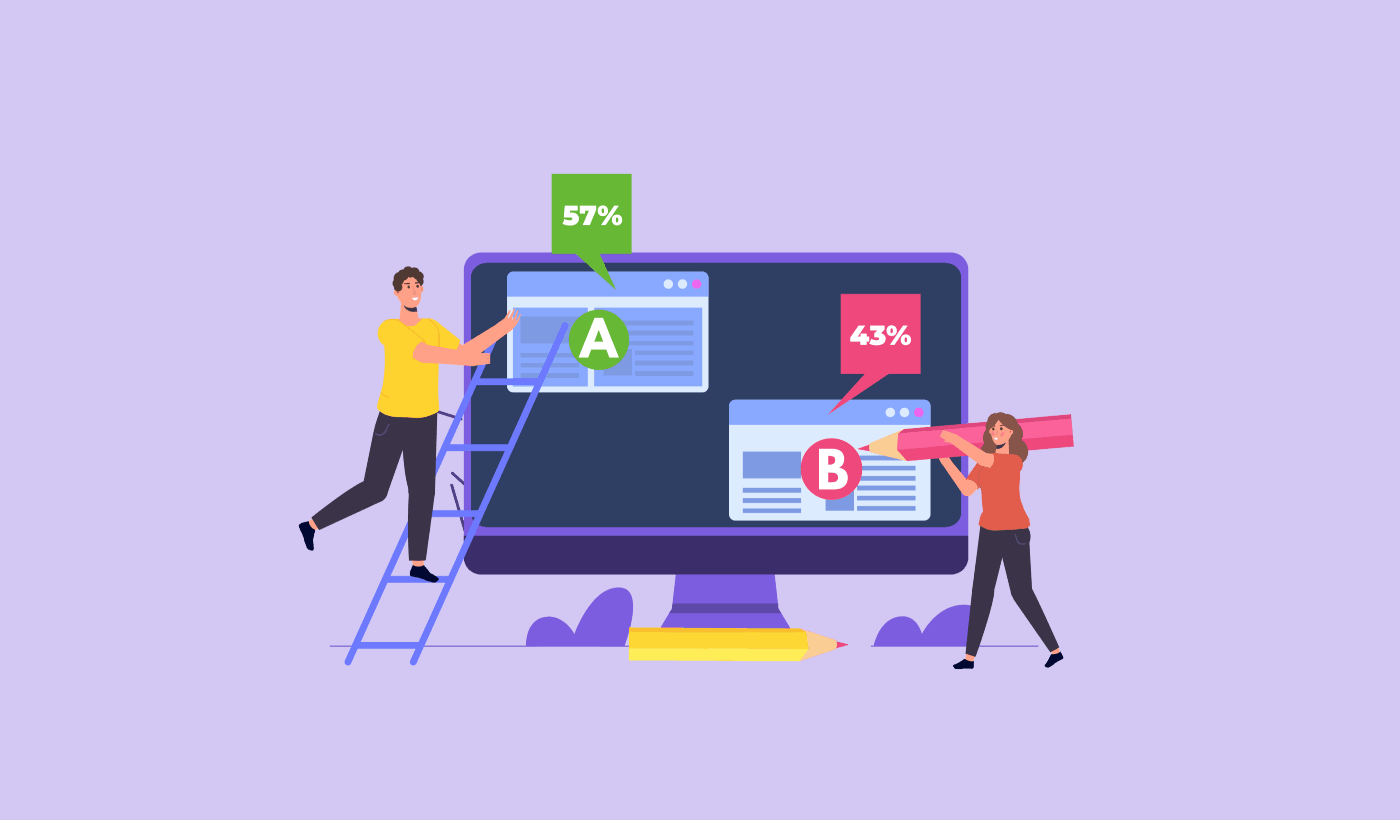
Ψάχνετε για έναν απλό οδηγό για A/B testing ειδοποιήσεων push;
Το A/B testing μπορεί να σας βοηθήσει να καταλάβετε ακριβώς τι ανταποκρίνεται περισσότερο στο κοινό σας. Αλλά πώς το κάνετε με τις ειδοποιήσεις push; Το περισσότερο λογισμικό ειδοποιήσεων push έρχεται με εργαλεία A/B testing.
Αλλά…
- Τι δοκιμάζετε;
- Ποια αποτελέσματα είναι καλά αποτελέσματα;
- Μπορείτε να το κάνετε χωρίς APIs και κωδικοποίηση;
Με λίγα λόγια: Τι πρέπει να γνωρίζετε πριν ξεκινήσετε το A/B testing ειδοποιήσεων push;
Θα απαντήσουμε σε όλες αυτές τις ερωτήσεις και σε πολλές άλλες σε αυτό το άρθρο. Λοιπόν, ας ξεκινήσουμε.
Τι είναι το A/B Testing Ειδοποιήσεων Push;
Το A/B testing ειδοποιήσεων push είναι μια μέθοδος βελτιστοποίησης των μετατροπών σας από καμπάνιες ειδοποιήσεων push. Μπορείτε να επιλέξετε να βελτιστοποιήσετε διαφορετικά μέρη των ειδοποιήσεών σας push ανάλογα με το είδος των αποτελεσμάτων που θέλετε να βελτιώσετε.
Η ιδέα πίσω από το A/B testing (ή split testing) των ειδοποιήσεων push είναι πολύ απλή.
Στέλνετε μια έκδοση της ειδοποίησής σας (έκδοση Α) στο 50% του κοινού σας και μια άλλη έκδοση με μικρές αλλαγές (έκδοση Β) στο υπόλοιπο κοινό σας. Και βλέπετε ποια ειδοποίηση push λειτουργεί καλύτερα για το κοινό σας.
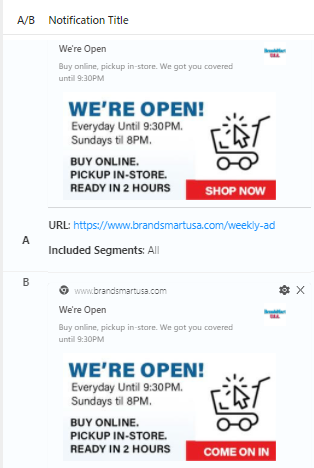
Αν είστε έξυπνοι, μπορείτε ακόμη και να περιορίσετε το A/B testing σας σε ένα μικρό τμήμα του κοινού σας για να έχετε καλύτερη απόδοση καμπάνιας. Αυτό ονομάζεται Έξυπνο A/B Testing.
Στην Έξυπνη Δοκιμή A/B, εκτελείτε τη δοκιμή σε ένα μέρος του συνολικού σας κοινού. Συνιστούμε να εκτελέσετε μια Έξυπνη Δοκιμή A/B στο 30% του κοινού σας. Με αυτόν τον τρόπο, στέλνετε την έκδοση Α στο 15% του κοινού σας και την έκδοση Β σε ένα άλλο 15%. Όποια ειδοποίηση push αποδίδει καλύτερα, αποστέλλεται αυτόματα στο υπόλοιπο κοινό σας.
Έτσι, στην Έξυπνη Δοκιμή A/B, μπορείτε να στείλετε την νικήτρια ειδοποίηση push στο 85% του κοινού σας αντί να τη στείλετε στο 50%. Αυτό βελτιώνει άμεσα τη συνολική απόδοση της καμπάνιας σας και είναι εξαιρετικά απλό στη ρύθμιση.
Τι Μπορείτε να Κάνετε Split Test στις Ειδοποιήσεις Push;
Είναι καιρός να απαντήσουμε στη μεγαλύτερη ερώτηση με δοκιμές A/B ειδοποιήσεων push. Τι μπορείτε να δοκιμάσετε σε μια ειδοποίηση push;
Οι πιο συνηθισμένες μετρήσεις απόδοσης για τις ειδοποιήσεις push είναι:
- Ποσοστό κλικ: Το ποσοστό κλικ σε μια ειδοποίηση push είναι πόσο συχνά οι συνδρομητές σας είδαν την ειδοποίησή σας push και στη συνέχεια έκαναν κλικ σε αυτήν.
- Ποσοστό προβολής: Το ποσοστό προβολής μιας ειδοποίησης push είναι πόσο συχνά ένας συνδρομητής έλαβε την ειδοποίησή σας push και την είδε πριν λήξει.
- Μετατροπές στόχου: Μπορείτε να ορίσετε στόχους για την καμπάνια σας και να ρυθμίσετε την παρακολούθηση στόχων για τις καμπάνιες σας. Οι μετατροπές στόχου είναι ένα μέτρο του πόσες φορές επιτύχατε τον στόχο σας.
Για να αυξήσετε τα ποσοστά προβολής σας, θέλετε να χρησιμοποιήσετε μια μεγάλη εικόνα στις ειδοποιήσεις σας push. Η χρήση εικόνων στις ειδοποιήσεις σας τις κάνει αμέσως πιο ελκυστικές.

Μπορείτε επίσης να πειραματιστείτε με λέξεις-κλειδιά στον τίτλο της ειδοποίησής σας.

Έτσι, μπορείτε να κάνετε A/B testing στις ειδοποιήσεις με εικόνες και χωρίς. Μπορείτε επίσης να ελέγξετε τα ποσοστά προβολής κάνοντας split testing στις ειδοποιήσεις push με και χωρίς λέξεις-κλειδιά στον τίτλο.
Αν θέλετε να βελτιώσετε το ποσοστό κλικ, πρέπει να εστιάσετε στο κύριο μήνυμα και να εργαστείτε για να το κάνετε εξαιρετικά σχετικό. Κυρίως, αυτό αφορά ένα από τα δύο πράγματα:
Και δεν υπάρχει τίποτα για A/B testing σε αυτόν τον τομέα. Αλλά μπορείτε να κάνετε A/B testing στα ποσοστά κλικ σας με τα κουμπιά Παρότρυνσης για Δράση (CTA) στις ειδοποιήσεις push. Δοκιμάστε A/B testing στις ειδοποιήσεις push με ένα ή κανένα CTA έναντι μιας με δύο CTA.
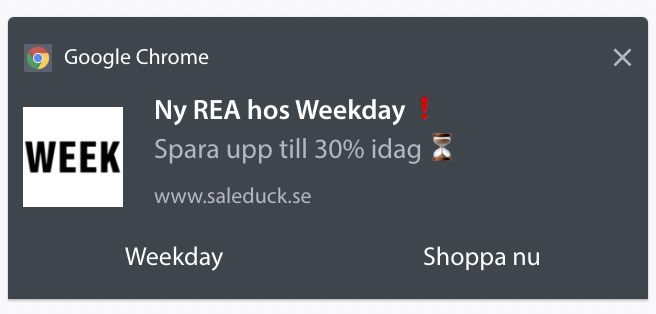
Αν δεν είστε σίγουροι πώς να δημιουργήσετε πολλαπλά CTA, δείτε αυτό το άρθρο για το πώς να προσθέσετε κουμπιά στις ειδοποιήσεις push.
Με τις μετατροπές στόχου, είναι κυρίως θέμα ρύθμισης σχετικών ειδοποιήσεων push ηλεκτρονικού εμπορίου. Έτσι, και πάλι, δεν υπάρχουν ΠΟΛΛΑ πράγματα για split test εδώ. Ωστόσο, αν μπορείτε να βελτιστοποιήσετε τις ειδοποιήσεις σας push για καλύτερα κλικ σε μια πραγματικά καλή προσφορά, οι μετατροπές στόχου σας θα αυξηθούν. Μπορείτε να λάβετε περισσότερα κλικ εστιασμένα σε μετατροπές δοκιμάζοντας το κείμενο της ειδοποίησής σας push.
Πώς να Ξεκινήσετε με το A/B Testing Ειδοποιήσεων Push
Τώρα που ξέρουμε τι είναι το A/B testing ειδοποιήσεων push και τι πρέπει να δοκιμάζετε, ας σας δώσουμε μια ματιά στο πώς να ξεκινήσετε γρήγορα.
Βήμα #1: Επιλέξτε μια Υπηρεσία Ειδοποιήσεων Push
Συνιστούμε να χρησιμοποιήσετε το PushEngage για να στείλετε τις ειδοποιήσεις σας push.

Το PushEngage είναι το #1 λογισμικό push notification στον κόσμο.
Οι ειδοποιήσεις push σας βοηθούν να αυξήσετε την επισκεψιμότητα του ιστότοπού σας και την αλληλεπίδραση σε αυτόματο πιλότο. Και αν διαχειρίζεστε ένα online κατάστημα, το PushEngage σας βοηθά επίσης να αυξήσετε τις πωλήσεις σας, βοηθώντας σας να δημιουργήσετε αυτοματοποιημένες ειδοποιήσεις push eCommerce.
Μπορείτε να ξεκινήσετε δωρεάν, αλλά αν σοβαρά θέλετε να αναπτύξετε την επιχείρησή σας, θα πρέπει να αγοράσετε ένα επί πληρωμή πρόγραμμα. Επίσης, πριν αγοράσετε οποιαδήποτε υπηρεσία ειδοποιήσεων push, θα πρέπει να δείτε αυτόν τον οδηγό για το κόστος ειδοποιήσεων push.
Ακολουθεί μια γρήγορη επισκόπηση του τι παίρνετε με το PushEngage:
- Αυτοματοποιημένες καμπάνιες υψηλής μετατροπής
- Πολλαπλές επιλογές στόχευσης και προγραμματισμού καμπάνιας
- Παρακολούθηση στόχων και προηγμένη ανάλυση
- Έξυπνες Δοκιμές A/B
- Ένας Αφοσιωμένος Διαχειριστής Επιτυχίας
Θα δείτε ότι το PushEngage είναι μακράν η καλύτερη επιλογή αν θέλετε να αυξήσετε την επισκεψιμότητα, την αλληλεπίδραση και τις πωλήσεις για την επιχείρησή σας. Δείτε αυτή τη σύγκριση των καλύτερων υπηρεσιών ειδοποιήσεων push αν έχετε αμφιβολίες. Και αν έχετε περιορισμένο προϋπολογισμό, μπορείτε πάντα να γίνετε λίγο δημιουργικοί με τις ειδοποιήσεις σας push.
Βήμα #2: Δημιουργία Ειδοποίησης Push
Μεταβείτε στον πίνακα ελέγχου PushEngage σας και πηγαίνετε στο Campaign » Push Broadcasts και κάντε κλικ στο κουμπί Create a New Push Broadcast:

Στην καρτέλα Content, προσθέστε το περιεχόμενο της ειδοποίησης push σας:
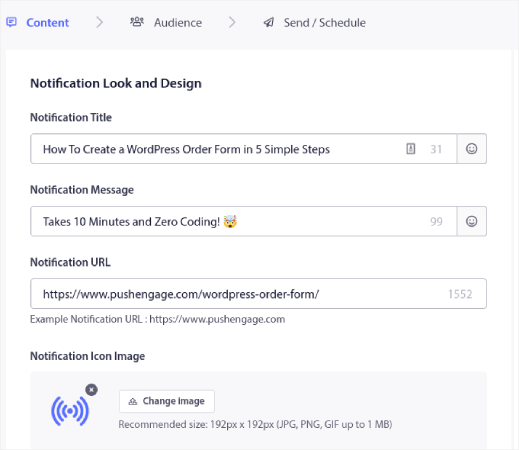
Βήμα #3: Προσθήκη Δοκιμής A/B
Κάντε κλικ στον σύνδεσμο Προσθήκη Δοκιμής A/B για να δημιουργήσετε άμεσα μια δοκιμή A/B για την ειδοποίηση push σας:
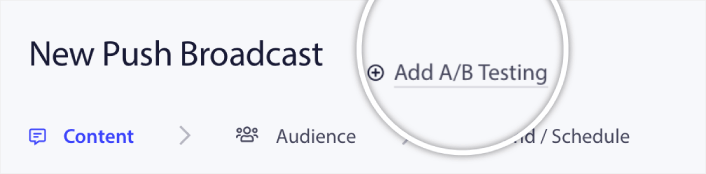
Και στη συνέχεια, μπορείτε απλά να δημιουργήσετε δύο εκδόσεις της ειδοποίησης push σας:
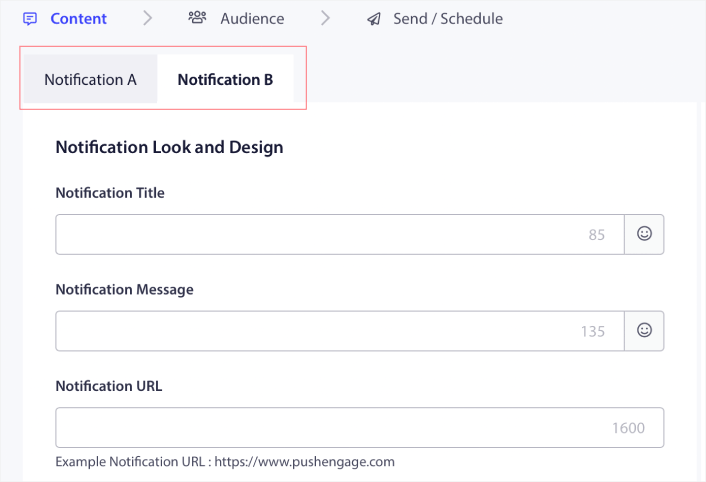
Και μπορείτε να αλλάξετε οτιδήποτε θέλετε στην έκδοση Β σας. Αν κάνετε κύλιση προς τα κάτω, μπορείτε ακόμη και να δοκιμάσετε A/B τα κουμπιά ενεργειών των ειδοποιήσεών σας push. Μόλις τελειώσετε τη ρύθμιση του περιεχομένου στις δύο εκδόσεις, κάντε κλικ στο κουμπί Αποθήκευση και Επιλογή Τμημάτων.
Μπορείτε να επιλέξετε ένα προσαρμοσμένο κοινό εδώ:
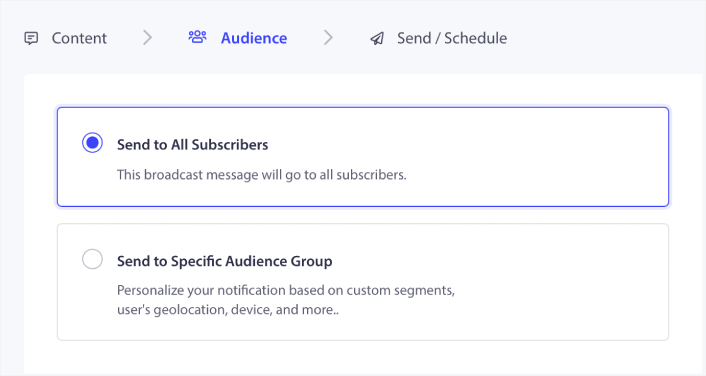
Εναλλακτικά, μπορείτε να το στείλετε σε όλους τους συνδρομητές των ειδοποιήσεών σας push. Όταν τελειώσετε, κάντε κλικ στο κουμπί Αποστολή/Προγραμματισμός.
Βήμα #4: Δημιουργία Έξυπνης Δοκιμής A/B
Εδώ, μπορείτε να ενεργοποιήσετε την Έξυπνη Δοκιμή A/B:
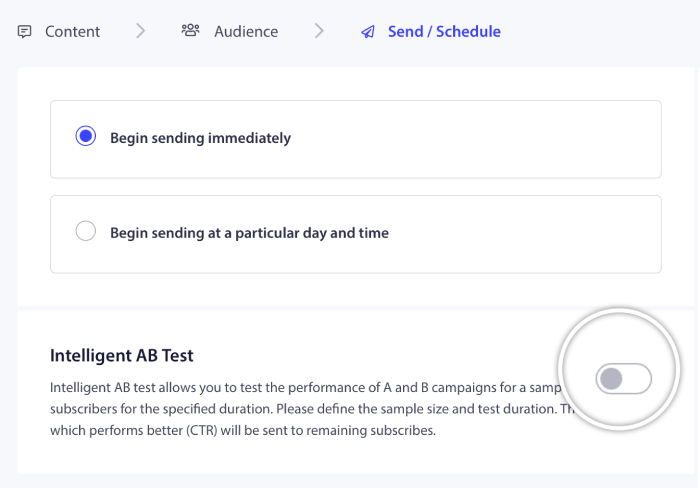
Ενεργοποιήστε την έξυπνη δοκιμή A/B και ορίστε το μέγεθος του δείγματος για τη δοκιμή.
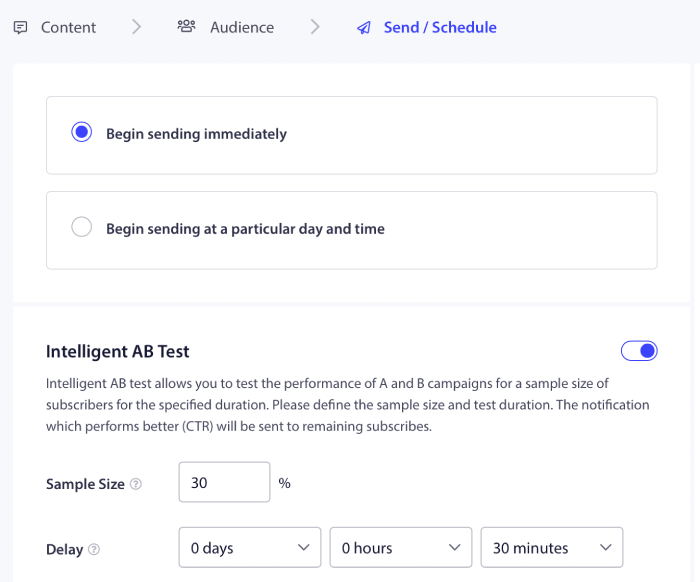
Και απλώς προγραμματίστε ή στείλτε την ειδοποίησή σας push. Τελειώσατε!
Βέλτιστες Πρακτικές Δοκιμών A/B
Ας ρίξουμε μια γρήγορη ματιά σε μερικές από τις βέλτιστες πρακτικές για τις δοκιμές A/B, ώστε να αξιοποιήσετε στο έπακρο τα πειράματά σας.
- Δοκιμάστε τα Σωστά Στοιχεία: Πριν δημιουργήσετε μια δοκιμή διαχωρισμού, βεβαιωθείτε για το τι θέλετε να βελτιστοποιήσετε. Μην προσπαθείτε να βελτιστοποιήσετε 5 διαφορετικές μετρήσεις ταυτόχρονα, αλλιώς θα καταλήξετε να καταστρέψετε το πείραμα με πάρα πολλές μεταβλητές.
- Δώστε Προσοχή στο Μέγεθος Δείγματος: Το μέγεθος δείγματος που χρησιμοποιείτε για τη δοκιμή διαχωρισμού μπορεί να αλλάξει πολλά. Δεν θέλετε να εκτελείτε δοκιμές στο 5% του συνολικού κοινού σας, επειδή τα αποτελέσματα δεν θα είναι στατιστικά σημαντικά. Και δεν θέλετε το κοινό της δοκιμής να είναι τόσο μεγάλο που η συνολική σας απόδοση να πέσει επίσης. Η έξυπνη δοκιμή A/B είναι ιδανική για αυτήν την ισορροπία.
- Βεβαιωθείτε ότι τα Δεδομένα σας Είναι Αξιόπιστα: Μερικές φορές, θα δείτε εξαιρετικά αποτελέσματα στις δοκιμές A/B σας. Ωστόσο, συνιστούμε να χρησιμοποιήσετε έναν υπολογιστή στατιστικής σημαντικότητας για να γνωρίζετε εάν τα δεδομένα σας είναι πραγματικά αξιόπιστα.
- Προγραμματίστε τις Δοκιμές σας Σωστά: Εάν προγραμματίσετε μια δοκιμή A/B κατά τη διάρκεια της Black Friday και περιμένετε τα αποτελέσματα να είναι συγκρίσιμα με οποιαδήποτε τυχαία Τετάρτη, θα λάβετε πολύ παραπλανητικές πληροφορίες.
- Δοκιμάστε Ένα Στοιχείο τη Φορά: Εάν δοκιμάσετε πάρα πολλά στοιχεία μιας ειδοποίησης push ταυτόχρονα, δεν θα ξέρετε τι προκαλεί τη διαφορά.
Χρησιμοποιήστε αυτές τις απλές πρακτικές για να δημιουργήσετε μια διαδικασία γύρω από τις δοκιμές A/B σας. Φυσικά, συνιστούμε να χρησιμοποιήσετε πρώτα τις βέλτιστες πρακτικές ειδοποιήσεων push και στη συνέχεια να βελτιώσετε την απόδοσή σας με δοκιμές A/B ειδοποιήσεων push.
Τι να κάνετε Αφού Μάθετε τις Δοκιμές A/B Ειδοποιήσεων Push
Αυτό ήταν για αυτό το θέμα, φίλοι!
Μέχρι τώρα, έχετε ήδη ξεκινήσει τις δοκιμές A/B ειδοποιήσεων push.
Τώρα, το μόνο που απομένει είναι η δημιουργία κίνησης στον ιστότοπό σας, ώστε να μπορείτε να αποκτήσετε συνδρομητές ειδοποιήσεων push για να εκτελέσετε δοκιμές A/B. Η αποστολή ειδοποιήσεων push είναι ένας εξαιρετικός τρόπος για τη δημιουργία επαναλαμβανόμενης κίνησης για τον ιστότοπό σας. Εάν αυτό είναι κάτι που σας ενδιαφέρει, θα πρέπει επίσης να δείτε αυτά τα άρθρα:
- Κόστος Ειδοποιήσεων Push: Είναι Πραγματικά Δωρεάν; (Ανάλυση Τιμών)
- Πώς να αυξήσετε την επισκεψιμότητα στο WordPress Blog σας (9 εύκολοι τρόποι)
- Πώς να Αυξήσετε το Ποσοστό Συγκατάθεσης για Ειδοποιήσεις Push στο Web (7 Τρόποι)
Συνιστούμε τη χρήση του PushEngage για την αποστολή των ειδοποιήσεων push σας. Το PushEngage είναι το #1 λογισμικό ειδοποιήσεων push στον κόσμο. Έτσι, αν δεν το έχετε κάνει ήδη, ξεκινήστε με το PushEngage σήμερα.


