
Δυσκολεύεστε να λάβετε κριτικές πελατών για το ηλεκτρονικό σας κατάστημα; Αν μπερδεύεστε σχετικά με το πώς να λάβετε κριτικές για το ηλεκτρονικό σας κατάστημα, αυτό το άρθρο είναι τέλειο για εσάς.
Και πριν ξεκινήσουμε, θέλουμε να γνωρίζετε ότι δεν είστε μόνοι.
Όλοι δυσκολεύονται να λάβουν κριτικές για το ηλεκτρονικό κατάστημα. Εννέα φορές στις δέκα, οι πελάτες σας δεν θα επιστρέψουν στον ιστότοπό σας για να αφήσουν μια κριτική, ακόμα κι αν είναι πραγματικά ευχαριστημένοι με το προϊόν σας.
Το πιο θλιβερό είναι ότι η απόκτηση περισσότερων κριτικών στο ηλεκτρονικό σας κατάστημα είναι ένας πραγματικά εξαιρετικός τρόπος για να συνεχίσετε να αναπτύσσετε την επιχείρησή σας. Οι καλές κριτικές ενθαρρύνουν περισσότερους ανθρώπους να αγοράσουν από εσάς.
Έτσι, μπορεί να είναι πραγματικά σκληρό όταν δεν λαμβάνετε αρκετές κριτικές, ακόμη και για τα προϊόντα με τις καλύτερες πωλήσεις σας.
Για να είμαστε σαφείς: Υπάρχουν και άλλες προκλήσεις στην εκτέλεση μιας επιχείρησης ηλεκτρονικού εμπορίου, όπως η αντιμετώπιση προβλημάτων εγκατάλειψης καλαθιού. Αλλά προς το παρόν, ας επικεντρωθούμε αυστηρά στο πώς να λάβετε κριτικές για το ηλεκτρονικό κατάστημα χρησιμοποιώντας απλά, πρακτικά βήματα.
Έτοιμοι; Ας βουτήξουμε κατευθείαν!
- Δημιουργήστε μια καμπάνια ειδοποιήσεων push για κριτικές ηλεκτρονικού καταστήματος
- Χρησιμοποιήστε τις κριτικές για να στείλετε προτάσεις προϊόντων
- Ενσωματώστε κωδικούς QR σε ληφθέντα αρχεία
- Στείλτε μια καμπάνια email για κριτικές ηλεκτρονικού καταστήματος
- Κάντε την αφήγηση κριτικής γρήγορη και εύκολη
- Προβάλετε τις κριτικές του ηλεκτρονικού σας καταστήματος
- Χρησιμοποιήστε το σύστημα Review Rabbit για να λάβετε περισσότερες κριτικές
- Μοιραστείτε τις κριτικές σας στα μέσα κοινωνικής δικτύωσης
- Δημιουργήστε μια σελίδα μαρτυριών
#1. Δημιουργήστε μια καμπάνια ειδοποιήσεων push για κριτικές ηλεκτρονικού καταστήματος
Μια πολύ απλή τακτική που οι περισσότεροι ξεχνούν να χρησιμοποιήσουν είναι να ζητούν από τους πελάτες κριτικές.
Είναι πολύ απλό αλλά απίστευτα αποτελεσματικό. Αλλά φυσικά, η χειροκίνητη εκτέλεση είναι μια πολύ κακή ιδέα. Εδώ είναι που μια καμπάνια ανατροφοδότησης προϊόντων χρησιμοποιώντας το PushEngage μπορεί να είναι απίστευτα ισχυρή:
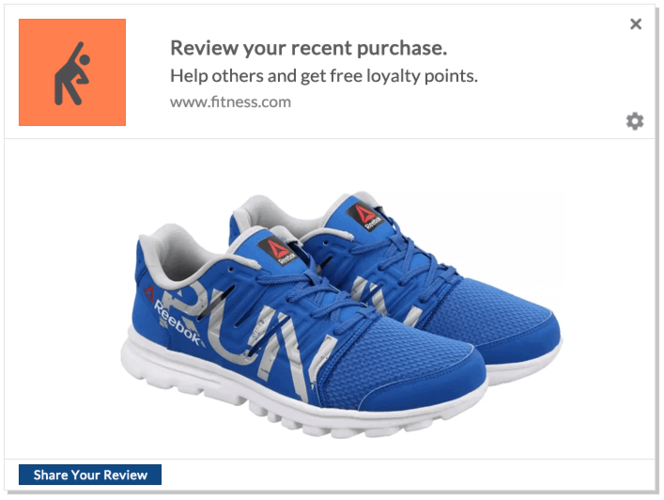
Το PushEngage είναι το #1 λογισμικό ειδοποιήσεων web push στην αγορά. Και είναι πολύ εύκολο να ρυθμίσετε μια καμπάνια κριτικών προϊόντων σε αυτό.
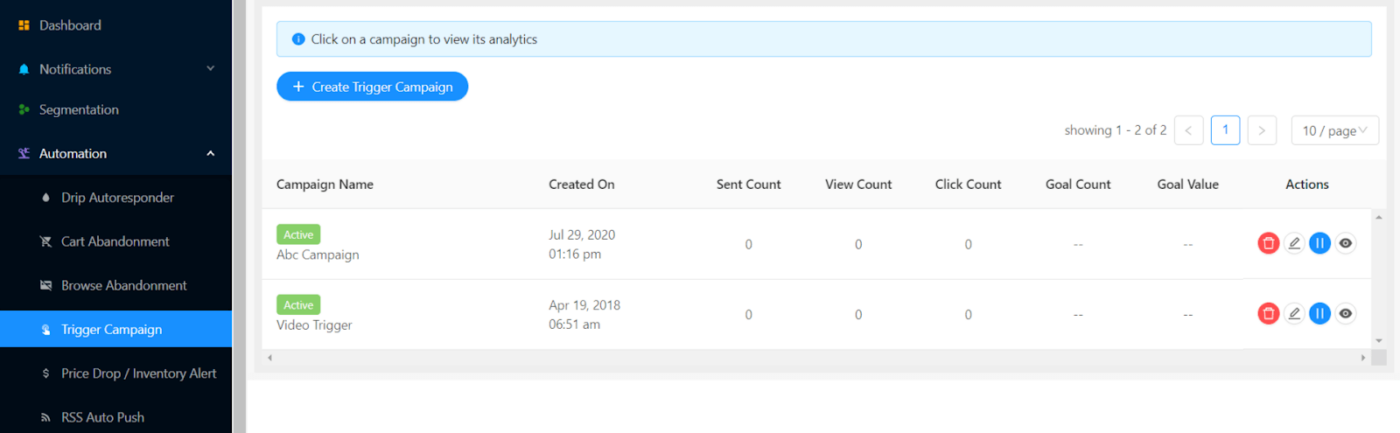
Αν είστε ήδη πελάτης του PushEngage, μεταβείτε στο Αυτοματισμοί » Καμπάνιες Ενεργοποίησης » Νέα Καμπάνια Ενεργοποίησης:
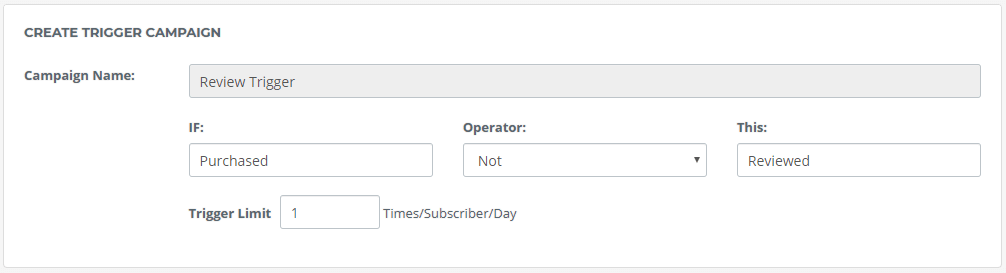
Στη συνέχεια, ρυθμίστε την καμπάνια ενεργοποίησης με την ενεργοποίηση ως ‘Αγοράστηκε’ ΟΧΙ ‘Έγινε κριτική’:
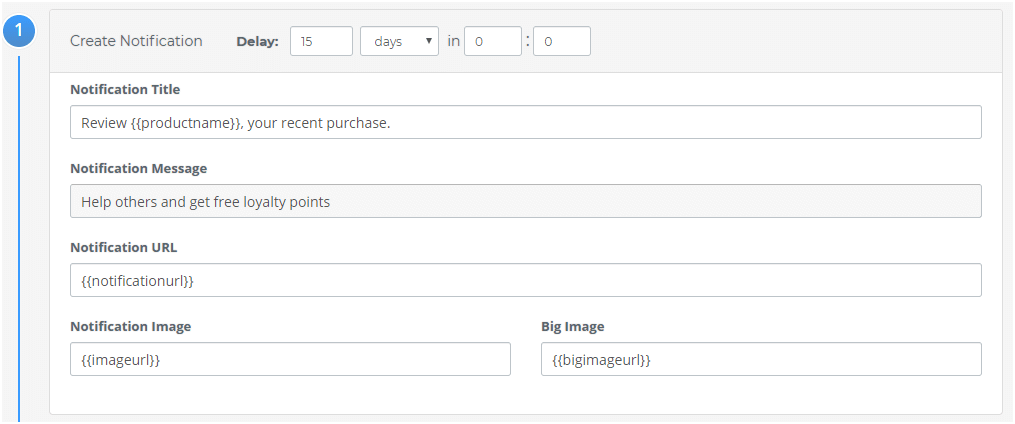
Μπορείτε να εξατομικεύσετε το μήνυμα ειδοποίησης:
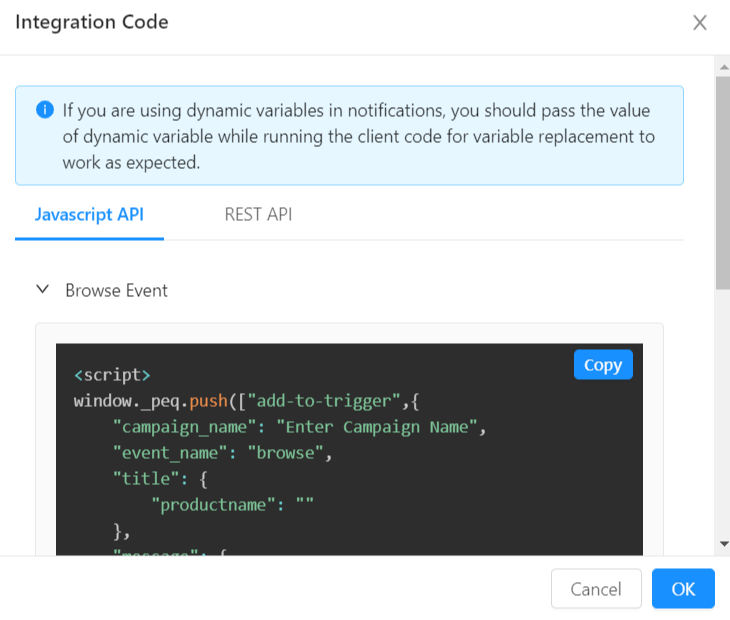
Και τέλος, ενσωματώστε τον κώδικα στον ιστότοπό σας:
Και αυτό είναι όλο.
Αν δεν είστε ήδη πελάτης του PushEngage, τι περιμένετε; Ξεκινήστε με το PushEngage σήμερα.
#2. Χρησιμοποιήστε τις κριτικές για να στείλετε προτάσεις προϊόντων
Αυτό το τμήμα αφορά κυρίως τη λήψη των κριτικών σας και την υπερτροφοδότηση της επίδρασής τους στις πωλήσεις. Ας πούμε για παράδειγμα ότι αφήσατε μια κριτική για ένα αρθρωτό ντουλάπι κουζίνας. Είναι αρκετά προφανές ότι ανακαινίζετε την κουζίνα σας αυτή τη στιγμή.
Έτσι, αν λάβετε αυτήν την ειδοποίηση push:

Αυτή είναι μια πραγματικά εξαιρετική πρόταση, σωστά;
Τα υπέροχα νέα: Μπορείτε να στείλετε επικές προτάσεις προϊόντων με βάση τις κριτικές των προϊόντων σας χρησιμοποιώντας το PushEngage.
Τώρα, αυτό είναι ένα πραγματικά προηγμένο χαρακτηριστικό και θα χρειαστείτε έναν προγραμματιστή για να χρησιμοποιήσετε αυτήν την ιδέα. Αλλά αν μπορείτε να αντέξετε οικονομικά έναν προγραμματιστή για να χρησιμοποιήσετε το PushEngage Javascript API, προηγμένες καμπάνιες όπως αυτή αξίζουν απόλυτα.
Επαγγελματική Συμβουλή: Πριν εφαρμόσετε οποιαδήποτε προηγμένη καμπάνια, μιλήστε πάντα με τον Υπεύθυνο Εξυπηρέτησης Πελατών σας. Η Ομάδα Εξυπηρέτησης Πελατών μας είναι πέρα από επική και θα σας βοηθήσουμε να ρυθμίσετε ολόκληρη την καμπάνια πολύ πιο γρήγορα.
#3. Ενσωματώστε τον Κωδικό QR μιας Φόρμας Κριτικής σε Λήψιμα Αρχεία
Τα περισσότερα ηλεκτρονικά καταστήματα στέλνουν πολλά PDF. Αυτά περιλαμβάνουν λογαριασμούς, τιμολόγια, αποδείξεις και ψηφιακά προϊόντα.
Είναι επίσης πολύ πιθανό να χρησιμοποιείτε lead magnets για να δημιουργήσετε μια λίστα email.
Οι πελάτες σας θα ανοίγουν σίγουρα αυτά τα αρχεία. Λοιπόν, γιατί να μην χρησιμοποιήσετε αυτόν τον premium διαφημιστικό χώρο;
Εδώ είναι το διασκεδαστικό μέρος: μπορείτε να ενσωματώσετε έναν κωδικό QR για να αφήσετε μια κριτική για τα προϊόντα σας μέσα σε αυτά τα λήψιμα αρχεία.
Απλά δημιουργήστε μια φόρμα κριτικής στο WPForms για τη συλλογή κριτικών:
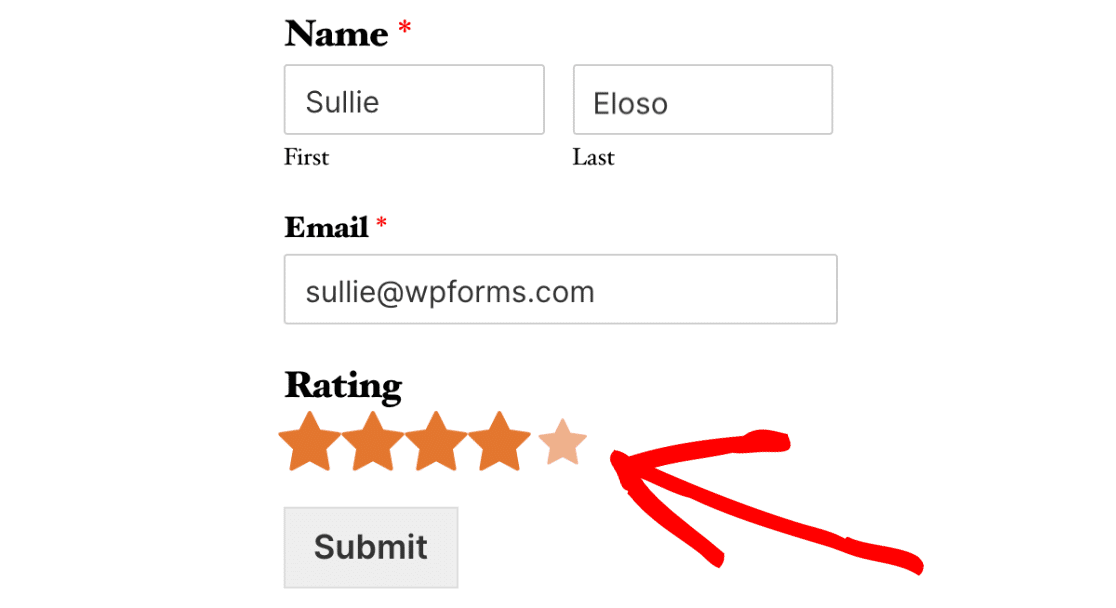
Και προσθέστε την σε μια σελίδα που συλλέγει κριτικές και σχόλια.
Τέλος, δημιουργήστε έναν κωδικό QR για τη σελίδα κριτικής χρησιμοποιώντας έναν δωρεάν γεννήτρια κωδικών QR:
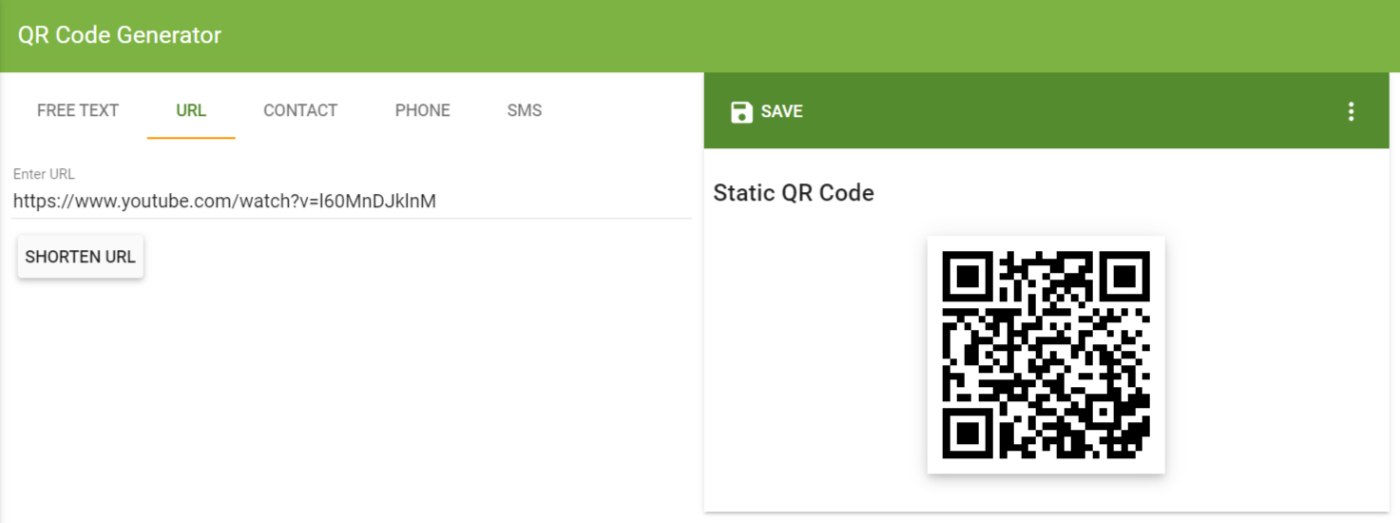
Και προσθέστε αυτόν τον κωδικό QR στα λήψιμα αρχεία σας!
#4. Στείλτε μια Καμπάνια Email για Κριτικές Ηλεκτρονικού Εμπορίου
Και πάλι, πρέπει να ζητήσετε από τους πελάτες σας μια κριτική. Είναι κακή ιδέα να περιμένετε απλώς και να ελπίζετε ότι το προϊόν σας είναι τόσο επικό που οι πελάτες σας θα αφήσουν αυτόματα σπουδαίες κριτικές.
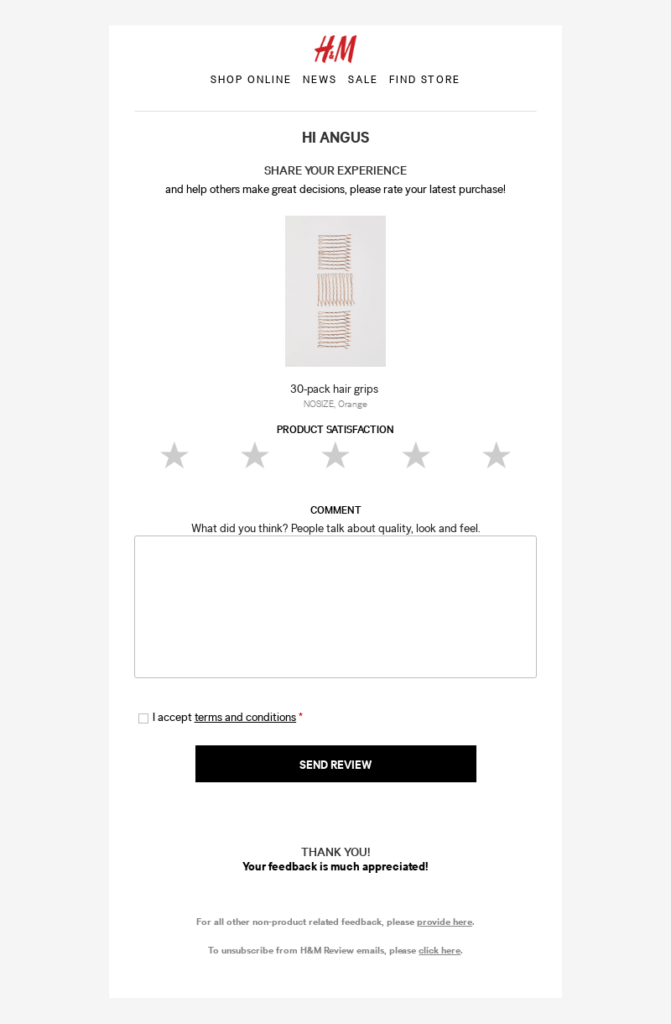
Έτσι, μπορείτε να στείλετε καμπάνιες email ζητώντας κριτικές μαζί με την καμπάνια ειδοποιήσεων push. Ρίξτε μια ματιά σε αυτήν από την H&M:
Συνιστούμε να χρησιμοποιήσετε το Drip για να στείλετε email σχολίων προϊόντων. Μεταβείτε στο Drip για να δημιουργήσετε την καμπάνια σχολίων προϊόντων σας και να δημιουργήσετε μια αυτοματοποιημένη ροή εργασίας:
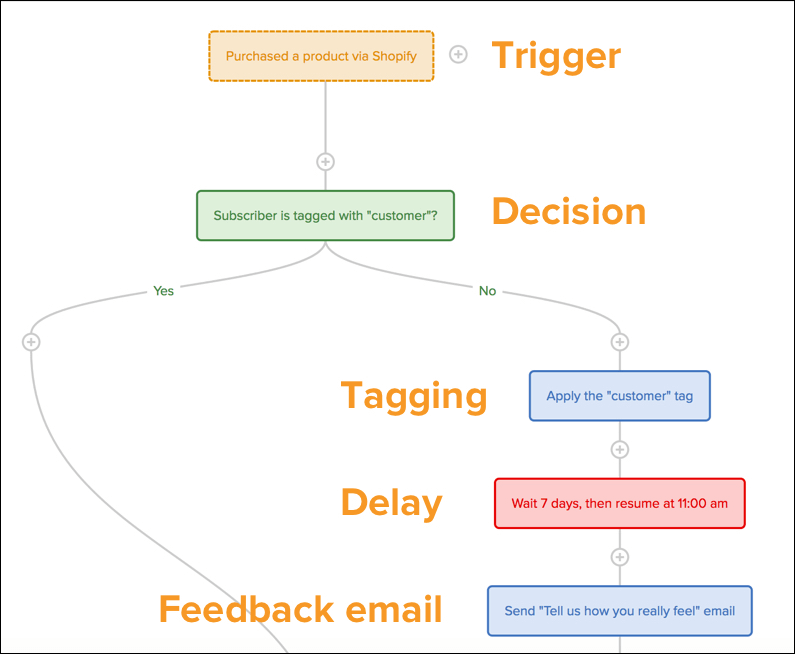
ΣΗΜΕΙΩΣΗ: Αυτό το άρθρο μπορεί να σας βοηθήσει να ρυθμίσετε την καμπάνια κριτικών προϊόντων σας στο Drip.
#5. Κάντε την Αφήγηση Κριτικής Γρήγορη και Εύκολη
Ακόμα και πριν αρχίσετε να ζητάτε κριτικές, πρέπει να βεβαιωθείτε ότι είναι εύκολο για οποιονδήποτε να αφήσει μια κριτική. Αν είναι πολύ δύσκολο να αφήσετε μια κριτική, οι πιθανότητες είναι ότι δεν θα λάβετε καμία από τους πελάτες σας.
Για παράδειγμα, αν έπρεπε να αφήσετε μια κριτική για ένα plugin WordPress στο WordPress.org, αυτό είναι ένα δύσκολο έργο. Για να αφήσετε μια κριτική, πρέπει να δημιουργήσετε έναν λογαριασμό WordPress, να συνδεθείτε στον λογαριασμό και στη συνέχεια να αφήσετε μια κριτική.
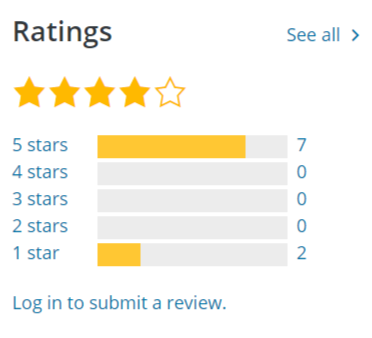
Αυτή είναι μια διαδικασία 3 βημάτων!
Αντ' αυτού, συνιστούμε να χρησιμοποιήσετε το WooCommerce Product Reviews Pro για να δημιουργήσετε μια προσαρμοσμένη εμπειρία για κριτικές προϊόντων:
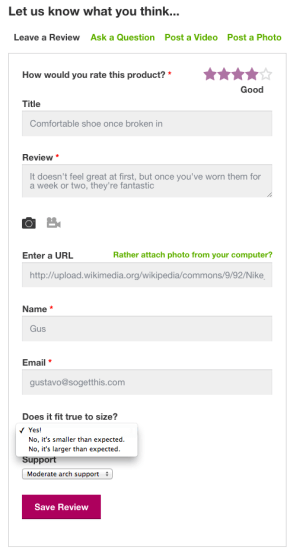
Αν ρίξετε μια πιο προσεκτική ματιά στη φόρμα κριτικής, θα δείτε ότι έχει μερικές επιπλέον ερωτήσεις μετά το πεδίο κριτικής. Αυτές οι επιπλέον ερωτήσεις ονομάζονται προσδιοριστές. Η συμπερίληψη προσδιοριστών είναι ένας εξαιρετικός τρόπος για να τονίσετε γιατί είναι ένα τόσο υπέροχο προϊόν.
Το καλύτερο κομμάτι; Μπορείτε ακόμη και να δεχτείτε βίντεο μαρτυρίες ως κριτικές χρησιμοποιώντας αυτό το plugin.
#6. Προβάλετε τις Κριτικές Ηλεκτρονικού Εμπορίου σας
Αφού ρυθμίσετε μια προσαρμοσμένη λειτουργία κριτικών για eCommerce, θα χρειαστεί να δημιουργήσετε έναν ωραίο τρόπο για να προβάλλετε και τις κριτικές των προϊόντων σας. Η προβολή των κριτικών σας θα ενθαρρύνει περισσότερους πελάτες να αφήσουν κριτικές στον ιστότοπό σας.
Λοιπόν, ποιος είναι ο καλύτερος τρόπος για να εμφανίσετε τις κριτικές σας για eCommerce;
Ο απλούστερος τρόπος για να δείξετε στους πελάτες σας τις υπάρχουσες κριτικές είναι να τις συμπεριλάβετε στη σελίδα του προϊόντος σας. Ορισμένοι από τους μεγαλύτερους ιστότοπους eCommerce χρησιμοποιούν αυτήν ακριβώς την ιδέα για να προβάλλουν τις κριτικές των προϊόντων τους. Μπορείτε να το κάνετε αυτό πολύ εύκολα χρησιμοποιώντας τα μπλοκ WooCommerce του SeedProd.
Το SeedProd είναι ο απλούστερος κατασκευαστής σελίδων προορισμού WordPress με μεταφορά και απόθεση στην αγορά. Έτσι, μπορείτε να το χρησιμοποιήσετε για να εμφανίσετε τις κριτικές σας ακόμα κι αν δεν γνωρίζετε τίποτα για κωδικοποίηση.
Συμβουλή Επαγγελματία: Μπορείτε να προβάλλετε περισσότερα από απλώς τις κριτικές σας για eCommerce. Μπορείτε ναενσωματώσετε τις κριτικές σας στο Googleστον ιστότοπό σας για να αυξήσετε τις μετατροπές σας. Ή μπορείτε να εμφανίσετε άλλα βραβεία και κριτικές για να ενθαρρύνετε περισσότερες κριτικές.
Για παράδειγμα, η PushEngage λαμβάνει κριτικές στο G2Crowd αρκετά συχνά:

Και φροντίζουμε να το προβάλλουμεστη σελίδα τιμολόγησής μας.
Με λίγα λόγια: Η εμφάνιση των κριτικών σας είναι ένας εξαιρετικός τρόπος για να λάβετε περισσότερες κριτικές και αν δεν το έχετε κάνει ήδη, μπορείτε να ξεκινήσετε αμέσως.
#7. Χρησιμοποιήστε το Σύστημα Review Rabbit για να Λάβετε Περισσότερες Κριτικές
Το Σύστημα Review Rabbit είναι ένας διασκεδαστικός τρόπος για να λαμβάνετε περισσότερες κριτικές από πελάτες που χρησιμοποιούμε.
Είναι μια πολύ απλή ιδέα: Επιβραβεύστε όλους τους πελάτες σας που αφιέρωσαν χρόνο για να αφήσουν μια κριτική.
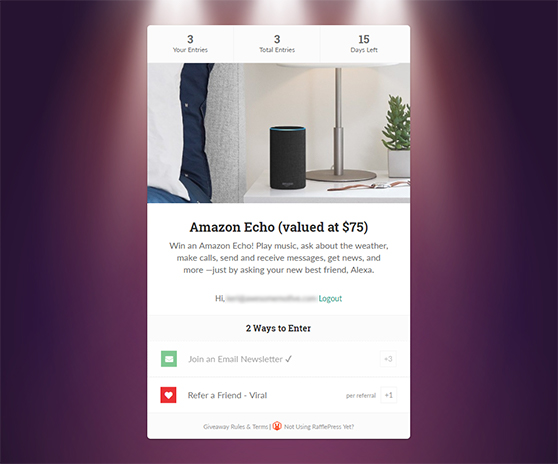
Μπορείτε να δημιουργήσετε διαγωνισμούς στο RafflePress για να λάβετε περισσότερες κριτικές. Το RafflePress είναι το καλύτερο πρόσθετο WordPress για δώρα και διαγωνισμούς. Το μόνο που έχετε να κάνετε είναι να δημιουργήσετε έναν νέο διαγωνισμό που επιβραβεύει τους επαληθευμένους αγοραστές για την αφήγηση μιας κριτικής.
Μπορείτε να χρησιμοποιήσετε την επιλογή δώρου «Εφεύρετε τη Δική σας» στο RafflePress για να δημιουργήσετε αυτό το είδος προσαρμοσμένης καμπάνιας.
#8. Μοιραστείτε τις Κριτικές σας στα Social Media
Τα social media είναι το τέλειο μέρος για να μοιραστείτε τις καλές σας κριτικές για να τραβήξετε την προσοχή, να οδηγήσετε κίνηση στον ιστότοπο eCommerce σας και να χτίσετε την εμπιστοσύνη της επωνυμίας.
Δείτε αυτό το παράδειγμα από την Fantasea Cruising:
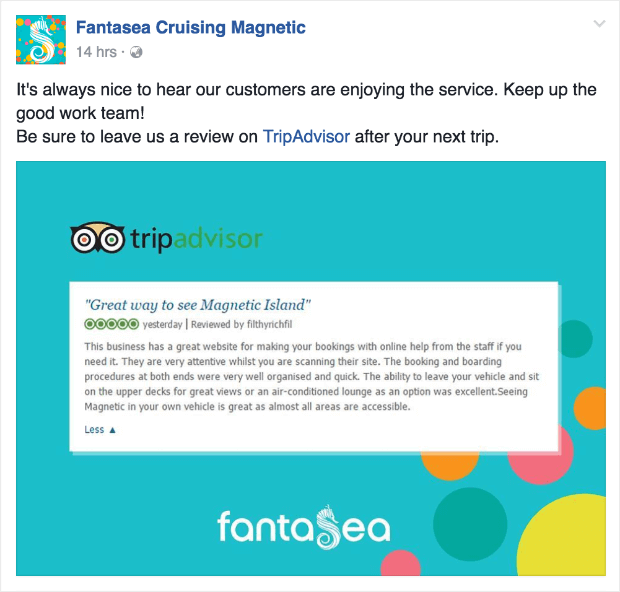
Είναι ένας πραγματικά απλός τρόπος για να αντλήσετε περισσότερη δύναμη από μια ωραία κριτική. Ταυτόχρονα, αν οι πελάτες σας δουν ότι αναφέρετε τις κριτικές τους, θα νιώσουν πιο ενθουσιασμένοι να αφήσουν τις δικές τους κριτικές.
#9. Δημιουργήστε μια Σελίδα Μαρτυριών
Έχετε ακούσει ποτέ τη φράση «Hall of Fame» για κάποιο άθλημα;
Μια σελίδα μαρτυριών είναι ένας εύκολος τρόπος για να δημιουργήσετε ένα Hall of Fame για τους πελάτες σας. Αυτό είναι το τέλειο αντίστοιχο της σελίδας κριτικών και σχολίων που αναφέραμε νωρίτερα.
Απλά ρίξτε μια ματιά σε αυτήν τη σελίδα μαρτυριών από την Toast:
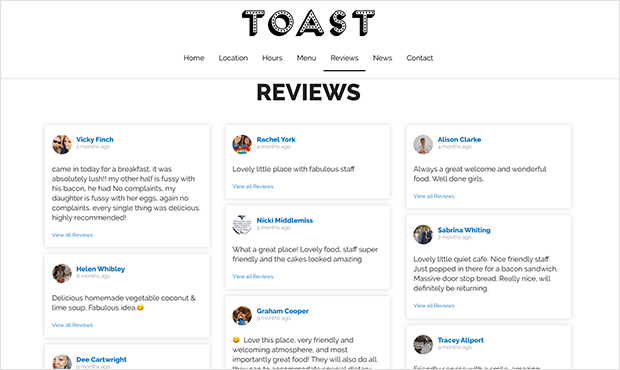
Είναι ένας τόσο υπέροχος τρόπος για να προβάλλετε τις κριτικές σας σε ένα μέρος. Και αν χρειάζεστε έμπνευση, δείτε αυτό το άρθρο για επικά παραδείγματα σελίδων μαρτυριών.
Εναλλακτικά, θα μπορούσατε να δείτε τις μαρτυρίες και τις μελέτες περιπτώσεων μας. Μας αρέσει να πιστεύουμε ότι κάνουμε καλή δουλειά εκτιμώντας τους πελάτες μας επίσης!
Συνοψίζοντας
Αυτό ήταν για αυτό το θέμα, φίλοι.
Για τους περισσότερους ιδιοκτήτες ιστότοπων eCommerce, η αλληλεπίδραση με τον ιστότοπο μπορεί να αποτελέσει μεγάλη πρόκληση. Επομένως, μη διστάσετε να δείτε το άρθρο μας σχετικά με τα καλύτερα εργαλεία αλληλεπίδρασης με τον ιστότοπο για να αποκτήσετε περισσότερους καθημερινούς ενεργούς χρήστες.
Θα διαπιστώσετε ότι ένα από αυτά τα εργαλεία είναι οι ειδοποιήσεις push και συνιστούμε ανεπιφύλακτα να χρησιμοποιήσετε το PushEngage για τις καμπάνιες ειδοποιήσεων push. Το PushEngage είναι το #1 λογισμικό ειδοποιήσεων web push στον κόσμο.
Μπορούμε να σας βοηθήσουμε να λάβετε δωρεάν επαναλαμβανόμενη επισκεψιμότητα στον ιστότοπό σας σε αυτόματο πιλότο. Και στη συνέχεια, να κερδίσετε περισσότερα χρήματα στη διαδικασία.
Οπότε, αν δεν το έχετε κάνει ήδη, ξεκινήστε με το PushEngage σήμερα.


