Ψάχνετε έναν απλό τρόπο για να ενεργοποιήσετε τις ειδοποιήσεις push του Google Chrome;
Οι ειδοποιήσεις push μέσω προγράμματος περιήγησης σάς βοηθούν να παραμένετε σε επαφή με τις αγαπημένες σας μάρκες. Και μπορείτε να επιλέξετε τις ειδοποιήσεις push αρκετά εύκολα. Αλλά πώς αρχίζετε να λαμβάνετε ειδοποιήσεις push μέσω προγράμματος περιήγησης;
Σε αυτό το άρθρο, θα σας δείξουμε βήμα προς βήμα πώς να ενεργοποιήσετε τις ειδοποιήσεις push του Google Chrome.
Ακούγεται καλό; Ας βουτήξουμε.
Πώς να λαμβάνετε ειδοποιήσεις push του Google Chrome από οποιονδήποτε ιστότοπο
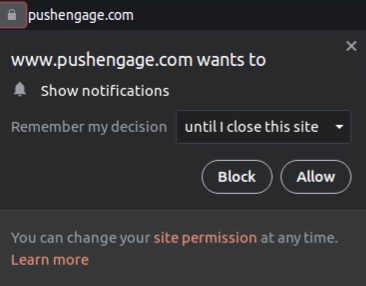
Θα ξεκινήσουμε με το πώς μπορείτε να λαμβάνετε ειδοποιήσεις push από έναν ιστότοπο. Κάθε ιστότοπος χρειάζεται την άδειά σας για να σας στέλνει ειδοποιήσεις push. Το μόνο που έχετε να κάνετε είναι να μεταβείτε σε οποιονδήποτε ιστότοπο και όταν εμφανιστεί η επιλογή λήψης ειδοποιήσεων push, κάντε κλικ στο Να επιτρέπεται:
Ορισμένοι ιστότοποι έχουν διπλή επιλογή για τις ειδοποιήσεις push. Σε αυτήν την περίπτωση, αφού κάνετε κλικ στο Να επιτρέπεται, θα πρέπει να επιβεβαιώσετε ότι θέλετε πραγματικά να εγγραφείτε στις ειδοποιήσεις push του Chrome.
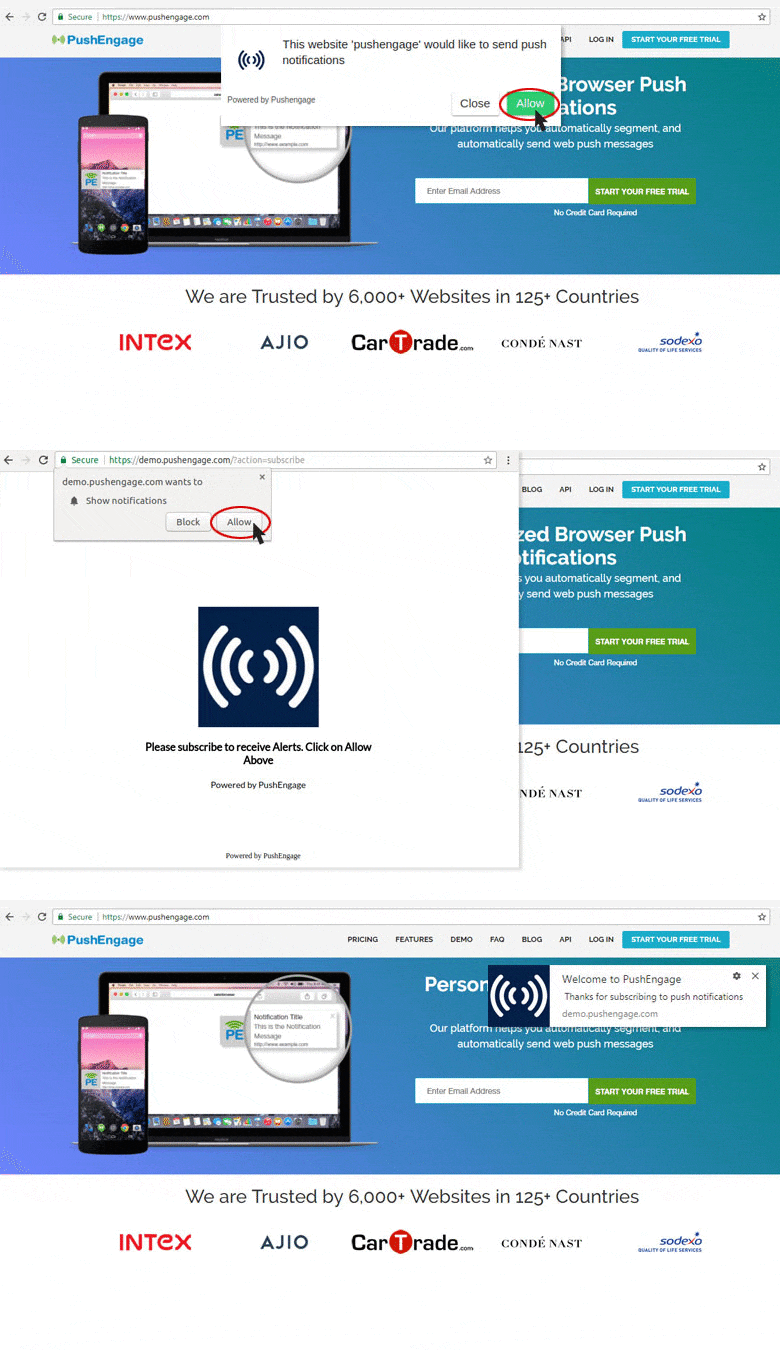
Εφόσον ο ιστότοπος έχει επιλογή ειδοποίησης push, μπορείτε να εγγραφείτε στις ειδοποιήσεις push του με αυτόν τον τρόπο από το Google Chrome.
Πώς να ενεργοποιήσετε τις ειδοποιήσεις push του Chrome από τις Ρυθμίσεις Ασφαλείας
Ένα σημαντικό πρόβλημα με τη λήψη ειδοποιήσεων push είναι ότι το Chrome έχει ρυθμίσεις ειδοποιήσεων push που μπορούν να αποκλείσουν όλες τις ειδοποιήσεις push. Φυσικά, αυτή δεν είναι η προεπιλεγμένη ρύθμιση. Πολλοί χρήστες του Chrome απλώς θέλουν να καταργήσουν την εγγραφή τους από τις ειδοποιήσεις push και είναι υπερβολικά δύσκολο να βρουν συγκεκριμένους ιστότοπους για να αποκλείσουν από μια λίστα.
Έτσι, αν εγγραφήκατε στις ειδοποιήσεις push του Google Chrome και εξακολουθείτε να μην μπορείτε να λάβετε τις ειδοποιήσεις, πρέπει να προσαρμόσετε τις ρυθμίσεις σας.
Μεταβείτε στον ιστότοπο που θέλετε. Στη γραμμή διευθύνσεων, κάντε κλικ στο λουκέτο για να επιλέξετε ρυθμίσεις και, στην αναπτυσσόμενη λίστα, θα δείτε Ειδοποιήσεις:
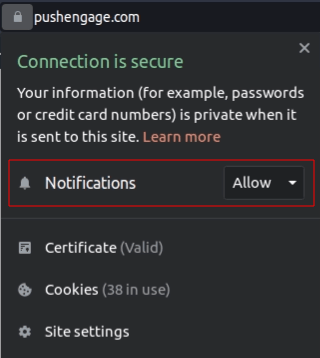
Βεβαιωθείτε ότι η ρύθμιση έχει οριστεί σε Να επιτρέπεται. Αν έχει οριστεί σε Αποκλεισμός, τότε δεν θα λαμβάνετε ειδοποιήσεις push από αυτόν τον ιστότοπο και θα πρέπει να κάνετε κλικ στην αναπτυσσόμενη λίστα για τις Ειδοποιήσεις και να επιλέξετε Να επιτρέπεται.
Πώς να ενεργοποιήσετε τις ειδοποιήσεις push του Google από τις Ρυθμίσεις του Chrome
Μπορείτε επίσης να ενεργοποιήσετε τις ειδοποιήσεις push του Google Chrome από τις Ρυθμίσεις του Chrome.
Και αυτή η μέθοδος σας δίνει μεγαλύτερο έλεγχο στις ειδοποιήσεις push που θέλετε πραγματικά να λαμβάνετε. Η ενεργοποίηση ειδοποιήσεων από τις ρυθμίσεις του Chrome είναι ιδανική για εσάς αν δεν θέλετε να λαμβάνετε ειδοποιήσεις push του Google Chrome από κάθε ιστότοπο, και θέλετε να λαμβάνετε μηνύματα push μόνο από συγκεκριμένους ιστότοπους.
Ανοίξτε το Chrome και μεταβείτε σε μια νέα καρτέλα προγράμματος περιήγησης. Στη συνέχεια, μεταβείτε στο chrome://settings/content για να ξεκινήσετε.
Μεταβείτε στο Δικαιώματα » Ειδοποιήσεις:
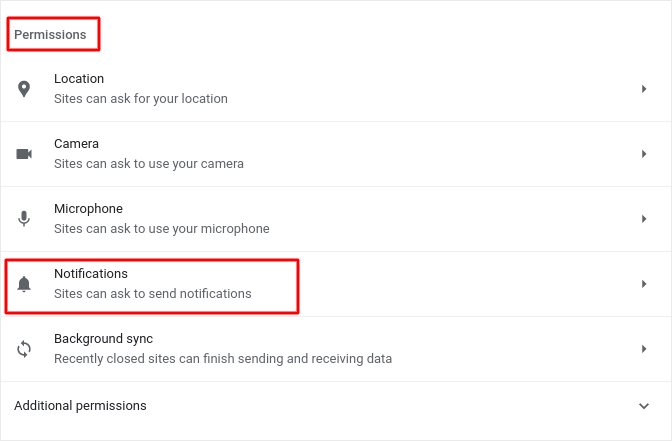
Και στη συνέχεια, κάντε κλικ στο βέλος δίπλα του. Κάντε κύλιση προς τα κάτω στο Επιτρέπεται η αποστολή ειδοποιήσεων:
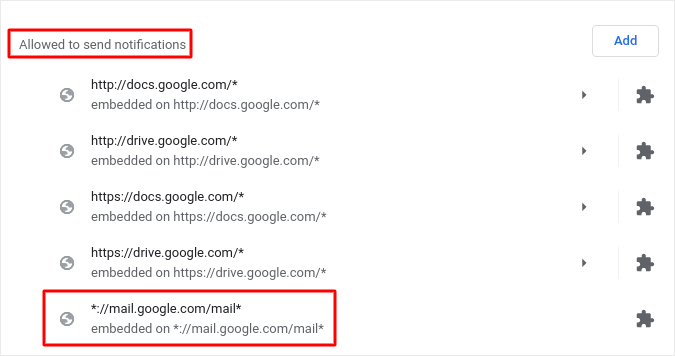
Αυτή είναι μια λίστα με όλους τους ιστότοπους που μπορούν να σας στείλουν ειδοποιήσεις push μέσω web. Σας συνιστούμε να μην απενεργοποιήσετε καμία από τις βασικές υπηρεσίες της Google, όπως το Gmail. Αλλά όποιες ειδοποιήσεις έχετε εγγραφεί θα εμφανίζονται εδώ. Βρείτε την επωνυμία από την οποία θέλετε να λαμβάνετε ειδοποιήσεις push του Google Chrome.
Κάντε κλικ στο βέλος δίπλα του και μετακινηθείτε προς τα κάτω στις Δικαιώματα » Ειδοποιήσεις:
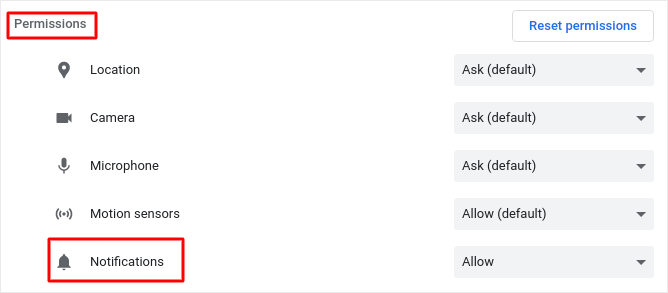
Και αλλάξτε αυτήν την άδεια από Αποκλεισμός σε Να επιτρέπεται.
Αυτό είναι όλο! Ολοκληρώσατε. Αυτή η μέθοδος θα λειτουργεί ανεξάρτητα από το λειτουργικό σύστημα ή τη συσκευή που χρησιμοποιείτε, εφόσον χρησιμοποιείτε το πρόγραμμα περιήγησης Chrome.
Τι να κάνετε αφού ενεργοποιήσετε τις ειδοποιήσεις push του Google Chrome
Το γεγονός ότι αγαπάτε το περιεχόμενο των ειδοποιήσεων push που λαμβάνετε, δεν σημαίνει ότι πρέπει να εγγραφείτε σε αυτές. Πριν εγγραφείτε σε οποιεσδήποτε άλλες ειδοποιήσεις push, θα πρέπει να ελέγξετε τους κανόνες συμμόρφωσης GDPR και να μάθετε αν οι ειδοποιήσεις push σας είναι ασφαλείς.
Και αν πιστεύετε ότι οι ειδοποιήσεις push του Google Chrome είναι υπέροχες, θα πρέπει επίσης να δείτε πώς μπορείτε να ξεκινήσετε με τις ειδοποιήσεις push για την επιχείρησή σας.
Οι ειδοποιήσεις push είναι ένας εξαιρετικός τρόπος για να αυξήσετε οργανικά τη βάση των θαυμαστών σας. Και είναι πολύ εύκολο να ρυθμίσετε καμπάνιες push. Επίσης, αν είστε νέοι στις ειδοποιήσεις push, θα πρέπει να ελέγξετε αυτούς τους επικούς πόρους:
- Πώς να προσθέσετε ένα widget εγγραφής blog στο WordPress
- Πώς να αυξήσετε την επισκεψιμότητα στο WordPress Blog σας (9 εύκολοι τρόποι)
- Κόστος Ειδοποιήσεων Push: Είναι Πραγματικά Δωρεάν; (Ανάλυση Τιμών)
- Πώς να Αυξήσετε το Ποσοστό Συγκατάθεσης για Ειδοποιήσεις Push στο Web (7 Τρόποι)
- Πώς να χρησιμοποιήσετε τα κουμπιά ενεργειών ειδοποιήσεων push για να διπλασιάσετε τα κλικ
Συνιστούμε τη χρήση του PushEngage για τη δημιουργία των καμπανιών ειδοποιήσεων push. Το PushEngage είναι το κορυφαίο λογισμικό ειδοποιήσεων push στην αγορά και οι καμπάνιες σας θα είναι σε ασφαλή χέρια.
Λοιπόν, αν δεν το έχετε κάνει ήδη, ξεκινήστε με το PushEngage σήμερα.


