
Ψάχνετε για έναν γρήγορο και εύκολο τρόπο να αποκτήσετε κίνηση από ειδοποιήσεις push στον ιστότοπό σας;
Φανταστείτε να λαμβάνετε δωρεάν επισκεψιμότητα αυτόματα κάθε φορά που δημοσιεύετε μια νέα ανάρτηση ιστολογίου χωρίς τις χρονοβόρες καμπάνιες SEO. Αν διαχειρίζεστε έναν ιστότοπο WordPress, γνωρίζετε ήδη πόση δουλειά απαιτείται για την προώθηση του περιεχομένου σας και για να επιστρέφουν οι αναγνώστες στο περιεχόμενό σας.
Σε αυτό το άρθρο, θα σας δείξουμε πώς να αποκτήσετε άμεσα επαναλαμβανόμενους επισκέπτες κάθε φορά που δημοσιεύετε. Και θα το κάνουμε χρησιμοποιώντας κίνηση από ειδοποιήσεις push, ώστε να μην χρειάζεται να βασίζεστε αποκλειστικά σε πληρωμένες διαφημίσεις και SEO.
Ακούγεται καλό; Ας βουτήξουμε.
Κατανόηση της Κίνησης από Ειδοποιήσεις Push
Πριν μπούμε στις λεπτομέρειες του πώς να αποκτήσετε κίνηση από ειδοποιήσεις push, ας ρίξουμε μια ματιά στα βασικά της στρατηγικής μάρκετινγκ με ειδοποιήσεις push. Θα το κάνουμε απλό και εύκολο για εσάς. Οπότε, μην ανησυχείτε αν δεν έχετε προηγούμενη εμπειρία με ειδοποιήσεις push.
Τι Είναι οι Ειδοποιήσεις Push;
Μια ειδοποίηση push είναι ένα σύντομο, κλικαρίσιμο μήνυμα pop-up που εμφανίζεται στη συσκευή ενός συνδρομητή και τον ανακατευθύνει στο περιεχόμενό σας με ένα κλικ:
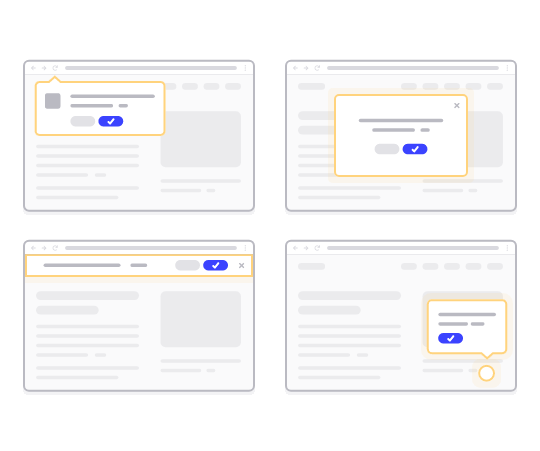
Το καλύτερο είναι ότι οι ειδοποιήσεις εμφανίζονται ακόμα κι αν ο συνδρομητής δεν χρησιμοποιεί πρόγραμμα περιήγησης. Είναι σαν ένα μαζικό email, αλλά με μια ειδοποίηση push στο διαδίκτυο, οι συνδρομητές σας δεν χρειάζεται να χρησιμοποιούν μια εφαρμογή για να δουν το μήνυμά σας.
Με λίγα λόγια: Οι ειδοποιήσεις push WordPress είναι ένας απλός τρόπος αποστολής ενός κλικαρίσιμου συνδέσμου προς το περιεχόμενό σας σε οποιονδήποτε έχει επιλέξει να τις λαμβάνει από το pop-up ειδοποιήσεων push σας.
Με τις ακολουθίες ειδοποιήσεων push, το κοινό σας δεν έχει πλέον καμία δικαιολογία να σας αγνοήσει. Και σε αντίθεση με τους ιστότοπους κοινωνικής δικτύωσης, δεν υπάρχει αλγόριθμος που να περιορίζει την εμβέλειά σας για να σας αναγκάσει να πληρώσετε για διαφημίσεις.
Το πιο εντυπωσιακό με την επισκεψιμότητα από ειδοποιήσεις push είναι ότι μπορείτε να τις χρησιμοποιήσετε για να συμπληρώσετε τα lead magnets και τις φόρμες εγγραφής email σας. Μπορείτε ακόμη και να χρησιμοποιήσετε pop-ups για τη συλλογή συνδρομητών ειδοποιήσεων push.
Οφέλη από την Αύξηση της Κίνησης από Ειδοποιήσεις Push
Ας μιλήσουμε για το γιατί η επισκεψιμότητα από ειδοποιήσεις push είναι σημαντική για την επιχείρησή σας.
Πόσο συχνά δημιουργείτε περιεχόμενο και περιμένετε να απογειωθεί; Αν περιμένετε από τις μηχανές αναζήτησης και τα μέσα κοινωνικής δικτύωσης να αυξήσουν εκρηκτικά την επισκεψιμότητα του ιστότοπού σας, θα πρέπει να γνωρίζετε:
- Το SEO δεν φέρνει εκρηκτική ανάπτυξη. Το SEO φέρνει σταθερή ανάπτυξη με την πάροδο του χρόνου.
- Οι διαφημίσεις αναζήτησης και κοινωνικών μέσων είναι «πληρωμή για να παίξεις». Μπορείτε να έχετε μόνο αιχμές επισκεψιμότητας. Για να επαναστοχεύσετε αυτήν την επισκεψιμότητα, θα χρειαστεί να πληρώσετε περισσότερα.
- Η ιογενής διάδοση στα μέσα κοινωνικής δικτύωσης είναι δύσκολη. Και δεν υπάρχει τρόπος να γνωρίζετε αν θα συμβεί ποτέ.
Λοιπόν, αν η επισκεψιμότητα είναι τόσο δύσκολο να αποκτηθεί, πώς αυξάνετε τις πωλήσεις σας; Ξεχάστε τις πωλήσεις, πώς αυξάνετε ακόμη και την αλληλεπίδραση στον ιστότοπό σας προβλέψιμα;
Η απάντηση είναι η επισκεψιμότητα από ειδοποιήσεις push. Ακολουθούν μερικά βασικά οφέλη των καμπανιών ειδοποιήσεων push:
- Βελτίωση της Αλληλεπίδρασης των Χρηστών
- Διατήρηση Πελατών και Συνδρομητών
- Αύξηση των Ποσοστών Μετατροπής
- Στόχευση των Σωστών Χρηστών
- Παρακολούθηση Ενεργών Μετρήσεων
- Βελτίωση της Στρατηγικής Εξυπηρέτησης Πελατών σας
- Ενίσχυση της Συνέπειας της Επωνυμίας
Κατά τη διάρκεια αυτού του άρθρου, θα εξηγήσουμε λεπτομερώς πώς μπορείτε να χρησιμοποιήσετε αυτά τα οφέλη προς όφελός σας. Αν προτιμάτε να δείτε πραγματικά παραδείγματα, θα πρέπει να δείτε αυτό το άρθρο σχετικά με τα οφέλη των ειδοποιήσεων push.
Επιλογή Υπηρεσίας για Απόκτηση Κίνησης από Ειδοποιήσεις Push
Πριν δημιουργήσετε μια καμπάνια ειδοποιήσεων push, πρέπει να επιλέξετε μια υπηρεσία ειδοποιήσεων push. Μια υπηρεσία ειδοποιήσεων push είναι ένα λογισμικό που σας επιτρέπει να δημιουργείτε καμπάνιες push χωρίς καμία κωδικοποίηση.
Συνιστούμε τη χρήση του PushEngage για να αποκτήσετε συνδρομητές ειδοποιήσεων push.

Το PushEngage είναι το #1 plugin ειδοποιήσεων push στον κόσμο.
Οι ειδοποιήσεις push σας βοηθούν να αυξήσετε την επισκεψιμότητα του ιστότοπού σας και την αλληλεπίδραση σε αυτόματο πιλότο. Και αν διαχειρίζεστε ένα online κατάστημα, το PushEngage σας βοηθά επίσης να αυξήσετε τις πωλήσεις σας, βοηθώντας σας να δημιουργήσετε αυτοματοποιημένες ειδοποιήσεις push eCommerce.
Μπορείτε να ξεκινήσετε δωρεάν, αλλά αν σοβαρά θέλετε να αναπτύξετε την επιχείρησή σας, θα πρέπει να αγοράσετε ένα επί πληρωμή πρόγραμμα. Επίσης, πριν αγοράσετε οποιαδήποτε υπηρεσία ειδοποιήσεων push, θα πρέπει να δείτε αυτόν τον οδηγό για το κόστος ειδοποιήσεων push.
Ακολουθεί μια γρήγορη επισκόπηση του τι παίρνετε με το PushEngage:
- Αυτοματοποιημένες εκστρατείες με υψηλή μετατροπή
- Πολλαπλές επιλογές στόχευσης ειδοποιήσεων push και προγραμματισμού καμπανιών
- Παρακολούθηση στόχων και προηγμένα αναλυτικά στοιχεία
- Έξυπνες δοκιμές A/B
- Πρότυπα ειδοποιήσεων push
- Πολλαπλά στυλ αναδυόμενων ειδοποιήσεων push
- Ένας Αφοσιωμένος Διαχειριστής Επιτυχίας
Και πολλά άλλα!
Θα δείτε ότι η PushEngage είναι μακράν η καλύτερη επιλογή αν θέλετε να αυξήσετε την επισκεψιμότητα, την αφοσίωση και τις πωλήσεις για την επιχείρησή σας. Και αν έχετε περιορισμένο προϋπολογισμό, μπορείτε πάντα να γίνετε λίγο δημιουργικοί με τις ειδοποιήσεις push σας.
ΣΗΜΕΙΩΣΗ: Εάν διαχειρίζεστε έναν ιστότοπο WordPress, θα πρέπει να εγκαταστήσετε και να ενεργοποιήσετε το plugin PushEngage για WordPress.
Πάμε!
Βήμα #1: Δημιουργήστε έναν Δωρεάν Λογαριασμό PushEngage
Μεταβείτε στο PushEngage και κάντε κλικ στο Ξεκινήστε Δωρεάν Τώρα:
Μπορείτε να ξεκινήσετε με το δωρεάν πρόγραμμα. Αλλά αν θέλετε να στείλετε στοχευμένες ειδοποιήσεις push, θα πρέπει να επιλέξετε το Πρόγραμμα Ανάπτυξης. Μόλις γνωρίζετε ποιο πρόγραμμα θέλετε, κάντε κλικ στο Ξεκινήστε για να δημιουργήσετε τον λογαριασμό σας στο PushEngage.
Βήμα #2: Εγγραφείτε στο PushEngage
Τώρα, είναι ώρα να δημιουργήσετε τον λογαριασμό σας στο PushEngage. Ξεκινήστε κάνοντας εγγραφή με μια διεύθυνση email ή ένα αναγνωριστικό Gmail:

Στη συνέχεια, συμπληρώστε τα στοιχεία του λογαριασμού σας:

Και προσθέστε τα στοιχεία της πιστωτικής σας κάρτας για να αγοράσετε το πρόγραμμά σας:

Εάν επιλέξατε τον δωρεάν λογαριασμό, τότε η πιστωτική σας κάρτα δεν θα χρεωθεί ποτέ χρήματα μέχρι να επιλέξετε να αναβαθμίσετε το πρόγραμμά σας. Και τώρα, είστε έτοιμοι να αποκτήσετε πρόσβαση στον πίνακα ελέγχου του PushEngage. Απλώς κάντε κλικ στο Ολοκλήρωση Εγγραφής και Άμεση Πρόσβαση.
Εάν έχετε χρησιμοποιήσει το OneSignal ή το PushAlert στο παρελθόν, θα δείτε ότι το PushEngage σας προσφέρει μια πολύ πιο καθαρή εμπειρία από τον πίνακα ελέγχου. Ο πίνακας ελέγχου του OneSignal δεν είναι σχεδιασμένος για προηγμένες καμπάνιες. Για αυτό, θα χρειαστείτε το API περισσότερο από το plugin του OneSignal.
Βήμα #3: Εγκατάσταση Plugin WordPress για Αύξηση Κίνησης από Ειδοποιήσεις Push
ΣΗΜΕΙΩΣΗ: Εάν δεν διαχειρίζεστε ιστότοπο WordPress, θα πρέπει να ελέγξετε τους οδηγούς εγκατάστασης για να ξεκινήσετε.
Ολοκληρώσατε τη δημιουργία του λογαριασμού σας. Έτσι, κατευθυνθείτε στον πίνακα ελέγχου του PushEngage, όπου μπορείτε να παρακολουθείτε τα ποσοστά αλληλεπίδρασης των ειδοποιήσεων push και να ακολουθείτε:

Κάντε κλικ στο Ρυθμίσεις Ιστότοπου » Λεπτομέρειες Ιστότοπου και κάντε κλικ στο κουμπί Κάντε Κλικ Εδώ Για Οδηγίες Εγκατάστασης:

Κάντε κλικ στην καρτέλα WordPress και κάντε κλικ στο κουμπί Εγκατάσταση Πρόσθετου PushEngage WordPress για να εγκαταστήσετε το πρόσθετο στον ιστότοπό σας.

Εδώ είναι το ενδιαφέρον: Όταν δημιουργήσατε τον λογαριασμό σας στο PushEngage, συγχρονίσατε ήδη τον ιστότοπό σας με τον λογαριασμό σας στο PushEngage. Έτσι, κάντε κλικ στον σύνδεσμο εγκατάστασης στον πίνακα ελέγχου του PushEngage για να εγκαταστήσετε αυτόματα το πρόσθετο PushEngage WordPress στον ιστότοπό σας.
Βήμα #4: Συνδέστε τον Ιστότοπό σας WordPress με το PushEngage
Όταν ολοκληρώσετε την εγκατάσταση και ενεργοποίηση του plugin WordPress PushEngage, θα δείτε τον οδηγό ρύθμισης του PushEngage:

Ο οδηγός είναι αρκετά απλός. Εάν είστε νέος χρήστης, κάντε κλικ στο Νέος; Διεκδικήστε τον Δωρεάν Λογαριασμό σας. Και αν έχετε ήδη εγγραφεί, κάντε κλικ στο Σύνδεση του Υπάρχοντος Λογαριασμού σας.
Στη συνέχεια, μπορείτε να επιλέξετε τον ιστότοπό σας από το αναπτυσσόμενο μενού Επιλογή Ιστότοπου κάτω από το Σύνδεση εγγεγραμμένου ιστότοπου εάν έχετε ήδη καταχωρήσει έναν ιστότοπο κατά την εγγραφή:

Εναλλακτικά, μπορείτε να κάνετε κλικ στο Εγγραφή νέου ιστότοπου για να προσθέσετε έναν νέο ιστότοπο εάν έχετε πακέτο τιμολόγησης Premium ή υψηλότερο. Στο επόμενο βήμα, ο οδηγός γνωριμίας θα σας ζητήσει να εγκαταστήσετε άλλα απαραίτητα πρόσθετα WordPress.

Εάν ακολουθήσατε κάθε βήμα σωστά, θα δείτε αυτό το μήνυμα επιτυχίας από τον οδηγό:

Είστε τώρα έτοιμοι να δημιουργήσετε καμπάνιες και αναδυόμενα παράθυρα ειδοποιήσεων push.
Δημιουργία Περιεχομένου που Αυξάνει την Κίνηση από Ειδοποιήσεις Push
Εδώ είναι ένα μικρό μυστικό που οι copywriters δεν θέλουν να σας πουν…
Το Copywriting καθοδηγείται κυρίως από τυπικά μοτίβα. Αυτό που φαίνεται δημιουργικό εξωτερικά είναι στην πραγματικότητα απλώς ένα γνωστό μοτίβο. Και η ύπαρξη συναρπαστικού περιεχομένου σας προσφέρει πολύ περισσότερη επισκεψιμότητα, αλληλεπίδραση και πωλήσεις κατ' επανάληψη.
Ας ρίξουμε μια ματιά στα διάφορα μέρη του περιεχομένου για τις περισσότερες επιτυχημένες καμπάνιες.
Δημιουργία Ελκυστικών Μηνυμάτων Ειδοποιήσεων Push
Το Netflix είναι ο βασιλιάς του περιεχομένου που σε κάνει να το βλέπεις με τη μία. Και οι ειδοποιήσεις push του είναι απλώς επικές.
Αλλά πώς το κάνουν;
Το Netflix στέλνει εξατομικευμένες ειδοποιήσεις push όσο στέλνει και εξατομικευμένες προτάσεις περιεχομένου:
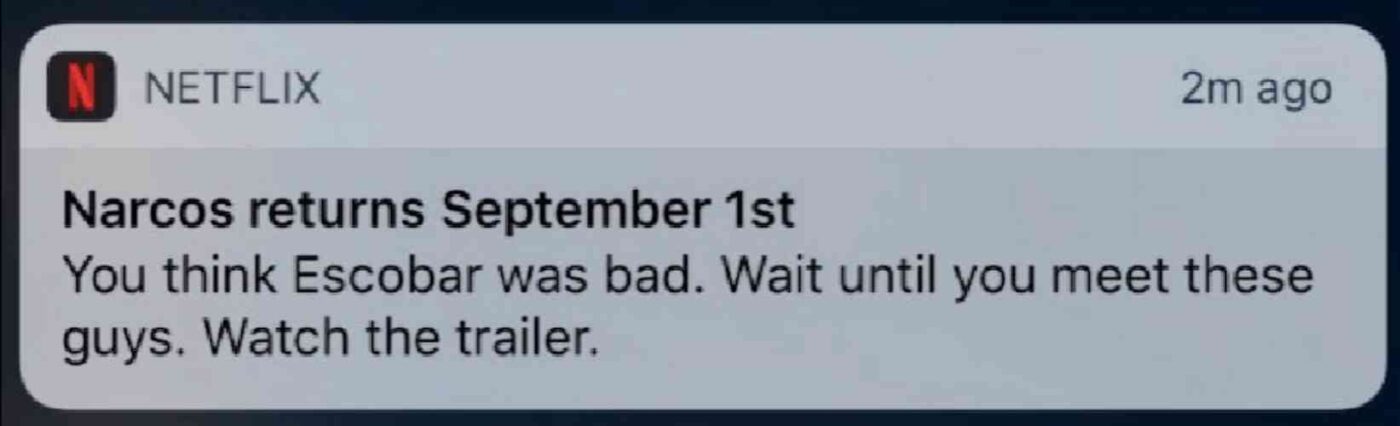
Οποιοσδήποτε θαυμαστής του Narcos ξέρει τι σημαίνει αυτή η ειδοποίηση. Ένα κείμενο σαν αυτό τους ενθουσιάζει αμέσως επειδή το κείμενο βασίζεται σε μια υπάρχουσα βάση θαυμαστών που είναι ήδη εξοικειωμένη με την ιστορία του Narcos.
Λοιπόν, ποιο είναι το βασικό μάθημα εδώ;
Εξατομικευμένες Προτάσεις + Αφηγηματικό Κείμενο = Υψηλή Αλληλεπίδραση.
Και δεν έχει σημασία αν δεν έχετε μια υπάρχουσα βάση αφοσιωμένων θαυμαστών. Αυτή η μέθοδος λειτουργεί και για μια μικρή επιχείρηση με μια μικρή λίστα συνδρομητών. Δείτε αυτά τα παραδείγματα κειμένων ειδοποιήσεων push για να πάρετε περισσότερη έμπνευση.
Αξιοποίηση της Εξατομίκευσης
Οι εξατομικευμένες ειδοποιήσεις push κάνουν τους συνδρομητές σας να νιώθουν ότι δημιουργήθηκαν ειδικά για αυτούς. Το καλύτερο; Οι πελάτες μας επιτυγχάνουν ποσοστά μετατροπής περίπου 8% για εξατομικευμένες καμπάνιες.
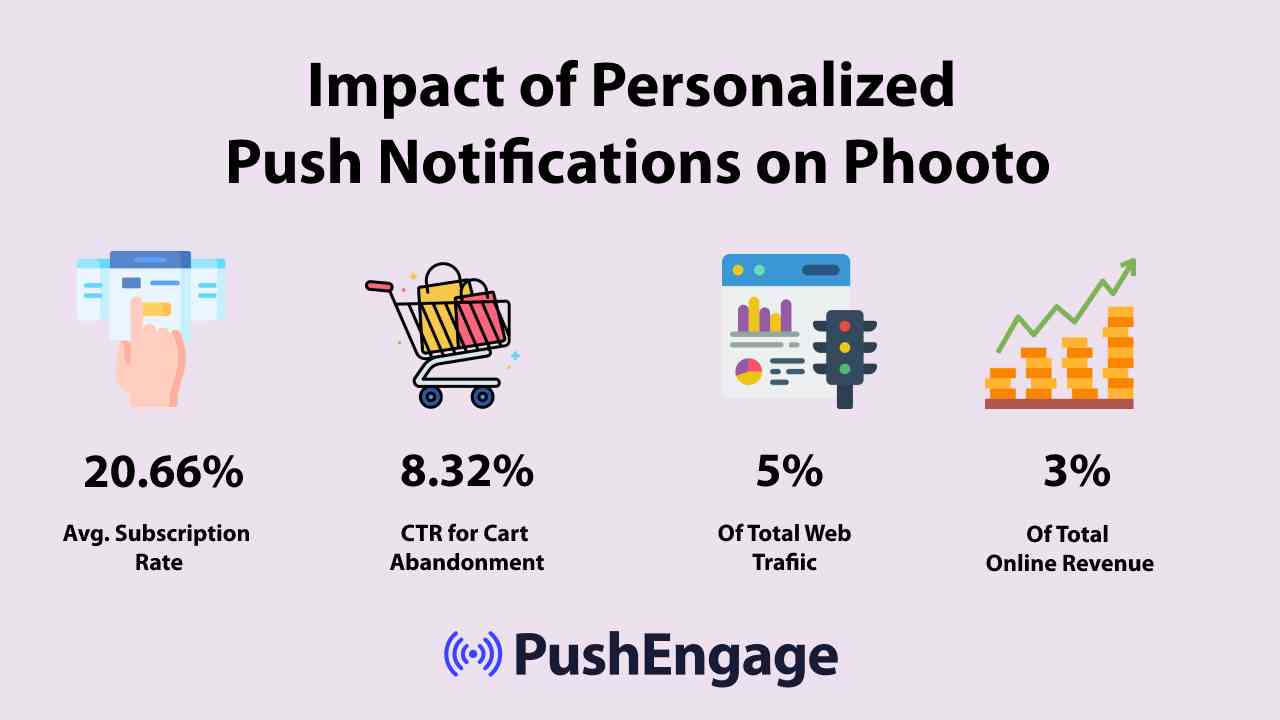
Σαφώς, οι εξατομικευμένες ειδοποιήσεις push μπορούν να αλλάξουν τον τρόπο που κάνετε επιχειρήσεις στο διαδίκτυο.
Αλλά σύμφωνα με μια μελέτη, το 70% των εμπειριών εξατομίκευσης σε έναν ιστότοπο eCommerce συμβαίνουν μόνο όταν ο χρήστης έχει συνδεθεί στον λογαριασμό του. Αλλά ιδανικά, θα θέλατε να προσφέρετε μια εξατομικευμένη εμπειρία ακόμα και όταν δεν είναι συνδεδεμένοι.
- Εκστρατείες Εγκατάλειψης Περιήγησης
- Ειδοποιήσεις αποθέματος
- Ειδοποιήσεις Πτώσης Τιμών
- Εξατομίκευση κατά Τοποθεσία
- Καμπάνιες εγκατάλειψης καλαθιού
- Καμπάνιες Κριτικών Προϊόντων
- Υπενθυμίσεις και Ενημερώσεις Ζωντανών Εκδηλώσεων
Οι ειδοποιήσεις push σας βοηθούν ακόμη και να προσεγγίσετε τους πελάτες σας όποτε είναι συνδεδεμένοι, ανεξάρτητα από το αν βρίσκονται ή όχι στον ιστότοπό σας.
Χρήση Θεμάτων Περιεχομένου
Τα θέματα περιεχομένου είναι ένας εξαιρετικός τρόπος για να κάνετε τους ανθρώπους να εγγραφούν στις ειδοποιήσεις push σας. Μπορείτε να χρησιμοποιήσετε διαφορετικές περιστάσεις, όπως η Black Friday, ως θέματα περιεχομένου:
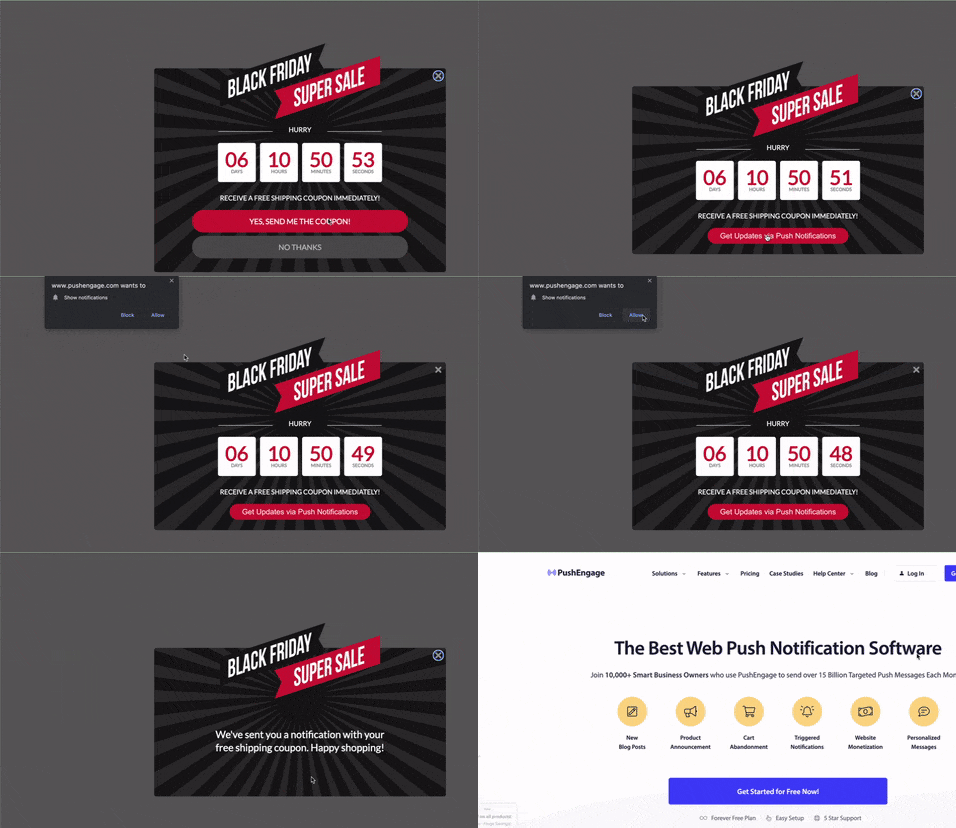
Μπορείτε επίσης να χρησιμοποιήσετε τμηματοποίηση βάσει περίστασης για να στείλετε διαφορετικούς τύπους στοχευμένων καμπανιών push. Ακόμα καλύτερα, μπορείτε να χρησιμοποιήσετε αυτά τα τμήματα για να δημιουργήσετε widgets εγγραφής στον ιστότοπό σας:

Ένα widget διαχείρισης εγγραφών επιτρέπει στους επισκέπτες σας να επιλέξουν τι είδους ειδοποιήσεις push θέλουν να λαμβάνουν από εσάς.

Και μπορείτε ακόμη και να δημιουργήσετε αναδυόμενα παράθυρα ειδοποιήσεων push που τμηματοποιούν αυτόματα τους συνδρομητές σας όταν εγγράφονται.
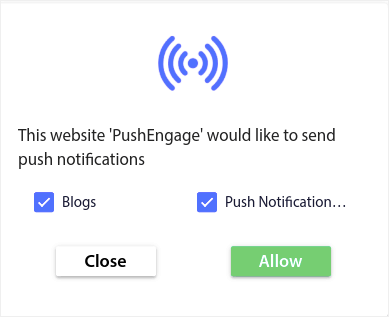
Τα θέματα περιεχομένου σας επιτρέπουν να στέλνετε μόνο σχετικό περιεχόμενο στους συνδρομητές σας. Αυτό θα σας βοηθήσει να αυξήσετε τα ποσοστά εγγραφής σας, ακόμη και τα ποσοστά αλληλεπίδρασης.
Επαγγελματική Συμβουλή: Θυμηθείτε να διαφοροποιήσετε τα θέματα του περιεχομένου σας. Μπορείτε να δημιουργήσετε πολλαπλές επιλογές εγγραφής για ειδοποιήσεις push για να στοχεύσετε διαφορετικούς τύπους χρηστών. Η δημιουργία πολλαπλών προσαρμοσμένων επιλογών εγγραφής είναι ένας εξαιρετικός τρόπος για να αυξήσετε τους συνδρομητές σας push από το υπάρχον περιεχόμενό σας.
Δημιουργία Στρατηγικής Εγγραφής Συνδρομητών Push
Το προσαρμοσμένο περιεχόμενο είναι ένας από τους ευκολότερους τρόπους για να αποκτήσετε επισκεψιμότητα από ειδοποιήσεις push. Αλλά δεν είναι μόνο αυτό. Θα χρειαστείτε επίσης μια σαφή στρατηγική για να συνεχίσετε να αυξάνετε τη λίστα των συνδρομητών σας. Ας εξετάσουμε από κοντά μερικά από τα πιο κρίσιμα μέρη μιας στρατηγικής εγγραφής.
Εφαρμογή Σαφούς Παρότρυνσης για Δράση
Ένα κουμπί παρότρυνσης για δράση είναι ο απλούστερος τρόπος για να κάνετε τους επισκέπτες του ιστότοπού σας να εγγραφούν. Από προεπιλογή, τα αναδυόμενα παράθυρα ειδοποιήσεων push σας ζητούν να εγγραφείτε. Αλλά μπορείτε να αλλάξετε το κείμενο σε ό,τι θέλετε.
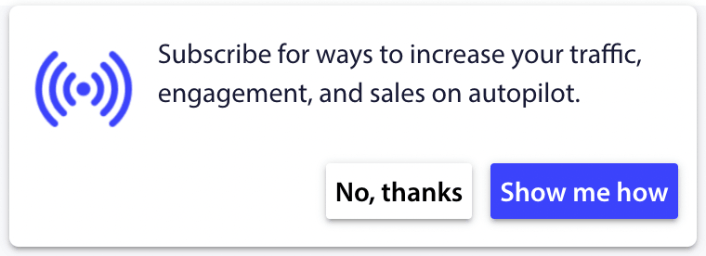
Και το καλύτερο είναι ότι μπορείτε να προσαρμόσετε την εμφάνιση και την αίσθηση, συμπεριλαμβανομένων των χρωμάτων της επωνυμίας σας.
Απλά θυμηθείτε, περισσότερα κλικ εγγραφής = περισσότεροι συνδρομητές = περισσότερη επισκεψιμότητα από ειδοποιήσεις push.
Επαγγελματική Συμβουλή: Μπορείτε επίσης να χρησιμοποιήσετε κουμπιά δράσης στις ειδοποιήσεις push σας για να λάβετε πολύ περισσότερα κλικ και να αποκτήσετε περισσότερη άμεση επισκεψιμότητα από ειδοποιήσεις push.
Χρονισμός και Συχνότητα Ειδοποιήσεων
Υπάρχει κάτι τέτοιο όπως πάρα πολλές ειδοποιήσεις push.
Ο αριθμός των ειδοποιήσεων push που πρέπει να στέλνετε εξαρτάται από τον κλάδο σας. Ωστόσο, το καλύτερο είναι να στέλνετε στους πελάτες σας το πολύ 2 ειδοποιήσεις την ημέρα. Και όχι περισσότερες από 5 την εβδομάδα.
Ένας μέσος όρος 1 ειδοποίησης την ημέρα λειτουργεί ακόμη καλύτερα.
Εκτός αν έχετε κάτι πραγματικά σημαντικό να πείτε στους συνδρομητές σας, φυσικά:
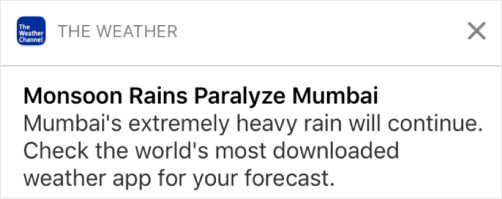
Θα μπορούσατε εύκολα να φανείτε πολύ επιθετικοί και να ενοχλήσετε τους συνδρομητές σας. Αυτός είναι ένας εξαιρετικός τρόπος να χάσετε συνδρομητές push notification. Αλλά θα πρέπει να συνδεθείτε με τους πελάτες σας. Και πρέπει να τους στέλνετε προωθητικές και συναλλακτικές ειδοποιήσεις.
Δείτε αυτό το άρθρο σχετικά με το πόσες ειδοποιήσεις push πρέπει να στέλνετε για ακόμη περισσότερες συμβουλές.
Μπορείτε επίσης να προγραμματίσετε τις ειδοποιήσεις push σας με διαφορετικούς τρόπους.

Είναι εξαιρετικά εύκολο να προγραμματίσετε την αποστολή ειδοποιήσεων push:
- Αμέσως
- Σε μια συγκεκριμένη ημερομηνία και ώρα
- Ως επαναλαμβανόμενο συμβάν
Η γνώση του πόσες ειδοποιήσεις να στέλνετε και πότε να στέλνετε ειδοποιήσεις push θα μειώσει δραματικά τα ποσοστά απεγγραφής σας.
Επαγγελματική Συμβουλή: Εάν φτάσετε σε ένα σημείο όπου οι συνδρομητές σας push δεν αλληλεπιδρούν μαζί σας, μπορείτε να ξεκινήσετε μια καμπάνια επαναστόχευσης για να αλληλεπιδράσετε ξανά μαζί τους. Εάν αυτό δεν λειτουργήσει, μπορείτε πάντα να καθαρίσετε τη λίστα συνδρομητών σας.
A/B Testing για Αύξηση Κίνησης από Ειδοποιήσεις Push
Το split testing είναι ένας καλός τρόπος για να διατηρήσετε τους συνδρομητές ειδοποιήσεων push εγγεγραμμένους. Αλλά τι μπορείτε να κάνετε split test σε μια ειδοποίηση push;
Οι πιο συνηθισμένες μετρήσεις απόδοσης για τις ειδοποιήσεις push είναι:
- Ποσοστό κλικ: Το ποσοστό κλικ σε μια ειδοποίηση push είναι πόσο συχνά οι συνδρομητές σας είδαν την ειδοποίηση push σας και στη συνέχεια έκαναν κλικ σε αυτήν.
- Ποσοστό προβολής: Το ποσοστό προβολής μιας ειδοποίησης push είναι πόσο συχνά ένας συνδρομητής έλαβε την ειδοποίησή σας push και την είδε πριν λήξει.
- Μετατροπές στόχων: Μπορείτε να ορίσετε στόχους για την καμπάνια σας και να ρυθμίσετε την παρακολούθηση στόχων για τις καμπάνιες σας. Οι μετατροπές στόχων είναι ένα μέτρο του πόσες φορές επιτύχατε τον στόχο σας.
Για να αυξήσετε τα ποσοστά προβολής σας, θέλετε να χρησιμοποιήσετε μια μεγάλη εικόνα στις ειδοποιήσεις push σας. Η χρήση εικόνων στις ειδοποιήσεις σας την καθιστά άμεσα πιο ελκυστική.
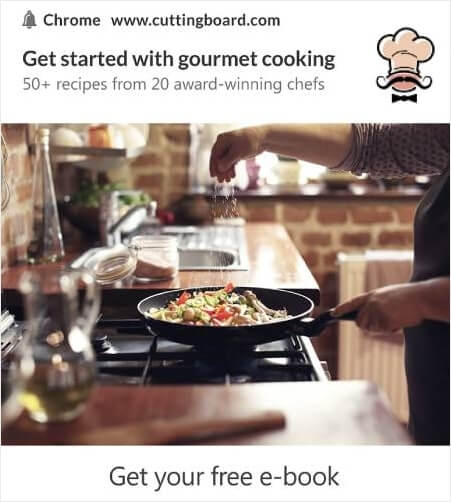
Μπορείτε επίσης να πειραματιστείτε με λέξεις-κλειδιά στον τίτλο της ειδοποίησής σας.

Έτσι, μπορείτε να κάνετε A/B testing στις ειδοποιήσεις με εικόνες και χωρίς. Μπορείτε επίσης να ελέγξετε τα ποσοστά προβολής κάνοντας split testing στις ειδοποιήσεις push με και χωρίς λέξεις-κλειδιά στον τίτλο.
Αν θέλετε να βελτιώσετε το ποσοστό κλικ, πρέπει να εστιάσετε στο κύριο μήνυμα και να εργαστείτε για να το κάνετε εξαιρετικά σχετικό. Κυρίως, αυτό αφορά ένα από τα δύο πράγματα:
Και δεν υπάρχει τίποτα για A/B testing σε αυτόν τον τομέα. Αλλά μπορείτε να κάνετε A/B testing στα ποσοστά κλικ σας με τα κουμπιά Παρότρυνσης για Δράση (CTA) στις ειδοποιήσεις push. Δοκιμάστε A/B testing στις ειδοποιήσεις push με ένα ή κανένα CTA έναντι μιας με δύο CTA.
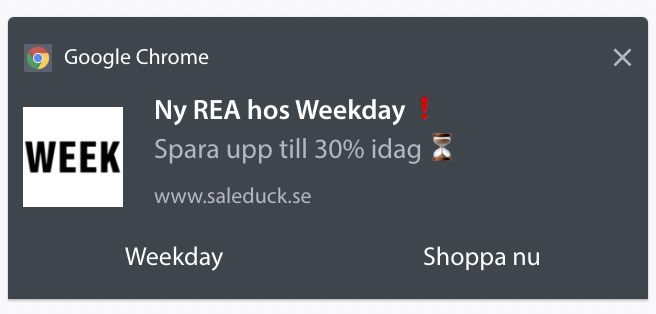
Αν δεν είστε σίγουροι πώς να δημιουργήσετε πολλαπλά CTA, δείτε αυτό το άρθρο για το πώς να προσθέσετε κουμπιά στις ειδοποιήσεις push.
Με τις μετατροπές στόχων, είναι κυρίως θέμα ρύθμισης σχετικών ειδοποιήσεων push ηλεκτρονικού εμπορίου. Έτσι, και πάλι, δεν υπάρχει ΠΟΛΥ πράγμα για split testing εδώ. Ωστόσο, αν μπορείτε να βελτιστοποιήσετε τις ειδοποιήσεις push για καλύτερα κλικ σε μια πολύ καλή προσφορά, οι μετατροπές στόχων σας θα αυξηθούν.
Βελτίωση της Κίνησης από Ειδοποιήσεις Push
Με τον καιρό, μπορείτε να βελτιώσετε τα ποσοστά εγγραφής για τα αναδυόμενα παράθυρα ειδοποιήσεων push. Με κάθε καλή υπηρεσία ειδοποιήσεων push, λαμβάνετε λεπτομερή αναλυτικά στοιχεία εγγραφής.
Κάθε εργαλειοθήκη μετατροπών στον ήλιο έρχεται με τα δικά της αναλυτικά στοιχεία αναδυόμενων παραθύρων. Λοιπόν, γιατί οι ειδοποιήσεις push να είναι διαφορετικές;
Να τι είναι επικό…
Μπορείτε να λάβετε αναλύσεις όχι μόνο για τις καμπάνιες ειδοποιήσεων push, αλλά και για τις εγγραφές σας!
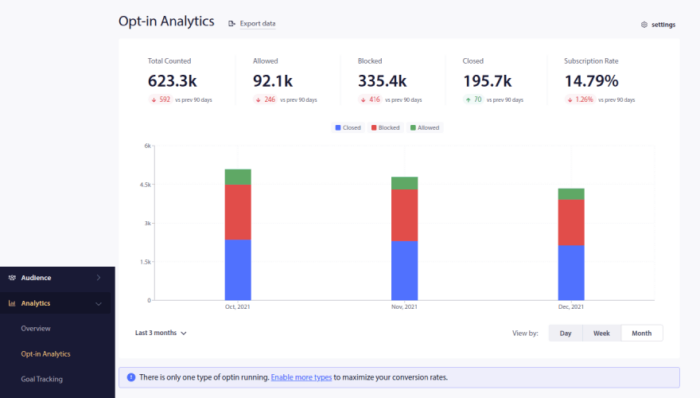
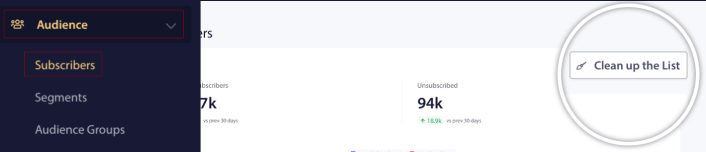
Η προσοχή στα αναλυτικά στοιχεία opt-in είναι ένας καλός τρόπος για να αποκτήσετε συνδρομητές ειδοποιήσεων push. Θα πρέπει επίσης να καθαρίζετε τις λίστες συνδρομητών σας κατά καιρούς και να αφαιρείτε οποιονδήποτε συνδρομητή αρνείται απλώς να αλληλεπιδράσει με τις καμπάνιες σας. Με αυτόν τον τρόπο, έχετε τους πραγματικούς αριθμούς αλληλεπίδρασης και στέλνετε ειδοποιήσεις push μόνο σε συνδρομητές που ΘΕΛΟΥΝ να ακούσουν από εσάς.
Ταυτόχρονα, συνιστούμε επίσης να λαμβάνετε σχόλια από τους συνδρομητές σας σχετικά με τις καμπάνιες ειδοποιήσεων push.
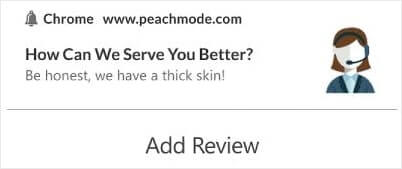
Μπορείτε να δημιουργήσετε μια απλή σελίδα προορισμού με φόρμα για τη συλλογή κριτικών και σχολίων σχετικά με τις καμπάνιες σας.
Ανησυχίες Απορρήτου Όταν Αποκτάτε Συνδρομητές Ειδοποιήσεων Push
Σύμφωνα με τον GDPR, πρέπει να λάβετε ρητή συγκατάθεση πριν συλλέξετε ή επεξεργαστείτε οποιαδήποτε προσωπική πληροφορία κατοίκου ή πολίτη της ΕΕ.
Τώρα, οι ειδοποιήσεις push είναι πολύ παρόμοιες με τα email, αλλά ακόμη πιο περιορισμένες. Μπορείτε ΜΟΝΟ να στείλετε ειδοποιήσεις push στους συνδρομητές σας. Σε αντίθεση με τα email, δεν μπορείτε να στείλετε μια μεμονωμένη ειδοποίηση push τυχαία σε κάποιον που δεν είναι εγγεγραμμένος.
Εκεί που ο GDPR συναντά το λογισμικό ειδοποιήσεων push είναι ότι αποκτάτε συνδρομητές ειδοποιήσεων push. Έτσι, κατά μία έννοια, συλλέγετε δεδομένα καταναλωτών.
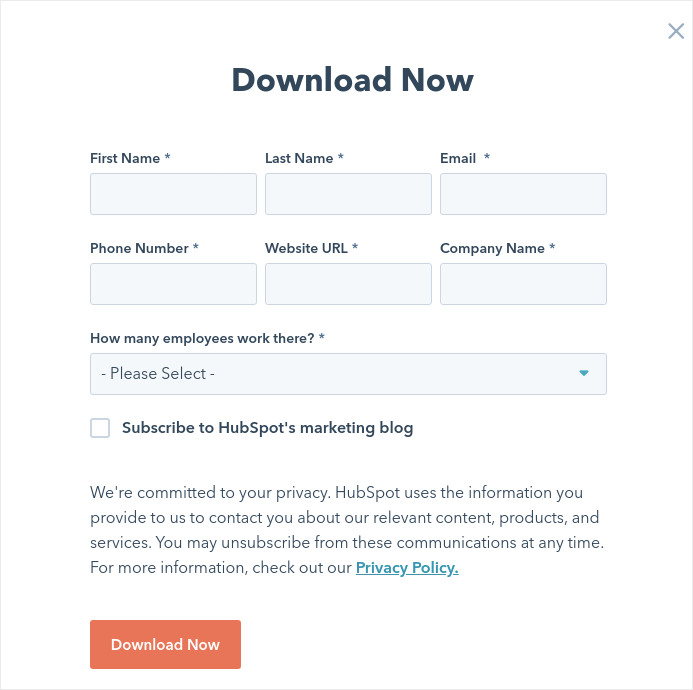
Φυσικά, δεν είναι το ίδιο με μια εγγραφή email. Με μια εγγραφή email, πρέπει να καταγράψετε τη διεύθυνση email, αλλά μπορείτε να καταγράψετε ΠΟΛΛΑ επιπλέον δεδομένα. Ρίξτε μια ματιά σε αυτό από το HubSpot:
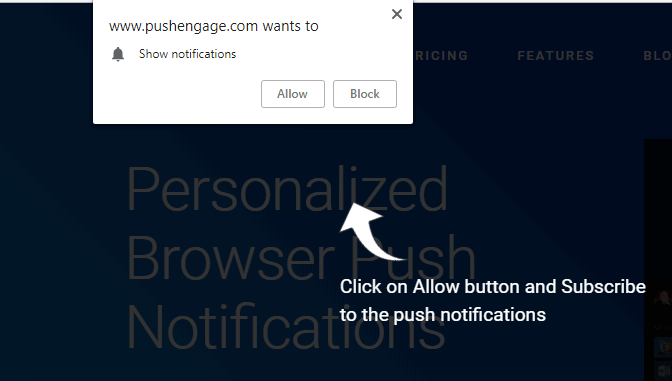
Αλλά με τις ειδοποιήσεις push, καταγράφετε τον συνδυασμό της συσκευής και της διεύθυνσης IP για να δημιουργήσετε ένα κλειδί που είναι μοναδικό για τη συσκευή του πελάτη. Αυτό συμβαίνει όταν οι άνθρωποι επιλέγουν τις ειδοποιήσεις push σας κάνοντας κλικ στο «Allow»:
Επιπλέον, το PushEngage μπορεί να αποθηκεύσει τη γεωγραφική θέση των συνδρομητών σας, ώστε να μπορείτε να δημιουργήσετε εξατομικευμένες καμπάνιες ειδοποιήσεων push. Αυτό περιλαμβάνει τη χώρα, την πολιτεία και την πόλη κατά τη στιγμή της εγγραφής.
Αλλά όπως πιθανότατα μπορείτε να καταλάβετε, αυτό βασίζεται εξ ολοκλήρου στη συγκατάθεση. Όταν κάποιος επιλέγει τις ειδοποιήσεις push, σας δίνει τη συγκατάθεση να του στέλνετε διαφημιστικές ειδοποιήσεις. Έτσι, οι ειδοποιήσεις push είναι ήδη συμβατές με τον GDPR εξ ορισμού, επειδή λειτουργούν με μια παράδοση που βασίζεται πρώτα στη συγκατάθεση.
Τι να Κάνετε Αφού Αποκτήσετε Κίνηση από Ειδοποιήσεις Push
Τώρα που ξέρετε πώς να αποκτήσετε κίνηση από ειδοποιήσεις push, είναι ώρα να αρχίσετε να δημιουργείτε τις καμπάνιες σας. Ξεκινήστε εξετάζοντας περισσότερα παραδείγματα για το πώς μπορείτε να χρησιμοποιήσετε τις ειδοποιήσεις push αποτελεσματικά:
- 21 Καλύτερα Παραδείγματα Μηνυμάτων Καλωσορίσματος Ιστοτόπου που Μπορείτε να Χρησιμοποιήσετε
- 75 Επικά Παραδείγματα Ειδοποιήσεων Push που Μπορείτε να Κλέψετε Τώρα
- 15 παραδείγματα κειμένων ειδοποιήσεων push για να σας εμπνεύσουν
- 7 Παραδείγματα Εγγραφής Ειδοποιήσεων Push με Υψηλή Μετατροπή (2022)
- 11 Δημιουργικά παραδείγματα ειδοποιήσεων push που μπορείτε να κλέψετε τώρα!
- Πώς να προσθέσετε ένα πρόσθετο WordPress για ειδοποιήσεις ιστού στον ιστότοπό σας
Θα πρέπει επίσης να διαβάσετε το άρθρο μας σχετικά με τις βέλτιστες πρακτικές ειδοποιήσεων push για να αξιοποιήσετε στο έπακρο τις καμπάνιες ειδοποιήσεων push.
Αλλά τίποτα από αυτά δεν θα κάνει διαφορά για την επωνυμία σας, εκτός αν αρχίσετε να στέλνετε ειδοποιήσεις push.
Έτσι, αν δεν το έχετε κάνει ήδη, ξεκινήστε με το PushEngage σήμερα!


