
Ψάχνετε για έναν πόρο σχετικά με το πώς να αποκτήσετε περισσότερους συνδρομητές στο YouTube χρησιμοποιώντας ειδοποιήσεις push;
Η αύξηση των συνδρομητών σας στο YouTube μπορεί να είναι δύσκολη. Ένα από τα μεγαλύτερα προβλήματα στην ανάπτυξη του καναλιού σας είναι ότι υπάρχουν πολύ λίγοι τρόποι να ελέγξετε τη λίστα των συνδρομητών σας. Και αυτό συμβαίνει επειδή δεν έχετε πρόσβαση ή έλεγχο στη δική σας λίστα συνδρομητών.
Αυτός είναι ο λόγος που συμβουλεύουμε ΚΑΘΕ YouTuber και Twitch streamer ή δημιουργό περιεχομένου στα social media να έχει επίσης έναν ιστότοπο για να συλλέγει ξεχωριστά μια λίστα συνδρομητών. Οποιαδήποτε λίστα email ή λίστα συνδρομητών ειδοποιήσεων push που συλλέγετε στον ιστότοπό σας, είναι δική σας.
Σε αυτό το άρθρο, θα σας δείξουμε βήμα προς βήμα πώς να αποκτήσετε περισσότερους συνδρομητές στο YouTube σε έναν ιστότοπο WordPress χρησιμοποιώντας ειδοποιήσεις push. Το καλύτερο μέρος; Είναι πολύ εύκολο να το κάνετε.
Ας ξεκινήσουμε.
- Γιατί οι Ειδοποιήσεις Push είναι Απαραίτητες για τα Κανάλια YouTube
- Ρύθμιση του PushEngage για το Κανάλι σας στο YouTube
- Σχεδιασμός Αποτελεσματικών Ειδοποιήσεων Push
- #1. Ειδοποιήσεις Νέου Βίντεο
- #2. Αποσπάσματα Αποκλειστικού Περιεχομένου
- #3. Γιορτές Ορόσημων Συνδρομητών
- #4. Ανακοινώσεις Ζωντανής Μετάδοσης
- #5. Επισημάνσεις Συνεργασιών
- #6. Δημοσκοπήσεις και Αλληλεπίδραση Κοινού
- #7. Προσφορές Μόνο για Συνδρομητές
- #8. Ειδοποιήσεις Ανακεφαλαίωσης
- #9. Ματιές στα Παρασκήνια (BTS)
- #10. Προωθήσεις Περιεχομένου Δημιουργημένου από Χρήστες
- Βελτιστοποίηση Χρόνου και Συχνότητας Ειδοποιήσεων
- Στόχευση και Τμηματοποίηση του Κοινού σας
- Παρακολούθηση και Ανάλυση των Εκστρατειών Ειδοποιήσεων Push
- Πώς να Αυξήσετε τους Συνδρομητές του YouTube Ακόμα Πιο Γρήγορα
Γιατί οι Ειδοποιήσεις Push είναι Απαραίτητες για τα Κανάλια YouTube
Οι ειδοποιήσεις push είναι ένας έξυπνος τρόπος για να διατηρήσετε την ανάπτυξη του καναλιού σας στο YouTube. Διασφαλίζουν ότι οι θαυμαστές σας γνωρίζουν τα βίντεό σας και βοηθούν στη δημιουργία μιας κοινότητας γύρω από το κανάλι σας.
Δείτε γιατί πρέπει να αρχίσετε να στέλνετε εκστρατείες ειδοποιήσεων push για το κανάλι σας στο YouTube:
- Γίνετε Άμεσα Αντιληπτοί: Όταν δημοσιεύετε ένα βίντεο, οι ειδοποιήσεις push ενημερώνουν αμέσως τους θαυμαστές σας. Αυτό σημαίνει ότι περισσότεροι άνθρωποι βλέπουν το βίντεό σας γρήγορα.
- Ξεχωρίστε Ανάμεσα σε Πολλούς: Το YouTube είναι πολύ απασχολημένο με τόνους βίντεο. Οι ειδοποιήσεις push διασφαλίζουν ότι οι θαυμαστές σας δεν χάνουν τα βίντεό σας.
- Κρατήστε τους Θαυμαστές να Επιστρέφουν: Τα τακτικά μηνύματα στους θεατές σας τους βοηθούν να θυμούνται να παρακολουθούν τα βίντεό σας.
- Επικοινωνήστε με τους Σωστούς Ανθρώπους: Μπορείτε να στείλετε μηνύματα που ταιριάζουν με τα ενδιαφέροντα κάθε θαυμαστή. Αυτό τους κάνει πιο ενδιαφερόμενους να παρακολουθήσουν τα βίντεό σας.
- Ιδανικό για Σημαντικά Πράγματα: Αν συμβαίνει κάτι ιδιαίτερο, όπως ένα ζωντανό βίντεο, οι ειδοποιήσεις push κάνουν τους θαυμαστές σας να το παρακολουθήσουν αμέσως.
- Δείτε τι λειτουργεί: Μπορείτε να ελέγξετε ποια μηνύματα λαμβάνουν την καλύτερη ανταπόκριση και να μάθετε τι αρέσει στους θεατές σας.
- Εξοικονομήστε χρήματα: Οι ειδοποιήσεις push είναι ένας φθηνός τρόπος για να ενημερώνετε τους ανθρώπους για τα βίντεό σας.
- Δημιουργήστε μια κοινότητα θαυμαστών: Αυτά τα μηνύματα μπορούν να βοηθήσουν τους θεατές σας να νιώσουν ότι ανήκουν σε μια ομάδα.
Οι ειδοποιήσεις push μπορούν να διαδραματίσουν υποστηρικτικό ρόλο στην αντιμετώπιση ζητημάτων όπως το shadowbanning, η απονομιμοποίηση εσόδων και οι αποκλεισμοί καναλιών σε πλατφόρμες όπως το YouTube. Δείτε πώς:
- Κατά του Shadowbanning: Το Shadowbanning μπορεί να καταστήσει το περιεχόμενό σας αόρατο σε ένα ευρύτερο κοινό χωρίς ειδοποίηση. Οι ειδοποιήσεις push ενημερώνουν απευθείας τους συνδρομητές σας για νέο περιεχόμενο, διασφαλίζοντας ότι τα βίντεό σας φτάνουν στο κοινό σας, ακόμη και αν υπάρχει shadowbanning.
- Ασφάλιση κατά της Απονομιμοποίησης Εσόδων: Εάν τα βίντεό σας απονομιμοποιηθούν, θα μπορούσε να καταστρέψει τη μοναδική σας πηγή εσόδων. Οι ειδοποιήσεις push μπορούν να βοηθήσουν στη διατήρηση της αφοσίωσης των θεατών και στην προσέλκυση επισκεψιμότητας, παρέχοντας μια σταθερή βάση θεατών που είναι ανεξάρτητη από την κατάσταση της απονομιμοποίησης εσόδων.
- Προστασία από Αποκλεισμούς Καναλιών: Στη δυσάρεστη περίπτωση αποκλεισμού καναλιού, η ύπαρξη άμεσης γραμμής επικοινωνίας μέσω ειδοποιήσεων push μπορεί να σας βοηθήσει να καθοδηγήσετε το κοινό σας σε εναλλακτικές πλατφόρμες ή περιεχόμενο, διασφαλίζοντας τη συνέχεια της βάσης των θεατών σας.
Αυτά δεν είναι υποθετικά προβλήματα.
Οι ζωντανοί streamers υφίστανται shadowbanning συνεχώς. Μακροχρόνιοι YouTubers όπως ο MxR Plays υφίστανται μαζική απονομιμοποίηση εσόδων και πλησιάζουν στο κλείσιμο του καναλιού τους συνεχώς.
Αυτή είναι η σκοτεινή πλευρά του YouTube και είναι αποκαρδιωτικό να βλέπεις μακροχρόνιους YouTubers να καταστρέφονται οικονομικά. Ειδικά λαμβάνοντας υπόψη ότι οι οδηγίες του YouTube είναι εξαιρετικά ασαφείς και είναι πολύ δύσκολο να κατανοήσει κανείς την αιτιολόγηση πίσω από την απονομιμοποίηση εσόδων.
Ορισμένοι δημιουργοί όπως ο MxR Plays χρησιμοποιούν το Patreon και έναν ιστότοπο eCommerce για να παραμένουν σε επαφή με τους παλαιότερους θαυμαστές τους. Αλλά η ύπαρξη ενός ιστότοπου είναι πάντα πολύ καλύτερη. Αν είναι η δουλειά πλήρους απασχόλησής σας, δεν υπάρχει τίποτα χειρότερο από το να σας την αρπάξουν. Στην πραγματικότητα, ο MxR έκανε ένα βίντεο μιλώντας για το πόσο καταστροφικό ήταν για αυτούς μετά την απονομιμοποίηση 279 βίντεο σε διάστημα 2 εβδομάδων.
Η χρήση ειδοποιήσεων push μπορεί να παρέχει ένα μέτρο ασφάλειας και σταθερότητας για τους δημιουργούς περιεχομένου έναντι ορισμένων από τις προκλήσεις που σχετίζονται με την πλατφόρμα. Για να μην αναφέρουμε, μπορείτε να στείλετε μερικές αρκετά εκπληκτικές καμπάνιες push για να αλληλεπιδράσετε με τους θαυμαστές σας.
Φυσικά, πριν αρχίσετε να στέλνετε ειδοποιήσεις push, θα χρειαστείτε μια εφαρμογή ή έναν ιστότοπο για να συλλέξετε συνδρομητές. Αν έχετε ήδη μια εφαρμογή ή έναν ιστότοπο, αυτό είναι υπέροχο. Αλλά αν όχι, θα πρέπει πραγματικά να δημιουργήσετε έναν ιστότοπο για το κανάλι σας σήμερα.
Ρύθμιση του PushEngage για το Κανάλι σας στο YouTube
Πριν δημιουργήσετε μια καμπάνια ειδοποιήσεων push, πρέπει να επιλέξετε μια υπηρεσία εγγραφής ειδοποιήσεων push. Μια υπηρεσία ειδοποιήσεων push είναι ένα λογισμικό που σας επιτρέπει να δημιουργείτε καμπάνιες ειδοποιήσεων push χωρίς καμία κωδικοποίηση.
Συνιστούμε τη χρήση του PushEngage για να αποκτήσετε συνδρομητές ειδοποιήσεων push.

Το PushEngage είναι το #1 plugin ειδοποιήσεων push στον κόσμο.
Οι ειδοποιήσεις push σας βοηθούν να αυξήσετε την επισκεψιμότητα του ιστότοπού σας και την αλληλεπίδραση σε αυτόματο πιλότο. Και αν διαχειρίζεστε ένα online κατάστημα, το PushEngage σας βοηθά επίσης να αυξήσετε τις πωλήσεις σας, βοηθώντας σας να δημιουργήσετε αυτοματοποιημένες ειδοποιήσεις push eCommerce.
Μπορείτε να ξεκινήσετε δωρεάν, αλλά αν σοβαρά θέλετε να αναπτύξετε την επιχείρησή σας, θα πρέπει να αγοράσετε ένα επί πληρωμή πρόγραμμα. Επίσης, πριν αγοράσετε οποιαδήποτε υπηρεσία ειδοποιήσεων push, θα πρέπει να δείτε αυτόν τον οδηγό για το κόστος ειδοποιήσεων push.
Ακολουθεί μια γρήγορη επισκόπηση του τι παίρνετε με το PushEngage:
- Αυτοματοποιημένες εκστρατείες με υψηλή μετατροπή
- Πολλαπλές επιλογές στόχευσης ειδοποιήσεων push και προγραμματισμού καμπανιών
- Παρακολούθηση στόχων και προηγμένα αναλυτικά στοιχεία
- Έξυπνες δοκιμές A/B
- Πρότυπα ειδοποιήσεων push
- Πολλαπλά στυλ αναδυόμενων ειδοποιήσεων push
- Ένας Αφοσιωμένος Διαχειριστής Επιτυχίας
Και πολλά άλλα!
Θα δείτε ότι η PushEngage είναι μακράν η καλύτερη επιλογή αν θέλετε να αυξήσετε την επισκεψιμότητα, την αφοσίωση και τις πωλήσεις για την επιχείρησή σας. Και αν έχετε περιορισμένο προϋπολογισμό, μπορείτε πάντα να γίνετε λίγο δημιουργικοί με τις ειδοποιήσεις push σας.
ΣΗΜΕΙΩΣΗ: Εάν διαχειρίζεστε έναν ιστότοπο WordPress, θα πρέπει να εγκαταστήσετε και να ενεργοποιήσετε το plugin PushEngage για WordPress.
Πάμε!
Βήμα #1: Δημιουργήστε έναν Δωρεάν Λογαριασμό PushEngage
Πηγαίνετε στο PushEngage και κάντε κλικ στο Ξεκινήστε Δωρεάν Τώρα.
Μπορείτε να ξεκινήσετε με το δωρεάν πρόγραμμα. Αλλά αν θέλετε να στείλετε στοχευμένες ειδοποιήσεις push, θα πρέπει να επιλέξετε το Πρόγραμμα Ανάπτυξης. Μόλις γνωρίζετε ποιο πρόγραμμα θέλετε, κάντε κλικ στο Ξεκινήστε για να δημιουργήσετε τον λογαριασμό σας στο PushEngage.
Βήμα #2: Εγγραφείτε στο PushEngage
Τώρα, είναι ώρα να δημιουργήσετε τον λογαριασμό σας στο PushEngage. Ξεκινήστε κάνοντας εγγραφή με μια διεύθυνση email ή ένα αναγνωριστικό Gmail:

Στη συνέχεια, συμπληρώστε τα στοιχεία του λογαριασμού σας:

Και προσθέστε τα στοιχεία της πιστωτικής σας κάρτας για να αγοράσετε το πρόγραμμά σας:

Εάν επιλέξατε τον δωρεάν λογαριασμό, τότε η πιστωτική σας κάρτα δεν θα χρεωθεί ποτέ χρήματα μέχρι να επιλέξετε να αναβαθμίσετε το πρόγραμμά σας. Και τώρα, είστε έτοιμοι να αποκτήσετε πρόσβαση στον πίνακα ελέγχου του PushEngage. Απλώς κάντε κλικ στο Ολοκλήρωση Εγγραφής και Άμεση Πρόσβαση.
Εάν έχετε χρησιμοποιήσει το OneSignal ή το PushAlert στο παρελθόν, θα δείτε ότι το PushEngage σας προσφέρει μια πολύ πιο καθαρή εμπειρία από τον πίνακα ελέγχου. Ο πίνακας ελέγχου του OneSignal δεν είναι σχεδιασμένος για προηγμένες καμπάνιες. Για αυτό, θα χρειαστείτε το API περισσότερο από το plugin του OneSignal.
Βήμα #3: Εγκαταστήστε ένα Plugin Εγγραφής Ειδοποιήσεων Push για WordPress
ΣΗΜΕΙΩΣΗ: Εάν δεν διαχειρίζεστε ιστότοπο WordPress, θα πρέπει να ελέγξετε τους οδηγούς εγκατάστασης για να ξεκινήσετε.
Ολοκληρώσατε τη δημιουργία του λογαριασμού σας. Έτσι, κατευθυνθείτε στον πίνακα ελέγχου του PushEngage, όπου μπορείτε να παρακολουθείτε τα ποσοστά αλληλεπίδρασης των ειδοποιήσεων push και να ακολουθείτε:

Κάντε κλικ στο Ρυθμίσεις Ιστότοπου » Λεπτομέρειες Ιστότοπου και κάντε κλικ στο κουμπί Κάντε Κλικ Εδώ Για Οδηγίες Εγκατάστασης:

Κάντε κλικ στην καρτέλα WordPress και κάντε κλικ στο κουμπί Εγκατάσταση Πρόσθετου PushEngage WordPress για να εγκαταστήσετε το πρόσθετο στον ιστότοπό σας.

Εδώ είναι το ενδιαφέρον: Όταν δημιουργήσατε τον λογαριασμό σας στο PushEngage, συγχρονίσατε ήδη τον ιστότοπό σας με τον λογαριασμό σας στο PushEngage. Έτσι, κάντε κλικ στον σύνδεσμο εγκατάστασης στον πίνακα ελέγχου του PushEngage για να εγκαταστήσετε αυτόματα το πρόσθετο PushEngage WordPress στον ιστότοπό σας.
Βήμα #4: Συνδέστε τον Ιστότοπό σας WordPress με το PushEngage
Όταν ολοκληρώσετε την εγκατάσταση και ενεργοποίηση του plugin WordPress PushEngage, θα δείτε τον οδηγό ρύθμισης του PushEngage:

Ο οδηγός είναι αρκετά απλός. Εάν είστε νέος χρήστης, κάντε κλικ στο Νέος; Διεκδικήστε τον Δωρεάν Λογαριασμό σας. Και αν έχετε ήδη εγγραφεί, κάντε κλικ στο Σύνδεση του Υπάρχοντος Λογαριασμού σας.
Στη συνέχεια, μπορείτε να επιλέξετε τον ιστότοπό σας από το αναπτυσσόμενο μενού Επιλογή Ιστότοπου κάτω από το Σύνδεση εγγεγραμμένου ιστότοπου εάν έχετε ήδη καταχωρήσει έναν ιστότοπο κατά την εγγραφή:

Εναλλακτικά, μπορείτε να κάνετε κλικ στο Εγγραφή νέου ιστότοπου για να προσθέσετε έναν νέο ιστότοπο εάν έχετε πακέτο τιμολόγησης Premium ή υψηλότερο. Στο επόμενο βήμα, ο οδηγός γνωριμίας θα σας ζητήσει να εγκαταστήσετε άλλα απαραίτητα πρόσθετα WordPress.

Εάν ακολουθήσατε κάθε βήμα σωστά, θα δείτε αυτό το μήνυμα επιτυχίας από τον οδηγό:

Είστε τώρα έτοιμοι να δημιουργήσετε καμπάνιες και αναδυόμενα παράθυρα ειδοποιήσεων push.
Σχεδιασμός Αποτελεσματικών Ειδοποιήσεων Push
Αν διαχειρίζεστε ένα επιτυχημένο κανάλι στο YouTube, τότε καταλαβαίνετε ήδη τι θέλει να βλέπει το κοινό σας από εσάς. Ξέρετε ήδη πώς να στέλνετε εξατομικευμένες ειδοποιήσεις push για να νιώθουν οι συνδρομητές σας ότι ήταν φτιαγμένες ειδικά για αυτούς. Το καλύτερο; Οι πελάτες μας επιτυγχάνουν ποσοστά μετατροπής περίπου 8% για εξατομικευμένες καμπάνιες.
Τώρα, ας ξεκινήσουμε με το πιο βασικό πράγμα που μπορείτε να κάνετε για να αποκτήσετε περισσότερους συνδρομητές. Και αυτό είναι να ζητήσετε από τους ανθρώπους να εγγραφούν στο κανάλι σας. Στη συνέχεια, θα σας δείξουμε μερικούς εξαιρετικούς τρόπους για να ενισχύσετε την ανάπτυξη του καναλιού σας όσον αφορά:
- Χρόνος παρακολούθησης
- Επαναλαμβανόμενη επισκεψιμότητα
- Πωλήσεις μέσω συνεργατών
- Πωλήσεις εμπορευμάτων
Και πολλά άλλα!
Το πιο απλό πράγμα που μπορείτε να κάνετε είναι να προσθέσετε ένα κουμπί «κλικ για εγγραφή» σε όλες τις ειδοποιήσεις push. Μεταβείτε στο κανάλι σας στο YouTube και αντιγράψτε το URL. Για εμάς, είναι https://www.youtube.com/@Pushengage.
Στο τέλος του URL, απλώς προσθέστε '?sub_confirmation=1'. Έτσι, για το κανάλι μας, θα ήταν: https://www.youtube.com/@PushEngage?sub_confirmation=1.
Στη συνέχεια, χρησιμοποιήστε αυτόν τον σύνδεσμο ως URL του κουμπιού ειδοποίησης push:
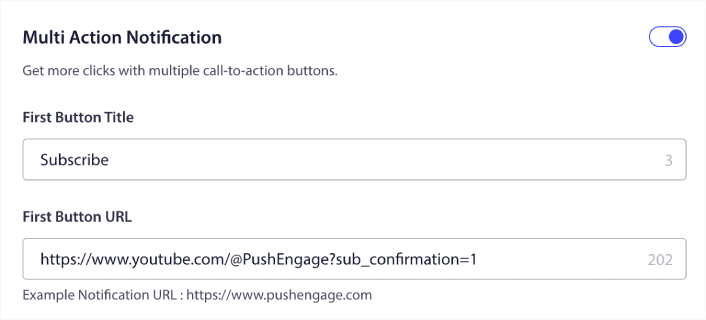
Αν δεν είστε σίγουροι πώς να το κάνετε αυτό, δείτε αυτόν τον οδηγό για το πώς να προσθέσετε ένα κουμπί σε μια ειδοποίηση push.
Στη συνέχεια, ας δούμε μερικές ωραίες ιδέες καμπάνιας για ειδοποιήσεις push που μπορείτε να χρησιμοποιήσετε για να αναπτύξετε το κανάλι σας στο YouTube.
#1. Ειδοποιήσεις Νέου Βίντεο
Κάθε φορά που ανεβάζετε ένα νέο βίντεο, μπορείτε να στέλνετε μια ειδοποίηση νέου βίντεο στους συνδρομητές σας μέσω ειδοποιήσεων push.
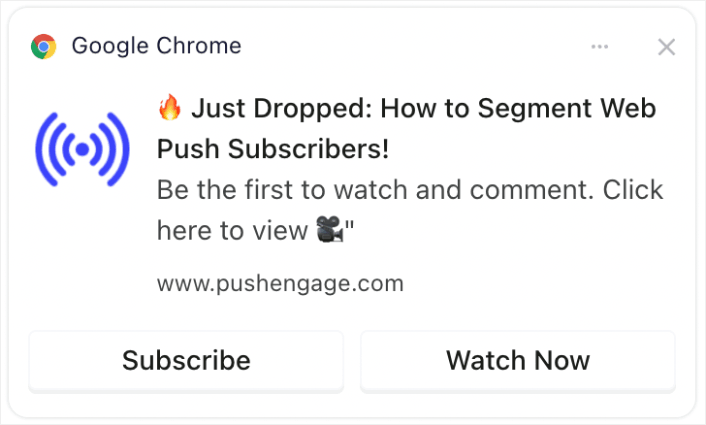
Έγκαιρες ειδοποιήσεις για νέα βίντεο μπορούν να αυξήσουν σημαντικά τις αρχικές προβολές, κάτι που είναι κρίσιμο για τον αλγόριθμο του YouTube. Βοηθά στην άμεση προσέλκυση της προσοχής, ενισχύοντας την πιθανότητα το βίντεο να προταθεί σε άλλους.
Επαγγελματική Συμβουλή: Κάθε φορά που ανεβάζετε νέα shorts ή βίντεο στο YouTube, ΠΟΤΕ μην χρησιμοποιείτε τη λειτουργία ειδοποίησης συνδρομητών στο YouTube. Αν το κάνετε, το YouTube θα στείλει το βίντεο αποκλειστικά στους πιο ενεργούς συνδρομητές σας πρώτα. Με βάση την απόκριση και τα ποσοστά κλικ, ο αλγόριθμος μπορεί να μειώσει την οργανική σας επισκεψιμότητα εάν δεν λάβετε εξαιρετική απόκριση τις πρώτες ώρες.
Χρησιμοποιώντας τους συνδρομητές σας μέσω web και app push, μπορείτε ακόμα να στείλετε κίνηση στο βίντεό σας και με αυτόν τον τρόπο, δεν επηρεάζεται η απόφαση του αλγορίθμου να προωθήσει το βίντεό σας σε νέα άτομα.
#2. Αποσπάσματα Αποκλειστικού Περιεχομένου
Μοιραστείτε αποσπάσματα ή προεπισκοπήσεις επερχόμενων βίντεο αποκλειστικά με τους συνδρομητές ειδοποιήσεων push.
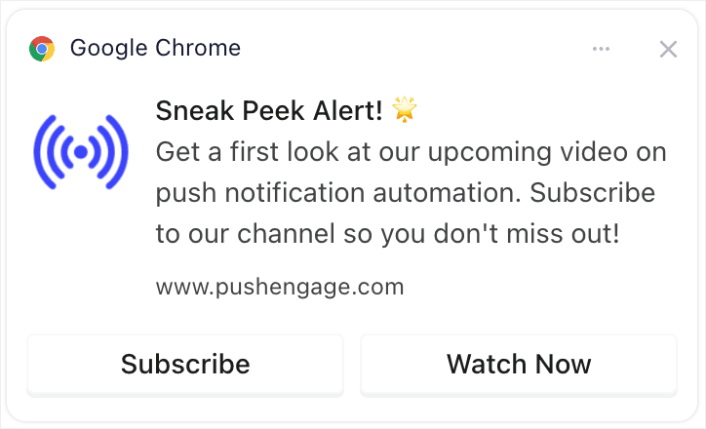
Η κοινοποίηση αποκλειστικών προεπισκοπήσεων ή αποσπασμάτων μπορεί να δημιουργήσει προσμονή και ενθουσιασμό. Αυτή η αλληλεπίδραση μπορεί να οδηγήσει σε αυξημένη κοινοποίηση και συζητήσεις σχετικά με το περιεχόμενό σας, διευρύνοντας την εμβέλειά σας.
#3. Γιορτές Ορόσημων Συνδρομητών
Δημιουργήστε ενθουσιασμό γύρω από ορόσημα του καναλιού, όπως η επίτευξη ενός συγκεκριμένου αριθμού συνδρομητών.
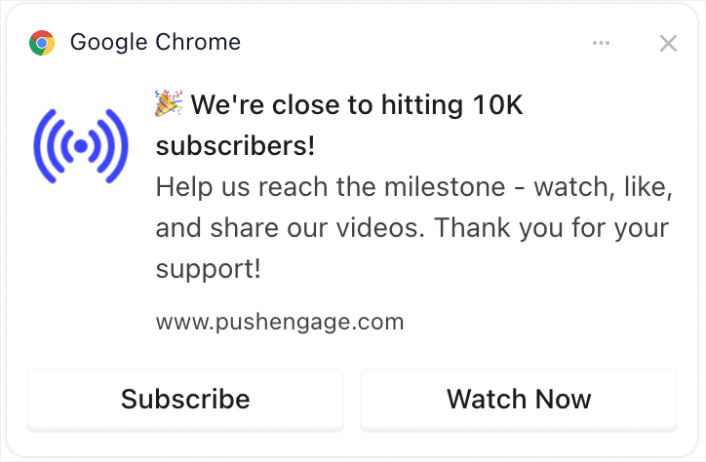
Η συμμετοχή του κοινού σας στον εορτασμό οροσήμων δημιουργεί αίσθημα κοινότητας. Μπορεί να ενθαρρύνει περισσότερες εγγραφές, καθώς οι θεατές θέλουν να είναι μέρος ενός αναπτυσσόμενου, επιτυχημένου καναλιού.
#4. Ανακοινώσεις Ζωντανής Μετάδοσης
Ειδοποιήστε τους συνδρομητές για επερχόμενες ζωντανές μεταδόσεις ή συνεδρίες ερωταπαντήσεων.
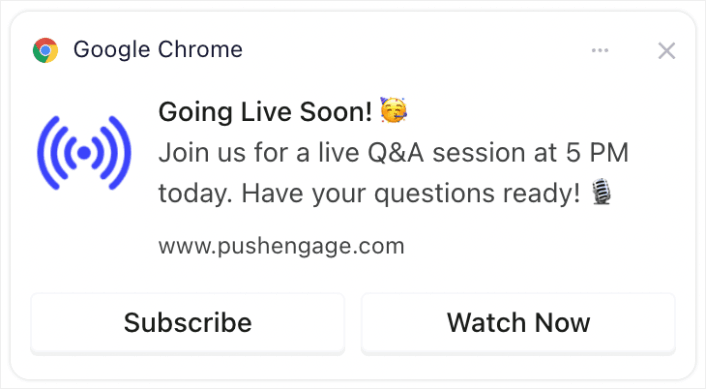
Η ειδοποίηση για ζωντανές μεταδόσεις διασφαλίζει υψηλότερη αλληλεπίδραση σε πραγματικό χρόνο, η οποία εκτιμάται από το YouTube. Μπορεί να αυξήσει την τηλεθέαση, τα σχόλια και τις αλληλεπιδράσεις κατά τη διάρκεια ζωντανών μεταδόσεων.
#5. Επισημάνσεις Συνεργασιών
Ανακοινώστε συνεργασίες με άλλους YouTubers, επωνυμίες ή influencers.
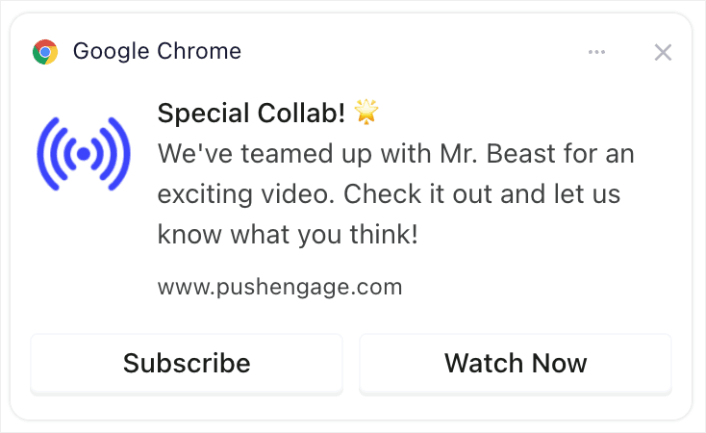
Η ανακοίνωση συνεργασιών μπορεί να αξιοποιήσει τη βάση θαυμαστών των συνεργατών, φέρνοντας δυνητικά νέους συνδρομητές στο κανάλι σας.
#6. Δημοσκοπήσεις και Αλληλεπίδραση Κοινού
Προσελκύστε συνδρομητές ζητώντας τη γνώμη τους για μελλοντικά θέματα βίντεο ή σχόλια για προηγούμενο περιεχόμενο.
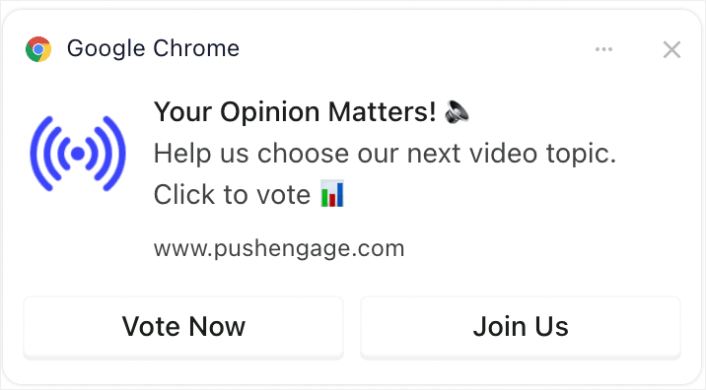
Διαδραστικό περιεχόμενο όπως δημοσκοπήσεις κρατά το κοινό σας αφοσιωμένο και τους δίνει φωνή, καλλιεργώντας την αφοσίωση και τη συχνή παρακολούθηση. Και αν δεν έχετε ξανατρέξει ποτέ δημοσκόπηση, μπορείτε να δείτε αυτόν τον οδηγό για τη δημιουργία δημοσκόπησης στο WordPress.
#7. Προσφορές Μόνο για Συνδρομητές
Παρέχετε ειδικές προσφορές ή μπόνους (όπως περιεχόμενο για λήψη ή αποκλειστική πρόσβαση) σε συνδρομητές.
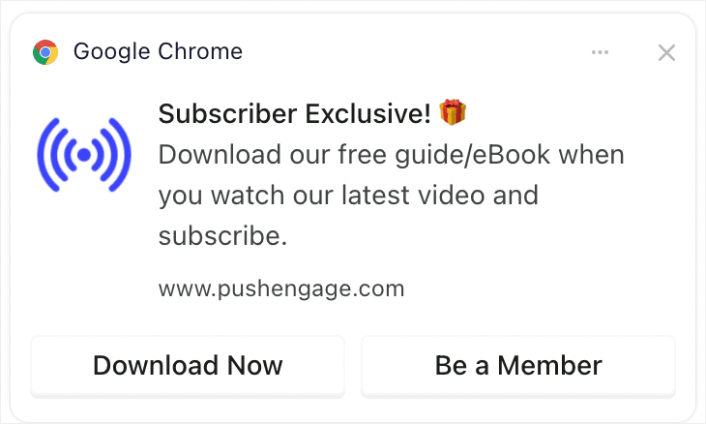
Η παροχή αποκλειστικών προσφορών ή περιεχομένου μπορεί να αποτελέσει ισχυρό κίνητρο για τους θεατές να εγγραφούν και να παραμείνουν αφοσιωμένοι στο κανάλι σας.
#8. Ειδοποιήσεις Ανακεφαλαίωσης
Στείλτε εβδομαδιαίες ή μηνιαίες περιλήψεις των πιο δημοφιλών βίντεο.
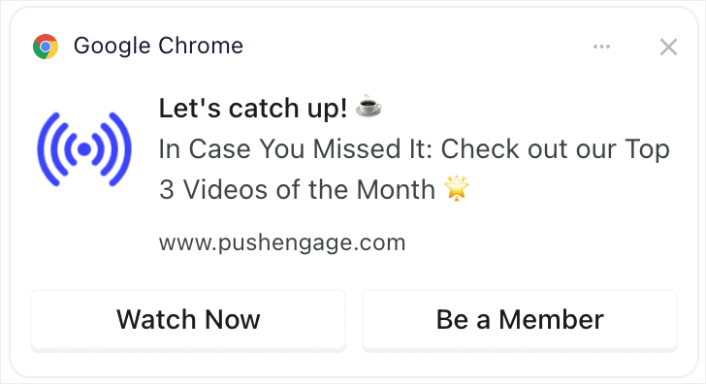
Η υπενθύμιση στους θεατές για το πιο δημοφιλές ή πρόσφατο περιεχόμενό σας μπορεί να τραβήξει την προσοχή όσων το έχασαν, αυξάνοντας τις προβολές και την αφοσίωση.
Αν δεν θέλετε να δημιουργήσετε ένα βίντεο περίληψης, τότε μπορείτε απλά να δημιουργήσετε μια ανάρτηση που να παραθέτει όλο το πρόσφατο περιεχόμενό σας και να στείλετε έναν σύνδεσμο προς την ανάρτηση. Εναλλακτικά, θα μπορούσατε να δημιουργήσετε έναν σύνδεσμο στο Linktree για να δημιουργήσετε μια προσωρινή σελίδα προορισμού με μια λίστα όλων των πρόσφατων βίντεό σας.
#9. Ματιές στα Παρασκήνια (BTS)
Μοιραστείτε περιεχόμενο από τα παρασκήνια ή τη δημιουργία ενός βίντεο.
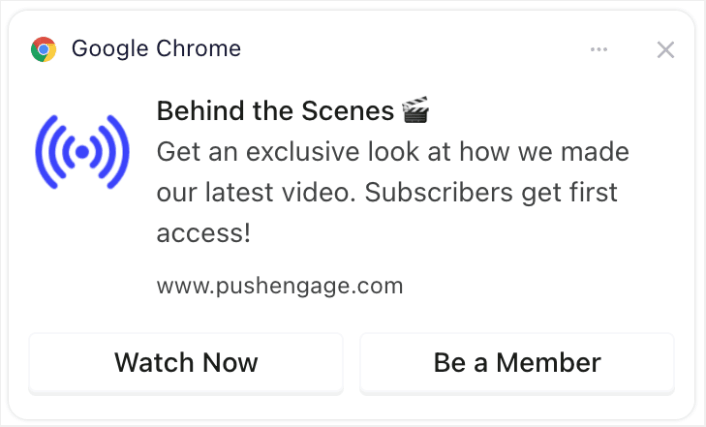
Η προσφορά μιας ματιάς στα παρασκήνια μπορεί να εμβαθύνει τη σύνδεση των θεατών με το κανάλι σας, καθιστώντας τους πιο πιθανό να αλληλεπιδράσουν και να μοιραστούν το περιεχόμενό σας.
#10. Προωθήσεις Περιεχομένου Δημιουργημένου από Χρήστες
Ενθαρρύνετε τους συνδρομητές να δημιουργήσουν το δικό τους περιεχόμενο σχετικό με το κανάλι σας και να το προβάλλετε.
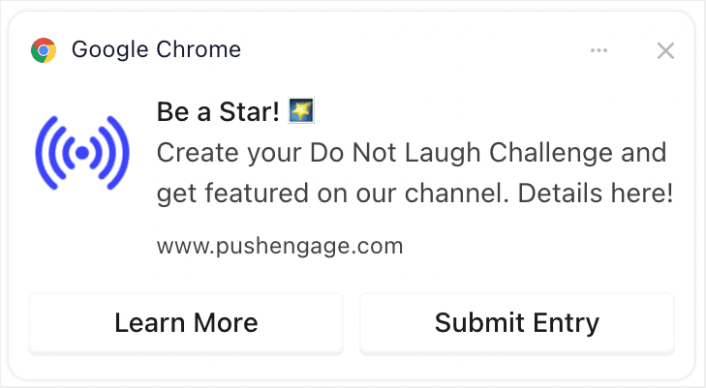
Η ενθάρρυνση των θεατών να δημιουργήσουν σχετικό περιεχόμενο μπορεί να οδηγήσει σε οικοδόμηση κοινότητας και αυξημένη αφοσίωση, καθώς οι θεατές αισθάνονται πιο συνδεδεμένοι και πολύτιμοι. Και είναι εξαιρετικά εύκολο να δημιουργήσετε μια φόρμα στο WordPress για να συλλέξετε συμμετοχές από τους συνδρομητές σας.
Βελτιστοποίηση Χρόνου και Συχνότητας Ειδοποιήσεων
Υπάρχει κάτι τέτοιο όπως πάρα πολλές ειδοποιήσεις push.
Ο αριθμός των ειδοποιήσεων push που πρέπει να στέλνετε εξαρτάται από τον κλάδο σας. Ωστόσο, το καλύτερο είναι να στέλνετε στους πελάτες σας το πολύ 2 ειδοποιήσεις την ημέρα. Και όχι περισσότερες από 5 την εβδομάδα.
Ένας μέσος όρος 1 ειδοποίησης την ημέρα λειτουργεί ακόμη καλύτερα.
Εκτός αν έχετε κάτι πραγματικά σημαντικό να πείτε στους συνδρομητές σας, φυσικά:
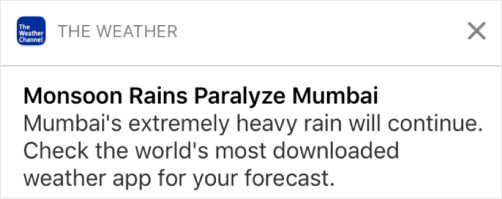
Θα μπορούσατε εύκολα να φανείτε πολύ επιθετικοί και να ενοχλήσετε τους συνδρομητές σας. Αυτός είναι ένας εξαιρετικός τρόπος να χάσετε συνδρομητές push notification. Αλλά θα πρέπει να συνδεθείτε με τους πελάτες σας. Και πρέπει να τους στέλνετε προωθητικές και συναλλακτικές ειδοποιήσεις.
Δείτε αυτό το άρθρο σχετικά με το πόσες ειδοποιήσεις push πρέπει να στέλνετε για ακόμη περισσότερες συμβουλές.
Μπορείτε επίσης να προγραμματίσετε τις ειδοποιήσεις push σας με διαφορετικούς τρόπους.

Είναι εξαιρετικά εύκολο να προγραμματίσετε την αποστολή ειδοποιήσεων push:
- Αμέσως
- Σε μια συγκεκριμένη ημερομηνία και ώρα
- Ως επαναλαμβανόμενο συμβάν
Η γνώση του πόσες ειδοποιήσεις να στέλνετε και πότε να στέλνετε ειδοποιήσεις push θα μειώσει δραματικά τα ποσοστά απεγγραφής σας.
Επαγγελματική Συμβουλή: Εάν φτάσετε σε ένα σημείο όπου οι συνδρομητές σας push δεν αλληλεπιδρούν μαζί σας, μπορείτε να ξεκινήσετε μια καμπάνια επαναστόχευσης για να αλληλεπιδράσετε ξανά μαζί τους. Εάν αυτό δεν λειτουργήσει, μπορείτε πάντα να καθαρίσετε τη λίστα συνδρομητών σας.
Στόχευση και Τμηματοποίηση του Κοινού σας
Οι στοχευμένες ειδοποιήσεις push οδηγούν σε υψηλότερα ποσοστά κλικ και χαμηλότερα ποσοστά απεγγραφής. Η τμηματοποίηση σάς επιτρέπει να προσφέρετε μια προσαρμοσμένη εμπειρία στους συνδρομητές σας push για κινητά. Με τις περισσότερες υπηρεσίες και εργαλεία ειδοποιήσεων push, χρειάζεστε προσαρμοσμένο κώδικα για να δημιουργήσετε τμήματα.
Τα τμήματα είναι ένας πραγματικά εξαιρετικός τρόπος για να στέλνετε στοχευμένες καμπάνιες push. Και θα πρέπει να αποτελούν μεγάλο μέρος της στρατηγικής σας για ειδοποιήσεις push. Αλλά πώς θα ξεκινήσετε; Τι είδους τμήματα θα πρέπει να δημιουργείτε;
Γράψαμε μια λεπτομερή εξήγηση στο άρθρο μας σχετικά με τους τρόπους τμηματοποίησης των συνδρομητών ειδοποιήσεων push.
Γενικά, υπάρχουν μερικοί διαφορετικοί τύποι τμημάτων που μπορείτε να δημιουργήσετε:
- Τμήματα βάσει περίστασης
- Τμήματα συμπεριφοράς
- Δυναμικά τμήματα
- Γεωγραφικά τμήματα
- Δημογραφικά τμήματα
...Για να αναφέρουμε μερικά.
Μπορείτε επίσης να χρησιμοποιήσετε τμηματοποίηση βάσει περίστασης για να στείλετε διαφορετικούς τύπους στοχευμένων καμπανιών push. Ακόμα καλύτερα, μπορείτε να χρησιμοποιήσετε αυτά τα τμήματα για να δημιουργήσετε widgets εγγραφής στον ιστότοπό σας:

Ένα widget διαχείρισης εγγραφών επιτρέπει στους επισκέπτες σας να επιλέξουν τι είδους ειδοποιήσεις push θέλουν να λαμβάνουν από εσάς.

Και μπορείτε ακόμη και να δημιουργήσετε αναδυόμενα παράθυρα ειδοποιήσεων push που αυτόματα τμηματοποιούν τους συνδρομητές σας όταν εγγράφονται.
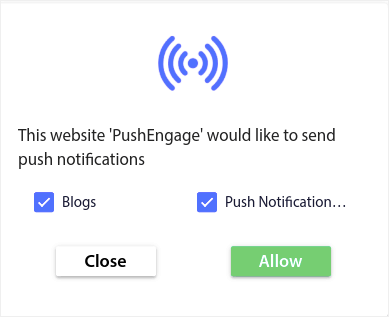
Τα θέματα περιεχομένου σας επιτρέπουν να στέλνετε μόνο σχετικό περιεχόμενο στους συνδρομητές σας. Αυτό θα σας βοηθήσει να αυξήσετε τα ποσοστά εγγραφής σας, ακόμη και τα ποσοστά αλληλεπίδρασης.
Επαγγελματική Συμβουλή: Θυμηθείτε να διαφοροποιήσετε τα θέματα του περιεχομένου σας. Μπορείτε να δημιουργήσετε πολλαπλές επιλογές ειδοποιήσεων push για να στοχεύσετε διαφορετικούς τύπους χρηστών. Η δημιουργία πολλαπλών προσαρμοσμένων επιλογών είναι ένας εξαιρετικός τρόπος για να αυξήσετε τους συνδρομητές push από το υπάρχον περιεχόμενό σας.
Παρακολούθηση και Ανάλυση των Εκστρατειών Ειδοποιήσεων Push
Το split testing είναι ένας καλός τρόπος για να διατηρήσετε τους συνδρομητές ειδοποιήσεων push εγγεγραμμένους. Αλλά τι μπορείτε να κάνετε split test σε μια ειδοποίηση push;
Οι πιο συνηθισμένες μετρήσεις απόδοσης για τις ειδοποιήσεις push είναι:
- Ποσοστό κλικ: Το ποσοστό κλικ σε μια ειδοποίηση push είναι πόσο συχνά οι συνδρομητές σας είδαν την ειδοποίηση push σας και στη συνέχεια έκαναν κλικ σε αυτήν.
- Ποσοστό προβολής: Το ποσοστό προβολής μιας ειδοποίησης push είναι πόσο συχνά ένας συνδρομητής έλαβε την ειδοποίησή σας push και την είδε πριν λήξει.
- Μετατροπές στόχων: Μπορείτε να ορίσετε στόχους για την καμπάνια σας και να ρυθμίσετε την παρακολούθηση στόχων για τις καμπάνιες σας. Οι μετατροπές στόχων είναι ένα μέτρο του πόσες φορές επιτύχατε τον στόχο σας.
Για να αυξήσετε τα ποσοστά προβολής σας, θέλετε να χρησιμοποιήσετε μια μεγάλη εικόνα στις ειδοποιήσεις push σας. Η χρήση εικόνων στις ειδοποιήσεις σας την καθιστά άμεσα πιο ελκυστική.
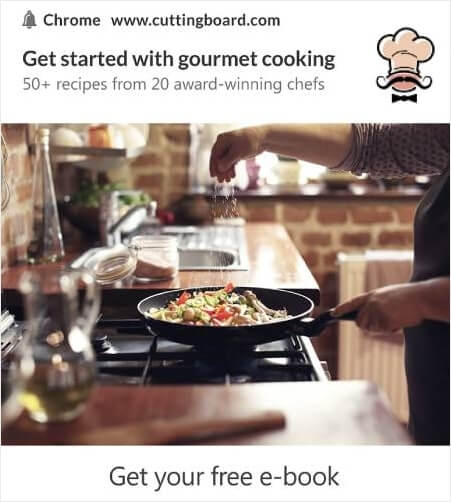
Μπορείτε επίσης να πειραματιστείτε με λέξεις-κλειδιά στον τίτλο της ειδοποίησής σας.

Έτσι, μπορείτε να κάνετε A/B testing στις ειδοποιήσεις με εικόνες και χωρίς. Μπορείτε επίσης να ελέγξετε τα ποσοστά προβολής κάνοντας split testing στις ειδοποιήσεις push με και χωρίς λέξεις-κλειδιά στον τίτλο.
Αν θέλετε να βελτιώσετε το ποσοστό κλικ, πρέπει να εστιάσετε στο κύριο μήνυμα και να εργαστείτε για να το κάνετε εξαιρετικά σχετικό. Κυρίως, αυτό αφορά ένα από τα δύο πράγματα:
Και δεν υπάρχει τίποτα για A/B testing σε αυτόν τον τομέα. Αλλά μπορείτε να κάνετε A/B testing στα ποσοστά κλικ σας με τα κουμπιά Παρότρυνσης για Δράση (CTA) στις ειδοποιήσεις push. Δοκιμάστε A/B testing στις ειδοποιήσεις push με ένα ή κανένα CTA έναντι μιας με δύο CTA.
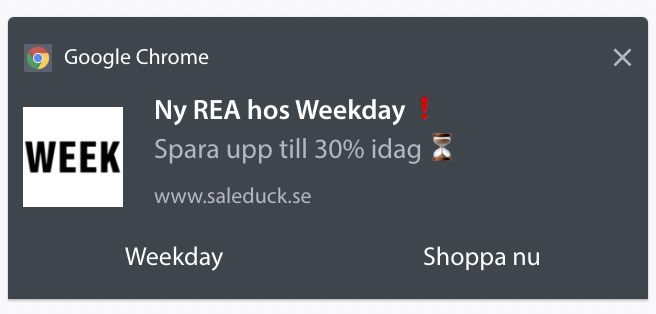
Αν δεν είστε σίγουροι πώς να δημιουργήσετε πολλαπλά CTA, δείτε αυτό το άρθρο για το πώς να προσθέσετε κουμπιά στις ειδοποιήσεις push.
Με τις μετατροπές στόχων, είναι κυρίως θέμα ρύθμισης σχετικών ειδοποιήσεων push ηλεκτρονικού εμπορίου. Έτσι, και πάλι, δεν υπάρχει ΠΟΛΥ πράγμα για split testing εδώ. Ωστόσο, αν μπορείτε να βελτιστοποιήσετε τις ειδοποιήσεις push για καλύτερα κλικ σε μια πολύ καλή προσφορά, οι μετατροπές στόχων σας θα αυξηθούν.
Με τον καιρό, μπορείτε να βελτιώσετε τα ποσοστά εγγραφής για τα αναδυόμενα παράθυρα ειδοποιήσεων push. Με κάθε καλή υπηρεσία ειδοποιήσεων push, λαμβάνετε λεπτομερή αναλυτικά στοιχεία εγγραφής.
Κάθε εργαλειοθήκη μετατροπών στον ήλιο έρχεται με τα δικά της αναλυτικά στοιχεία αναδυόμενων παραθύρων. Λοιπόν, γιατί οι ειδοποιήσεις push να είναι διαφορετικές;
Να τι είναι επικό…
Μπορείτε να λάβετε αναλύσεις όχι μόνο για τις καμπάνιες ειδοποιήσεων push, αλλά και για τις εγγραφές σας!
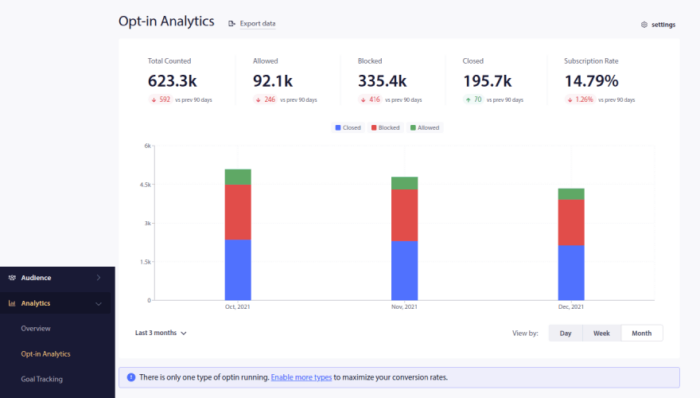
Η προσοχή στα αναλυτικά στοιχεία εγγραφής σας είναι ένας καλός τρόπος για να λάβετε συνδρομές για ειδοποιήσεις push. Θα πρέπει επίσης να καθαρίζετε τις λίστες συνδρομητών σας από καιρό σε καιρό και να αφαιρείτε οποιονδήποτε συνδρομητή που απλώς αρνείται να αλληλεπιδράσει με τις καμπάνιες σας. Με αυτόν τον τρόπο, λαμβάνετε τους πραγματικούς αριθμούς αλληλεπίδρασης και στέλνετε ειδοποιήσεις push μόνο σε συνδρομητές που ΘΕΛΟΥΝ να ακούσουν από εσάς.
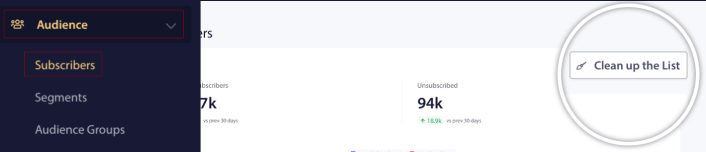
Ταυτόχρονα, συνιστούμε επίσης να λαμβάνετε σχόλια από τους συνδρομητές σας σχετικά με τις καμπάνιες ειδοποιήσεων push.
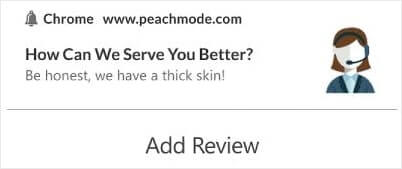
Μπορείτε να δημιουργήσετε μια απλή σελίδα προορισμού με φόρμα για τη συλλογή κριτικών και σχολίων σχετικά με τις καμπάνιες σας.
Πώς να Αυξήσετε τους Συνδρομητές του YouTube Ακόμα Πιο Γρήγορα
Τώρα που ξέρετε πώς να αποκτήσετε συνδρομές για ειδοποιήσεις push, είναι ώρα να αρχίσετε να χτίζετε τις καμπάνιες σας. Ξεκινήστε εξετάζοντας περισσότερα παραδείγματα για το πώς μπορείτε να χρησιμοποιήσετε αποτελεσματικά τις ειδοποιήσεις push:
- 21 Καλύτερα Παραδείγματα Μηνυμάτων Καλωσορίσματος Ιστοτόπου που Μπορείτε να Χρησιμοποιήσετε
- 75 Επικά Παραδείγματα Ειδοποιήσεων Push που Μπορείτε να Κλέψετε Τώρα
- 15 παραδείγματα κειμένων ειδοποιήσεων push για να σας εμπνεύσουν
- 7 Παραδείγματα Εγγραφής Ειδοποιήσεων Push με Υψηλή Μετατροπή (2022)
- 11 Δημιουργικά παραδείγματα ειδοποιήσεων push που μπορείτε να κλέψετε τώρα!
- Πώς να προσθέσετε ένα πρόσθετο WordPress για ειδοποιήσεις ιστού στον ιστότοπό σας
Θα πρέπει επίσης να διαβάσετε το άρθρο μας σχετικά με τις βέλτιστες πρακτικές ειδοποιήσεων push για να αξιοποιήσετε στο έπακρο τις καμπάνιες ειδοποιήσεων push.
Αλλά τίποτα από αυτά δεν θα κάνει διαφορά για την επωνυμία σας, εκτός αν αρχίσετε να στέλνετε ειδοποιήσεις push.
Έτσι, αν δεν το έχετε κάνει ήδη, ξεκινήστε με το PushEngage σήμερα!


