
Ψάχνετε έναν απλό τρόπο να ενεργοποιήσετε και να απενεργοποιήσετε τις ειδοποιήσεις του Firefox;
Οι ειδοποιήσεις push μέσω προγράμματος περιήγησης σάς βοηθούν να παραμένετε σε επαφή με τις αγαπημένες σας μάρκες. Και μπορείτε να επιλέξετε τις ειδοποιήσεις push αρκετά εύκολα. Αλλά πώς αρχίζετε να λαμβάνετε ειδοποιήσεις push μέσω προγράμματος περιήγησης;
Σε αυτό το άρθρο, θα σας δείξουμε βήμα προς βήμα πώς να ενεργοποιήσετε ή να απενεργοποιήσετε τις ειδοποιήσεις του Firefox.
Ακούγεται καλό; Ας βουτήξουμε.
Πώς να λαμβάνετε ειδοποιήσεις Firefox από οποιονδήποτε ιστότοπο
Ας ξεκινήσουμε ελέγχοντας πώς μπορείτε να λαμβάνετε ειδοποιήσεις Firefox από οποιονδήποτε ιστότοπο.
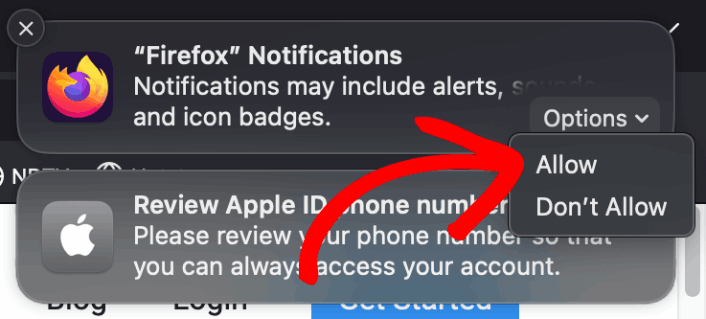
Την πρώτη φορά που θα εγκαταστήσετε τον Firefox, θα εμφανιστεί ένα αναδυόμενο παράθυρο για να επιτρέψετε ή να απορρίψετε τις ειδοποιήσεις push στο web στον Firefox. Απλώς κάντε κλικ στο Επιλογές » Να επιτρέπονται για να λαμβάνετε ειδοποιήσεις του Firefox:
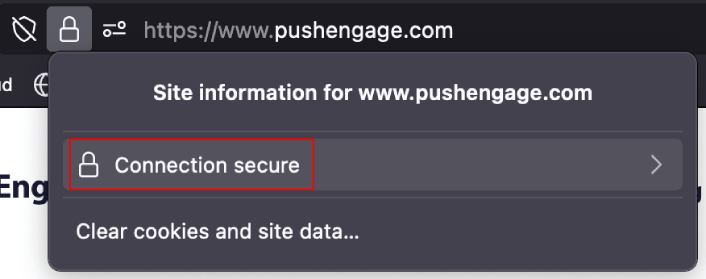
Εξ ορισμού, ο Firefox μπλοκάρει τις αιτήσεις λήψης ειδοποιήσεων push. Έτσι, αν θέλετε να λαμβάνετε ειδοποιήσεις Firefox από έναν ιστότοπο, μεταβείτε στη γραμμή διευθύνσεων και κάντε κλικ στο λουκέτο. Στο αναπτυσσόμενο μενού, κάντε κλικ στο Ασφαλής σύνδεση:
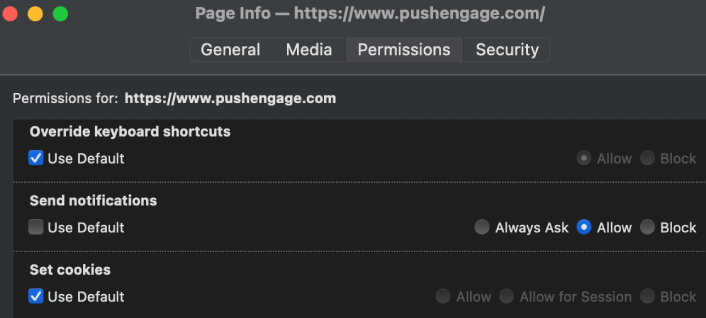
Εδώ, μπορείτε να ορίσετε δικαιώματα για τον ιστότοπο. Μεταβείτε στα Δικαιώματα, μετακινηθείτε προς τα κάτω στις Αποστολή ειδοποιήσεων, καταργήστε την επιλογή του πλαισίου Προεπιλογή και κάντε κλικ στο Να επιτρέπονται:
Τώρα, μπορείτε να λαμβάνετε ειδοποιήσεις Firefox από αυτόν τον ιστότοπο.
Πώς να Ενεργοποιήσετε ή να Απενεργοποιήσετε τις Ειδοποιήσεις του Firefox
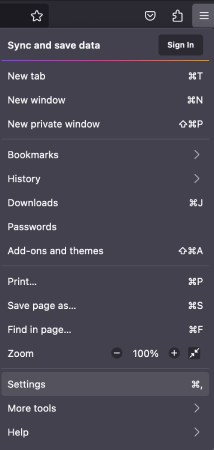
Ο Firefox διαθέτει ενσωματωμένες ρυθμίσεις και προτιμήσεις που μπορούν να ενεργοποιήσουν ή να απενεργοποιήσουν τις ειδοποιήσεις push. Ο απλούστερος τρόπος για να ενεργοποιήσετε ή να απενεργοποιήσετε τις ειδοποιήσεις του Firefox είναι να μεταβείτε στη γραμμή μενού και να επιλέξετε Ρυθμίσεις:
Στη συνέχεια, μεταβείτε στα Απόρρητο & Ασφάλεια » Ειδοποιήσεις » Ρυθμίσεις:
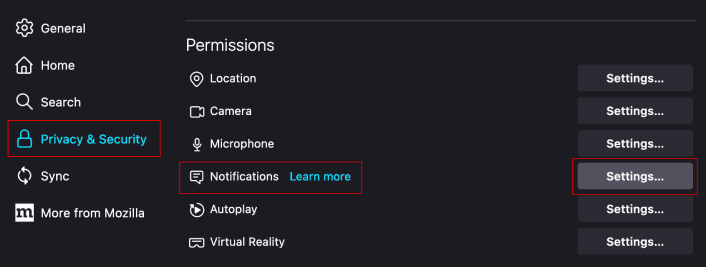
Εδώ, μπορείτε να επιτρέψετε ή να αρνηθείτε τις ειδοποιήσεις push από οποιονδήποτε ιστότοπο απλώς αλλάζοντας την άδεια δίπλα στον ιστότοπο.
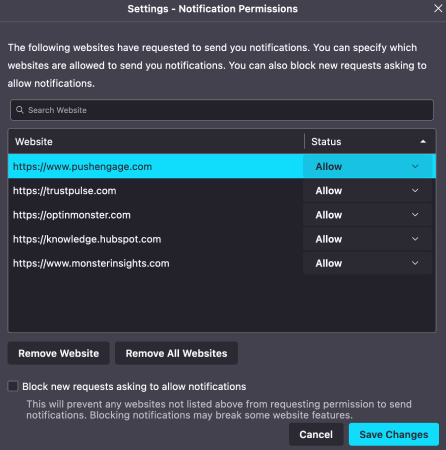
Αν θέλετε να ενεργοποιήσετε τις ειδοποιήσεις push του Firefox από έναν ιστότοπο, ορίστε το σε Να επιτρέπονται. Αν δεν θέλετε ειδοποιήσεις από έναν ιστότοπο, ορίστε την άδεια σε Αποκλεισμός.
Μπορείτε να καταργήσετε όλες τις άδειες κάνοντας κλικ στο Κατάργηση όλων των ιστοτόπων. Εναλλακτικά, αν θέλετε να καταργήσετε μόνο έναν ιστότοπο από τη λίστα των εγκεκριμένων ιστοτόπων που μπορούν να σας στείλουν ειδοποιήσεις, μπορείτε επίσης να κάνετε κλικ στο Κατάργηση ιστοτόπου.
Τι να κάνετε αφού ενεργοποιήσετε τις ειδοποιήσεις push του Firefox
Το γεγονός ότι αγαπάτε το περιεχόμενο των ειδοποιήσεων push που λαμβάνετε, δεν σημαίνει ότι πρέπει να εγγραφείτε σε αυτές. Πριν εγγραφείτε σε οποιεσδήποτε άλλες ειδοποιήσεις push, θα πρέπει να ελέγξετε τους κανόνες συμμόρφωσης GDPR και να μάθετε αν οι ειδοποιήσεις push σας είναι ασφαλείς.
Και αν πιστεύετε ότι οι ειδοποιήσεις push του Safari είναι ωραίες, θα πρέπει επίσης να δείτε πώς μπορείτε να ξεκινήσετε με τις ειδοποιήσεις push για την επιχείρησή σας.
Οι ειδοποιήσεις push είναι ένας εξαιρετικός τρόπος για να αυξήσετε οργανικά τη βάση των θαυμαστών σας. Και είναι πολύ εύκολο να ρυθμίσετε καμπάνιες push. Επίσης, αν είστε νέοι στις ειδοποιήσεις push, θα πρέπει να ελέγξετε αυτούς τους επικούς πόρους:
- Πώς να προσθέσετε ένα widget εγγραφής blog στο WordPress
- Πώς να αυξήσετε την επισκεψιμότητα στο WordPress Blog σας (9 εύκολοι τρόποι)
- Κόστος Ειδοποιήσεων Push: Είναι Πραγματικά Δωρεάν; (Ανάλυση Τιμών)
- Πώς να Αυξήσετε το Ποσοστό Συγκατάθεσης για Ειδοποιήσεις Push στο Web (7 Τρόποι)
- Πώς να χρησιμοποιήσετε τα κουμπιά ενεργειών ειδοποιήσεων push για να διπλασιάσετε τα κλικ
Συνιστούμε τη χρήση του PushEngage για τη δημιουργία των καμπανιών ειδοποιήσεων push. Το PushEngage είναι το #1 λογισμικό ειδοποιήσεων push στην αγορά και οι καμπάνιες σας θα είναι σε ασφαλή χέρια.
Λοιπόν, αν δεν το έχετε κάνει ήδη, ξεκινήστε με το PushEngage σήμερα.


