
Ψάχνετε έναν τρόπο να στείλετε καμπάνιες ειδοποιήσεων push Firebase Flutter;
Αφιερώνετε μήνες στην κατασκευή της εφαρμογής σας Flutter. Ομαλή διεπαφή χρήστη, εκπληκτικές λειτουργίες, τα πάντα είναι τέλεια.
Αλλά εδώ είναι η σκληρή αλήθεια: πάνω από το 70% των χρηστών εφαρμογών εξαφανίζονται εντός 90 ημερών.
Τους κατεβάζουν. Τους περιηγούνται. Τους ξεχνούν. Οι περισσότερες εφαρμογές δεν ανακάμπτουν ποτέ. Βυθίζονται στην άβυσσο των ξεχασμένων εγκαταστάσεων, ξοδεύοντας περισσότερα σε διαφημίσεις από όσα θα κερδίσουν ποτέ πίσω.
Αλλά τι θα γινόταν αν μπορούσατε να επαναφέρετε τους χρήστες χωρίς να πληρώνετε κάθε φορά;
Εδώ είναι ένα εντυπωσιακό στατιστικό: Οι εφαρμογές που χρησιμοποιούν ειδοποιήσεις push βλέπουν ποσοστά διατήρησης χρηστών έως και 88% υψηλότερα σε σύγκριση με αυτές που δεν τις χρησιμοποιούν. Και με τις δυνατότητες διαπλατφορμικής ανάπτυξης του Flutter, η υλοποίηση αυτών των ισχυρών εργαλείων αλληλεπίδρασης δεν ήταν ποτέ ευκολότερη.
Είστε έτοιμοι να ενισχύσετε τις καμπάνιες ειδοποιήσεων push Firebase Flutter; Ας βουτήξουμε σε όλα όσα πρέπει να γνωρίζετε για να ξεκινήσετε!
Στείλτε Ειδοποιήσεις Push για Εφαρμογές Κινητών Σήμερα!
Οι ειδοποιήσεις push είναι ένα εξαιρετικά αποτελεσματικό, χαμηλού κόστους εργαλείο μάρκετινγκ που σας βοηθά να αυξήσετε την επαναλαμβανόμενη επισκεψιμότητα, την αλληλεπίδραση και τις πωλήσεις σας αυτόματα.
Τι Είναι οι Ειδοποιήσεις Push Flutter;
Σκεφτείτε τις ειδοποιήσεις push ως ένα ψηφιακό χτύπημα στον ώμο – είναι μηνύματα που εμφανίζονται στις συσκευές των χρηστών σας ακόμα και όταν δεν χρησιμοποιούν ενεργά την εφαρμογή σας. Αλλά είναι πολύ περισσότερα από απλές ειδοποιήσεις!
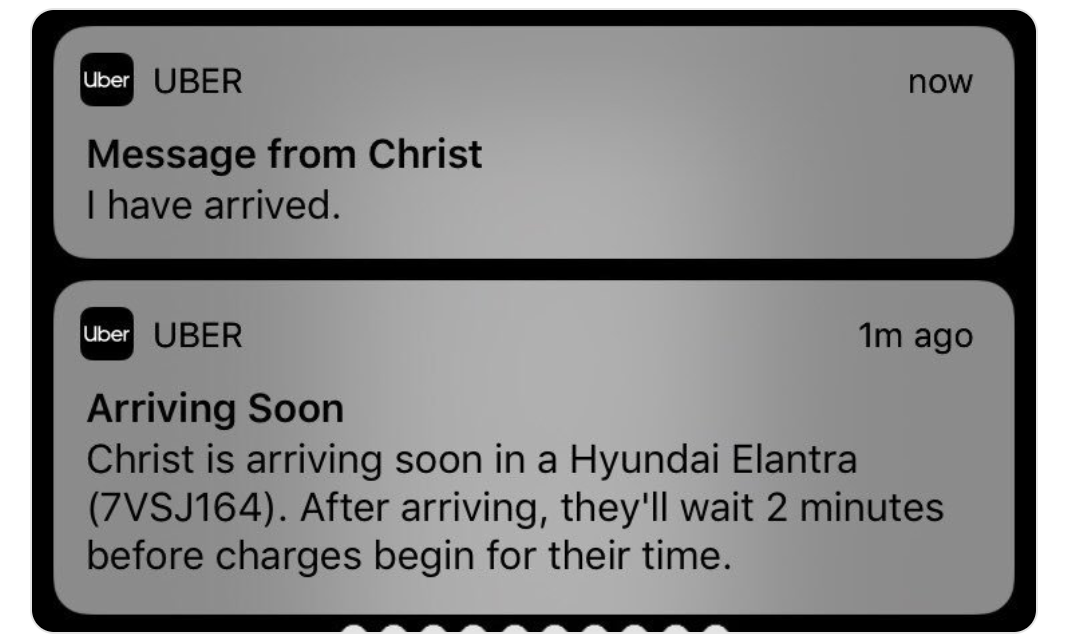
Οι ειδοποιήσεις push μπορούν να περιλαμβάνουν:
- Μηνύματα κειμένου και ειδοποιήσεις
- Πλούσια μέσα όπως εικόνες και βίντεο
- Διαδραστικά κουμπιά και ενέργειες
- Βαθιά σύνδεση σε συγκεκριμένες ενότητες της εφαρμογής
Η δημοτικότητα του Flutter δεν είναι τυχαία – είναι μια δύναμη για την ανάπτυξη διαπλατφορμικών εφαρμογών. Με πάνω από 500.000 εφαρμογές που έχουν δημιουργηθεί με το Flutter, έχει γίνει η κορυφαία επιλογή για προγραμματιστές παγκοσμίως. Αλλά τι το καθιστά ιδανικό για ειδοποιήσεις push;
- Ενιαίος κώδικας για iOS και Android
- Πλούσιο οικοσύστημα plugins ειδοποιήσεων
- Απρόσκοπτη ενσωμάτωση με δημοφιλείς υπηρεσίες
- Εξαιρετικές μετρήσεις απόδοσης
Τώρα που κατανοούμε λίγο πιο καθαρά γιατί πρέπει να προσθέσετε ειδοποιήσεις push στην εφαρμογή Flutter σας, ας δούμε πώς να στείλετε καμπάνιες ειδοποιήσεων push Firebase Flutter.
Όλα όσα πρέπει να γνωρίζετε για τις καμπάνιες ειδοποιήσεων push Firebase Flutter
Οι ειδοποιήσεις push είναι το απλούστερο αλλά και το πιο ισχυρό εργαλείο και μπορούν να αποτελέσουν το καλύτερο κανάλι για το μάρκετινγκ ανάπτυξης για επιχειρήσεις εφαρμογών για κινητά. Αυτά τα σύντομα μηνύματα εμφανίζονται στη συσκευή ενός χρήστη, ακόμη και όταν δεν χρησιμοποιεί ενεργά την εφαρμογή σας, καθιστώντας τα έναν ιδανικό τρόπο για να τραβήξετε την προσοχή και να παρακινήσετε σε δράση.
Ωστόσο, υπάρχουν μερικά σοβαρά εμπόδια στον κλάδο ανάπτυξης εφαρμογών με παρόχους ειδοποιήσεων push Firebase Flutter. Για να αντιμετωπίσουμε αυτά τα ζητήματα, δημιουργήσαμε αυτό το σύντομο βίντεο για να σας βοηθήσουμε να κατανοήσετε τι είναι δυνατό με τις ειδοποιήσεις push Flutter.
[ΠΡΟΕΙΔΟΠΟΙΗΣΗ] Γιατί το Firebase δεν αρκεί για να προσθέσετε ειδοποιήσεις push στην εφαρμογή Flutter σας
Γιατί οι περισσότεροι προγραμματιστές επιλέγουν το Firebase Cloud Messaging για τις εφαρμογές τους Flutter; Απλό – είναι δωρεάν, αξιόπιστο και υποστηρίζεται από την Google! Το FCM διαχειρίζεται δισεκατομμύρια μηνύματα καθημερινά και λειτουργεί απρόσκοπτα σε όλες τις πλατφόρμες.
Τα βασικά οφέλη του FCM περιλαμβάνουν:
- Δωρεάν απεριόριστες ειδοποιήσεις push
- Ενσωματωμένα αναλυτικά στοιχεία και παρακολούθηση
- Αυτόματη λογική επανάληψης
- Υποστήριξη για περιεχόμενο πλούσιων μέσων
Αν χρησιμοποιείτε το Firebase Cloud Messaging (FCM), έχετε ήδη συνειδητοποιήσει το πρόβλημα.
- Παραδίδει ειδοποιήσεις αλλά δεν σας λέει ποιος έκανε κλικ.
- Σας επιτρέπει να στέλνετε μηνύματα αλλά έχει μηδενικό ενσωματωμένο αυτοματισμό για να επαναφέρετε τους χρήστες.
- Προσφέρει βασική τμηματοποίηση αλλά δεν μπορείτε να προσαρμόσετε τη στόχευση με βάση τη συμπεριφορά του χρήστη.
Με λίγα λόγια; Το Firebase είναι ένα εργαλείο παράδοσης ειδοποιήσεων. Αυτό είναι όλο. Καμία δύναμη μάρκετινγκ. Καμία πραγματική στρατηγική αφοσίωσης.
Αν θέλετε να κρατήσετε τους χρήστες, χρειάζεστε κάτι περισσότερο από ένα αμβλύ εργαλείο. Χρειάζεστε ένα σύστημα που μετατρέπει τις ειδοποιήσεις σε μια μηχανή ανάπτυξης.
Πώς να επιλέξετε μια υπηρεσία ειδοποιήσεων push Firebase Flutter που λειτουργεί πραγματικά
Ενσωμάτωση με έναν βοηθό κωδικοποίησης AI; Οι δεξιότητες PushEngage Agent ανοιχτού κώδικα διδάσκουν στο Claude Code, Cursor και σε οποιονδήποτε συμβατό με SKILL.md πράκτορα να ενσωματώνει και να διορθώνει αυτό το SDK. Και μόλις αποστείλετε, ο διακομιστής PushEngage MCP επιτρέπει στον ίδιο πράκτορα να εκτελεί τις καμπάνιες σας — τμήματα, αποστολές, A/B δοκιμές και αναφορές. Δημιουργείτε στο Replit, Lovable ή Bolt; Τα κιτ vibe-coding ανοιχτού κώδικα περιλαμβάνουν ένα έτοιμο κατάστημα επίδειξης, ένα πρόγραμμα εκκίνησης Flutter και επιδείξεις ενός προτροπής με το PushEngage προ-καλωδιωμένο.
Η εφαρμογή σας έχει μία δουλειά: να κρατά τους χρήστες να επιστρέφουν. Το PushEngage διαθέτει ένα SDK ειδοποιήσεων push Flutter που το καθιστά αβίαστο.
🛠 Για Προγραμματιστές: Εύκολο SDK, απλή ρύθμιση και καμία πονοκέφαλος με το Firebase.
📈 Για Εμπόρους: Αυτοματοποιημένες καμπάνιες push, τμηματοποίηση και αναλύσεις βάσει δεδομένων.
💰 Για Ιδιοκτήτες Επιχειρήσεων: Λιγότερη απώλεια πελατών, περισσότερες μετατροπές και υγιέστερο τελικό αποτέλεσμα.
Το PushEngage σας βοηθά να αυξήσετε την επισκεψιμότητα και την αλληλεπίδραση του ιστότοπού σας αυτόματα. Και αν διαχειρίζεστε ένα online κατάστημα, το PushEngage σας βοηθά επίσης να αυξήσετε τις πωλήσεις σας, βοηθώντας σας να δημιουργήσετε αυτοματοποιημένες ειδοποιήσεις push ηλεκτρονικού εμπορίου.
Μπορείτε να ξεκινήσετε δωρεάν, αλλά αν είστε σοβαροί σχετικά με την ανάπτυξη της επιχείρησής σας, θα πρέπει να αγοράσετε ένα επί πληρωμή πρόγραμμα.
Το Flutter SDK του PushEngage δεν είναι απλώς ένα σύστημα παράδοσης — είναι η αυτοματοποιημένη σας δύναμη διατήρησης. Μην κάνετε λάθος, το PushEngage εξακολουθεί να χρησιμοποιεί τα ίδια αξιόπιστα συστήματα παράδοσης που παρέχονται από το Firebase και το APNS. Αλλά μπορείτε να κάνετε ΤΟΣΑ πολλά περισσότερα με πολύ λίγο κώδικα.
✅ Επαναφέρετε Αυτόματα Χαμένους Χρήστες: Ρυθμίστε έξυπνες καμπάνιες σταγόνας για να ωθήσετε τους ανενεργούς χρήστες πίσω στην εφαρμογή. Δεν απαιτείται χειροκίνητη εργασία.
✅ Υπερ-Εξατομικευμένη Μηνυματοδότηση: Στοχεύστε χρήστες με βάση το τι κάνουν πραγματικά μέσα στην εφαρμογή σας—όχι μόνο τυχαίες εικασίες.
✅ A/B Testing & Έξυπνος Προγραμματισμός: Μάθετε τι λειτουργεί, πότε λειτουργεί και στείλτε ειδοποιήσεις όταν οι χρήστες είναι πιο πιθανό να αλληλεπιδράσουν.
✅ Δύναμη Πολλαπλών Καναλιών: Πηγαίνετε πέρα από το κινητό. Το PushEngage σας επιτρέπει να συνδυάσετε ειδοποιήσεις push για web + κινητό για μια ολοκληρωμένη στρατηγική πολλαπλών καναλιών.
Και αυτές οι δυνατότητες είναι σχεδιασμένες για να βοηθούν τις μικρές επιχειρήσεις να αναπτυχθούν. Ρίξτε μια ματιά στις μελέτες περιπτώσεων και θα καταλάβετε πώς κάθε είδους επιχείρηση έχει απολαύσει μεγάλη επιτυχία από τις ειδοποιήσεις push του PushEngage.
Δεν πρόκειται απλώς για την αποστολή ειδοποιήσεων. Πρόκειται για τη διατήρηση της αφοσίωσης των χρηστών και τη μετατροπή τους σε πελάτες που πληρώνουν.
Θα δείτε ότι η PushEngage είναι μακράν η καλύτερη επιλογή αν θέλετε να αυξήσετε την επισκεψιμότητα, την αφοσίωση και τις πωλήσεις για την επιχείρησή σας. Και αν έχετε περιορισμένο προϋπολογισμό, μπορείτε πάντα να γίνετε λίγο δημιουργικοί με τις ειδοποιήσεις push σας.
Αυτή τη στιγμή, έχετε μία από τις τέσσερις επιλογές:
🚀 Νικηφόρο Τέλος: Μεταβαίνετε στο PushEngage, ρυθμίζετε αυτοματοποιημένες καμπάνιες και παρακολουθείτε την αφοσίωση & τα έσοδα να εκτοξεύονται.
😞 Τραγικό Τέλος: Παραμένετε στο Firebase, χάνοντας χρήστες και προσπαθώντας να τους ανακτήσετε με πληρωμένες διαφημίσεις.
🤷 Γλυκόπικρο Τέλος: Προσπαθείτε να δημιουργήσετε μόνοι σας ροές εργασίας διατήρησης, αλλά ποτέ δεν λειτουργούν ακριβώς.
💀 Ατέλειωτος Αγώνας: Αγνοείτε εντελώς τις ειδοποιήσεις push και συνεχίζετε να χάνετε χρήστες.
Ποιο τέλος θέλετε για την ιστορία ανάπτυξης της εφαρμογής σας Flutter;
Πώς να ξεκινήσετε με καμπάνιες ειδοποιήσεων Firebase Flutter σε λίγα λεπτά
Αν θέλετε να προσθέσετε ειδοποιήσεις push σε μια εφαρμογή Flutter, το PushEngage Flutter SDK χρειάζεται μόνο λίγα λεπτά.
- Ακολουθήστε τον απλό οδηγό ρύθμισης: Πώς να Ξεκινήσετε με Ειδοποιήσεις Push Εφαρμογής Flutter.
- Ρυθμίστε την πρώτη σας αυτοματοποιημένη καμπάνια με λίγα κλικ.
- Παρακολουθήστε την αφοσίωσή σας (και τα έσοδα) να απογειώνονται.
Οι χρήστες σας δεν θα επιστρέψουν μόνοι τους. Αλλά με το PushEngage, δεν θα θέλουν ποτέ να φύγουν.
Τι να κάνετε Αφού Προσθέσετε Ειδοποιήσεις Push σε μια Εφαρμογή Flutter
Τώρα που ξέρετε πώς να στείλετε καμπάνιες ειδοποιήσεων push Firebase Flutter, ήρθε η ώρα να αρχίσετε να δημιουργείτε καμπάνιες.
Προτείνουμε επίσης να αφιερώσετε λίγο χρόνο για να διαβάσετε τα άρθρα μας και να μάθετε πώς να ενισχύσετε τις αυτοματοποιημένες ειδοποιήσεις push σας. Ξεκινήστε με το άρθρο μας σχετικά με τις βέλτιστες πρακτικές ειδοποιήσεων push.
Αν είστε νέοι στις ειδοποιήσεις push, θα πρέπει να ακολουθήσετε μια πλήρη διαδικασία δοκιμών ειδοποιήσεων push πριν ξεκινήσετε. Θα σας βοηθήσει να αντιμετωπίσετε κοινά προβλήματα πριν τα δουν οι επισκέπτες σας και αρχίσουν να παραπονιούνται για μια προβληματική εμπειρία χρήστη.
Και σίγουρα θα πρέπει να ρυθμίσετε το Google Analytics για να παρακολουθείτε τις ειδοποιήσεις push.
Επαναστόχευση ειδοποιήσεων push για να στοχεύσετε τους συνδρομητές που έκαναν κλικ σε αυτές ή όχι. Ενημερώστε μας πώς λειτουργεί αυτό για εσάς. Εν τω μεταξύ, ελέγξτε αυτούς τους πόρους:
- Πώς να αυξήσετε τα κλικ στις ειδοποιήσεις push σας με την περιέργεια
- Πώς να εξατομικεύσετε κάθε ειδοποίηση push
- Πώς να ξεχωρίσετε με πλούσια μέσα στις ειδοποιήσεις push σας
- Πώς να επανενεργοποιήσετε αδρανείς συνδρομητές push
- Πώς να χρησιμοποιήσετε τις ειδοποιήσεις push για να κρατάτε τους πελάτες ενήμερους
- Πώς να χρησιμοποιήσετε emojis στις ειδοποιήσεις push σας για υψηλότερα ποσοστά κλικ
- Πώς να αυξήσετε τις μετατροπές δημιουργώντας αίσθηση επείγοντος
Και αν δεν το έχετε κάνει ήδη, ξεκινήστε με το PushEngage.


