Η έκδοση Chrome 68 κυκλοφόρησε με βελτιωμένη εμπειρία για τους χρήστες των Windows 10. Με τη νέα έκδοση του Chrome 68, η Google υποστηρίζει τις εγγενείς ειδοποιήσεις του λειτουργικού συστήματος Windows.
Μια σχετική αλλαγή ήταν η κυκλοφορία του Microsoft Edge που υποστηρίζει ειδοποιήσεις web push, το οποίο υποστηρίζει πλέον και το PushEngage.
Δείτε πώς εμφανίζεται η ειδοποίηση push σε διαφορετικά λειτουργικά συστήματα. Η τρέχουσα διάθεση θα επηρεάσει την εμφάνιση των ειδοποιήσεων push στα Windows 10.
Η συμπεριφορά και η εμφάνιση των ειδοποιήσεων push του Chrome θα αλλάξουν με αυτήν την ενημέρωση. Τώρα οι χρήστες θα βλέπουν τις ειδοποιήσεις να παραμένουν στο κέντρο ενεργειών των Windows, και ο κύριος αντίκτυπος θα είναι στην αλληλεπίδραση και στα ποσοστά κλικ που πρέπει να αυξηθούν καθώς η ειδοποίηση παραμένει στο κέντρο ενεργειών μέχρι να γίνει κλικ.
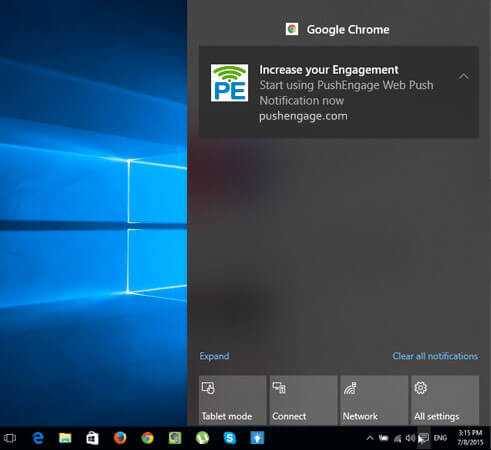
Επίσης, εάν χρησιμοποιείτε Μεγάλη Εικόνα Ειδοποίησης και Απαιτείται Αλληλεπίδραση κατά την Αποστολή Ειδοποιήσεων στους συνδρομητές σας, πρέπει να γνωρίζετε την ενημέρωση. Παρακάτω παρατίθενται οι αλλαγές με το Chrome 68 για τα Windows 10.
- Σχεδιασμός Ειδοποίησης
- Σχεδιασμός Ειδοποίησης Πολλαπλών Ενεργειών
- Σχεδιασμός και Μέγεθος Ειδοποίησης Μεγάλης Εικόνας
- Απαιτείται Αλληλεπίδραση
Το Chrome υποστηρίζει εγγενείς ειδοποιήσεις στο macOS, οι οποίες κυκλοφόρησαν τον Ιούνιο του 2017. Αυτό ήταν το Chrome έκδοση 59 και άνω. Οι χρήστες θέλουν παρόμοια εμπειρία στις συσκευές τους, οπότε με αυτήν την έκδοση το Chrome παρέχει στους χρήστες Εγγενείς Ειδοποιήσεις για τα Windows 10, οι οποίες θα παραμένουν στο κέντρο ενεργειών τους αφού εξαφανιστούν από την οθόνη.
Σχεδιασμός Ειδοποίησης
Η Ειδοποίηση Web Push νωρίτερα εμφανιζόταν με λευκό φόντο, καθώς το Chrome, μετά την ενημέρωση, χρησιμοποιεί το UI των Windows 10 για να δώσει σε όλες τις ειδοποιήσεις παρόμοια εμφάνιση και εμπειρία. Θα εμφανίζεται σε γκρι φόντο με κείμενο σε λευκό χρώμα και μια μικρή εικόνα στο πλάι.
Προηγουμένως –
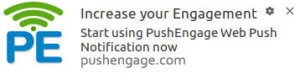
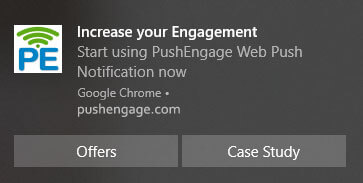
Τώρα –
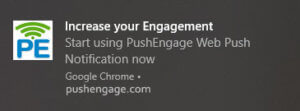
Πώς να βελτιστοποιήσετε την ειδοποίηση push για τα Windows 10
- Δεδομένου ότι το χρώμα φόντου δεν είναι πλέον λευκό, κάντε αλλαγές στη μικρή εικόνα που χρησιμοποιείται στην ειδοποίηση για να την κάνετε πιο ορατή.
Στο κέντρο ενεργειών, μαζί με το κουμπί κλεισίματος, υπάρχει ένα σύμβολο βέλους προς τα πάνω στην δεξιά γωνία, αυτό κάνει την ειδοποίηση να μπορεί να συμπτυχθεί.
Σχεδιασμός Ειδοποίησης Πολλαπλών Ενεργειών
Πριν από την κυκλοφορία, τα κουμπιά ενεργειών συνήθως εμφανίζονταν το ένα κάτω από το άλλο στα Windows 10 Chrome. Τώρα θα εμφανίζονται το ένα δίπλα στο άλλο.
Προηγουμένως
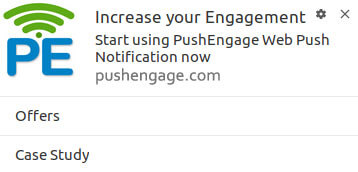
Τώρα –
Ειδοποίηση Μεγάλης Εικόνας
Το μέγεθος της εικόνας της ειδοποίησης μεγάλης εικόνας και η εμφάνισή της αλλάζουν.
Αντί να εμφανίζεται στο κάτω μέρος μετά τον τίτλο και το μήνυμα. Η Μεγάλη Εικόνα θα εμφανίζεται στην κορυφή της ειδοποίησης, κάτι που θα τραβήξει την προσοχή των χρηστών και είναι πιθανό να αυξηθούν τα CTR.
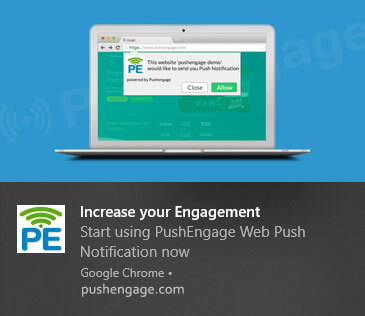
Το μέγεθος της εικόνας αλλάζει από 360X240px σε 364X180px. Εάν συνεχίσετε να χρησιμοποιείτε το παλιό μέγεθος, η εικόνα εμφανίζεται σωστά για όλα τα άλλα λειτουργικά συστήματα εκτός από τους χρήστες του Chrome στα Windows 10.
Πώς να βελτιστοποιήσετε την ειδοποίηση push για τα Windows 10
- Για την καλύτερη κάλυψη της μεγάλης εικόνας, χρησιμοποιήστε το μέγεθος 364X184px.
Για όλα τα άλλα Λειτουργικά Συστήματα (εκτός από Mac – που δεν υποστηρίζει μεγάλη εικόνα), μια Μεγάλη Εικόνα ή Εικόνα Επικεφαλίδας θα εμφανιστεί όπως συνήθως.
Απαιτείται Αλληλεπίδραση
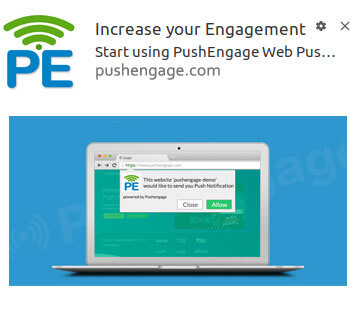
Πριν από την ενημέρωση, κατά την επιλογή «Διατήρηση ειδοποίησης ανοιχτής μέχρι την αλληλεπίδραση» από τον πίνακα ελέγχου του PushEngage, η ειδοποίηση παρέμενε στην οθόνη. Τώρα, με την ενημέρωση Chrome 68, η ειδοποίηση εξαφανίζεται από την οθόνη και μεταβαίνει στο Κέντρο Ενεργειών των Windows. Παραμένει εκεί μέχρι να υπάρξει αλληλεπίδραση.
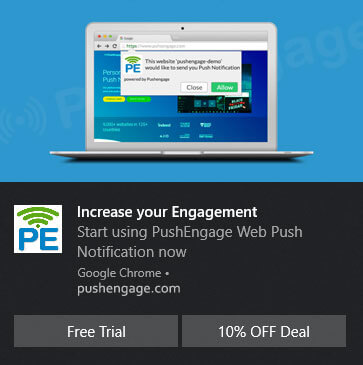
Υπάρχει ένα άλλο θέμα με την απαίτηση αλληλεπίδρασης: εάν προσθέσετε κουμπιά ενεργειών στις ειδοποιήσεις, τότε οι ειδοποιήσεις δεν θα μετακινηθούν στο κέντρο ενεργειών, θα παραμείνουν στην οθόνη μέχρι να υπάρξει αλληλεπίδραση.
Πώς να βελτιστοποιήσετε την ειδοποίηση push για τα Windows 10
- Επομένως, εάν σκοπεύετε να στείλετε μια ειδοποίηση και θέλετε οι χρήστες να αλληλεπιδρούν όχι από το κέντρο ενεργειών, αλλά από την ίδια την οθόνη, προσθέστε κουμπιά ενεργειών σε αυτήν.
Ο Googler Peter Beverloo ανακοίνωσε μέσω του tweet του ότι η ενημέρωση έχει κυκλοφορήσει πλέον για το 100% των χρηστών του Chrome. Θα διατηρήσουμε αυτήν τη σελίδα ενημερωμένη με τις αλλαγές που θα έρθουν με την επόμενη ενημέρωση.


