
Θέλετε οι ειδοποιήσεις push να φαίνονται τόσο καλές όσο και η απόδοσή τους; Η προσαρμογή του χρώματος ειδοποιήσεων Android είναι μια γρήγορη νίκη που βοηθά την επωνυμία σας να ξεχωρίζει κάθε φορά που προσεγγίζετε το κοινό σας, ειδικά στο κινητό. Είναι μια από αυτές τις μικρές λεπτομέρειες που έχουν μεγάλο αντίκτυπο σε όλες τις προσπάθειες αφοσίωσής σας.
Το καλύτερο μέρος; Χρειάζονται μόνο λίγα λεπτά για να ρυθμιστεί.
Σε αυτόν τον γρήγορο οδηγό, θα σας δείξουμε πώς να αλλάξετε το χρώμα ειδοποιήσεων Android για την εφαρμογή σας με μερικά απλά βήματα.
Ας το κάνουμε.
Στείλτε Εκστρατείες Ειδοποιήσεων Push Εφαρμογών Android Τώρα!
Οι ειδοποιήσεις push είναι ένα εξαιρετικά αποτελεσματικό, χαμηλού κόστους εργαλείο μάρκετινγκ που σας βοηθά να αυξήσετε την επαναλαμβανόμενη επισκεψιμότητα, την αλληλεπίδραση και τις πωλήσεις σας αυτόματα.
Γιατί να προσθέσετε ένα προσαρμοσμένο χρώμα ειδοποιήσεων Android για εφαρμογές
Βεβαίως! Ας το αναλύσουμε με απλούς όρους:
Φανταστείτε την εφαρμογή σας ως έναν χαρακτήρα σε μια ιστορία. Τώρα, σκεφτείτε πώς θέλετε οι άνθρωποι να αναγνωρίζουν αυτόν τον χαρακτήρα σε ένα πλήθος. Εκεί είναι που τα προσαρμοσμένα χρώματα ειδοποιήσεων Android είναι χρήσιμα!
- Εμφάνιση Επωνυμίας: Όταν οι ειδοποιήσεις της εφαρμογής σας ταιριάζουν με τα χρώματά της, είναι σαν να ντύνετε τον χαρακτήρα σας με την χαρακτηριστική του στολή. Τον καθιστά άμεσα αναγνωρίσιμο, κάτι που χτίζει εμπιστοσύνη και αφοσίωση με τους χρήστες.
- Ξεχωρίστε: Σε έναν κόσμο γεμάτο ειδοποιήσεις, η δική σας πρέπει να ξεχωρίζει. Τα προσαρμοσμένα χρώματα βοηθούν τα μηνύματά σας να τραβούν την προσοχή, διασφαλίζοντας ότι οι χρήστες τα παρατηρούν ανάμεσα στη θάλασσα των ενημερώσεων.
- Κάντε τους Χρήστες Ευτυχισμένους: Οι άνθρωποι αγαπούν όταν τα πράγματα αισθάνονται ότι φτιάχτηκαν μόνο για αυτούς. Το να επιτρέπετε στους χρήστες να επιλέγουν χρώματα ειδοποιήσεων τους δίνει μια αίσθηση ελέγχου και εξατομίκευσης. Ευτυχισμένοι χρήστες σημαίνουν περισσότερη αφοσίωση με την εφαρμογή σας.
- Βοηθήστε Όλους: Δεν βλέπουν όλοι τα χρώματα το ίδιο. Προσφέροντας διαφορετικές επιλογές χρωμάτων, διασφαλίζετε ότι όλοι μπορούν εύκολα να εντοπίσουν και να κατανοήσουν τις ειδοποιήσεις σας, ανεξάρτητα από το πώς βλέπουν τον κόσμο.
- Στείλτε ένα Μήνυμα: Τα χρώματα μπορούν να πουν πολλά χωρίς λόγια. Για παράδειγμα, ένα ήρεμο μπλε μπορεί να σηματοδοτεί κάτι ενημερωτικό, ενώ ένα έντονο κόκκινο μπορεί να σημαίνει ότι χρειάζεται επείγουσα δράση. Είναι σαν οι ειδοποιήσεις σας να μιλούν μια γλώσσα που όλοι καταλαβαίνουν.
- Μείνετε Μπροστά: Σε ένα πολυσύχναστο κατάστημα εφαρμογών, κάθε μικρή λεπτομέρεια μετράει. Η προσφορά προσαρμοσμένων χρωμάτων ειδοποιήσεων δείχνει ότι δίνετε προσοχή σε αυτό που θέλουν οι χρήστες. Βοηθά την εφαρμογή σας να λάμπει πιο φωτεινά από τις υπόλοιπες.
Έτσι, προσθέτοντας προσαρμοσμένα χρώματα ειδοποιήσεων στην εφαρμογή σας Android, δεν την κάνετε απλώς να φαίνεται όμορφη. Δημιουργείτε μια ισχυρότερη σύνδεση με τους χρήστες, κάνετε την εφαρμογή σας πιο εύκολη στον εντοπισμό και της δίνετε αυτό το επιπλέον πλεονέκτημα στον ανταγωνιστικό κόσμο των εφαρμογών. Επιπλέον, είναι ευκολότερο από ό,τι νομίζετε να ρυθμιστεί και μπορεί να κάνει μεγάλη διαφορά στον τρόπο που οι άνθρωποι αλληλεπιδρούν με την εφαρμογή σας.
Πώς να προσθέσετε ένα προσαρμοσμένο χρώμα ειδοποιήσεων push Android
Ενσωμάτωση με έναν βοηθό κωδικοποίησης AI; Οι δεξιότητες PushEngage Agent ανοιχτού κώδικα διδάσκουν στο Claude Code, Cursor και σε οποιονδήποτε συμβατό με SKILL.md πράκτορα να ενσωματώνει και να διορθώνει αυτό το SDK. Και μόλις αποστείλετε, ο διακομιστής PushEngage MCP επιτρέπει στον ίδιο πράκτορα να εκτελεί τις καμπάνιες σας — τμήματα, αποστολές, A/B δοκιμές και αναφορές. Δημιουργείτε στο Replit, Lovable ή Bolt; Τα κιτ vibe-coding ανοιχτού κώδικα περιλαμβάνουν ένα έτοιμο κατάστημα επίδειξης, ένα πρόγραμμα εκκίνησης Flutter και επιδείξεις ενός προτροπής με το PushEngage προ-καλωδιωμένο.
Τώρα που καταλαβαίνουμε τι σημαίνει ένα χρώμα ειδοποίησης Android για τις εφαρμογές σας και γιατί θα πρέπει να το προσθέσετε, ας δούμε πώς μπορείτε να το προσθέσετε εύκολα χωρίς καμία κωδικοποίηση.
Βήμα #1: Επιλέξτε μια Υπηρεσία Ειδοποιήσεων Push Εφαρμογής Android
Οι ειδοποιήσεις push είναι ένα εργαλείο μάρκετινγκ που σας βοηθά να συνδεθείτε με τους επισκέπτες του ιστού ακόμα και αφού εγκαταλείψουν τον ιστότοπό σας. Μπορείτε να στείλετε στοχευμένες ειδοποιήσεις στους συνδρομητές push σας και ακόμη και να εξατομικεύσετε τις ειδοποιήσεις σας για διαφορετικά τμήματα πελατών. Αλλά ποια υπηρεσία ειδοποιήσεων push Android πρέπει να επιλέξετε;
Συνιστούμε να χρησιμοποιήσετε το PushEngage για να στείλετε καμπάνιες ειδοποιήσεων push.

Το PushEngage είναι η καλύτερη υπηρεσία ειδοποιήσεων push στον κόσμο. Και δεν μιλάμε μόνο για τη δωρεάν έκδοση. Σας επιτρέπει να συνδεθείτε με επισκέπτες αφού φύγουν από τον ιστότοπό σας με στοχευμένα μηνύματα push.
Το PushEngage είναι η πρώτη μας επιλογή για υπηρεσίες και εργαλεία ειδοποιήσεων push επειδή είναι:
- Εξαιρετικά εύκολο στη χρήση
- Διαθέτει έναν οπτικό δημιουργό καμπανιών με προκατασκευασμένα πρότυπα που απαιτούν ελάχιστη ή καθόλου κωδικοποίηση για τη ρύθμιση
- Εύκολη ρύθμιση πλήρως αυτοματοποιημένων καμπανιών ειδοποιήσεων push για οποιοδήποτε είδος ιστότοπου
- Πλήρως εξοπλισμένο με SDK για Android και iOS για γρήγορη ανάπτυξη, ανάπτυξη, ανάλυση και διαχείριση καμπανιών push εφαρμογών
- Κατασκευασμένο με πολλαπλές επιλογές για αποστολή εξατομικευμένων ειδοποιήσεων push για υψηλότερα ποσοστά κλικ
- Εξοπλισμένο με προσαρμοσμένη παρακολούθηση στόχων, παραμέτρους UTM και προηγμένα αναλυτικά στοιχεία
- Διαθέτει ισχυρές επιλογές A/B testing ειδοποιήσεων push
Και αυτό είναι μόνο η αρχή. Ελέγξτε την πλήρη λίστα των λειτουργιών του PushEngage πριν προχωρήσετε παραπέρα. Το πιο απίστευτο μέρος του PushEngage είναι ότι έχει ένα για πάντα δωρεάν πρόγραμμα που μπορείτε να δοκιμάσετε πριν λάβετε απόφαση αγοράς.
Επαγγελματική Συμβουλή: Ελέγξτε το άρθρο μας σχετικά με την ανάλυση κόστους ειδοποιήσεων push πριν αγοράσετε οποιαδήποτε υπηρεσία.
Βήμα #2: Ρυθμίστε τις Ειδοποιήσεις Push Εφαρμογής Android PushEngage
Μέχρι τώρα, έπρεπε να χρησιμοποιείτε skeleton SDKs για να στέλνετε ειδοποιήσεις push εφαρμογών. Το πρόβλημα με τη χρήση αυτών των SDKs είναι ότι είναι αρκετά βασικά.
Θεωρητικά, μπορείτε να στείλετε οποιονδήποτε τύπο καμπάνιας push notifications για mobile apps με αυτές. Αλλά μετά, πρέπει επίσης να δημιουργήσετε:
- Μια διεπαφή για τη διαχείριση των καμπανιών σας
- Μια σουίτα αναλύσεων για την παρακολούθηση της απόδοσης των καμπανιών σας
- Καλύτερη υποστήριξη για πλούσια μέσα και συνδέσμους ανακατεύθυνσης εντός εφαρμογής (ή deep links)
- Διαδικασίες για τη συνεννόηση μεταξύ των ομάδων μάρκετινγκ και ανάπτυξης
Όλα για τον σκοπό της εισαγωγής ενός ενιαίου καναλιού ανάπτυξης. Η χρήση των παλιών εργαλείων για την αποστολή ειδοποιήσεων push εφαρμογών για κινητά ειδοποιήσεις push εφαρμογών για κινητά είναι κουραστική, δαπανηρή, απαιτεί πολλούς πόρους και χρονοβόρα. Και φυσικά, απαιτεί βαθιές δεξιότητες κωδικοποίησης στην ομάδα σας για να αναπτύξετε και να διαχειριστείτε ό,τι κατασκευάζετε.
Με το νέο SDK για Android της PushEngage, μπορείτε να στείλετε push για κινητές εφαρμογές χρησιμοποιώντας το ίδιο αξιόπιστο λογισμικό για εξαιρετικά ποσοστά παράδοσης. Αλλά έχουμε δημιουργήσει πολλά επίπεδα από πάνω που καθιστούν εξαιρετικά εύκολη τη δημιουργία προσαρμοσμένων ενσωματώσεων με την εφαρμογή σας. Και η PushEngage διαχειρίζεται ολόκληρο το SDK. Έτσι, δεν χρειάζεται καν να ξοδέψετε πολύ χρόνο και χρήμα για να διαχειριστείτε τις ενσωματώσεις σας.
Το μόνο που έχετε να κάνετε είναι να δημιουργήσετε!
Μπορείτε να στέλνετε μαζικές ειδοποιήσεις απευθείας από τον πίνακα ελέγχου της PushEngage αφού έχετε ρυθμίσει την εφαρμογή σας για να στέλνετε ειδοποιήσεις push εφαρμογών για κινητά χρησιμοποιώντας το SDK της PushEngage. Ναι, εξακολουθείτε να πρέπει να προσθέσετε κώδικα στην εφαρμογή σας και να αναπτύξετε τους συνδέσμους μεταξύ της εφαρμογής σας και του API της PushEngage. Αλλά μόλις γίνει αυτό, μπορείτε εύκολα να δημιουργήσετε καμπάνιες push εφαρμογών για κινητά από μια προκατασκευασμένη διεπαφή λογισμικού που έρχεται επίσης με:
- Άκρως ελκυστικοί τύποι καμπανιών push
- Αποδεδειγμένα πρότυπα καμπάνιας με υψηλά ποσοστά μετατροπής
- Αυτοματοποιημένες καμπάνιες για την προώθηση του περιεχομένου σας όποτε δημοσιεύετε
- Πολλαπλές επιλογές στόχευσης και προγραμματισμού καμπάνιας
- Καμπάνιες push στο web ως συμπληρωματικό κανάλι ανάπτυξης
- Αυξημένη διατήρηση κοινού χρησιμοποιώντας εξατομίκευση βάσει δεδομένων
- Παρακολούθηση στόχων και προηγμένη ανάλυση
- Έξυπνες δοκιμές A/B
- Ένας Αφοσιωμένος Διαχειριστής Επιτυχίας
Και πολλά άλλα. Αφαιρέσαμε τον πόνο από την ανάπτυξη καμπανιών push για κινητά Android για την εφαρμογή σας.
Βήμα #3: Προσθέστε ή Επεξεργαστείτε το Χρώμα Ειδοποιήσεων Android
Μπορείτε εύκολα να ορίσετε ένα προσαρμοσμένο χρώμα για τις ειδοποιήσεις push εφαρμογών για κινητά Android. Επιστρέψτε στον πίνακα ελέγχου του PushEngage και μεταβείτε στο Campaign » Broadcasts και κάντε κλικ στο Create a New Push Broadcast.

Στην ενότητα Android Options, μεταβείτε στο Accent Color:
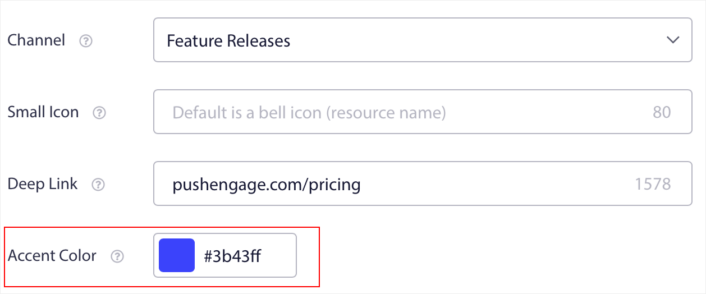
Μπορείτε να χρησιμοποιήσετε τον κωδικό RGB ή Hex για οποιοδήποτε χρώμα προφοράς θέλετε. Κάθε φορά που στέλνετε μια ειδοποίηση, το χρώμα ειδοποίησης Android που επιλέγετε εδώ θα εμφανίζεται στο κείμενο για τα κουμπιά παρότρυνσης για δράση και τη μικρή εικόνα.
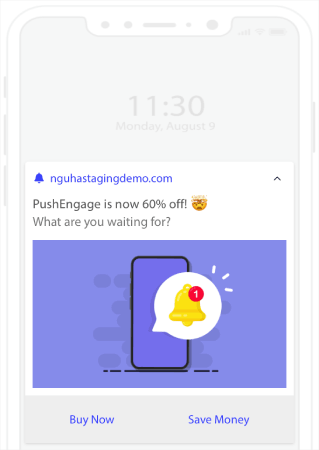
Με άλλα λόγια, μπορείτε να διατηρήσετε τις οδηγίες σχεδιασμού της επωνυμίας σας αρκετά εύκολα όταν στέλνετε ειδοποιήσεις push Android. Και όλα αυτά, από μια εύχρηστη διεπαφή που δεν θα χρειαστεί ποτέ να διαχειριστείτε!
Και το πιο εντυπωσιακό είναι ότι ακόμη και οι δωρεάν χρήστες μας θα έχουν πρόσβαση σε δωρεάν πρότυπα. Φυσικά, μπορείτε πάντα να αναβαθμίσετε το PushEngage
Ας δημιουργήσουμε τώρα μια καμπάνια καλωσορίσματος με ειδοποίηση push. Μεταβείτε στον πίνακα ελέγχου του PushEngage και πηγαίνετε στο Campaign »
Τι να κάνετε αφού προσθέσετε ένα χρώμα ειδοποιήσεων Android
Τώρα που ξέρετε πώς να προσθέσετε ένα χρώμα ειδοποίησης Android, είναι καιρός να αρχίσετε να δημιουργείτε τις δικές σας καμπάνιες. Αλλά πριν ξεκινήσετε με τις καμπάνιες, θα πρέπει πρώτα να μελετήσετε μερικά υπέροχα παραδείγματα ειδοποιήσεων push.
Και αν είστε νέοι στις ειδοποιήσεις push, θα πρέπει να διαβάσετε το άρθρο μας σχετικά με τις βέλτιστες πρακτικές ειδοποιήσεων push πριν ξεκινήσετε τη δημιουργία καμπανιών. Μερικές από τις βέλτιστες πρακτικές που συνιστούμε ενεργά περιλαμβάνουν:
- Αυξήστε τα Κλικ με την Περιέργεια
- Εξατομικεύστε Κάθε Ειδοποίηση Push
- Ξεχωρίστε με Πλούσια Πολυμέσα
- Επανενεργοποιήστε Ανενεργούς Συνδρομητές Push
- Κρατήστε τους Πελάτες Ενημερωμένους
- Χρησιμοποιήστε Emojis Όπου Μπορείτε
- Δημιουργήστε Αίσθηση Επείγοντος
Συνιστούμε τη χρήση του PushEngage για τη δημιουργία των καμπανιών ειδοποιήσεων push. Το PushEngage είναι το #1 λογισμικό ειδοποιήσεων push στην αγορά και οι καμπάνιες σας θα είναι σε ασφαλή χέρια.
Λοιπόν, αν δεν το έχετε κάνει ήδη, ξεκινήστε με το PushEngage σήμερα.


