
Ψάχνετε για ένα σεμινάριο σχετικά με την παρακολούθηση κλικ για να αυξήσετε τα έσοδα συνεργατών σας;
Το Google Analytics 4 παρακολουθεί ορισμένα κλικ σε συνδέσμους, αλλά δεν παρακολουθούνται όλα από προεπιλογή. Μπορείτε να ρυθμίσετε την παρακολούθηση προσαρμοσμένων συμβάντων, αλλά θα πρέπει να χρησιμοποιήσετε προσαρμοσμένο κώδικα ή το Google Tag Manager. Και στη συνέχεια, η αναφορά της ανάπτυξης μπορεί να είναι ένας πλήρης εφιάλτης.
Τα καλά νέα είναι ότι μπορείτε να ρυθμίσετε την παρακολούθηση κλικ σε 3 απλά βήματα για τον ιστότοπό σας στο WordPress. Δεν χρειάζεστε προσαρμοσμένο κώδικα και χρειάζονται το πολύ λίγα λεπτά για να ρυθμιστεί.
Σε αυτό το άρθρο, θα εξετάσουμε αυτήν τη μέθοδο χρησιμοποιώντας ισχυρά πρόσθετα WordPress που δημιουργήθηκαν για να σας βοηθήσουν να αναπτυχθείτε.
Ακούγεται καλό; Ας βουτήξουμε.
Πώς να ρυθμίσετε την παρακολούθηση κλικ χρησιμοποιώντας το Google Analytics
Όπως αναφέραμε ήδη, η παρακολούθηση κλικ στο Google Analytics χρησιμοποιώντας προσαρμοσμένα συμβάντα μπορεί να είναι πολύ δύσκολη. Αλλά το ωραίο είναι ότι μπορείτε να χρησιμοποιήσετε ένα πρόσθετο Google Analytics για WordPress για να δημιουργήσετε αυτόματα ένα προσαρμοσμένο συμβάν για εσάς. Συνιστούμε τη χρήση του MonsterInsights για να ρυθμίσετε την παρακολούθηση κλικ στον ιστότοπό σας.
Το MonsterInsights είναι το καλύτερο πρόσθετο Google Analytics για WordPress. Εάν δεν είστε εξοικειωμένοι με το Google Analytics 4 (GA4), θα χρειαστείτε έναν προγραμματιστή για να ρυθμίσετε το Google Analytics και να διαμορφώσετε την παρακολούθηση κλικ.
Το MonsterInsights κάνει ολόκληρη τη διαδικασία χρήσης του Google Analytics στο WordPress εξαιρετικά απλή. Ο καθένας μπορεί εύκολα να ρυθμίσει το Google Analytics και να διαμορφώσει προηγμένη παρακολούθηση χρησιμοποιώντας το MonsterInsights.
Μπορείτε να χρησιμοποιήσετε το πρόσθετο για να παρακολουθείτε:
- Κλικ σε συνδέσμους συνεργατών
- Κλικ σε συνδέσμους Προσθήκη στο Καλάθι
- Υποβολές φόρμας
- Λήψεις αρχείων
- Κλικ σε εξερχόμενους συνδέσμους
- Κλικ σε κουμπιά κλήσης για κλήση
- Κλικ σε κουμπιά παρότρυνσης για δράση
- Κλικ σε κουμπιά αναπαραγωγής βίντεο
Και πολλά άλλα! Το καλύτερο είναι ότι μπορείτε να βλέπετε αναλυτικές αναφορές απευθείας στον πίνακα ελέγχου του WordPress σας. Ας δούμε πώς μπορείτε να το κάνετε.
Βήμα #1: Εγκαταστήστε το πρόσθετο MonsterInsights
Για να ξεκινήσετε, θα χρειαστεί να κατεβάσετε το MonsterInsights και να το εγκαταστήσετε στο WordPress σας.
Εάν δεν είστε σίγουροι πώς να το κάνετε αυτό, δείτε αυτό το άρθρο σχετικά με το πώς να εγκαταστήσετε ένα πρόσθετο WordPress. Στη συνέχεια, θα πρέπει να ακολουθήσετε τον οδηγό εγκατάστασης για να ολοκληρώσετε την εγκατάσταση του πρόσθετου.
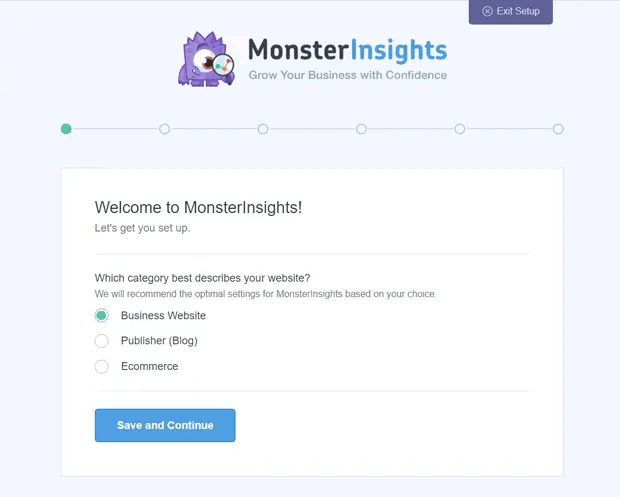
Εάν χρειάζεστε πιο λεπτομερείς οδηγίες, δείτε το άρθρο μας σχετικά με το πώς να ρυθμίσετε το Google Analytics στο WordPress. Μόλις ρυθμιστεί, μπορείτε να δείτε την αναφορά επισκόπησης για τον ιστότοπό σας στον πίνακα ελέγχου του WordPress.
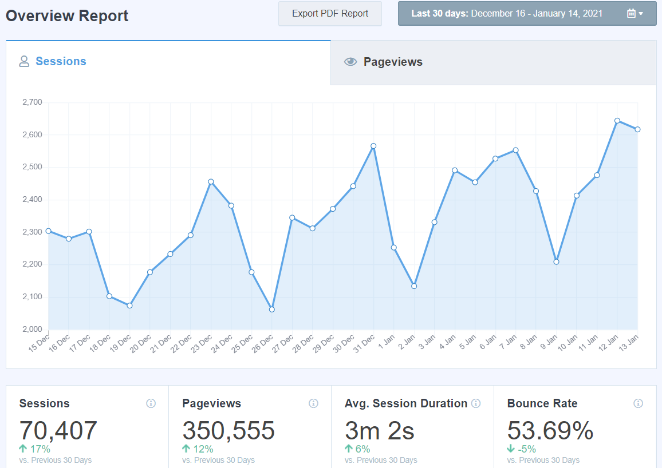
Για να δείτε λεπτομερείς αναφορές για τον ιστότοπό σας, θα πρέπει να μεταβείτε στις Insights » Reports από τον πίνακα ελέγχου του WordPress σας.
Βήμα #2: Εγκαταστήστε το Pretty Links Pro
Το Pretty Links Pro είναι μια υπηρεσία απόκρυψης συνδέσμων για συνδέσμους συνεργατών. Οι περισσότεροι σύνδεσμοι συνεργατών είναι είτε πολύ άσχημοι στην εμφάνιση είτε φαίνονται απίστευτα spammy. Αυτό δίνει στους αναγνώστες σας πολύ μικρό λόγο να κάνουν κλικ στους συνδέσμους συνεργατών.
Αλλά με το Pretty Links Pro, μπορείτε να δημιουργήσετε…
Το μαντέψατε: πιο όμορφους συνδέσμους συνεργατών!
Αλλά αυτό δεν είναι το μόνο που κάνει το plugin για εσάς. Το Pretty Links Pro είναι ένας κεντρικός κόμβος διαχείρισης για όλους τους συνδέσμους συνεργατών σας. Δημοφιλή χαρακτηριστικά περιλαμβάνουν:
- Ένας πλήρης πίνακας διαχείρισης για την αυτοματοποίηση της διαδικασίας δημιουργίας συνδέσμων συνεργατών
- Αυτοματοποιημένη διαδικασία για τη δημιουργία συντομευμένων συνδέσμων για όλες τις σελίδες και τις αναρτήσεις σας
- Άμεση σύνδεση καθορισμένων λέξεων-κλειδιών με προκαθορισμένους συνδέσμους συνεργατών
- Δοκιμή διαχωρισμού συνδέσμων για να δείτε ποιο αποτέλεσμα αποδίδει καλύτερα
- Πολλαπλές επιλογές ανακατεύθυνσης URL
Το Pretty Links είναι κυρίως χρήσιμο για bloggers, podcasters, εμπόρους, marketers μέσων κοινωνικής δικτύωσης και ουσιαστικά για κάθε δημιουργό που χρειάζεται καλύτερο έλεγχο των εσωτερικών του συνδέσμων. Αλλά αν δημιουργείτε το δικό σας πρόγραμμα συνεργατών ή ακόμα κι αν είστε affiliate marketer, το Pretty Links είναι καθαρός χρυσός.
Μόλις κατεβάσετε και εγκαταστήσετε το πρόσθετο, μεταβείτε στον πίνακα ελέγχου του WordPress σας. Στη συνέχεια, μεταβείτε στις Pretty Links » Options » Links » Base Slug Prefix:
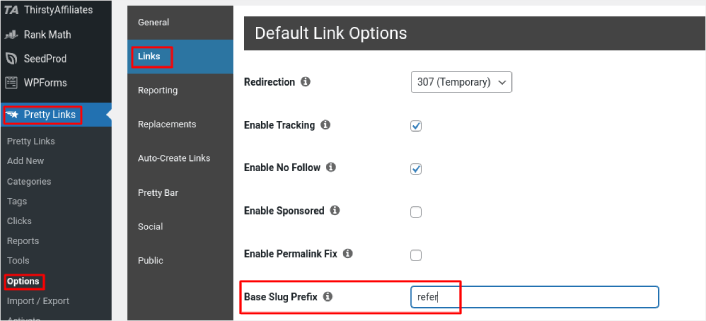
Το Πρόθεμα Βασικής Διεύθυνσης σας επιτρέπει να δημιουργήσετε μια πρόθεση URL για όλους τους συνδέσμους συνεργατών σας. Στο παράδειγμά μας, χρησιμοποιούμε την πρόθεση ‘refer’. Έτσι, οι σύνδεσμοι συνεργατών που δημιουργούμε χρησιμοποιώντας Pretty Links θα ακολουθούν όλοι το μοτίβο https://pushengage.com/refer/affiliate-offer.
Δεδομένου ότι η λέξη ‘refer’ θα αποτελεί μέρος όλων των συνδέσμων συνεργατών σας, θα είναι εξαιρετικά εύκολο να παρακολουθούνται.
Βήμα #3: Ενεργοποίηση Παρακολούθησης Κλικ στο MonsterInsights
Μεταβείτε στις Insights » Reports » Publishers στον πίνακα ελέγχου του WordPress σας. Εδώ, μπορείτε να ρυθμίσετε την παρακολούθηση κλικ συνεργατών φιλτράροντας την πρόθεση που δημιουργήσατε χρησιμοποιώντας το Pretty Links Pro.
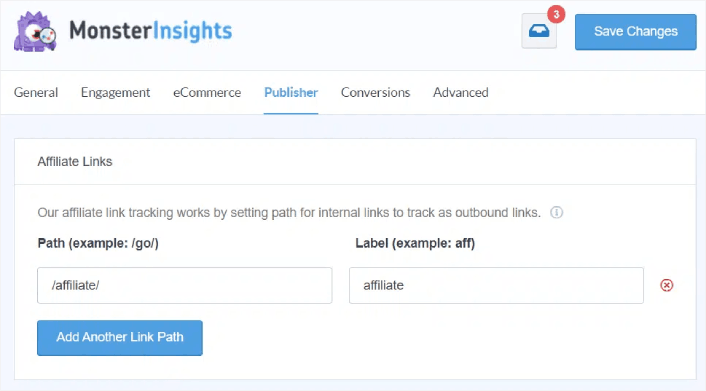
Στο πεδίο Path, μπορείτε να εισαγάγετε την πρόθεση που θέλετε να παρακολουθήσετε.
Όταν τελειώσετε, πατήστε Save Changes.
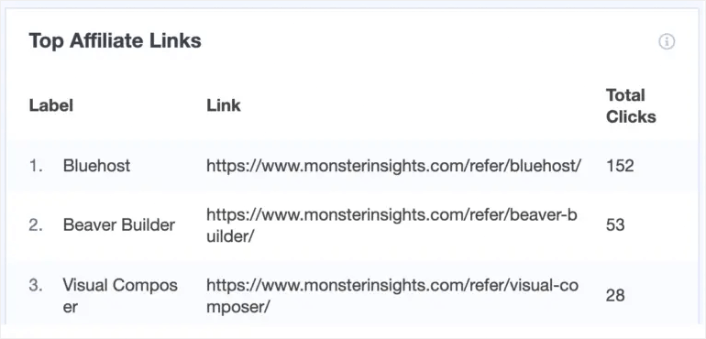
Αυτό είναι! Ολοκληρώσατε. Το MonsterInsights θα δημιουργήσει αυτόματα ένα προσαρμοσμένο συμβάν στο Google Analytics και θα αρχίσει να παρακολουθεί τα κλικ των συνδέσμων συνεργατών σας. Το καλύτερο είναι ότι μπορείτε να δείτε την αναφορά απευθείας από τον πίνακα ελέγχου του WordPress επισκεπτόμενοι τις Insights » Reports » Publishers.
Τι να κάνετε Αφού Ρυθμίσετε την Παρακολούθηση Κλικ Συνεργατών
Μόλις ρυθμίσετε την παρακολούθηση κλικ στον ιστότοπό σας WordPress για να μετρήσετε τα κλικ των συνδέσμων συνεργατών σας, θα πρέπει να αρχίσετε να προωθείτε τις προσφορές συνεργατών σας. Ένας από τους ευκολότερους τρόπους για να το κάνετε είναι να χρησιμοποιήσετε ειδοποιήσεις push. Οι ειδοποιήσεις push είναι ένα εξαιρετικό εργαλείο μάρκετινγκ για τη δημιουργία επαναλαμβανόμενης επισκεψιμότητας, αλληλεπίδρασης και πωλήσεων στον ιστότοπό σας.
Ελέγξτε αυτούς τους απίστευτους πόρους για να ξεκινήσετε:
Επαγγελματική Συμβουλή: Θα πρέπει επίσης να διαβάσετε το άρθρο μας σχετικά με το πώς να κερδίσετε χρήματα με το affiliate marketing αν δημιουργείτε μια εντελώς νέα επιχείρηση.
Εάν μόλις ξεκινάτε με τις ειδοποιήσεις push, θα πρέπει να ξεκινήσετε με το PushEngage. Το PushEngage είναι το καλύτερο λογισμικό ειδοποιήσεων push στον κόσμο. Έτσι, αν δεν το έχετε κάνει ήδη, ξεκινήστε με το PushEngage σήμερα.


