我们已在别处进行了战略论证:爆炸式增长时代已经结束,行为触发的通知是平台奖励且用户容忍的。本指南是另一半——如何从 iOS 应用事件实际触发推送通知,从数据埋点到营销交接。它面向负责连接的开发人员,包含您将要发布的代码以及保持其可维护性的约定。
一句话的架构
您的应用会触发带有类型化属性的命名事件。PushEngage 将这些事件与仪表板中配置的触发规则进行匹配,然后立即、延迟或作为具有退出条件的多个步骤序列发送营销活动。分工是关键:工程团队只需一次埋点;营销团队之后可以永久地创建、编辑和取消针对这些事件的营销活动,而无需重新构建。您的数据埋点是营销团队的 API。
trackEvent:通用信号
iOS SDK 1.0 引入了 trackEvent,这是自定义行为信号的工作引擎:
PushEngage.trackEvent(name: "product_viewed",
                      properties: [
                        "sku": "WCJ-1042",
                        "category": "outerwear",
                        "price": 189.00,
                        "in_stock": true
                      ],
                      profileId: currentUserId,   // ties the event to an identified subscriber
                      provider: nil,
                      eventType: nil) { success, error in
    if !success { log(error) }
}
SDK 强制执行的三条规则,请提前设计好:
- 属性值必须是字符串、数字或布尔值。 数组、字典和日期将在客户端被拒绝——发送前请先展平。
- 事件名称和属性键不能为空。 完成处理程序会告知您验证失败的情况;请在调试版本中记录下来。
- 完成处理程序在后台队列中到达。 在触摸 UI 之前请分派到主线程。
当用户被识别时,请始终传递 profileId——这可以使营销活动在设备之间跟踪客户,而不是跟踪设备。
sendTriggerEvent:连接经典的触发营销活动
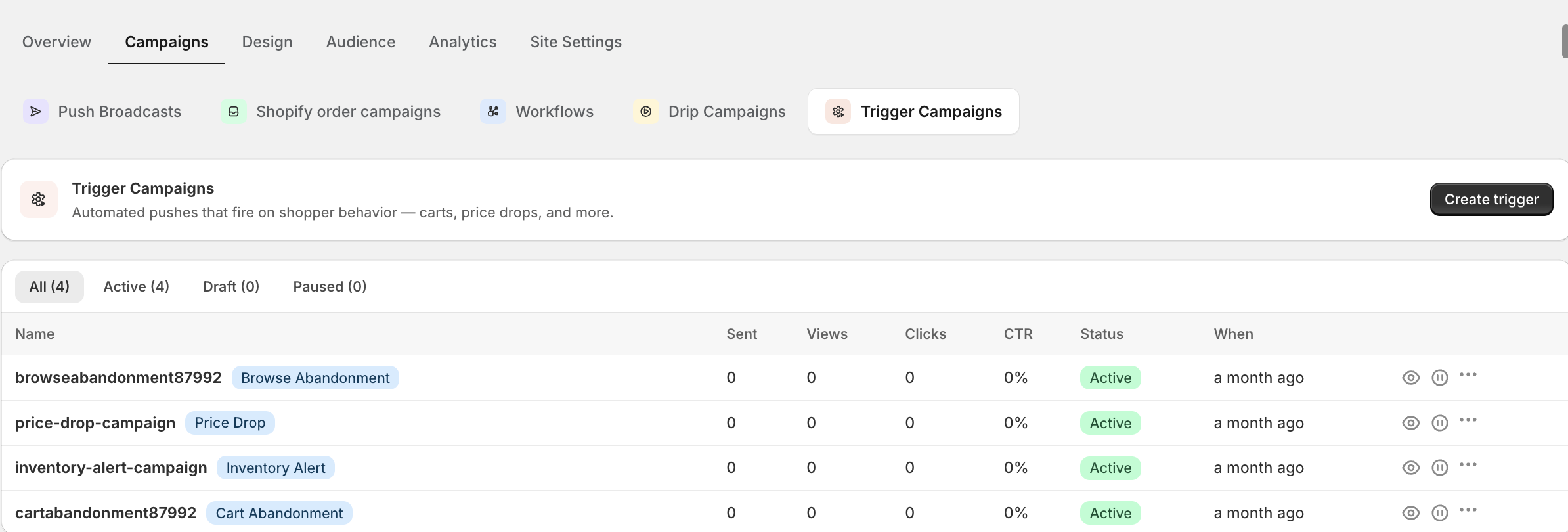
对于在仪表板的触发器构建器中构建的营销活动——购物车放弃、浏览放弃、自定义旅程——应用会触发 sendTriggerEvent,并附带营销人员配置的营销活动和事件名称,以及通知模板将要渲染的数据令牌:
let trigger = TriggerCampaign(campaignName: "cart_abandonment",
                              eventName: "add_to_cart",
                              data: [
                                "productname": "Waxed Canvas Jacket",
                                "price": "$189",
                                "cartlink": "myapp://cart"
                              ])

PushEngage.sendTriggerEvent(triggerCampaign: trigger) { success, error in
    // background queue — dispatch before UI work
}
data 令牌会流入通知文案——这就是“您的蜡面帆布夹克还在等您”在营销人员不接触代码的情况下得到个性化的方式。我们在移动应用购物车放弃手册中完整地介绍了整个购物车恢复流程;此调用是其引擎。
addAlert:内置的降价和补货提醒
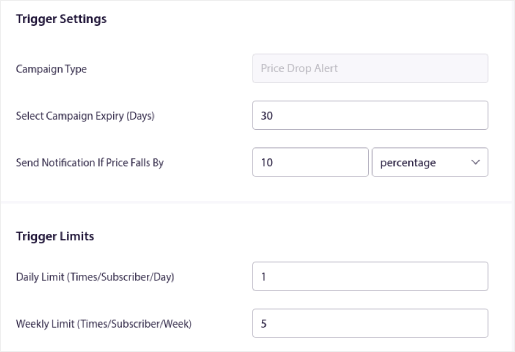
两个意图最高的电商触发器甚至不需要自定义营销活动——它们是 SDK 的一级公民。当用户关注某个产品时,注册提醒:
let alert = TriggerAlert(type: .priceDrop,        // or .inventory
                         productId: "WCJ-1042",
                         link: "myapp://product/WCJ-1042",
                         price: 189.00,
                         data: ["size": "M"])

PushEngage.addAlert(triggerAlert: alert) { success, error in }
PushEngage 会处理关注、匹配以及在价格下跌或库存恢复时发送。如果您阅读过我们的降价通知指南,这就是使这些营销活动触发的应用端注册。
可扩展的事件分类法
技术债务是真实存在的:六个月后,没有人记得这个事件是 addToCart、cart_add 还是 CartUpdated。从第一天起就选择约定俗成的命名方式——snake_case 命名、object_action 排序、单数属性键——并涵盖核心的商务事件集:
| 事件 | 关键属性 | 它驱动的营销活动 |
|---|---|---|
product_viewed | sku、类别、价格 | 浏览放弃、个性化 |
product_saved | sku、价格 | 降价、补货、挽回客户的触发器 |
cart_updated | 购物车价值、商品数量、最受欢迎的商品 | 购物车放弃 |
purchase_completed | 订单价值、商品数量 | 退出条件、购后营销、目标 |
search_performed | 查询、结果数量 | 零结果恢复、兴趣细分 |
onboarding_step | 步骤、已完成 | 新用户引导系列分支 |
六个事件,一次性埋点,即可驱动新用户引导系列、购物车挽回、挽回客户的触发器以及今年营销团队会要求的所有细分受众。
在移交之前测试整个流程
在调试版本中设置 PushEngage.enableLogging = true,并观察事件从设备发出。从测试版本触发每个事件,确认它已在仪表板的事件视图中显示,并为每个触发器发送一个端到端的测试营销活动。SDK 仓库中的示例应用程序包含一个可用的触发器屏幕,您可以从中借鉴流程。在这里花费十五分钟进行验证,可以节省以后调查“为什么营销活动没有触发”的时间——这通常是双方约定中一个拼写错误的事件名称。
移交:营销团队从这里开始负责什么
与 AI 编码助手集成?开源的 PushEngage Agent Skills 可教会 Claude Code、Cursor 和任何兼容 SKILL.md 的助手集成和调试此 SDK。一旦您发布,PushEngage MCP 服务器即可让同一助手运行您的广告系列 — 分段、发送、A/B 测试和报告。在 Replit、Lovable 或 Bolt 中构建?开源的 vibe-coding kits 包括现成的演示商店、Flutter 入门程序以及预先连接了 PushEngage 的一键式演示。
事件一旦流动起来,您的工作就完成了。营销团队负责构建触发规则、撰写文案、设置延迟和退出条件、进行 A/B 测试变体以及附加目标跟踪以进行收入归因——所有这些都在仪表板中完成,无需提交工单。在团队 Wiki 中发布事件分类表,作为双方之间的约定。然后,观察请求队列中“能否发送推送”的工单悄悄归零——这才是最初的目的。关于这些营销活动应遵循的策略,请将应用推送营销指南交给您的营销团队。


