
Looking for a quick guide to track SEO keyword rankings in WordPress?
Tracking your SEO rankings is one of the most important parts of any SEO campaign. If you can’t track your rankings, you can’t improve your traffic and conversions.
And WordPress has a ton of SEO plugins. But which one allows you to track SEO keywords? Do you need to buy a premium SEO tool like SEMrush or Ahrefs? Do you need a developer to integrate rank tracking into your WordPress site?
The short answer is: No!
You can simply install a WordPress plugin to track SEO keyword rankings. And in this article, we’re going to show you how.
让我们开始吧。
Why Should You Track SEO Keyword Rankings?
Let’s talk about why it’s a good idea to keep track of your website’s keyword rankings for SEO.
Think of it like keeping an eye on your garden to see how well your plants are growing. Just like you want your plants to flourish, you want your website to show up well when people search for stuff on the internet.
PushEngage是全球排名第一的推送通知插件。免费获取!
Here’s why tracking your SEO keyword rankings is like tending to your online garden:
- See What’s Blooming: By tracking your keyword rankings, you can see how your website is doing in search results. Are your keywords (the words people use to search) helping your site appear on the first page of results? It’s like checking to see if your flowers are blooming nicely.
- Measure Your Green Thumb: You can tell if your SEO efforts are working. If your keyword rankings are going up, it means you’re doing a good job. It’s like getting a thumbs-up for taking care of your garden well.
- Spot the Weeds: If your rankings drop, it’s a sign that something might be wrong. Maybe a new competitor popped up, or your content needs a little makeover. Just like spotting weeds early in your garden and getting rid of them.
- Stay Ahead of the Game: You can keep an eye on what your competitors are doing. If they’re using certain keywords that work well, you might want to consider using them too. It’s like learning from your gardening neighbors about which plants thrive best in your area.
- Tweak and Prune: When you see which keywords are doing great and which ones need a bit of help, you can make changes. It’s like adjusting how much water or sunlight your plants get to make them happier.
- Harvest the Fruits: High rankings mean more people see your site. When more folks visit, you might get more clicks and visitors. It’s like having a lot of people stop by to admire your garden.
- Plant New Seeds: If you notice some keywords are getting popular, you can create more content around them. It’s like planting new seeds in your garden to add more beauty.
- Celebrate Growth: Watching your rankings rise is exciting! It’s like watching your garden grow and flourish. You can pat yourself on the back for a job well done.
So, tracking SEO keyword rankings is like taking care of your website’s garden. You nurture it, watch it grow, and make sure it looks beautiful to everyone passing by (or searching online).
How to Track SEO Keyword Rankings
Now that we understand why we should track SEO keyword rankings, let’s check out how you can do it for your WordPress site.
Step #1: Install an SEO Rank Tracker WordPress Plugin
Before you can track SEO keyword rankings for your WordPress site, you need to pick the right WordPress SEO plugin. We recommend using All In One SEO.

All in One SEO (AIOSEO) 是WordPress社区中最受好评的SEO插件之一。原始版本已完全改版,增加了大量新功能和附加组件。因此,如果您过去使用过AIOSEO,则需要再次查看该插件。
AIOSEO不仅拥有足够强大的SEO功能来实施最新的SEO最佳实践,还提供了高级SEO设置,可直接解决特定的SEO问题。这包括:
- 面向本地受众的小型企业的本地SEO模块
- 在线商店的WooCommerce SEO
- WordPress编辑器内的SEO优化器
- 智能站点地图,可即时索引搜索引擎
- 一个Schema插件,可让您的内容在富摘要中排名
And of course, you also get a built-in SEO rank tracker to stay on top of your SEO rankings.
简而言之: All in One SEO 使您能够正确设置WordPress SEO,而无需聘请专家。如果超过300万的All in One SEO客户(包括我们)可以证明,AIOSEO是满足所有SEO需求的绝佳搜索引擎优化软件。
它非常适合博主和小企业主,因为它能帮助您处理SEO问题,而无需聘请专业人士。您可以参考我们的All in One SEO评测,或者阅读AIOSEO在帮助企业在搜索结果中获得趋势方面所产生的影响。
请记住:您只能将Google Search Console与All in One SEO集成。如果您需要更详细的网站分析,则应考虑安装MonsterInsights插件以将Google Analytics安装到您的WordPress网站。
Step #2: Get an Overview of Keyword Rankings
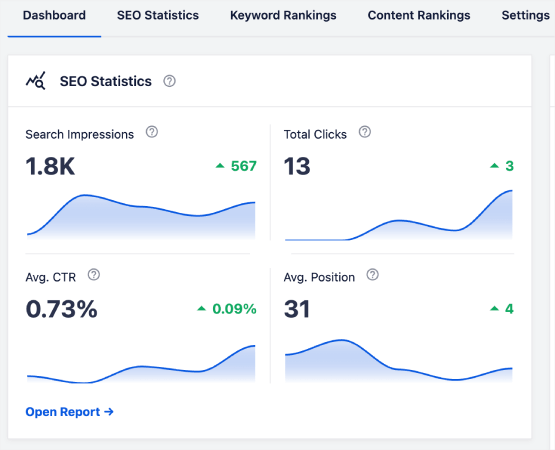
Head over to the Search Statistics section in the WordPress plugin to see an overview of your keyword rankings:
主仪表板还有一个“关键词排名”部分,显示您的“热门关键词”和“热门增长/下降”关键词的概览。
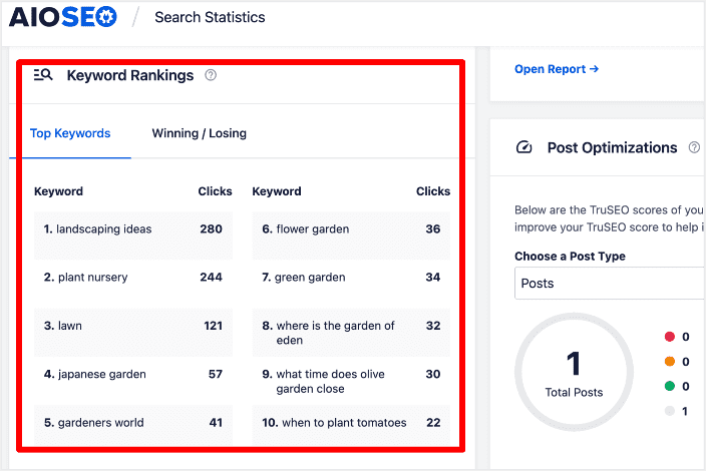
弄清楚哪些关键词的排名在下滑,就像找出拼图碎片丢失在哪里一样。这有助于您了解这些页面的情况,并制定策略以恢复这些排名。
And guess what? When you do that, you’ll see more people visiting your site, which means more money in your pocket. It’s like solving a puzzle to make your website even better!
On the other hand, the Top Winning keywords can give you insight into the SEO tactics that are producing results so you can replicate them.
Step #3: Dive Deep into the Keyword Rankings Report
在对关键词表现有了大致了解后,下一步是打开“关键词排名”报告。您还可以在此处查看内容排名的详细统计信息。
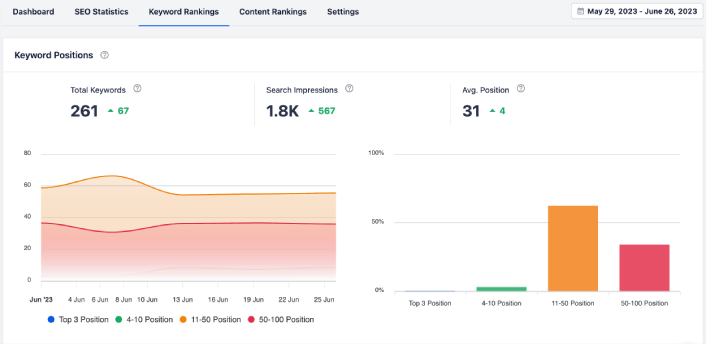
如果向下滚动更多,您甚至可以看到正在获得或失去搜索排名的确切帖子。更重要的是,您可以按点击次数过滤您的热门关键词,并即时查看它们的排名。
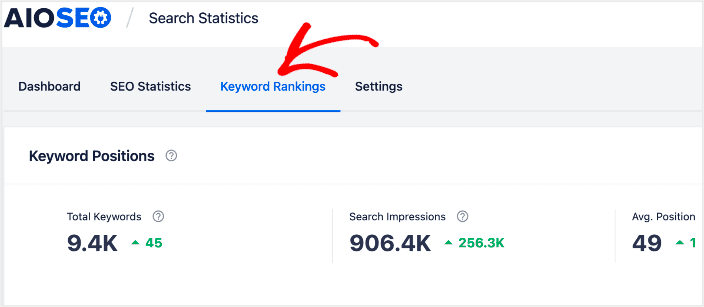
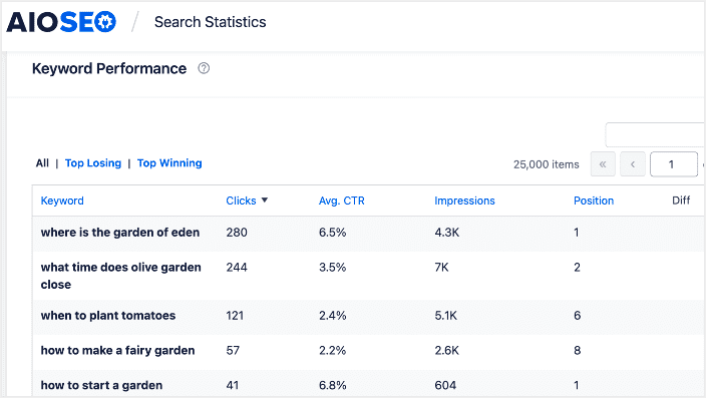
在这里,您可以获得所有关键词及其在 SERP 上表现的详细报告。向下滚动到“关键词表现”部分,可以更深入地了解各个关键词的表现情况。
这是您获得所有使用词语及其在搜索结果中表现的完整报告的地方。当您向下滚动到“关键词表现”部分时,您可以更深入地了解每个词语单独的表现情况。
如果您点击“热门增长”选项卡,您将看到排名正在提高的关键词。
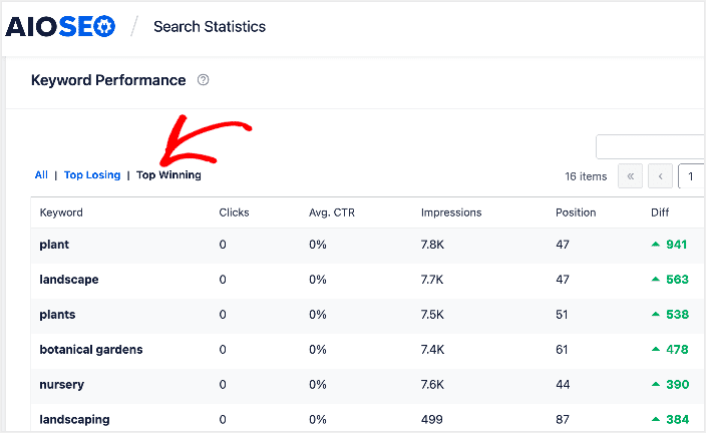
These show that you’ve optimized well for the target keywords and that your SEO strategy is working.
Step #4: Check Your Top Losing Keywords
除了查看您的热门增长关键词外,您还可以跟踪您的热门下降关键词。在“关键词表现”报告中点击“热门下降”选项卡即可进行此操作。
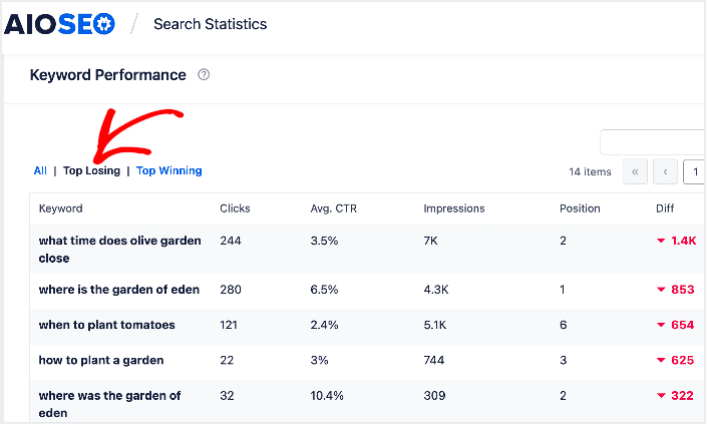
本节显示排名下降的关键字。这是至关重要的信息,因为它向您展示了需要优化的关键字和内容。如果您的关键字排名正在下降,那么您需要立即更新您的内容。
What to do After You Track SEO Keyword Rankings
Tracking your SEO rankings is only one part of the puzzle. Our top recommendation is to use All in One SEO to optimize your website content. The right tools can help you with getting repeat traffic, engagement, and sales. For that, we recommend using push campaigns.
推送通知可以成为发展业务的强大营销工具。不信?查看这些精彩资源:
我们建议使用PushEngage来创建您的推送通知广告系列。PushEngage是全球排名第一的推送通知软件。所以,如果您还没有,请立即开始使用PushEngage!


