
Looking for a quick and easy way to sell event tickets on WordPress?
Getting ticket sales is a difficult business. And it’s super difficult to scale offline. One of the easier ways to sell a ton of tickets is to sell tickets to your events online.
But how do you do that? Do you need to learn how to code? Do you need an expensive designer to create a landing page for you? How do you collect payments?
Fortunately, there’s an easy way to sell event tickets on WordPress. In this article, we’re going to help you start selling event tickets in less than 15 minutes.
准备好了吗?我们开始吧。
How to Sell Event Tickets on WordPress
Before we start selling event tickets on WordPress, you’ll need a WordPress site. If you don’t have one, you should check out our guide on how to create a WordPress site. WordPress gives you all the control you need to create beautiful pages to promote your event as well as the technical specs you need to sell tickets online.
What’s even better is that you don’t need any coding experience to use WordPress. You can install plugins to do most of the heavy lifting for you and start selling tickets in a matter of a few hours.
To sell event tickets on WordPress, we recommend using Sugar Calendar.
Sugar Calendar is a simple, easy to use events calendar plugin for WordPress. The best part about Sugar Calendar is how many different features it has. You can use Sugar Calendar for:
- Event management
- Event ticketing
- Recurring events
- Multi-day events
- 网络研讨会
- Public screenings
- 派对
- 展览
- Open Mic Nights
- Demonstrations
- Product launches
And more! The beauty of the plugin is that you can use it directly from the WordPress dashboard using the WordPress editor. Check out our Sugar Calendar review for a detailed breakdown of its features. When you’re done, let’s get started with selling tickets.
Step #1: Install and Activate Sugar Calendar
You’ll need to install and activate the Sugar Calendar plugin. If you’re not sure how to do that, you should check out this article on how to install a WordPress plugin.
Then, go to your Sugar Calendar dashboard and head over to Your Licenses:
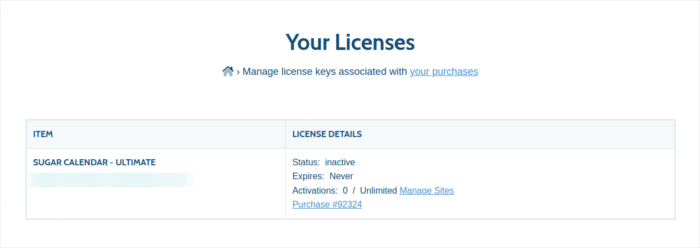
Copy your license key. Once that’s done, go to your WordPress dashboard and head over to Calendar » Settings » License:
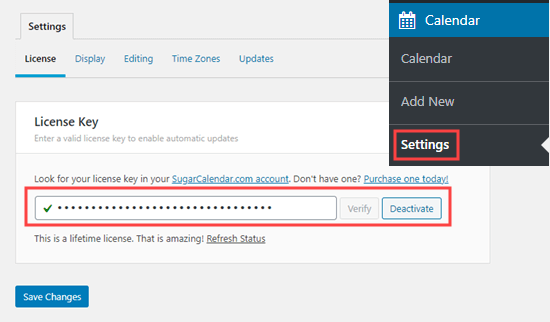
And paste in your license key. When you’re done, hit Save Changes.
Step #2: Create a New Event in WordPress
Let’s start by creating the event you want to sell tickets for inside your WordPress site. Go to Calendar » Add New. You can name the event, add a description, and configure the dates:
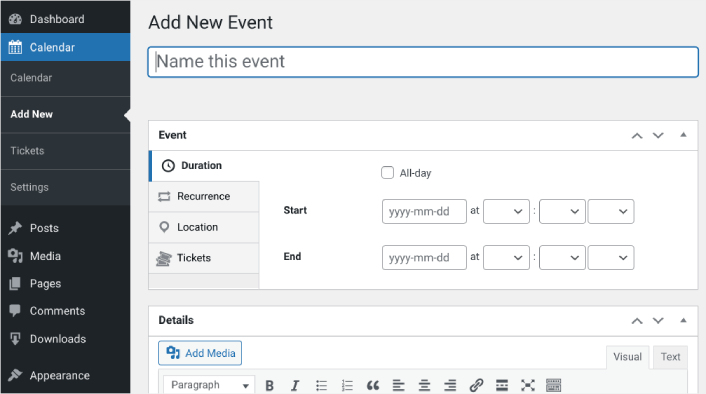
Next, navigate to the Tickets tab. Then click on Enable Ticket Sales:
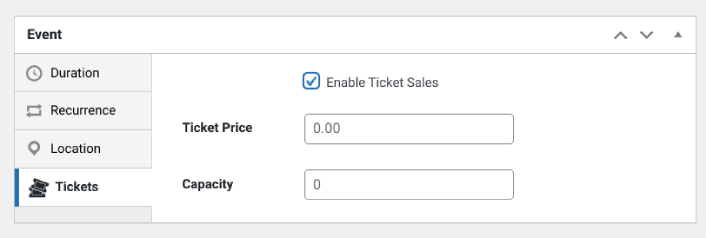
Then you can enter a ticket price and set the capacity, meaning the quantity of tickets available. If you want to sell unlimited tickets, you can leave this value at 0.
Step #3: Start to Sell Tickets Online with WordPress
When you’re done configuring the event and enabling tickets, the only thing left to do is to start selling. In the right-hand settings panel under Calendar, select your calendar or click on Add New Calendar. Then click Publish:
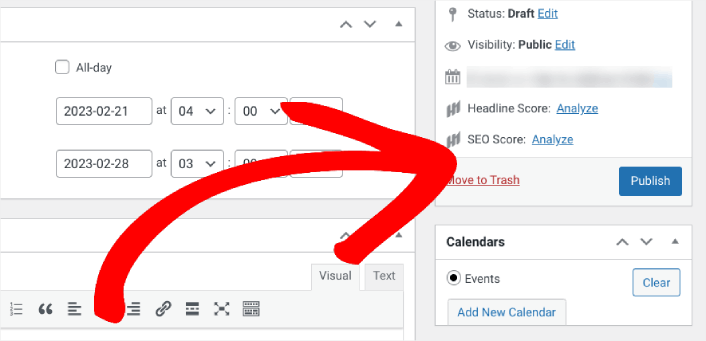
Then you can preview the event to see how it looks on your WordPress site:
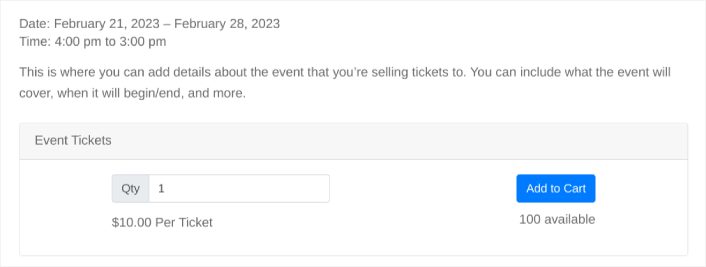
Congratulations! You can now start selling event tickets on your WordPress site.
How do You Sell Event Tickets on WordPress Even Faster?
Now that your event is live and you can sell tickets to the event, it’s time to work on your traffic, engagement, and sales. You should try using push notifications on your site. Push notifications are a great marketing tool that can help you grow your business.
看看这些精彩的资源,您就会明白我的意思了:
我们建议使用PushEngage来创建您的推送通知广告系列。PushEngage是全球排名第一的推送通知软件。所以,如果您还没有,请立即开始使用PushEngage!


