如何启用订阅选择加入分析?

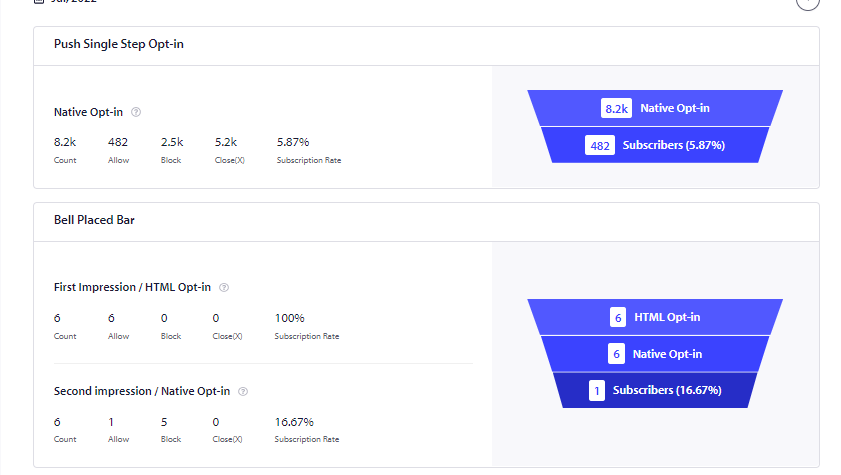
The subscription opt-in Analytics will give you a funnel view of your visitors accepting/blocking web push notifications on your website.
You can analyze this data and check which of the opt-in styles or strategies are working for you.

Note : This is the feature available in Business plans and above.

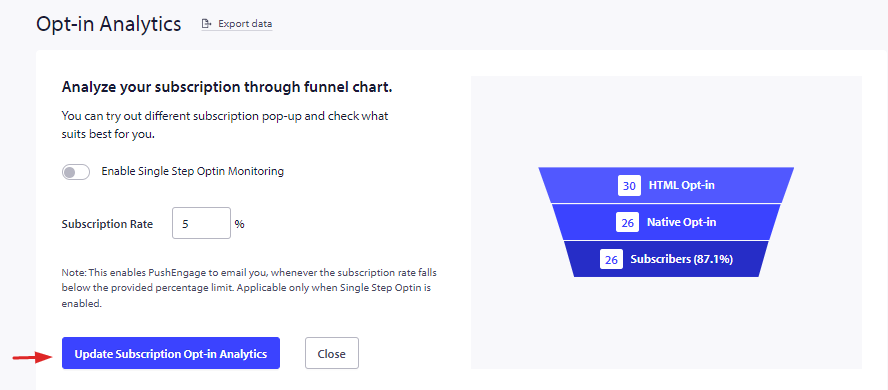
To enable this report, navigate to Analytics > Opt-in Analytics > Click on the Settings button

Enable subscription opt-in analytics and click on Update Subscription Opt-in Analytics.

After you enable this feature, you can see the analytics in the same section.

Here apart from the subscription opt-in you can also see the analytics from the recovery widget which is called as Get notification widget. This widget gives a second chance to visitors who have been clicking on block.

如果您遇到任何问题,请随时在此处单击联系我们。我们的支持团队将能够帮助您。

仍然卡住了?我们能帮您什么?
最后更新于 2026 年 3 月 9 日

在访客离开您的网站后与他们互动并挽留他们

通过难以忽略的推送通知,增加每次网站访问的价值。

  • 永久免费套餐
  • 轻松设置
  • 五星支持