注意:此项目没有可用的旧版文档,因此您看到的是当前文档。
Goal Tracking helps you see within the PushEngage dashboard how many goals count you have achieved and the goal value of your campaigns. These goals are visible across all your campaigns – push broadcast, drip autoresponders, and trigger campaigns.
Understanding Goals
Goal tracking is not just limited to Revenue tracking for E-commerce sites but it can be pageviews, bookings, coupon clicks anything that a business defines as a goal.
UTM 参数可以告诉您通过订阅者点击 Web 推送活动为网站带来的流量百分比。但是,当一个人直接点击这些活动时,购买或网站访问并不总是被归因。一些品牌或企业喜欢灵活地定义更长的时间窗口和将归因方法设置为活动视图或活动点击。
根据业务性质,查看或点击推送活动可能会影响目标的完成。
Enabling Goal Tracking
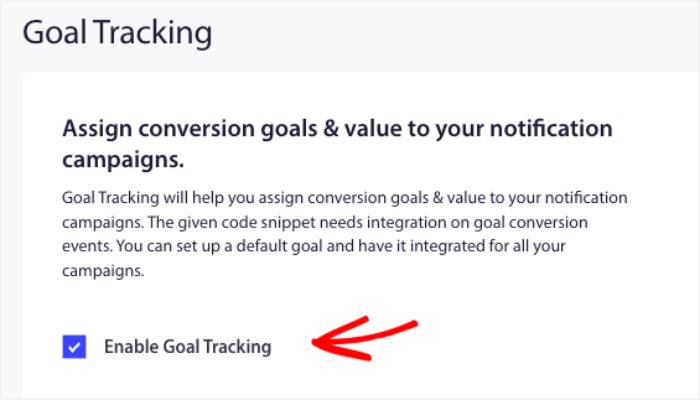
You must log in to PushEngage Dashboard and navigate to Analytics » Goal Tracking.
Here you will see a checkbox Enable Goal Tracking. This checkbox must be checked, and then you must decide the Attribution method and window.

您还需要为目标命名,以及它是否是货币。您可以从下拉列表中选择正确的货币,以便在您的仪表板中启用它。
一些企业喜欢使用最后点击和 5-7 天,而另一些企业,如媒体/博客网站,则将归因方法设置为视图,并将持续时间延长至 10 天。
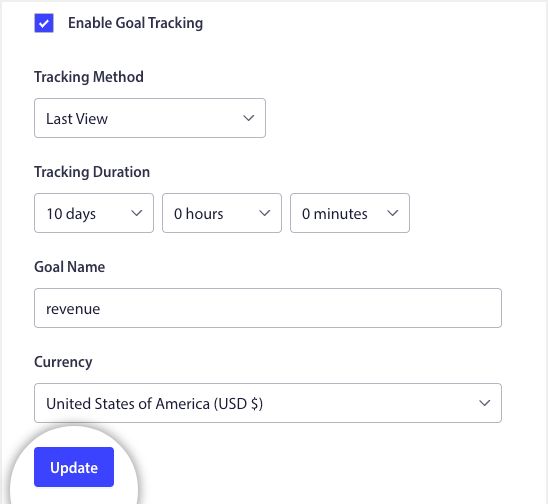
Once everything is set up, please click on Update.
Placing the Tracking Code
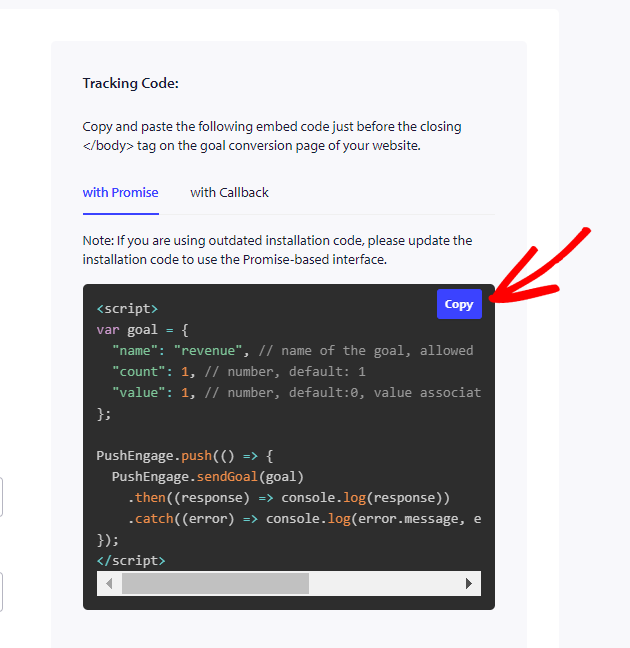
The Tracking code is mentioned on the right side of your dashboard. Once you have changed the goal name and currency, it gets updated.
Now you have to copy and send the tracking code to your developer so they can place it on your final conversion event, which could be anything like – a page visit of an article, click of a button, purchase of a product, or booking completion.
这里有两个重要值 –
1. Goal Count: This has to be unit value as many conversions happen; this can keep incrementing.
2. 目标值:这将是目标的实际值。它主要对电子商务、联盟和旅游网站有用,它们也将从后端动态发送此值,以便在我们的仪表板中反映出来并有助于更好的分析。
设置好跟踪代码和目标跟踪后,您所有的活动都应在 3-5 天内显示该值。
就是这样;目标跟踪集成已完成。
If you run into any issues, please contact us by clicking here. Our team will be able to help you.