注意:此项目没有可用的旧版文档,因此您看到的是当前文档。
With this guide, you can integrate Browser Push Notification on your Weebly website using PushEngage.
Log in into the PushEngage dashboard and get your PushEngage installation code that needs to be added to your website. Below is the PushEngage the javascript code you must add to your Weebly site; navigate to Site Settings » Installation.
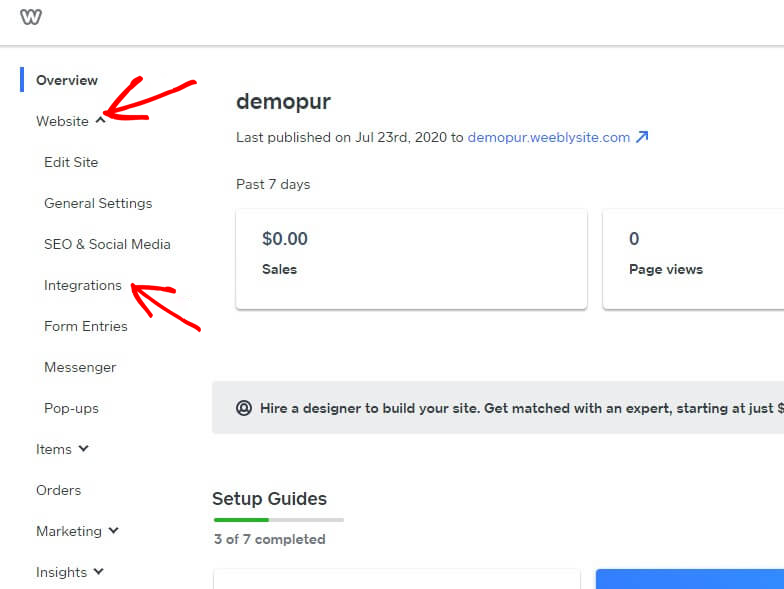
Log in to the Weebly dashboard and select Website » Integrations.

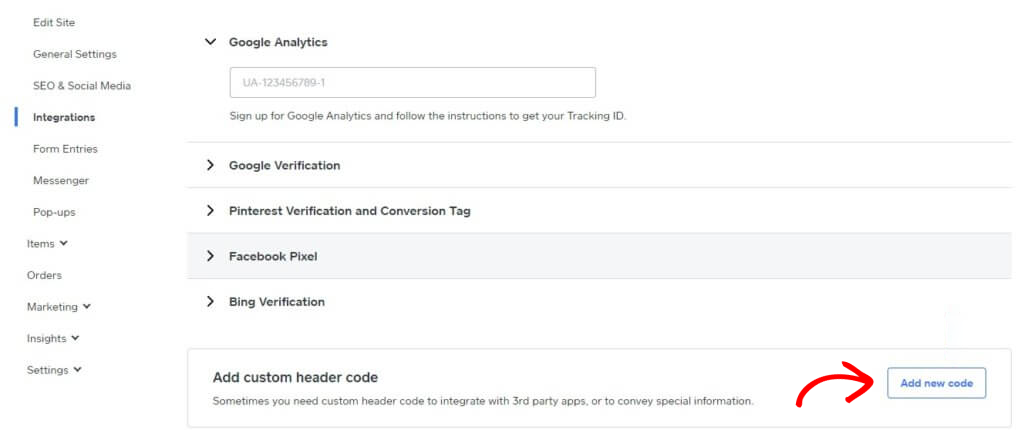
Add Custom Header Code at the bottom of the Integration page. Click on Add New Code.

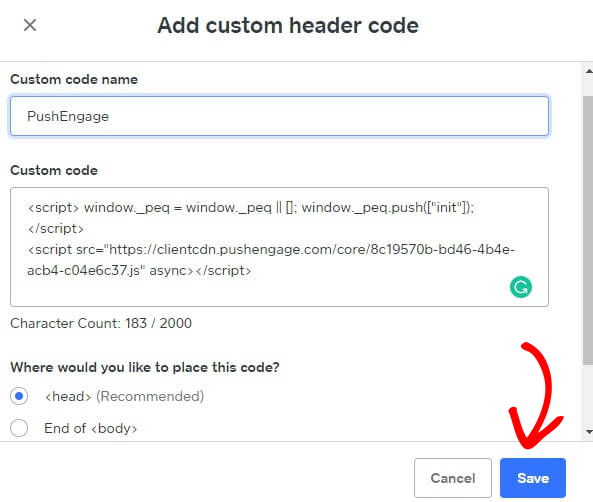
Paste the PushEngage code into the Header. You can also select the End of <body> to paste the code. On the screen below, we pasted the PushEngage javascript code into the footer section. Once done, click on Save.

This completes the PushEngage integration on the Weebly website. You can now start collecting subscribers and sending push notifications from the Weebly website.
如果您遇到任何问题,请随时在此处单击联系我们。我们的支持团队将能够帮助您。