我可以在延迟一段时间后显示订阅选择吗?

Your website can collect more number of subscribers if they have glanced through your website, before subscribing to your notifications. This will reduce the number of unsubscribes later on, which may occur if the visitor had subscribed without knowing the potential of your product.

There are two ways of showing a delayed Opt-in. One is by showing a delay, another when the visitor scrolls a certain percentage in the webpage. Navigate to Designs » Popup Modals » click on Edit of the selected Opt-in style like shown below :

Click on Options.

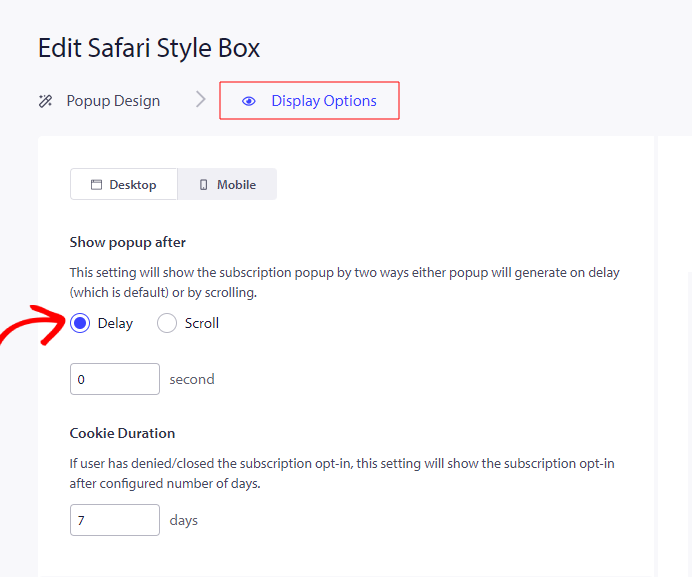
Select Delay & you can set the duration after which you want to show the Opt-in when the visitor visits your website.

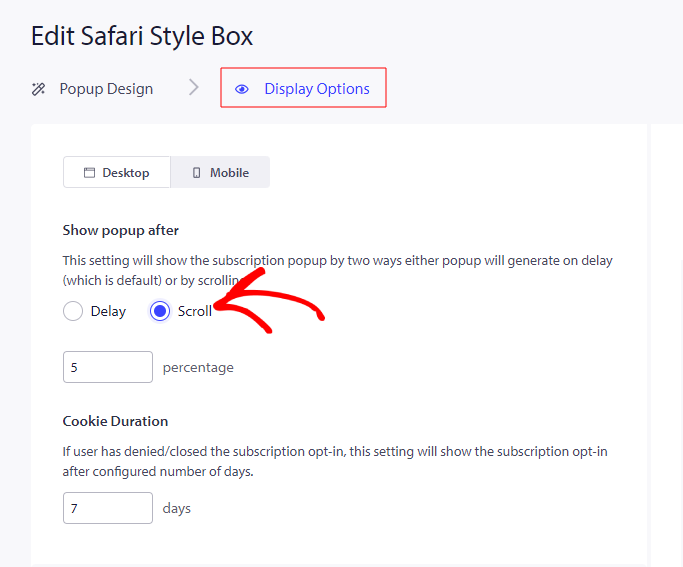
Similarly, select Scroll & set the percentage of scrolling on the page, after which the Opt-in should be shown.

如果您遇到任何问题,请随时在此处单击联系我们。我们的支持团队将能够帮助您。

仍然卡住了?我们能帮您什么?
最后更新于 2026 年 3 月 9 日

在访客离开您的网站后与他们互动并挽留他们

通过难以忽略的推送通知,增加每次网站访问的价值。

  • 永久免费套餐
  • 轻松设置
  • 五星支持